
Why Technical SEO Matters
Even excellent content can fail to rank if the technical foundation underneath it is broken. A few reasons this matters more than most teams assume:
- Crawlability determines visibility. If Googlebot can’t reach a page, that page effectively doesn’t exist to Google.
- Indexing determines eligibility. A page has to be indexed before it can compete for rankings at all.
- Core Web Vitals affect both rankings and conversions. Slow, unstable pages lose users and search visibility simultaneously.
- Structured data improves how AI systems understand your content, which increasingly determines whether you get cited in AI Overviews, ChatGPT, or Perplexity answers.
- JavaScript rendering issues can silently hide entire sections of a site from search engines, especially on frameworks like React and Next.js.
Business Impact of Technical SEO
Technical issues rarely show up as a single dramatic failure. More often, they show up as underperformance you can’t quite explain — traffic that should be higher, rankings that plateau, or pages that never seem to get indexed despite good content. Checking Google Search Console’s Index Coverage report is usually the fastest way to confirm whether this is happening on your own site. For step-by-step guidance, refer to the official Google Search Console Help documentation.
Common enterprise scenario: A large site migrates to a new CMS, content quality stays the same, but organic traffic drops 30% within weeks. In most cases like this, the cause isn’t the content — it’s broken redirects, altered URL structures, or lost canonical signals during migration. This is why technical audits are standard practice before and after any major site change.
Technical SEO and AI Search Visibility
AI systems like ChatGPT, Gemini, and Perplexity rely heavily on structured, well-organized content to generate accurate answers. A technically clean site with clear schema markup and logical structure is simply easier for these systems to cite correctly.
Quick Answer: Technical SEO matters because it controls whether search engines and AI systems can access, understand, and fairly evaluate your content — no amount of content quality can compensate for a page that can’t be crawled or indexed.
Best Practice: Before investing more in content, audit whether your existing pages are even indexed and crawlable. Publishing new content on top of unresolved technical issues rarely fixes the underlying traffic problem.
Technical SEO Maturity Model
Not every site needs the same level of technical sophistication. This maturity model helps you understand where your site currently stands and what the next level of investment should look like.
| Level | Stage | What It Means |
|---|---|---|
| Level 1 | Crawlable | Search engines can discover and access your pages without being blocked by robots.txt, broken links, or crawl traps |
| Level 2 | Indexable | Discovered pages are actually entering the search index — canonical tags, noindex directives, and duplicate content are under control |
| Level 3 | Performant | Indexed pages load quickly and pass Core Web Vitals thresholds on real-user data |
| Level 4 | Structured | Schema markup is implemented correctly across key page types, enabling rich results |
| Level 5 | AI Ready | Content and structure are clear enough for AI Overviews, ChatGPT, Gemini, Claude, and Perplexity to summarize and cite accurately |
| Level 6 | Enterprise Optimized | The site runs a repeatable audit cadence, log file monitoring, and cross-team technical governance at scale |
Progression order:
- Crawlable
- Indexable
- Performant
- Structured
- AI Ready
- Enterprise Optimized
Quick Answer: A Technical SEO Maturity Model ranks a website from basic crawlability (Level 1) to full enterprise-grade optimization (Level 6), helping teams identify what to fix next instead of trying to solve everything at once.
Implementation advice: Assess your site against each level in order — there’s little value auditing schema markup (Level 4) if pages are still being blocked at the crawling stage (Level 1). Fix lower levels first; higher levels depend on them.
Pro Tip: Most small and mid-sized sites plateau at Level 3 or 4 because they never get around to structured data or AI-readiness work. Reaching Level 5 is increasingly one of the clearest differentiators between sites that get cited in AI answers and sites that don’t.
Enterprise Consideration: Large organizations often have different teams responsible for different levels — developers own crawlability and performance, content teams own structure, and SEO teams own schema and AI readiness. Without a shared maturity framework like this one, these teams tend to optimize in isolation rather than as a coordinated system.
Technical SEO Workflow: From Discovery to Ranking
Every page that ranks in Google has passed through the same technical pipeline. Understanding this sequence helps you diagnose exactly where a problem is occurring.
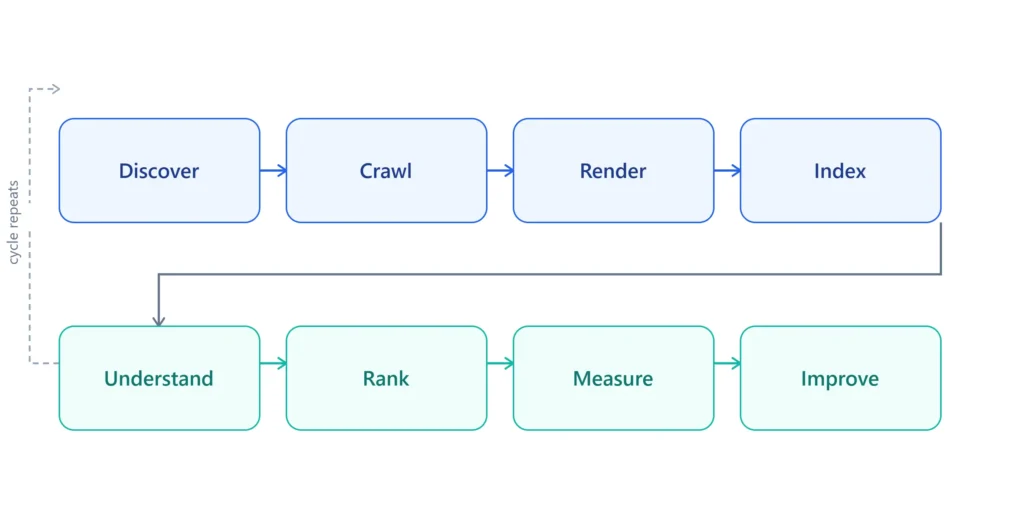
Workflow stages:
- Discover — Google finds a URL through sitemaps, internal links, or external links.
- Crawl — Googlebot requests the page and downloads its raw content.
- Render — For JavaScript-heavy pages, Google executes the code to see the final content.
- Index — The rendered page is evaluated and, if eligible, added to Google’s index.
- Understand — Google interprets the page’s topic, entities, and structured data.
- Rank — The indexed, understood page competes for relevant queries.
- Measure — Performance is tracked through Search Console, analytics, and rank tracking.
- Improve — Findings feed back into technical, content, or authority improvements.
Troubleshooting advice: When a page underperforms, work backward through this pipeline rather than forward. Confirm it’s indexed first, then check whether it was crawled recently, then check rendering, and only then look at ranking factors like content and authority.
Expert Note: A page can fail at any single stage of this pipeline and never reach the next one. Diagnosing “why isn’t this page ranking” almost always means walking backward through this sequence rather than jumping straight to content quality.
Prioritizing Technical SEO Issues
Not every technical issue deserves the same urgency. This prioritization matrix reflects common enterprise scenarios and helps teams decide what to fix first.
| Issue | SEO Impact | Implementation Difficulty | Priority | Fix First |
|---|---|---|---|---|
| Key pages blocked by robots.txt | Critical | Low | Critical | Yes |
| Poor Core Web Vitals on high-traffic templates | High | Medium | High | Yes |
| Missing canonical tags on duplicate product pages | High | Low | High | Yes |
| JavaScript rendering hiding main content | Critical | High | Critical | Yes |
| Orphan pages with no internal links | Medium | Low | Medium | Soon |
| Missing schema markup on FAQ/Article pages | Medium | Low | Medium | Soon |
| Redirect chains (3+ hops) | Medium | Medium | Medium | Soon |
| Minor image alt text gaps | Low | Low | Low | Later |
Best Practice: Use “SEO Impact” combined with “Implementation Difficulty” to build a quick-win list. Issues that are high-impact and low-effort — like fixing a misconfigured robots.txt rule — should almost always be resolved before anything requiring a full development sprint.
Troubleshooting Framework: Why Isn’t My Page Ranking?
When a page underperforms, working through a structured decision tree is faster than guessing.
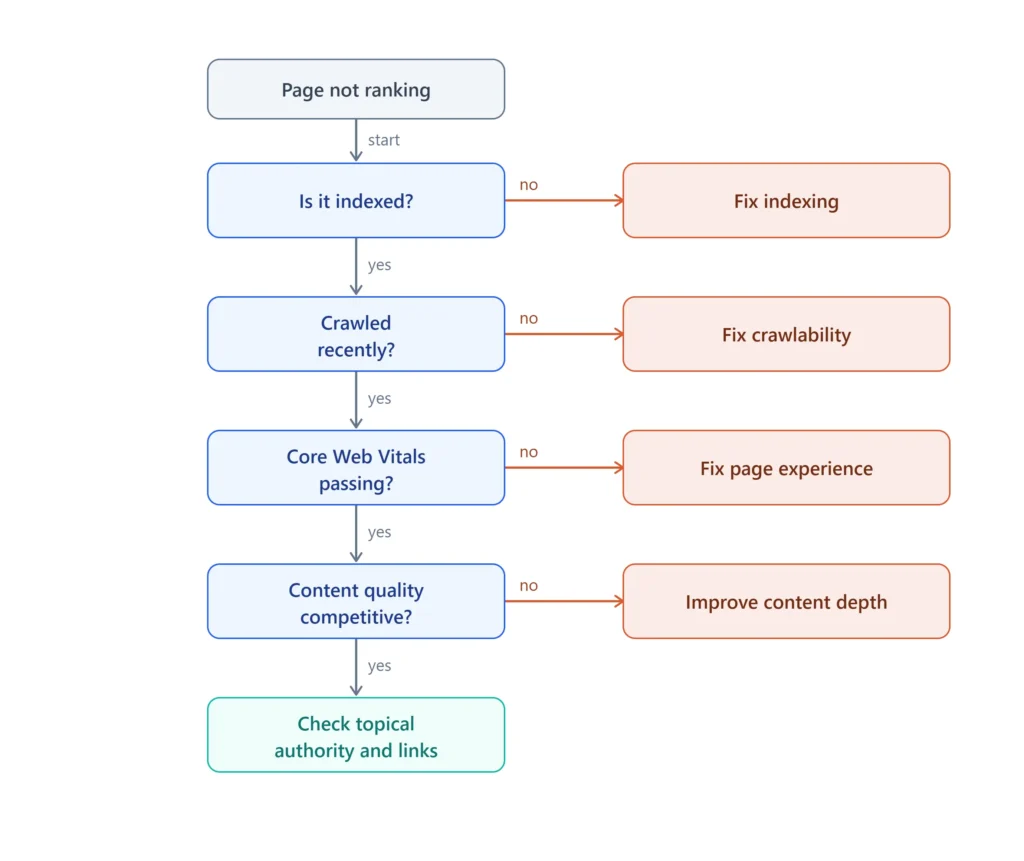
Decision flow:
- Page not ranking?
- Is it indexed? → No → Fix Indexing (canonical, noindex, duplicate content)
- Is it indexed? → Yes → Continue
- Was it crawled recently? → No → Fix Crawlability (robots.txt, crawl budget, internal links)
- Was it crawled recently? → Yes → Continue
- Are Core Web Vitals passing? → No → Fix Page Experience (LCP, INP, CLS)
- Are Core Web Vitals passing? → Yes → Continue
- Is content quality competitive? → No → Improve Content Depth and Relevance
- Is content quality competitive? → Yes → Check Topical Authority and Backlinks
Quick Answer: If a page isn’t ranking, check indexing status first, then crawlability, then Core Web Vitals, then content quality, and finally authority signals — in that order, since each stage depends on the one before it.
Technical SEO Learning Roadmap
Technical SEO can feel overwhelming because it spans crawling, indexing, performance, and code all at once. This roadmap breaks it into a logical sequence:
- Understand the basics — what Technical SEO is and why it matters
- Learn crawling — how search engines discover your site
- Learn indexing — how pages actually get added to the search index
- Learn site architecture — how structure and internal links guide both users and crawlers
- Learn Core Web Vitals — how speed and stability affect rankings
- Learn JavaScript SEO — how rendering affects indexing on modern websites
- Learn structured data — how schema improves search and AI understanding
- Learn advanced technical SEO — log files, hreflang, redirects, and full-scale audits
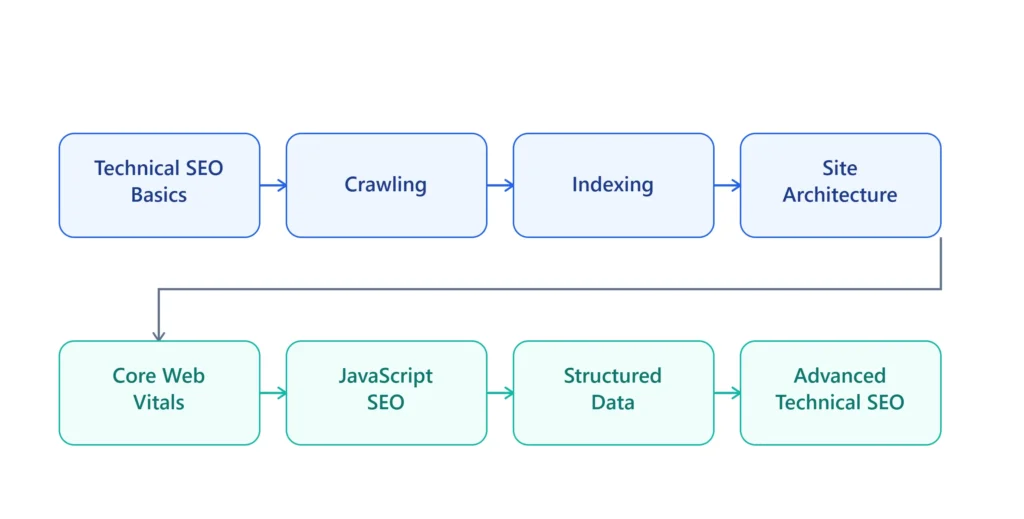
Each category below links directly to its primary guide and supporting resources.
Expert Note: Teams often try to learn Core Web Vitals or JavaScript SEO before understanding crawling and indexing fundamentals. This tends to create gaps — performance optimization is far more effective once you already understand whether the pages being optimized are even indexable in the first place.
Technical SEO Categories
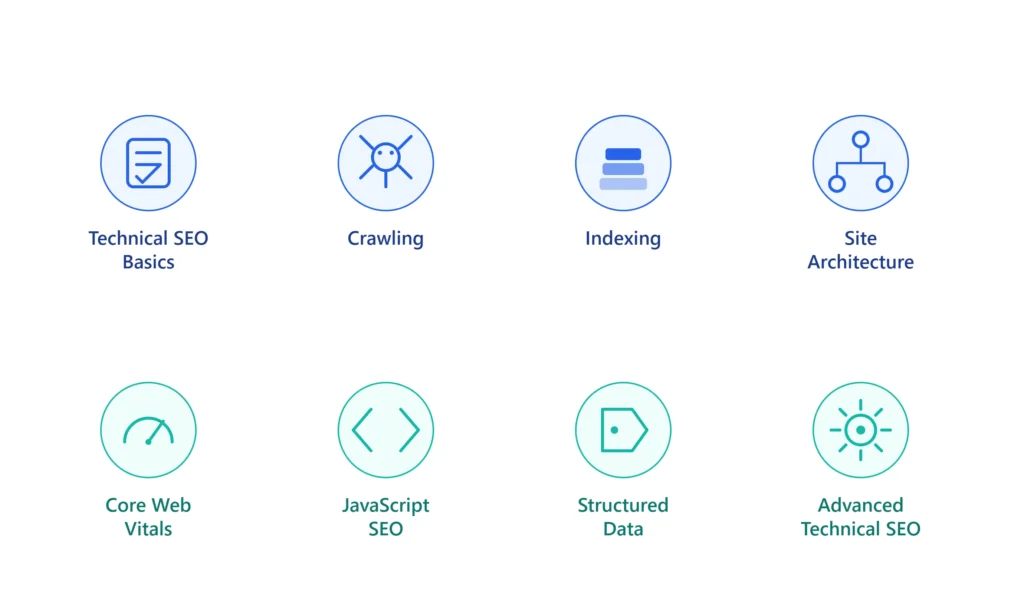
The Technical SEO Hub is organized into eight categories, each covering a distinct part of the technical foundation:
| Category | Core Focus |
|---|---|
| Technical SEO Basics | Foundational concepts, checklists, audits |
| Crawling | How search engines discover and access your site |
| Indexing | How pages get added to (or excluded from) the index |
| Site Architecture | Structure, internal linking, URLs, redirects |
| Core Web Vitals | Speed, stability, and interactivity signals |
| JavaScript SEO | Rendering, hydration, framework-specific issues |
| Structured Data | Schema markup and rich results |
| Advanced Technical SEO | Log files, hreflang, mobile-first indexing, audits at scale |
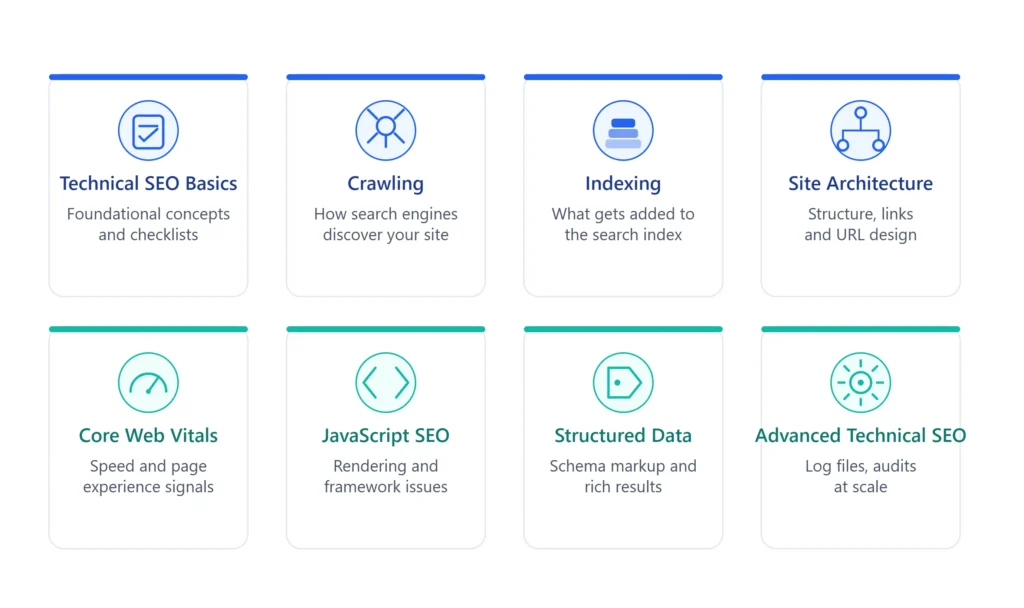
Category Cards
Technical SEO Basics
The starting point for anyone new to the subject. Covers foundational concepts, checklists, ranking factors, and the mistakes most sites make early on.
- [Internal Link: Technical SEO Checklist]
- [Internal Link: Technical SEO Audit Guide]
- [Internal Link: Technical SEO Tools]
Crawling
How Googlebot finds, requests, and processes your pages — and how to make sure nothing important gets missed.
- [Internal Link: Google Crawling Explained]
- [Internal Link: Crawl Budget Optimization]
- [Internal Link: Robots.txt Guide]
- [Internal Link: XML Sitemap Guide]
Indexing
What determines whether a crawled page actually makes it into Google’s index — and how to fix pages that don’t.
- [Internal Link: Why Pages Are Not Indexed]
- [Internal Link: Canonical Tag Guide]
- [Internal Link: Noindex Tag Guide]
- [Internal Link: Duplicate Content Fix]
Site Architecture
The structural backbone of a website: internal linking, URL design, and redirect strategy.
- [Internal Link: Internal Linking Strategy]
- [Internal Link: URL Structure SEO]
- [Internal Link: 301 vs 302 Redirects]
- [Internal Link: HTTPS SEO Importance]
Core Web Vitals
Google’s page experience signals — LCP, INP, and CLS — and how to optimize each one.
- [Internal Link: Core Web Vitals Explained]
- [Internal Link: LCP Optimization]
- [Internal Link: INP Optimization]
- [Internal Link: CLS Fix Guide]
JavaScript SEO
How search engines render JavaScript, and what commonly breaks on React, Next.js, and other modern frameworks.
- [Internal Link: JavaScript SEO Basics]
- [Internal Link: Rendering Explained]
- [Internal Link: React SEO Guide]
- [Internal Link: Next.js SEO Guide]
Structured Data
How schema markup helps search engines and AI systems understand your content.
- [Internal Link: Schema Markup Guide]
- [Internal Link: FAQ Schema]
- [Internal Link: Article Schema]
- [Internal Link: Breadcrumb Schema]
Advanced Technical SEO
Deeper diagnostics for larger sites: log file analysis, hreflang, mobile-first indexing, and full audit frameworks.
- [Internal Link: Log File Analysis SEO]
- [Internal Link: Hreflang SEO Guide]
- [Internal Link: Mobile-First Indexing]
- [Internal Link: Technical SEO Audit Checklist]
Best Practice: Not sure where to start? The [Internal Link: Technical SEO Checklist] takes about ten minutes and points you toward whichever category needs attention first.
Hub Navigation
| Category | Primary Guide | Related Guides |
|---|---|---|
| Basics | Technical SEO Checklist | Audit Guide, Tools, Mistakes |
| Crawling | Google Crawling Explained | Crawl Budget, Robots.txt, Sitemap |
| Indexing | Why Pages Are Not Indexed | Canonical Tags, Noindex, Duplicate Content |
| Site Architecture | Internal Linking Strategy | URL Structure, Redirects, HTTPS |
| Core Web Vitals | Core Web Vitals Explained | LCP, INP, CLS, Page Speed |
| JavaScript SEO | JavaScript SEO Basics | Rendering, React, Next.js |
| Structured Data | Schema Markup Guide | FAQ, Article, Breadcrumb Schema |
| Advanced | Technical SEO Audit Checklist | Log Files, Hreflang, Mobile-First |
Crawl vs. Index — Quick Reference
| Aspect | Crawling | Indexing |
|---|---|---|
| Definition | Googlebot discovering and fetching a URL | Google storing and evaluating a page for search results |
| Controlled by | Robots.txt, crawl budget, internal links | Canonical tags, noindex, content quality, duplication |
| Failure symptom | “Discovered – currently not indexed” or crawl errors in Search Console | “Crawled – currently not indexed” or missing from search results |
| Where to check | Search Console → Crawl Stats | Search Console → Page Indexing report |
Internal Link Strategy
This Hub follows a strict linking model so no page ever exists in isolation:
Upward Linking
Every cluster page links back to this Hub and to the [Internal Link: Technical SEO Guide] pillar.
Sideways Linking
Every cluster page links to related pages within its own category — Robots.txt links to XML Sitemap and Crawl Budget, for example.
Downward Linking
This Hub links to every category’s primary guide, and each primary guide links deeper into supporting topics.
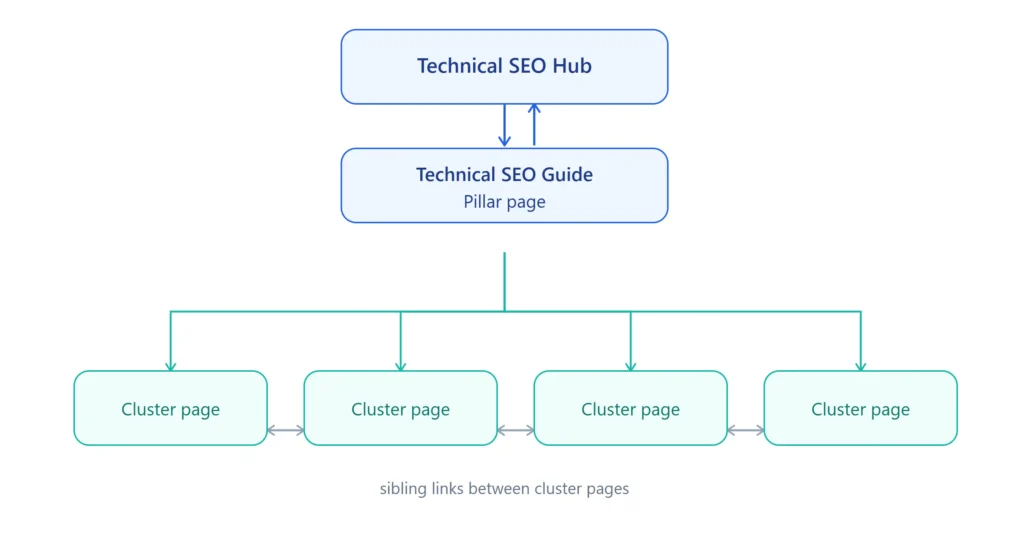
Enterprise Consideration: On large sites with hundreds of technical SEO articles, this parent/sibling/child linking model isn’t just a UX nicety — it’s how search engines infer topical depth. A hub with no consistent linking pattern signals a loosely organized content library rather than a genuine knowledge system.
Recommended Reading
If you’re not sure where to start, these are the highest-impact guides on the Hub:
- [Internal Link: Technical SEO Checklist] — a practical starting audit
- [Internal Link: Core Web Vitals Explained] — the metrics Google uses to judge page experience
- [Internal Link: Robots.txt Guide] — one of the most misunderstood files in SEO
- [Internal Link: Schema Markup Guide] — essential for AI Search visibility
- [Internal Link: Why Pages Are Not Indexed] — the most common technical SEO frustration
Beginner Path
Start here if you’re new to Technical SEO:
- [Internal Link: What Is Technical SEO]
- [Internal Link: Technical SEO for Beginners]
- [Internal Link: Technical SEO Checklist]
- [Internal Link: Google Crawling Explained]
- [Internal Link: Robots.txt Guide]
- [Internal Link: XML Sitemap Guide]
Intermediate Path
Once you understand the basics, move on to structure and performance:
- [Internal Link: Canonical Tag Guide]
- [Internal Link: Internal Linking Strategy]
- [Internal Link: Core Web Vitals Explained]
- [Internal Link: Page Speed Optimization]
- [Internal Link: Schema Markup Guide]
- [Internal Link: 301 vs 302 Redirects]
Advanced Path
For technical SEOs working on large or complex sites:
- [Internal Link: JavaScript SEO Basics]
- [Internal Link: React SEO Guide]
- [Internal Link: Next.js SEO Guide]
- [Internal Link: Log File Analysis SEO]
- [Internal Link: Hreflang SEO Guide]
- [Internal Link: Technical SEO Audit Checklist]
Quick Answer: If you can confidently explain the difference between crawling and indexing, you’re past the Beginner stage. If you’ve already diagnosed a JavaScript rendering issue, you’re operating at an Advanced level.
Prioritization framework for teams with limited time:
| If Your Problem Is… | Start With |
|---|---|
| Pages missing from search entirely | Indexing cluster |
| Site feels slow or unstable | Core Web Vitals cluster |
| React/Vue/Next.js site underperforming | JavaScript SEO cluster |
| Preparing for an international launch | Advanced Technical SEO (Hreflang) |
| No idea where the problem is | Technical SEO Audit Guide |
Technical SEO for AI Search
Technical SEO no longer serves Google alone. AI systems now generate answers by crawling, parsing, and summarizing web content — and the same technical fundamentals that help Google understand a page also determine whether AI assistants can accurately cite it.
Quick Answer: Technical SEO improves AI Search visibility by making content easier to crawl, parse, and summarize accurately — clean HTML, structured data, and clear entity relationships all increase the likelihood of accurate AI citation.
Google AI Overviews
How Technical SEO helps: AI Overviews draw heavily from pages that already rank well and carry strong structured data. A page with valid schema markup, clear headings, and a concise definition near the top of the content is far more likely to be pulled into an AI Overview summary.
Optimization tips:
- Lead sections with direct 40–60 word answers
- Validate schema markup with Google’s Rich Results Test
- Keep heading hierarchy logical and unambiguous
Common Mistake: Burying the direct answer under several paragraphs of preamble; missing or invalid structured data; inconsistent heading structure that obscures the page’s main topic.
ChatGPT
How Technical SEO helps: When ChatGPT browses or references web content, it favors pages with unambiguous definitions and clean semantic structure. Pages buried in JavaScript rendering issues or inconsistent heading hierarchy are harder for ChatGPT to parse and summarize reliably.
Optimization tips:
- Ensure critical content renders in initial HTML rather than relying solely on client-side JavaScript
- Write self-contained paragraphs that make sense without surrounding context
Common Mistake: Relying entirely on client-side rendering for key content; writing definitions that require reading the full article to understand.
Claude
How Technical SEO helps: Claude’s summarization accuracy improves significantly on pages with logical heading hierarchy and explicit entity relationships. Technical SEO practices like proper canonicalization and clean URL structure reduce the risk of Claude referencing outdated or duplicate versions of a page.
Optimization tips:
- Maintain one canonical version per topic
- Avoid duplicate or near-duplicate pages competing for the same query
- Use descriptive, consistent heading text
Common Mistake: Multiple unconsolidated pages covering the same topic; vague or clickbait-style headings that don’t describe the section’s actual content.
Gemini
How Technical SEO helps: Gemini, being built by Google, leans heavily on the same indexing and structured data signals used in traditional Search. Strong schema markup coverage and mobile-first indexing compliance directly support Gemini’s ability to surface and reference a page.
Optimization tips:
- Prioritize mobile-first indexing compliance
- Keep structured data consistent across desktop and mobile versions of a page
Common Mistake: Content or schema present on desktop but missing on mobile; unresolved mobile usability issues.
Perplexity
How Technical SEO helps: Perplexity prioritizes pages with strong external source credibility and clear factual structure. Fast-loading, well-organized pages with clean crawlability are more likely to be included in Perplexity’s real-time citation results.
Optimization tips:
- Keep page speed high, since Perplexity’s real-time crawling favors fast-loading sources
- Structure factual claims clearly and support them with credible references
Common Mistake: Slow-loading pages that time out during real-time crawling; unclear sourcing or unsupported factual claims.
Enterprise Consideration: Sites investing in AI Search visibility should treat structured data and rendering cleanliness as ranking factors in their own right — not simply as “nice to have” additions after content is finished.
Enterprise Technical SEO Audit Schedule
Technical SEO isn’t a single audit — it’s an ongoing cadence that scales with the size and complexity of the site.
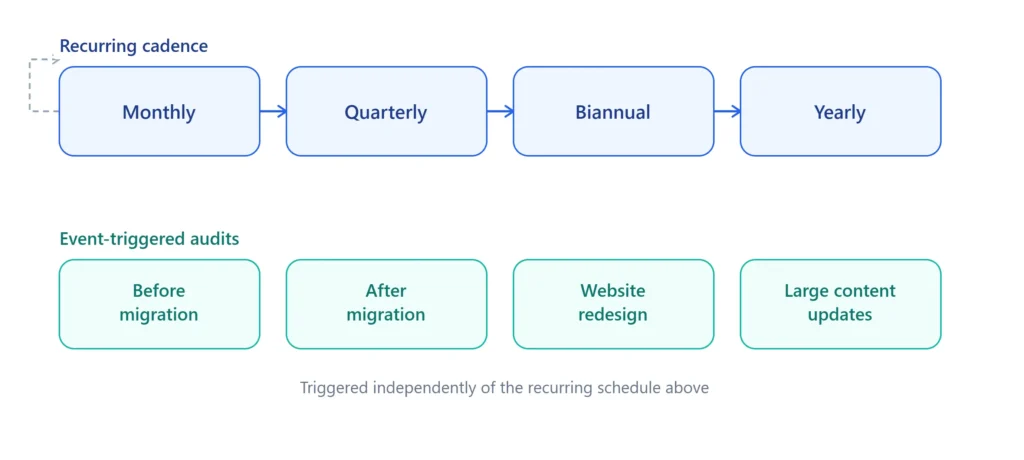
| Cadence | Focus |
|---|---|
| Monthly | Crawl errors, index coverage, Core Web Vitals monitoring |
| Quarterly | Full technical audit, schema validation, internal link health |
| Biannual | Site architecture review, redirect chain cleanup, content pruning alignment |
| Yearly | Full enterprise audit, log file analysis, competitive technical benchmarking |
| Before Migration | Full crawl and indexation baseline, redirect mapping plan |
| After Migration | Redirect verification, index coverage recovery check, Core Web Vitals comparison |
| Website Redesign | Rendering verification, schema re-validation, URL structure audit |
| Large Content Updates | Internal linking updates, duplicate content check, sitemap refresh |
Common Mistake: Many teams only run a technical audit reactively — after traffic has already dropped. Sites at Maturity Level 5 or 6 treat this schedule as a standing operational calendar rather than a one-time emergency response.