
Structured Data SEO: A Complete Guide to Schema Markup for Google Search (2026)
Last reviewed against Google Search Central documentation: October 31, 2026. Google may change structured data support and eligibility requirements. Check the linked official documentation before implementing or updating markup.
Structured data SEO means adding standardized, machine-readable information to a web page so search engines can better understand its content. For supported Google Search features, correctly implemented structured data can make a page eligible for a rich result. Google recommends JSON-LD, also supports Microdata and RDFa, and makes clear that valid markup does not guarantee enhanced search appearance. This guide explains structured data formats, Google’s supported features and retired features, implementation, testing, monitoring, and WordPress schema management. Structured data is a technical SEO practice—not a ranking shortcut. SEORAF is an independent SEO knowledge resource, not an agency. This guide contains no affiliate links and makes no ranking, traffic, or revenue promises.
New to structured data? The checklist near the end walks through choosing a supported type, adding markup, testing the live page, and monitoring the result.
Jump to the workflow checklist
Key Takeaways
- Structured data should describe information that is genuinely present on the page. Do not mark up content users cannot access or see.
- Google recommends JSON-LD but also supports Microdata and RDFa when correctly implemented.
- Valid markup can make a page eligible for a supported rich result. It does not guarantee that Google will display one.
- Google has retired HowTo rich results and significantly restricted FAQ rich results. Check the current feature gallery before implementing older schema recommendations.
- Structured data is not required for Google’s generative AI features, and Google does not require special schema.org markup for them.
- On WordPress, check which plugin, theme, or custom code generates each schema item to avoid duplicate or conflicting markup.
How to Read This Guide
| Label | Meaning |
|---|---|
| Google-documented | Information stated in Google Search Central or Search Console documentation. |
| Schema.org-documented | Information stated in Schema.org’s vocabulary or technical documentation. |
| SEORAF recommendation | Editorial guidance based on the documentation. It is not an official Google rule or a claim of controlled testing. |
| Unverified | A claim that could not be confirmed against an official source during the review. Verify it before relying on it. |
What Is Structured Data, and How Is It Different From Schema Markup?
Structured data is a standardized way of describing information on a web page so that machines can interpret it. For example, markup can identify a page as an article and describe its headline, author, publication date, and images.
Google uses structured data to help understand page content. When a page meets the requirements for a supported search feature, its markup may also make it eligible for a rich result. Eligibility does not guarantee that Google will display that result.
Schema markup is a common industry term for implementing the Schema.org vocabulary on a web page. Structured data is the broader term used in Google’s Search documentation.
| Term | Plain-English meaning | Source basis |
|---|---|---|
| Structured data | Machine-readable information describing a page’s content. | Google-documented |
| Schema.org | A shared vocabulary of types, such as Article, and properties, such as headline. | Schema.org vocabulary; also explained in Google’s documentation |
| Schema markup | Common shorthand for structured data that uses Schema.org vocabulary. | SEORAF terminology note |
| JSON-LD | A structured data format commonly placed in a separate script block. | Google-documented |
| Microdata | A format that adds attributes such as itemscope and itemprop to HTML elements. | Google-documented |
| RDFa | A format that adds attributes such as vocab, typeof, and property to HTML elements. | Google-documented |
| Rich result | An enhanced search appearance that may display additional information beyond a standard search result. | Google-documented |
How Google Uses Structured Data
Google-documented: structured data helps Google understand page content and can make pages eligible for supported search features. However, Google does not guarantee that eligible markup will appear as a rich result. Display can depend on several factors, including the search query, device, location, and Google’s assessment of the search experience.
Google’s documentation also explains that structured data must be accurate, relevant, and representative of the visible page. A technically valid implementation can still be ineligible if it violates Google’s guidelines.
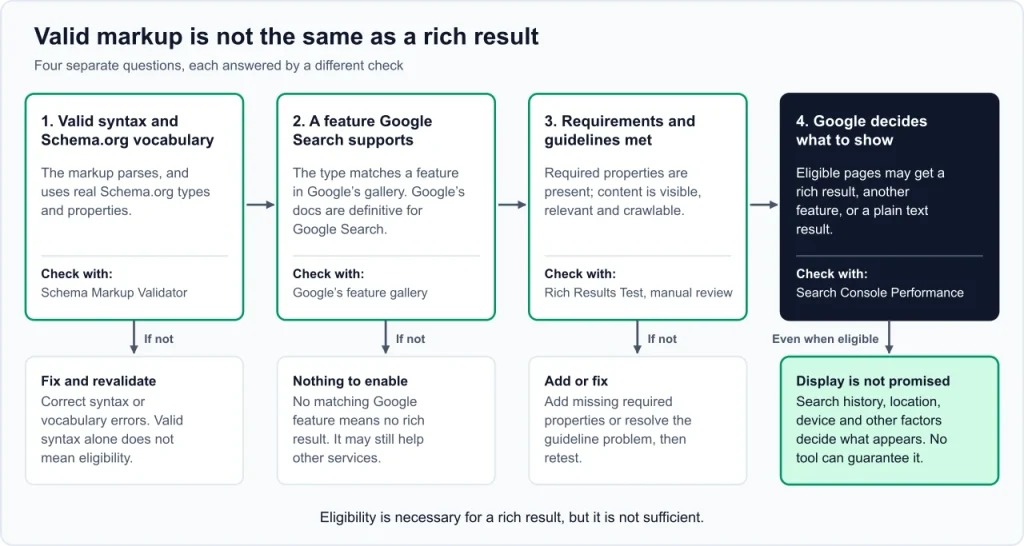
Valid Markup, Eligibility, and Display Are Different
These four questions describe separate stages:
- Is the markup syntactically valid? Check whether the code parses correctly and uses recognized types and properties.
- Does Google support the feature? Check Google’s structured data feature gallery. A Schema.org type does not automatically qualify for a Google rich result.
- Does the page meet the requirements? Required properties, content relevance, visibility, and Google’s quality guidelines all matter.
- Will Google display the rich result? Google makes that decision. No validator or SEO tool can guarantee display.
Google’s Documentation Versus Schema.org
Google-documented: Google Search uses vocabulary from Schema.org, but it does not use every available Schema.org type or property for rich results. Google’s own documentation is the reference for understanding which structured data features Google Search supports and how its requirements work.
Other search engines, applications, and services may use Schema.org vocabulary differently. Therefore, a type or property can be valid in Schema.org without being eligible for a Google Search rich result.
JSON-LD vs. Microdata vs. RDFa: Which Format Should You Use?
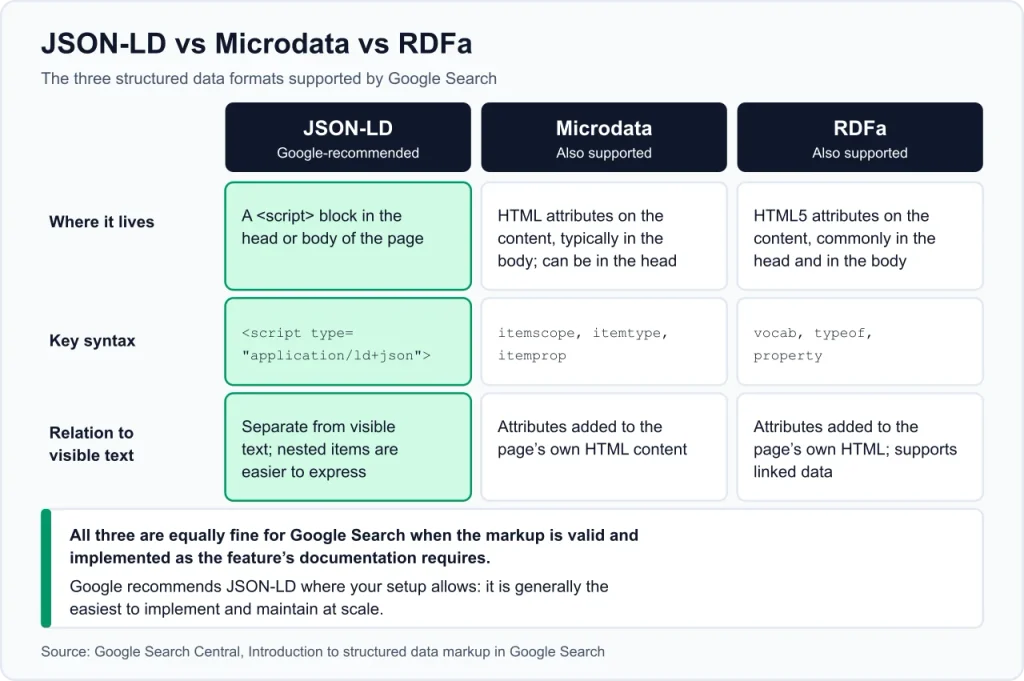
Google-documented: Google supports JSON-LD, Microdata, and RDFa. It recommends JSON-LD when your website’s setup allows it because the markup is generally easier to add and maintain separately from visible HTML. Microdata and RDFa can also be used when implemented correctly.
Google can process JSON-LD generated with JavaScript, provided the structured data is present in the rendered page and follows Google’s requirements.
| Format | Where it appears | Potential advantages | Maintenance considerations |
|---|---|---|---|
| JSON-LD | Usually in a <script type="application/ld+json"> block in the page head or body. | Separates structured data from visible HTML and is convenient for templates and larger websites. | Values can become inconsistent with visible content if generated separately. |
| Microdata | HTML attributes added to elements in the page. | Connects markup directly to the content it describes. | HTML or template changes can affect the markup. |
| RDFa | HTML attributes added to page elements. | Supports linked-data descriptions. | Requires careful implementation and maintenance within HTML. |
The following examples describe the same fictional organization. Replace the example values with accurate information before using any code.
JSON-LD Example
<script type="application/ld+json">
{
  "@context": "https://schema.org",
  "@type": "Organization",
  "name": "Example Company",
  "url": "https://example.com/"
}
</script>
Microdata Example
<div itemscope itemtype="https://schema.org/Organization">
  <span itemprop="name">Example Company</span>
  <a itemprop="url" href="https://example.com/">example.com</a>
</div>
RDFa Example
<div vocab="https://schema.org/" typeof="Organization">
  <span property="name">Example Company</span>
  <a property="url" href="https://example.com/">example.com</a>
</div>
Technical references: JSON-LD, HTML Microdata specification, and RDFa.
Which Structured Data Features Does Google Support?
Google-documented: Google’s structured data feature gallery is the primary reference for features that can produce enhanced appearances in Google Search. The table below is a simplified overview, not a substitute for each feature’s individual requirements. Availability and eligibility can change, so check the current gallery before implementation.
| Content or website type | Examples of supported features | Important considerations |
|---|---|---|
| Articles and publishers | Article, Breadcrumb, Image metadata, Video, Subscription and paywalled content, Speakable | Check each feature’s current eligibility and availability. Breadcrumb appearance is limited to desktop results. |
| Ecommerce | Product snippets, Merchant listings, Review snippets | Product markup has feature-specific requirements. Review markup has additional quality rules. |
| Organizations and local businesses | Organization, Local business | Self-serving reviews are not eligible for review stars on LocalBusiness and Organization pages. |
| Software and reviews | Software app, Review snippet | Review markup must follow Google’s review snippet guidelines. |
| Community and Q&A | Discussion forum, Profile page, Q&A | Use the relevant feature guide to confirm supported properties and page requirements. |
| Jobs, events, and travel | Job posting, Employer aggregate rating, Event, Vacation rental | Each feature has specific content, location, and eligibility requirements. |
| Education and other content | Course list, Education Q&A, Math solver, Carousel | Check the gallery for supported combinations and current requirements. |
| Food and entertainment | Recipe, Movie | Use the individual feature documentation rather than assuming every property produces a rich result. |
Important distinction: Schema.org contains types that Google Search does not use for rich results. Dataset markup, for example, is associated with Google Dataset Search and should not be presented as a standard Google Search rich-result feature.
Structured Data Features Google Has Retired or Restricted
Older SEO tutorials may recommend markup for features that Google no longer displays or has restricted. Review Google’s documentation updates and the June 2025 search results announcement before relying on historical recommendations.
| Feature | Documented status |
|---|---|
| HowTo | HowTo rich results were removed from Google Search in September 2023. The feature is no longer displayed on desktop or mobile. |
| FAQ | FAQ rich results were restricted in August 2023 to well-known, authoritative government and health websites. Do not assume an ordinary website is eligible for FAQ rich results. |
| Course info, Estimated salary, Learning video, Special announcement, Vehicle listing | Google announced changes to these search appearances in June 2025. Check the documentation updates for the current status of each feature. |
| Practice problem | Google removed the documentation in January 2026 because the feature was no longer shown. |
| Sitelinks search box | Google discontinued the feature and removed its documentation in November 2024. |
| Breadcrumb | Breadcrumb structured data remains documented, but Google limited breadcrumb display to desktop search results in January 2025. |
Editorial note: FAQ markup and HowTo markup may still exist in the wider Schema.org vocabulary. Their continued existence as vocabulary does not mean Google displays the corresponding rich results. Keep useful FAQ or instructional content in ordinary HTML when it helps readers.
How to Choose Structured Data Types for Your Website
SEORAF recommendation: start with markup that accurately describes your website and its visible content. Do not add types simply because an SEO tutorial recommends them.
- Blog or knowledge website: consider Article or BlogPosting markup for individual articles, BreadcrumbList where appropriate, and Organization markup for the organization behind the website.
- Ecommerce website: review Product and merchant listing documentation before implementing product markup.
- Local business website: consider the appropriate LocalBusiness subtype when the page represents a genuine local business and meets Google’s requirements.
- Review website: use review-related markup only when the reviewed item, rating, and review content meet Google’s guidelines.
Google’s feature gallery explains which structured data features it supports and links to their implementation requirements.
Open Google’s structured data feature gallery
Google’s Structured Data Guidelines: Eligibility and Quality Rules
Google’s general structured data guidelines apply across supported features. Valid syntax alone is not enough: markup must also be accurate, relevant, accessible, and consistent with the page.
Technical Requirements
- Use a supported format. Google supports JSON-LD, Microdata, and RDFa.
- Include required properties. Missing required properties can make an item ineligible for a rich result.
- Keep pages accessible. Do not block pages containing structured data with robots.txt,
noindex, or login requirements when you want Google to crawl and index them. - Use accessible image URLs. Images referenced in structured data should be crawlable and indexable.
- Mark up the page it describes. Structured data should represent the content of the relevant page.
- Check duplicate URLs. Follow Google’s guidance for structured data on duplicate and canonical pages rather than assuming markup on one URL automatically covers every version.
- Follow feature-specific instructions. Required and recommended properties differ by feature. For example, Google’s Article guide does not list required properties but recommends useful details such as headline, author, and dates.
Content and Quality Requirements
- Visible and accessible content: do not mark up information that is hidden from users or unrelated to the page.
- Relevance: the structured data must describe the page’s actual main content.
- Accuracy: names, dates, ratings, prices, and other values must be correct and current.
- Completeness: add relevant recommended properties when they genuinely apply. Do not invent values to fill optional fields.
- No deception: do not misrepresent an organization, author, product, review, or page purpose.
- Spam compliance: structured data must follow Google’s spam policies.
Structured Data Manual Actions
Google-documented: a structured data manual action means Google ignores the affected markup for rich result purposes. The page can still appear in ordinary Google Search results. Google states that a structured data manual action does not affect the page’s ranking in web search.
Check the Manual Actions report in Search Console if you suspect a structured data policy issue.
Review Markup: Special Rules for Review Websites
Review markup has additional requirements. Read Google’s review snippet guidelines before implementing it.
Google-documented highlights:
- The marked-up review and rating information must be readily visible to users on the page.
- Reviews should describe a specific item, not a category or a list of unrelated items.
- Do not aggregate ratings or reviews from other websites and present them as your own review data.
- When using aggregate ratings, the underlying ratings must be represented accurately and meet Google’s requirements.
- Do not publish fake reviews or reviews obtained through incentives without the required clear and prominent disclosure.
- Self-serving review snippets are not eligible for LocalBusiness and Organization pages when the reviewed entity controls the reviews about itself.
For software review websites: Google documents SoftwareApplication as a supported structured data type and includes software app information in its feature documentation. However, a software review page should not automatically receive a rating just because it contains an editorial verdict. Confirm that the rating is eligible under the current review snippet and software app requirements, is visible to users, and represents genuine review information. Do not invent customer ratings or imply that an editorial score is an aggregate customer rating.
How to Implement Structured Data
Step 1: Choose the Correct Structured Data Type
Open Google’s feature gallery and identify a supported feature that matches the page’s main content. Then read the individual feature guide to understand its required and recommended properties.
Step 2: Choose an Implementation Method
| Method | When it may fit | Important consideration |
|---|---|---|
| Website templates | You control the website’s code or templates. | Generate values from the page’s actual content and data source. |
| CMS or SEO plugin | You use WordPress or another content management system. | Inspect the rendered output and check for overlapping schema from other plugins or the theme. |
| Google Tag Manager | You need to manage certain tags without editing the page template directly. | Google recommends using variables that read values from the page rather than manually duplicating information. |
| JavaScript or server-side rendering | Your website generates content dynamically. | Confirm that the structured data is present in the rendered page and follows Google’s JavaScript and feature-specific guidance. |
Step 3: Use Accurate Values
Every property should describe the actual page or entity. If the markup names an author, that author should be identifiable on the page. If it provides a publication date, the date should match the visible publication information. Do not use fictional authors, ratings, prices, or images.
Step 4: Test the Implementation
Test the live URL with the appropriate Google testing tool. Fix critical errors, review warnings, and inspect the rendered page. A successful test checks technical eligibility; it does not promise a rich result.
Step 5: Deploy and Monitor
After deployment, use URL Inspection and relevant Search Console reports to check how Google processes the page. Google may need time to recrawl and reprocess updated markup.
JSON-LD Examples for Structured Data SEO
Important: these examples are educational templates, not ready-to-publish markup. Replace every example value with accurate information from your own website. The examples use example.com and fictional details. They should be tested after adaptation. Do not add them to a page if your SEO plugin or theme already generates the same structured data item.
Example 1: Article and BreadcrumbList
Google’s Article documentation recommends properties such as headline, image, datePublished, dateModified, and author. These properties help describe the article, but they must match the page.
<script type="application/ld+json">
[
  {
    "@context": "https://schema.org",
    "@type": "Article",
    "@id": "https://example.com/example-article/#article",
    "headline": "Your Visible Article Headline",
    "image": [
      "https://example.com/images/article-1x1.jpg",
      "https://example.com/images/article-4x3.jpg",
      "https://example.com/images/article-16x9.jpg"
    ],
    "datePublished": "2026-10-31T09:00:00+06:00",
    "dateModified": "2026-10-31T09:00:00+06:00",
    "author": {
      "@type": "Person",
      "name": "Author Name Shown on the Page",
      "url": "https://example.com/about/author-name/"
    },
    "mainEntityOfPage": {
      "@type": "WebPage",
      "@id": "https://example.com/example-article/"
    }
  },
  {
    "@context": "https://schema.org",
    "@type": "BreadcrumbList",
    "itemListElement": [
      {
        "@type": "ListItem",
        "position": 1,
        "name": "Technical SEO",
        "item": "https://example.com/technical-seo/"
      },
      {
        "@type": "ListItem",
        "position": 2,
        "name": "Your Visible Article Headline"
      }
    ]
  }
]
</script>| Property | What to enter |
|---|---|
headline | The article’s actual visible headline. |
image | Relevant images used on the article page. Make sure Google can crawl and index them. |
datePublished | The genuine original publication date in an appropriate date format. |
dateModified | The genuine date of a meaningful update. Do not change it simply to make an article appear fresh. |
author | The actual author shown on the page, with an appropriate author profile URL where available. |
mainEntityOfPage | The canonical page URL that the article describes. |
BreadcrumbList | The page’s real breadcrumb hierarchy. Match the site’s navigation and visible breadcrumb trail. |
Example 2: Organization
This simplified example describes a fictional organization. Use it only when the page and website genuinely represent the organization.
<script type="application/ld+json">
{
  "@context": "https://schema.org",
  "@type": "Organization",
  "@id": "https://example.com/#organization",
  "name": "Example Company",
  "url": "https://example.com/",
  "logo": "https://example.com/images/logo.png",
  "sameAs": [
    "https://www.linkedin.com/company/example-company/"
  ]
}
</script>
Replace the organization name, URL, logo, and social profile with genuine details. Include only profiles that actually belong to the organization. Google’s Organization structured data guide explains its requirements and recommended properties.
Connecting Related Structured Data Items With @id
The @id property can identify an entity so related structured data items can refer to the same entity. For example, an Article, WebPage, and Organization may be connected when the relationships are accurate and useful. Follow the relevant Google feature guide when connecting entities; do not add relationships simply to make the graph more complicated.
WordPress and Rank Math: How to Avoid Duplicate Schema
WordPress websites can generate structured data through an SEO plugin, theme, dedicated schema plugin, or custom code. Problems can occur when multiple sources output competing descriptions of the same page or entity.
Google can understand multiple structured data items on one page. Multiple items are not automatically an error. The concern is duplicate, inconsistent, or conflicting markup that is difficult to maintain.
SEORAF recommendation:
- Identify the source of each item. Check which tool generates Article, WebPage, BreadcrumbList, and Organization markup.
- Avoid unnecessary duplication. If Rank Math already generates an Article item, do not add a second competing Article item without a clear reason.
- Inspect the rendered page. Do not rely only on plugin settings. Test the live URL and inspect its generated structured data.
- Check the theme and other plugins. A theme, page builder, or schema plugin may also generate markup.
- Keep values consistent. Author names, dates, page URLs, and organization details should not conflict across different items.
- Do not add retired rich-result markup for a display benefit. FAQ and HowTo content can remain useful as ordinary page content without being treated as a rich-result strategy.
- Retest after updates. Check the output after changing plugins, themes, templates, or custom code.
Rank Math note: the exact schema output depends on the plugin version, settings, post type, and configuration. Do not assume every installation generates the same schema by default. Inspect the rendered page to establish what your own website outputs.
How to Test Structured Data
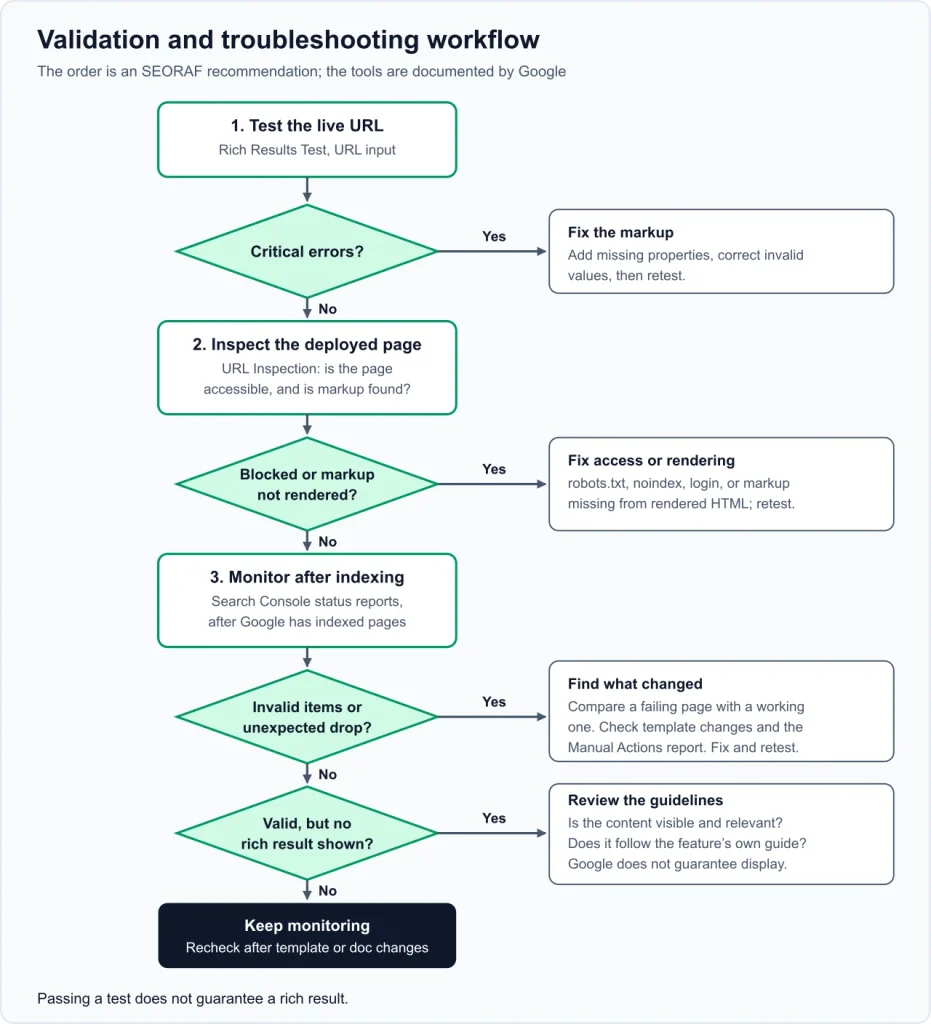
| Tool | What it helps check | What it cannot guarantee |
|---|---|---|
| Google Rich Results Test | Whether Google detects supported rich-result markup and whether it identifies relevant errors. | Whether Google will display the rich result. |
| Schema Markup Validator | General Schema.org markup validation. | Eligibility for a Google Search rich result. |
| Google URL Inspection | How Google accesses and processes a URL, including indexing information and live testing options. | A guarantee that a rich result will appear. |
| Rich result status reports | Reported valid and invalid structured data items for supported features after Google processes pages. | A complete explanation of every visibility change. |
| Unparsable structured data report | Structured data parsing problems reported by Google. | Whether correctly parsed markup is accurate or policy-compliant. |
| Manual Actions report | Whether a manual action has been applied to structured data. | Every possible algorithmic or quality issue. |
Testing Tips
- Fix critical errors that prevent eligibility for the relevant feature.
- Review warnings and recommended properties, but do not invent values just to remove warnings.
- If a structured data type is not supported by the Rich Results Test, inspect the rendered HTML and use a general validator where appropriate.
- Check whether the page is blocked by robots.txt,
noindex, or a login requirement. - For JavaScript-generated markup, inspect the rendered page rather than assuming that markup exists because it appears in the original source.
- Test the deployed URL after making changes, not only a local code sample.
Use Google’s Rich Results Test to check whether a live page contains detectable markup for supported search features. A passing test does not guarantee a rich result.
Monitoring Structured Data in Google Search Console
Google-documented: Search Console can help monitor structured data after implementation. Google recommends checking relevant reports after deploying markup, after significant website or template changes, and periodically when reviewing search performance.
- After initial deployment: allow Google to crawl and process the pages, then review the relevant rich result status reports.
- After template or code changes: check whether invalid items increase or valid items disappear. Compare affected URLs and inspect the rendered page.
- During routine monitoring: review relevant Search Console performance data where available. Search appearance filters and reports depend on the supported feature and the data Google provides.
Google’s missing rich results troubleshooting guide explains how to investigate cases where an expected search appearance does not appear.
How to Evaluate the Effect of Structured Data
Structured data should not be treated as proof of ranking improvement. If you want to understand its effect on search appearance, compare relevant Search Console data while accounting for other changes to the pages.
SEORAF recommendation: record the date of implementation, the affected URLs, the markup changes, and the relevant Search Console observations. Avoid attributing every traffic or impression change to structured data. Search performance can change for many reasons, including seasonality, query demand, competition, indexing, and other website updates.
Search Console rich result reports can help identify reported structured data errors and valid items after Google has processed your pages.
Read Google’s rich result report guide
Why Is Structured Data Not Working? Troubleshooting Guide
| Symptom | Possible explanation | What to check |
|---|---|---|
| The test passes, but no rich result appears | Passing a test does not guarantee display. The page may not meet all guidelines or Google may choose another search appearance. | Review the feature’s guidelines, visible content, and eligibility. Allow time for recrawling. |
| Markup is not detected | The page may be blocked, marked noindex, require login, or fail to render the markup. | Use URL Inspection and inspect the rendered HTML. |
| Errors appear after a template update | A changed template may have removed or altered required properties. | Compare affected pages with a working page and inspect Search Console reports. |
| A required property is missing | The markup does not meet the feature’s required property list. | Read the specific feature documentation and add accurate values. |
| Images are not recognized | Image URLs may be inaccessible, blocked, irrelevant, or incorrectly specified. | Check image URLs, crawlability, and the feature’s image requirements. |
| Review snippets do not appear | The review may not meet Google’s requirements, may not be visible, or may describe an ineligible item. | Review Google’s review snippet guidelines and confirm the reviewed entity. |
| Markup values do not match the page | Manually duplicated values or outdated template data may have become inconsistent. | Use a reliable source of page data and compare the rendered content with the markup. |
| The same item appears more than once | A plugin, theme, page builder, or custom code may generate overlapping markup. | Inspect the page output and identify which source should own each item. |
| Rich result visibility decreases | Errors, policy issues, a feature change, or Google’s display decisions may explain the change. | Review Search Console reports, manual actions, and Google’s documentation updates. |
Common Structured Data Mistakes to Avoid
- Marking up content that visitors cannot see or access.
- Using a structured data type that does not match the page’s actual content.
- Following outdated tutorials for retired or restricted rich-result features.
- Assuming a passing Rich Results Test guarantees enhanced search appearance.
- Adding inaccurate, incomplete, or invented property values.
- Blocking pages or images that Google needs to crawl.
- Using misleading, fake, or improperly disclosed review information.
- Leaving outdated prices, dates, or other values in structured data after the visible page changes.
- Allowing plugins, themes, and custom code to produce conflicting descriptions of the same entity.
- Failing to retest markup after a template or plugin update.
- Ignoring Search Console reports after implementation.
Does Structured Data Help With AI Search Features?
Google-documented: Google’s guidance for generative AI features says structured data is not required for those features and that no special Schema.org markup is needed for inclusion. Google recommends continuing to use structured data where appropriate as part of general SEO and rich-result eligibility.
Google’s guidance also says that website owners do not need to create special files such as llms.txt for Google Search visibility and that there is no special content-chunking requirement for its generative AI search features. These statements should not be interpreted as a reason to ignore ordinary technical SEO or structured data requirements for supported search features.
Read Google’s guidance on optimizing websites for generative AI features for the current recommendations.
SEORAF recommendation: treat claims that a particular schema type guarantees or directly increases AI citations as unverified unless supported by reliable evidence. Focus on accurate information, useful content, accessible pages, and correct structured data where it applies.
Structured Data SEO Myths vs. Google’s Documentation
| Claim | What the documentation supports |
|---|---|
| “Schema markup automatically boosts rankings.” | Google documents structured data as a way to help understand content and enable eligibility for supported search features. A direct ranking boost is not established by this documentation. |
| “Valid markup guarantees a rich result.” | Incorrect. Google says eligibility does not guarantee display. |
| “FAQ and HowTo markup always produce rich results.” | Incorrect. HowTo rich results were retired, and FAQ rich results were restricted. |
| “Special schema or llms.txt is required for Google’s AI features.” | Google says special Schema.org markup is not required for its generative AI features. |
| “JSON-LD is the only format Google accepts.” | Incorrect. Google also supports Microdata and RDFa. |
| “Every Schema.org property is used by Google Search.” | Incorrect. Google uses only selected types and properties for its documented search features. |
| “Hidden markup is acceptable if the information is accurate.” | Google’s guidelines say structured data should represent content that users can see on the page. |
| “A validator confirms Google eligibility.” | A general Schema.org validator checks vocabulary and syntax; Google feature eligibility requires the relevant Google documentation and testing tools. |
A Practical Structured Data SEO Workflow and Checklist
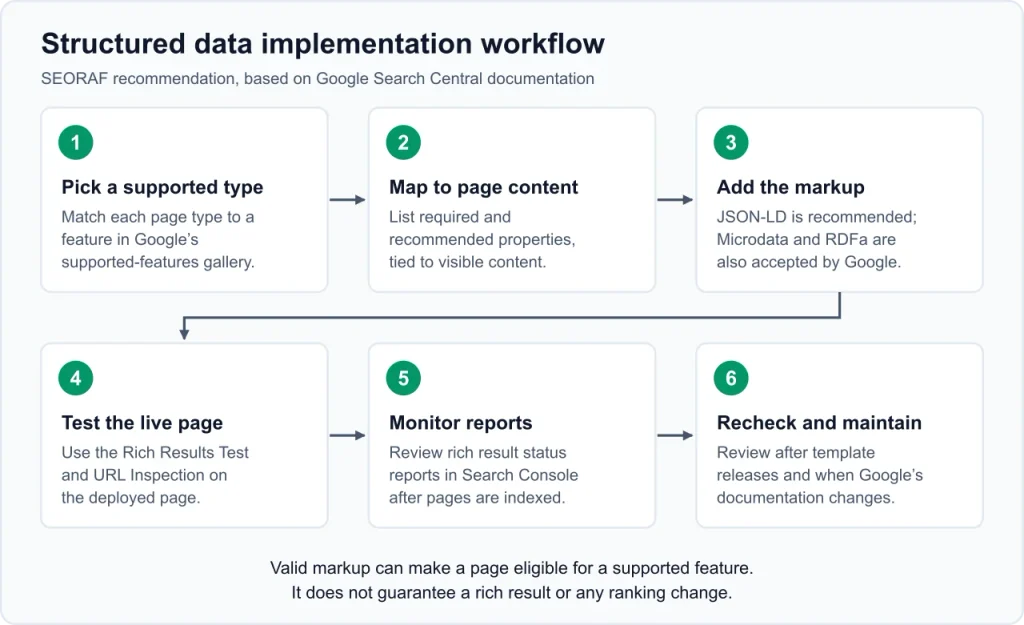
SEORAF recommendation: this workflow turns Google’s documentation into a repeatable implementation process. It is an editorial checklist, not an official Google procedure.
Implementation Workflow
- List your website’s main page types, such as articles, product pages, organization pages, and reviews.
- Check Google’s feature gallery to identify supported structured data features that match those pages.
- Read the relevant feature guide and identify its required and recommended properties.
- Map each property to accurate, visible page content or a reliable source of website data.
- Choose an implementation method and identify one source of truth for each structured data item.
- Test the live URL with the Rich Results Test and inspect the rendered page.
- Use URL Inspection and relevant Search Console reports after deployment.
- Review the documentation and retest after significant website or template changes.
Pre-Publication Checklist
- The markup describes the page’s actual main content.
- Every marked-up value is accurate and represented on the page.
- All required properties for the selected feature are present.
- Dates and author information are genuine and consistent.
- Image URLs are relevant and accessible to Google.
- The page is not unintentionally blocked by robots.txt, noindex, or a login requirement.
- The Rich Results Test detects the expected supported markup.
- The rendered page does not contain conflicting or unnecessary duplicate items.
- Review markup, if used, follows Google’s review guidelines.
- No retired feature is being implemented solely to obtain a rich result.
- A monitoring process is in place for future template and plugin changes.
Frequently Asked Questions About Structured Data SEO
Is structured data a Google ranking factor?
Google documents structured data as a way to help it understand page content and determine eligibility for supported rich results. Its documentation does not establish that adding markup directly improves organic rankings. Treat claims of guaranteed ranking improvements as unverified.
Should I use JSON-LD or Microdata?
Google recommends JSON-LD when your website setup allows it. Microdata and RDFa are also supported when correctly implemented. Choose a format that your website can maintain accurately.
Do I need a WordPress plugin to add structured data?
No. Structured data can be generated through website templates, CMS features, plugins, or custom code. A plugin may make implementation easier, but you should still inspect the rendered output and check for duplicate markup.
Can a page contain more than one structured data type?
Yes. A page can describe multiple related entities, such as an Article, WebPage, and Organization. Each item must accurately represent the page or entity. Use identifiers such as @id when they help express genuine relationships.
Why does valid structured data not produce a rich result?
A passing test does not guarantee display. Google may decide not to show a rich result, the page may not meet all feature guidelines, or the content may not be suitable for the search query. Review the feature documentation and allow time for Google to recrawl the page.
Is FAQ schema still worth adding?
FAQ content can still help readers, but Google restricted FAQ rich results in August 2023 to well-known, authoritative government and health websites. Most ordinary websites should not add FAQ markup expecting a Google FAQ rich result. Useful questions and answers can remain in ordinary HTML.
Can I use Schema.org types that Google does not support for rich results?
Schema.org vocabulary can be used for purposes beyond Google rich results. However, a valid Schema.org type does not automatically create a Google Search feature. Check Google’s documentation when your goal is a Google rich result.
How often should I check structured data?
Check after initial implementation, after changes to plugins or templates, and periodically through relevant Search Console reports. Also review Google’s documentation when planning to use a feature that may have changed.
Conclusion: Use Structured Data to Describe Your Content Accurately
Structured data SEO is most useful when it accurately describes real page content and follows the requirements of the feature you are implementing. Choose an appropriate type, use a maintainable format, avoid conflicting markup, test the live page, and monitor the results.
Remember that valid markup creates eligibility—not a promise of rich results or higher rankings. Treat structured data as part of a sound technical SEO process rather than a shortcut to search visibility.
Suggested next steps:
- Review Google’s current structured data feature gallery.
- Choose one feature that accurately matches a page on your website.
- Read its official implementation guide and check your current schema output.
- Test the live page with Google’s Rich Results Test.
- Monitor relevant Search Console reports after Google processes the page.
Sources and Further Reading
The following official documentation and technical references support this guide. Google may update these pages, so check their current content before implementation.
Google Search Central
- Introduction to structured data markup in Google Search
- General structured data guidelines
- Structured data features supported by Google Search
- Google Search documentation updates
- Simplifying the search results page
- Article structured data
- Review snippet structured data
- Organization structured data
- Generate structured data with JavaScript
- Optimizing your website for generative AI features
- Google Search spam policies
- Testing website changes
- Google Search case studies
Google Search Console Help
- URL Inspection tool
- Rich result status reports
- Unparsable structured data report
- Manual Actions report
- Troubleshoot missing rich results
- Generative AI performance report
Testing and Technical Specifications
- Google Rich Results Test
- Schema Markup Validator
- Schema.org getting started guide
- JSON-LD
- HTML Microdata specification
- RDFa
Editorial disclosure: SEORAF uses official documentation as the primary reference for Google Search behavior. Recommendations identified as SEORAF recommendations are editorial guidance, not Google requirements. Tool availability, feature support, and eligibility can change after this guide is reviewed.