
SEO Audit Service: Prioritized Website Review With Clear Evidence and Limits
By Mousume Akter, Founder & Editor, SEORAF
Last updated:October 3, 2026
An SEO audit is a structured review of a website’s technical setup, on-page elements, content and internal structure. It identifies issues that affect how pages are crawled, indexed and presented in organic search, then ranks those issues by priority so they can be fixed in a sensible order.
My SEO audit service delivers that review as a written report you or your developer can act on. This page explains what I audit, what you receive, who the service suits, who may not need it, what I need from you, what happens afterwards, and what an audit cannot guarantee.
I run SEORAF as an independent SEO knowledge resource and work as a solo SEO specialist. SEORAF is not an agency, and there is no team behind this page. When this page says “I”, it means me.
Request an SEO audit | See what is included
I reply with an assessment of fit, a recommended scope and a quote. There is no obligation to proceed.
How to read this page. “Google’s documentation says” means the point comes from Google Search Central. “Industry practice” means a widely used approach that Google does not require. “My recommendation” or “in my view” marks a judgment call. Google’s documentation changes, so follow the links to read the current version.
What I audit
A website SEO audit covers the parts of your site that affect how search engines find, understand and present your pages.
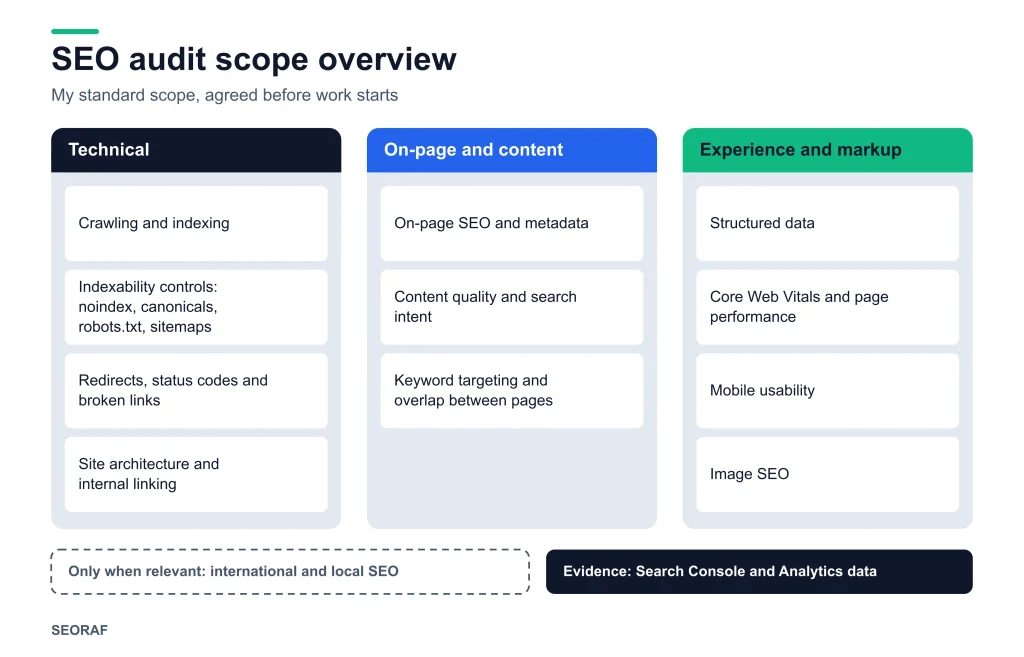
The standard scope is:
- Crawling and indexing: what search engines can reach, what they index, and what they skip.
- Indexability controls: noindex, canonical tags, robots.txt, XML sitemaps and status codes.
- Redirects and broken links: chains, loops, soft 404s and dead ends.
- Site architecture and internal linking: how pages are organized and connected.
- On-page SEO and content: titles, headings, metadata, content quality and search intent.
- Keyword targeting: which pages target which topics, and where pages overlap.
- Structured data, Core Web Vitals, mobile usability and images.
- International or local SEO, only when your site needs it.
- Search Console and Analytics data: used as evidence for the findings above.
Scope is agreed before work starts, and not every site needs every area. The explanation of each area is in audit scope in detail.
Not part of this audit unless we agree otherwise in writing: making changes to your site, writing content, link building, paid search, social media and development work.
What you receive
The deliverable is a written SEO audit report, designed to be read by a decision-maker and used by whoever implements the changes. It includes:
- A plain-language summary of the main conclusions and the highest-priority actions.
- Findings grouped by area, each with its evidence source, priority and recommended fix.
- An estimate of the work involved for each recommendation, and a realistic description of the likely benefit. This is a qualitative judgment, not a forecast of rankings or traffic.
- A prioritized action list ordered by impact, effort and confidence.
- Notes on scope and limits: what was reviewed, what was not, and where findings rest on estimates or incomplete data.
- Pointers to Google’s documentation where a recommendation rests on it, so your team can verify it independently.
Example: how a finding is written (hypothetical)
Every finding states what was found, how I know, how much it matters, and what I suggest. The examples below are a hypothetical illustration of format only. They are not from a real client or site and contain no real data.
Example 1
Finding
Several category pages are marked noindex, but are linked from the main navigation and listed in the XML sitemap.
Evidence
Site crawl; Search Console page indexing report; sitemap review.
Priority
High: conflicting signals on pages that appear intended to rank.
Recommended action
Confirm whether the pages should be indexed. If yes, remove noindex and re-check. If no, remove them from the sitemap and reduce internal prominence.
Example 2
Finding
Two blog posts target the same question with overlapping content.
Evidence
Search Console queries by page; manual review of both pages.
Priority
Medium: possible cannibalization.
Recommended action
Decide which page should serve the intent; merge or differentiate the other, and redirect if merged.
Where something is a judgment call and not a clear error, the report says so.
Is an SEO audit right for you?
Who this service suits
In my view, an audit is most useful if:
- Organic visibility has dropped or stalled and the cause is unclear.
- You are planning a redesign, platform change or URL migration and want to know what to protect. Google’s hiring guidance says a redesign or new launch is a good time to involve an SEO, the earlier the better.
- You have published a lot of content with uneven results.
- You are inheriting a site, or hiring an SEO, and want an independent baseline.
- You want a prioritized roadmap before investing in development or content.
- You have a team or developer who can act on the recommendations.
Who may not need it
An audit may not be the right step if:
- Your site is small, with a handful of pages and no known problems. Google’s hiring guidance says that if you run a small local business, you can probably do much of the work yourself, starting with its SEO Starter Guide.
- You have no capacity to act on recommendations. An audit that is not acted on changes nothing.
- You are looking for someone to implement changes, write content or build links. That is a different service.
- You want a guarantee of rankings, traffic or AI search visibility. No one can honestly provide one.
- The real problem is the offer, product or pricing rather than search visibility.
Quick decision guide
My view of a sensible first step for common situations:
My view of a sensible first step for common situations:
| Your situation | Suggested first step |
|---|---|
| Small site, no known problems | Self-review with Google’s SEO Starter Guide |
| Search traffic dropped, cause unclear | Full SEO audit. Google’s guide to debugging drops in Search traffic is a free starting point. |
| Redesign or migration planned | Audit with a technical emphasis before changes are made |
| Lots of content, uneven results | Audit with a content and intent emphasis (scope agreed during scoping) |
| You already have a tool report | Treat it as an input; an audit can verify and prioritize it |
| No capacity to implement changes | Plan capacity first |
What I need from you
To scope and start the audit
- Your website address and the platform it runs on (for example, WordPress or a custom build).
- Roughly how large the site is, and which languages or regions it serves.
- What you want from the audit, and your most important pages or goals.
- Any known problems and recent changes, such as a redesign, migration or plugin changes.
- Read-only access to Google Search Console, and to Google Analytics if you use it.
- Any previous audits or tool reports you want me to consider.
- Your timeline, and who will implement the changes (for example, a developer or in-house team).
What I do not need
- Your CMS login, hosting credentials or passwords.
- Write access to Search Console. Google’s hiring guidance advises granting only read access to Search Console during an audit.
SEO audit process: step by step
My SEO audit process has six steps, from scoping to follow-up questions.
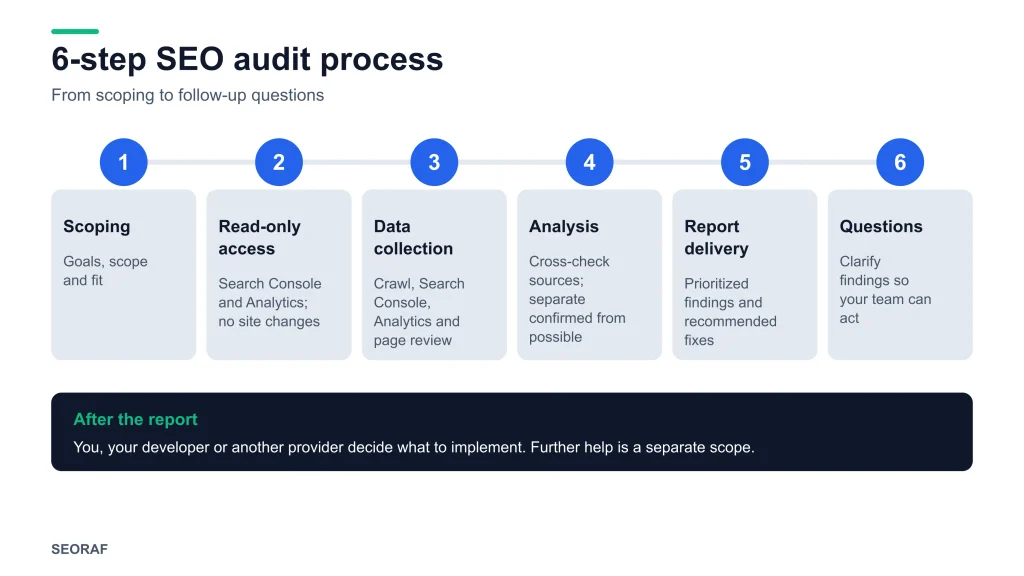
- Scoping. You tell me about the site and your goals. I confirm what the audit will and will not cover, and whether it is a good fit.
- Access. You grant read-only access to Google Search Console, and to Google Analytics if relevant. I do not make changes to your site.
- Data collection. I crawl the site, review Search Console and analytics data, and inspect representative pages and templates.
- Analysis. I cross-check sources against each other, test hypotheses on specific URLs, and separate confirmed problems from possible ones.
- Report delivery. I deliver the written report with prioritized findings and recommended fixes.
- Questions. After delivery, I am happy to clarify anything in the report so that your team can act on it.
What happens after the audit
The audit ends with the report. What happens next is your decision.
- Clarification. You can ask questions about any finding so that your team understands what to do and why.
- Implementation is yours to direct. You, your developer or another provider decide what to change and when. I do not change your site as part of the audit, and responsibility for changes made to it rests with you.
- Test before you publish. My recommendation is to make significant changes in a staging environment where possible, keep backups, and check Search Console afterwards. Re-check recommendations against Google’s documentation before major changes.
- Further help is a separate scope. If you want implementation support or a follow-up review after changes, we can discuss that separately.
- Results take time and are not predictable. Search engines process changes at their own pace, and the effect of any fix depends on many factors.
What an SEO audit does not guarantee
An SEO audit cannot guarantee rankings, traffic, indexing, AI search visibility or business results. Being direct about limits is part of the service.
- Rankings and traffic. Search results depend on Google’s systems, competition, demand and many factors outside anyone’s control. Google’s hiring guidance says no one can guarantee a number-one ranking and advises finding someone else if a provider promises first place.
- Indexing. Following good practice makes pages eligible and easier to process, but Google decides what to index.
- AI search features. Google’s guide on optimizing for generative AI features says that, from Google Search’s perspective, optimizing for generative AI search is still SEO, and that special files or markup (such as an llms.txt file) are not needed to appear in those features. It does not promise inclusion for any page. I treat these features as a reason to get the fundamentals right, and I do not sell separate AI-visibility outcomes.
- Business results. Traffic is not revenue. Conversions depend on your offer, pricing, site experience and market.
- Permanence. An audit is a snapshot. Sites, search engines and Google’s documentation change, so findings may need re-checking later.
- Implementation. An audit that is not acted on changes nothing, and some fixes need developer time or budget outside my scope.
- Missing data. If Search Console has little history, or analytics was set up recently, some conclusions will be tentative, and the report will say so.
Google’s hiring guidance says an audit should give you realistic estimates of improvement and of the work involved. That is the standard I aim to meet, which is why the report describes likely benefit qualitatively and does not forecast numbers.
SEO audit pricing: what affects the cost
I do not publish a fixed price for my SEO audit service, because the effort varies too much between sites for one number to be honest. I quote after scoping, based on what the work involves.
These factors move the cost of any SEO audit, whether you hire me or someone else:
- Site size and complexity: a small brochure site and a large e-commerce site with many thousands of URLs need very different analysis.
- Platform and technical setup: JavaScript-heavy sites, custom builds and multiple subdomains take more investigation.
- Scope: a technical-only review is narrower than a combined technical, content and architecture audit.
- International or local requirements: multiple languages, regions or locations add layers.
- Data availability: established Search Console and analytics history makes findings easier to verify.
- Depth of deliverables: a summary-and-priorities report differs from a detailed page-level review.
Ask whether an audit is a good fit
If you are unsure whether an audit is worth it for your site, send me a short description of it. I will tell you plainly whether I think an audit is a sensible next step, and if not, what to do first.
Not ready for an audit? Start with SEO basics, my technical SEO basics guide, or the technical SEO checklist.
SEO audit explained: scope, types and terminology
An SEO audit reviews a website against search engine guidance, technical requirements and user needs. Its purpose is to show what is helping organic visibility, what is holding it back, and what is worth fixing first. There is no single standard for what an audit must contain, so scope varies between providers.
My audits combine three kinds of analysis:
- Technical SEO: whether search engines can reach your pages, render them, and decide which versions to index.
- On-page and content SEO: whether each page targets a real search need, delivers on it, and is presented in a way search engines can interpret.
- Site structure and measurement: how pages connect, and what first-party data in Google Search Console and Google Analytics shows about performance.
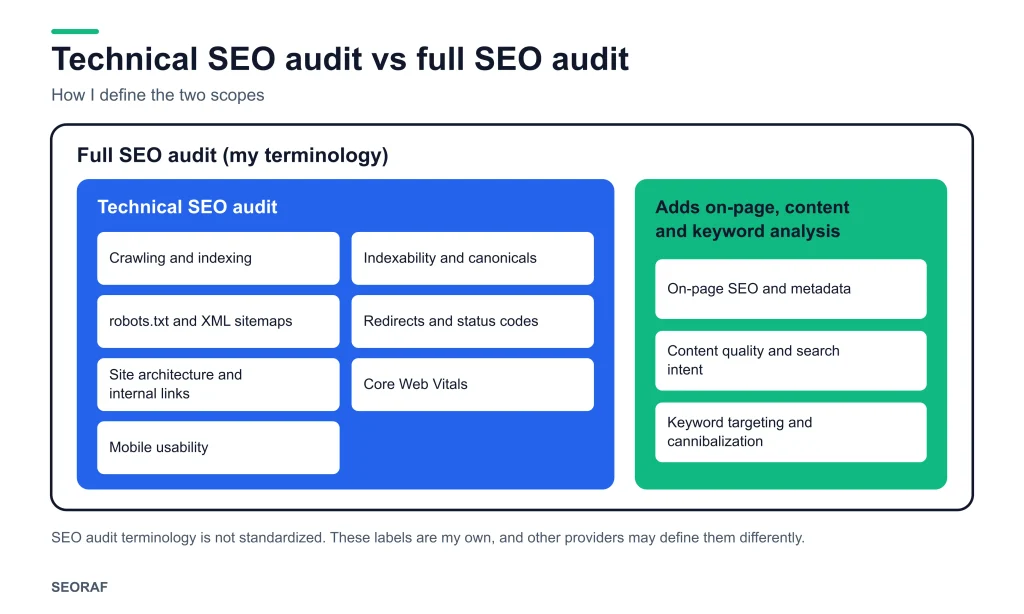
What is a technical SEO audit? A technical SEO audit covers how search engines crawl, render and index a site: crawling, indexability, robots.txt, XML sitemaps, canonicals, redirects, site architecture, performance and mobile usability. A full SEO audit adds on-page, content and keyword analysis.
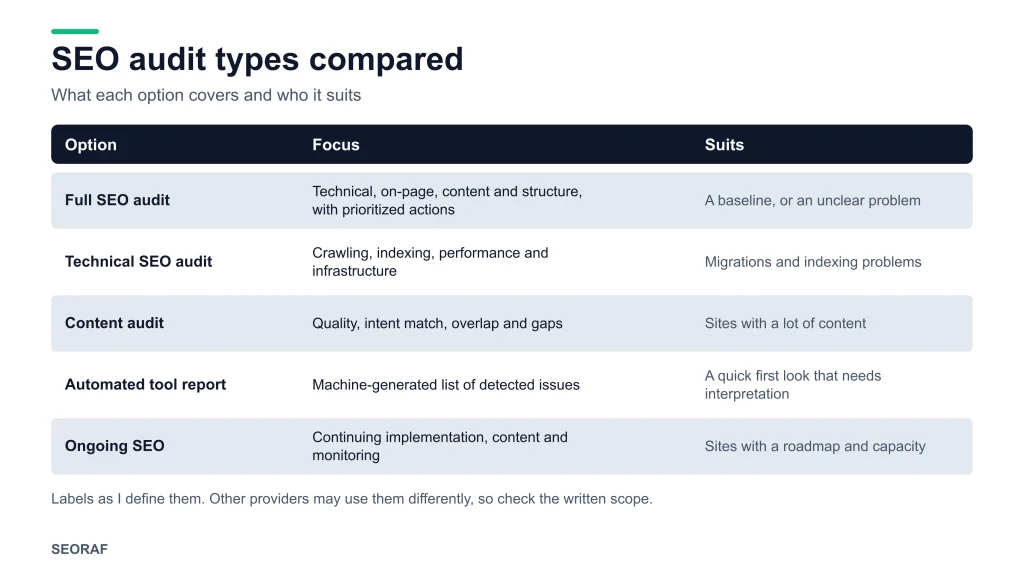
These labels are used differently by different providers, so always check the written scope. This is how I use them:
My view of a sensible first step for common situations:
| Option | What it covers and who it suits |
|---|---|
| Full SEO audit | Technical, on-page, content and structural review with prioritized actions. Suits a baseline before investing, or an unclear problem. |
| Technical SEO audit | Crawling, indexing, performance and infrastructure. Suits migrations, indexing problems, or sites where content is not the main concern. |
| Content audit | Quality, intent match, overlap and gaps in existing pages. Suits sites with a lot of content and uneven performance. |
| Automated tool report | A machine-generated list of detected issues. A quick first look that needs interpretation before it becomes a plan. |
| Ongoing SEO | Continuing implementation, content and monitoring. A different service from an audit. |
For the technical foundations explained from scratch, see my technical SEO basics guide and the technical SEO hub.
What a website SEO audit checks, in detail
Each section below explains what is examined and why it matters. The first six sections, plus performance and mobile usability, make up the technical SEO audit.
Crawling and indexing
Crawling is how search engines discover pages; indexing is how they store and consider them for results. I compare what exists on the site (from a crawl) with what Google reports about it in Search Console’s page indexing report, and look at the gaps: pages that are blocked, not indexed, indexed unintentionally, or discovered but not indexed.
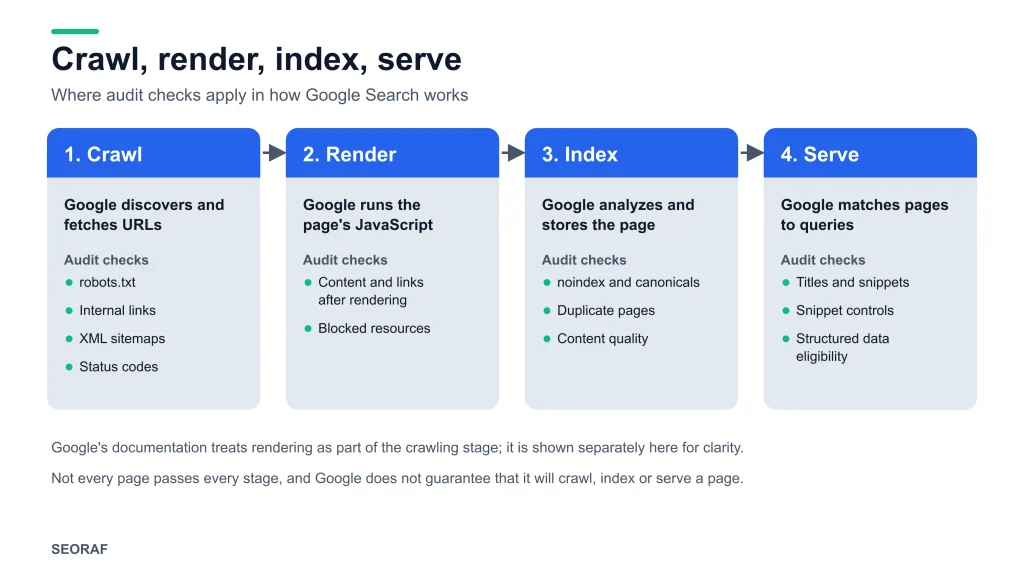
I also look for crawl waste, such as parameter URLs, faceted navigation or duplicate paths that use up crawling without adding value. Google’s documentation says there is no guarantee that any particular page will be added to its index, so an unindexed page is a finding to investigate, not automatically a fault. Background is in my guides to crawling and indexing.
Indexability and snippet eligibility
Indexability is whether a crawlable page is actually eligible to be indexed. I check noindex directives, canonical tags, HTTP status codes, redirects, login walls and rendering problems.
I also check snippet-related controls. Google’s guide on generative AI features describes eligibility for those features as requiring a page to be indexed and eligible to show a snippet in Search. The aim is to confirm that pages meant to rank are eligible and that pages not meant to rank are not competing by accident. More is in my indexability guide.
robots.txt and XML sitemaps
robots.txt controls crawling, not indexing. Google’s robots.txt documentation says the file is mainly used to avoid overloading your site with requests and is not a mechanism for keeping a page out of Google. A page blocked by robots.txt can still appear in results without a description, and a noindex directive on a blocked page cannot be seen because the page is not crawled.
I review whether the file blocks anything important, whether it blocks resources needed for rendering, and whether it matches your intent. For XML sitemaps, my recommendation is that they list canonical, indexable, successful URLs and exclude redirects, errors and noindexed pages. A sitemap helps search engines discover URLs; it does not oblige Google to crawl or index them.
Canonicalization and duplicate content
Canonicalization is how a site signals which URL is the preferred version when the same or very similar content is reachable at several addresses, such as with and without trailing slashes, with tracking parameters, or across HTTP and HTTPS. Canonical tags are a signal, not a command, and Google can choose a different canonical if the signals conflict.
I check whether canonicals, internal links, redirects and sitemaps all point to the same preferred URL. Conflicting signals are one way a page can end up with a canonical you did not intend.
Redirects, status codes and broken links
I review redirect chains and loops, temporary redirects used where permanent ones are intended, soft 404s, server errors and broken internal links. Not every 404 is a problem: a page that was deliberately removed and returns a 404 or 410 is normal. What matters is whether important URLs, internal links or pages with external links lead to dead ends, and whether redirects send people and crawlers to a relevant destination.
Site architecture and internal linking
Site architecture is how a site’s pages are organized and linked. I look at how deep key pages sit, whether the hierarchy reflects how your topics relate, which pages are orphaned, and where internal links are missing or use vague anchor text. Internal links are within a site owner’s direct control, which makes them a practical place to look for improvements. For more, see my work on technical SEO site architecture.
On-page SEO and metadata
On-page SEO covers the elements that describe and organize a page: title elements, meta descriptions, headings, URL structure and copy. These help searchers and search engines understand what a page is about; they are not a place to repeat keywords.
Google’s title link documentation explains that Google may display different text from your title element. I therefore evaluate whether titles and descriptions are accurate and distinctive, rather than chasing exact formulas.
Content quality and search intent
Search intent is what a searcher is trying to accomplish with a query, such as learning, comparing, buying or finding a local result. I check whether each page matches the intent of the query it targets, offers something useful beyond what already exists, and shows real knowledge and trustworthiness for its topic. I also look for thin pages, overlapping pages and outdated content.
Google’s guidance on helpful, reliable, people-first content is the reference I use, rather than a tool’s score. In my view, technically clean pages can still fail to answer the question behind the query, so I give content and intent the same weight as technical checks.
Keyword targeting and cannibalization
Keyword targeting is the match between the topics a page aims at and the queries it actually appears for. I compare your pages against Search Console data and look for mismatches, missed opportunities and cannibalization, where several pages compete for the same intent. Third-party keyword data is useful for direction, but it is estimated rather than measured by Google, so I treat it as a supporting input.
Structured data
Structured data is markup that describes a page’s content in a standard format. I check whether it is present where it genuinely applies, valid, and consistent with what is visible on the page. Google’s structured data documentation is the reference for what each feature requires.
Markup does not guarantee a rich result, because eligibility depends on Google’s guidelines and its own decisions. I flag errors and inconsistencies, and I do not recommend adding markup for its own sake.
Core Web Vitals and page performance
Google’s Core Web Vitals documentation describes three metrics: Largest Contentful Paint (loading), Interaction to Next Paint (responsiveness) and Cumulative Layout Shift (visual stability). Google recommends achieving good Core Web Vitals and says they align with what its core ranking systems seek to reward.
I look at real-user (field) data where it is available, and use lab tests to diagnose causes such as heavy images, render-blocking scripts or layout shifts. My view is that performance matters first for the people using your site, and should be weighed alongside content relevance. I do not present speed as a ranking trick.
Mobile usability and mobile-first indexing
Google predominantly uses the mobile version of a site for indexing; its mobile-first indexing documentation has the details. In practice I check that mobile pages contain the same important content, links and structured data as desktop, and that they are usable on a small screen: readable text, tappable elements, and nothing broken or missing.
Image SEO
Image SEO is making images discoverable, understandable and light enough not to slow the page. I review whether important images are crawlable and indexable, whether alt text is descriptive where it adds meaning, whether file names and surrounding text give context, and whether size and format hurt performance. Google’s image guidance is the reference for what Google Images supports.
Separately, as a performance best practice (not a Google Search requirement), I check that the main above-the-fold image is not lazy-loaded, since that can delay the page’s largest element.
International and local SEO (only when relevant)
If your site serves multiple languages or regions, I check hreflang implementation, URL structure and duplicate-content handling across versions, using Google’s international and multilingual guidance as the reference. If you rely on local search, I review the consistency of business information on your site against Google’s guidance on business details. If neither applies, these checks are left out of the scope.
How SEO audit findings are prioritized
I prioritize findings by impact, effort and confidence. This framework is my own method, not a Google standard.
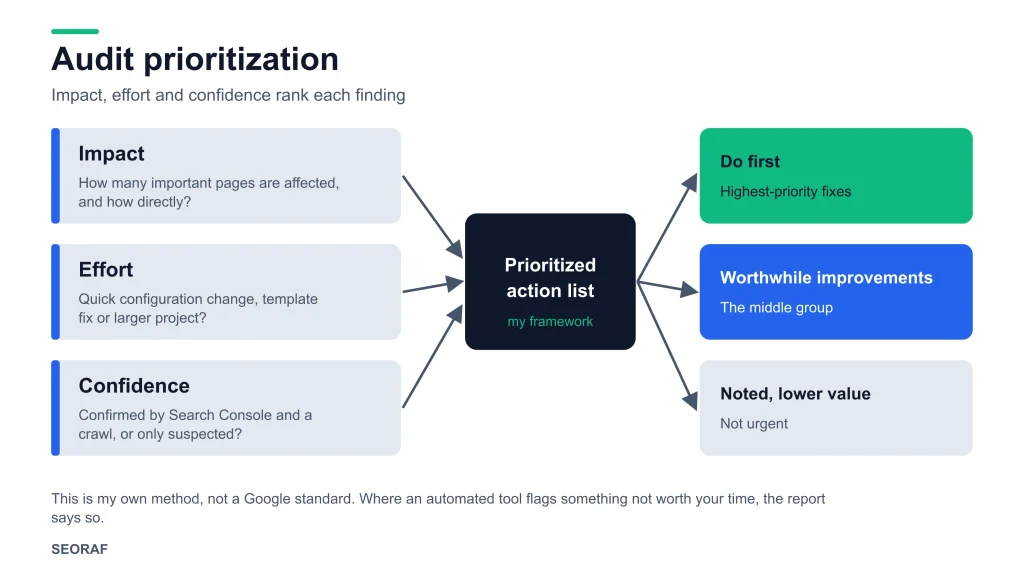
A long list of issues is not a plan, so each finding is ranked using three questions:
- Impact: how many important pages are affected, and how directly does the issue affect crawling, indexing or the user’s experience?
- Effort: is this a quick configuration change, a template fix, or a larger development or content project?
- Confidence: how strong is the evidence? An error confirmed by Search Console and a crawl is treated differently from a pattern I suspect but cannot confirm.
The result is a short list of what to do first, a middle group of worthwhile improvements, and a longer tail of lower-value items that are noted but not urgent. Where an automated tool flags something that is not worth your time, I say so.
Methodology, evidence and independence
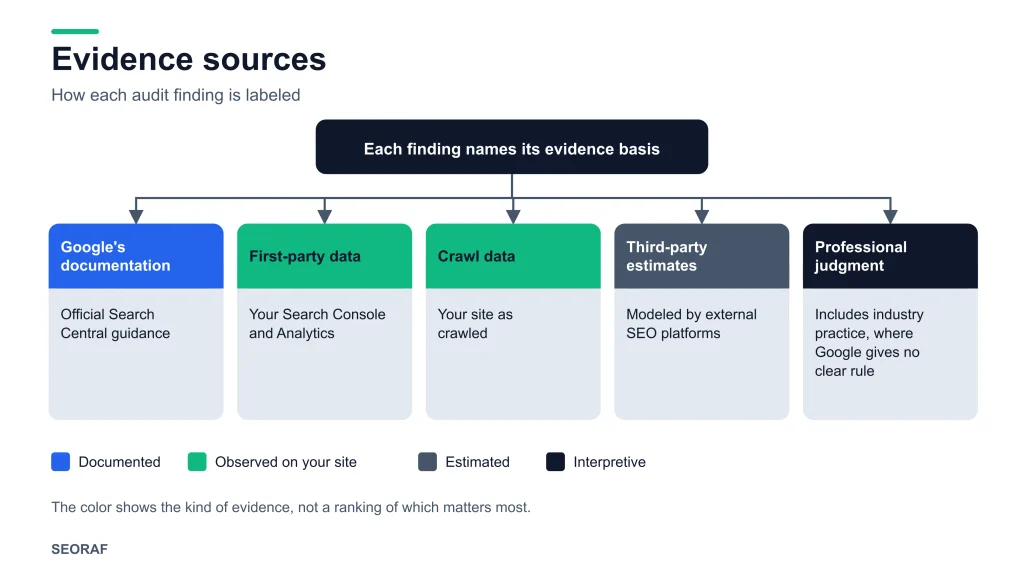
I label the basis for each finding so you can judge how much weight to give it:
- Google’s documentation: the recommendation follows Google Search Central guidance.
- First-party data: the finding comes from your own Search Console or Analytics data.
- Crawl data: the finding comes from crawling your site.
- Third-party estimates: the finding relies on external SEO platforms, which model search behavior.
- Industry practice or professional judgment: a widely used approach or my interpretation, where Google gives no clear rule.
It matters to keep Google’s requirements separate from best practice. Google’s Search Essentials set out its technical requirements and spam policies. Most audit recommendations go beyond that baseline, including my prioritization method, so the report distinguishes between them and does not present a preference as a rule.
Independent analysis. The analysis is mine, and it rests on evidence from your site and on Google’s documentation. Findings do not depend on which software or vendor you use. My primary sources are Google Search Console and Google Analytics. I may use third-party platforms such as Ahrefs, Semrush or Moz as supporting inputs for competitive context and keyword research. Google’s hiring guidance says these tools do not have access to Google’s internal ranking data, so I treat their scores and “health” numbers as indicators to investigate, not verdicts.
Google’s hiring guidance also suggests checking a third-party audit’s recommendations against official Google guidance before making significant changes. I encourage that for my own reports too.
How to choose an SEO audit provider
Google’s “Do you need an SEO?” documentation suggests questions to ask before hiring anyone. Use them with any provider, including me.
Questions to ask, and how I answer them
- Do you follow Google’s Search Essentials? Yes. I use Google’s documentation as my reference point, I do not use techniques that violate its spam policies, and I do not recommend them to clients.
- What results do you expect, and how do you measure success? An audit produces a diagnosis and a plan, not a ranking outcome. I do not predict specific rankings or traffic. I describe the work involved and the likely scale of benefit in qualitative terms, and the report notes how each fix can be checked afterwards, for example in Search Console.
- Will you explain what you recommend and why? Yes. Each finding states its evidence and reasoning, and the audit is read-only, so nothing is changed on your site.
- Can you show examples of your work, share references, or describe your experience in my industry or country? I do not publish client names or results on this page. I am happy to discuss my background and relevant experience while we scope your project, so you can judge fit before paying for anything.
Warning signs, according to Google’s guidance
- A guarantee of first place or any specific ranking.
- Claims of a special relationship with Google, or a “priority submit”.
- Unwillingness to explain clearly what the provider intends to do.
- A request for more access than an audit needs.
- Tools described as “approved” or “acceptable” to Google Search. Google says it does not evaluate or endorse third-party SEO tools.
What to compare between quotes
- Is the scope written down, including what is excluded?
- Is it a manual analysis, or a repackaged export from an automated tool?
- Does every finding come with evidence, a priority and a recommended action?
- Is implementation included, or a separate engagement?
SEO audit checklist or professional audit?
An SEO audit checklist tells you what to look at. A professional SEO audit interprets what you find, verifies it against evidence, and ranks it by priority. A checklist is a good starting point for a small site; an audit is more useful when the cause of a problem is unclear or the site is large or complex.
If you want to start on your own, these steps teach a lot:
- Set up Google Search Console and review the page indexing report to see which pages are indexed and why others are not.
- Check your most important pages for accidental noindex tags, blocked resources and redirect problems.
- Review whether each key page has a clear purpose, a unique title and content that answers the question it targets.
- Check how your main pages perform on mobile, and review your Core Web Vitals data in Search Console.
- Read Google’s SEO Starter Guide. Google describes it as covering much of what an SEO would do for you, and reading it helps you spot recommendations that are not advisable.
For structure, use my technical SEO checklist. If you are choosing software, my pages on free SEO tools, SEO tools and SEO software explain what different tools are and are not useful for.
About the author and how I work
I am Mousume Akter, Founder & Editor of SEORAF. SEORAF is an independent SEO knowledge resource, and I work as a solo SEO specialist. I am not an agency. The audit is done by me, from scoping to report.
I am deliberately not listing client names, results or statistics on this page. I would rather you judge the approach by how clearly it is explained, how openly its limits are stated, and by the educational material on this site. Because I work alone, I scope each project carefully, and I will tell you plainly if your project would be better served by a different kind of provider or a different first step.
SEO audit service: frequently asked questions
What is an SEO audit service?
An SEO audit service reviews a website’s technical setup, on-page elements, content and structure, and delivers a prioritized report of issues and recommended fixes. It is a diagnosis and a plan. Implementing the fixes is a separate step.
What does an SEO audit include?
It typically includes crawling and indexing, indexability, robots.txt and sitemaps, canonicals, redirects, site architecture, internal linking, on-page elements, content quality and search intent, structured data, Core Web Vitals, mobile usability and images. See the standard scope.
How much does an SEO audit cost?
It depends on site size and complexity, scope, platform, data availability and depth of deliverables. I do not publish a fixed price; I quote after scoping. See the factors that affect cost.
How long does an SEO audit take?
It depends on the size and complexity of the site and the agreed scope, so I confirm a timeframe during scoping rather than quoting a standard duration.
Is a technical SEO audit the same as a full SEO audit?
No. A technical SEO audit covers how search engines crawl, render and index a site. A full SEO audit adds on-page, content and keyword analysis. Compare the types.
Can I do an SEO audit myself?
For a small site, often yes. Google says small local businesses can probably do much of the work themselves, starting with its SEO Starter Guide. A professional audit is more useful when the cause of a problem is unclear or the site is large or complex.
Will an SEO audit improve my rankings?
An audit itself changes nothing. Implementing well-chosen fixes can help a site be crawled, indexed and understood more effectively, but no one can promise a specific ranking, traffic or revenue outcome.
Do you need access to my website?
I ask for read-only access to Google Search Console, and to Google Analytics if relevant. I do not need CMS, hosting or write access for an audit.
Do you offer AI search, GEO or AEO optimization?
Not as a separate service. Google’s guidance says optimizing for generative AI search is still SEO, so I cover it through the fundamentals the audit already examines: whether pages are crawlable, indexed and genuinely useful. Google also suggests checking any AI-optimization advice against its official guidance.
Will you implement the fixes?
Not as part of the audit. The report is written so you, your developer or another provider can act on it. If you want implementation help, we can discuss that as a separate scope.
Request an SEO audit
To start a conversation, send me a short description of your site. The list in what I need from you shows what helps most, but a few lines are enough to begin.
I will reply with an honest view of fit, the scope I would recommend, and a quote. There is no obligation to proceed. An audit does not guarantee rankings, traffic, indexing or AI search visibility, and implementing the recommendations is the client’s responsibility.
Sources and further reading
- Google Search Central: Do you need an SEO?
- Google Search Central: SEO Starter Guide
- Google Search Central: Search Essentials
- Google Search Central: Optimizing for generative AI features
- Google Search Central: Introduction to robots.txt
- Google Search Central: Core Web Vitals
- SEORAF: Technical SEO, Technical SEO basics, Crawling, Indexing, Indexability, Site architecture, SEO resources