
A page can be published, listed in an XML sitemap, and still have nothing on the site linking to it. Whether it is found reliably, and what its position says about it, depends on the structure around it as much as on the page itself.
Site architecture is how a website’s pages are organized and connected — the hierarchy, URLs, navigation, and internal links that shape how people and search engines find pages and how those pages relate to each other. This guide covers the structural decisions: what to build, why, and how to check what you have. Implementation of crawl controls, index coverage, and indexing directives lives in the crawling, indexing, and indexability resources within the Technical SEO hub, and this guide links to them where the two meet.
Nothing here promises a ranking or AI Overview outcome. Site structure is one input among many, and its effects are described below with the qualifications Google itself applies to them.
Start here
This guide moves from what site architecture is, to the models and mechanics behind it, to how to audit and maintain it:
- New to the topic? Start with What is site architecture in SEO?
- Choosing a structure for a new site? See Site architecture models and Planning your structure with page roles.
- Diagnosing a problem? Go to Auditing and troubleshooting site architecture.
- Deciding on a subdomain, subdirectory, or ecommerce structure? See Architecture by website type.
- Want the flagship evaluation method? See the SEORAF Six-Lens Review inside the auditing section.
Claims below are labeled as they’re introduced: documented (stated in Google’s published guidance), convention (widespread practice Google doesn’t require), or SEORAF recommendation (our judgment). All examples that aren’t drawn from a real, published SEORAF case are marked “Worked example (illustrative).”
What is site architecture in SEO?
Site architecture is the organization of a website’s pages and the relationships between them: hierarchy, URLs, navigation, and links. Three things about it matter for SEO:
- Discovery. Google uses links as a signal and as a way to find new pages to crawl. Sitemaps and other sources contribute too, so a page’s place in the link structure affects how reliably it’s found.
- Context. Parent pages, breadcrumbs, categories, and surrounding links say something about what a page belongs to.
- Maintainability. Structure needs rules that survive new content, new authors, and redesigns.
SEORAF recommendation: treat architecture as a way to remove avoidable obstacles and ambiguity, not as a ranking lever on its own. A well-organized site of weak pages is still a site of weak pages.
Site architecture is closely related to information architecture, a UX discipline concerned with labeling and grouping content around how people look for it. SEO architecture borrows from that discipline and adds crawler-facing concerns: crawlability, indexability, and how internal links distribute discovery and context across a site.
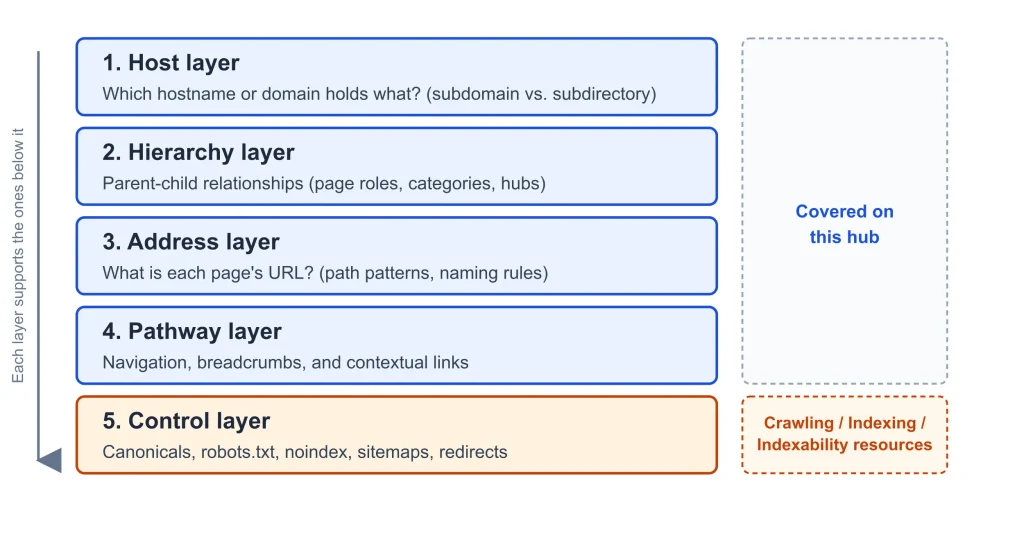
The control layer supports the layers above it but can’t repair them: a canonical tag can’t make overlapping categories coherent, and a sitemap can’t give an orphaned page a sensible parent. Detailed implementation of that control layer belongs to the crawling and indexability resources.
Google generally crawls links that are standard <a> elements with an href attribute; most other link formats aren’t reliably parsed. Google’s own guidance also notes that sitemaps help with discovery but don’t guarantee that a listed URL will be crawled or indexed. Visitors have more routes than crawlers do — search boxes, bookmarks, shared links — so a page reachable only through an internal search box has no route through the site’s own link structure, even though a person can find it easily.
Discovery paths and context paths (SEORAF model). Links do two jobs, and a page can pass one test and fail the other. Its discovery path is how a crawler or visitor first reaches it. Its context path is what the structure says it belongs to — its parent link, breadcrumb, category, and neighboring links.
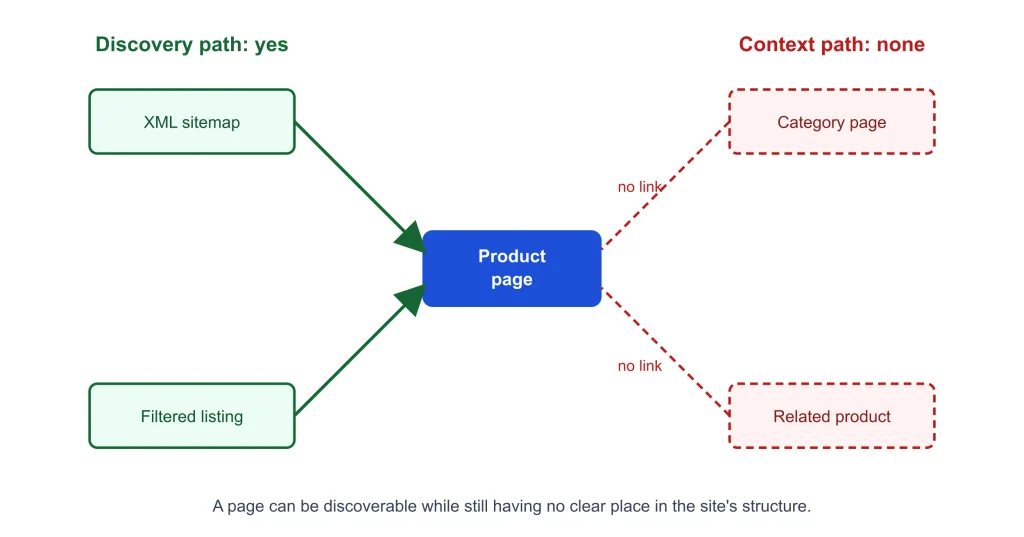
Worked example (illustrative): a product page appears in a sitemap and a filtered listing, so it is discoverable, but no category page or related product links to it, so it has no context. “It’s in the sitemap” only answers the first question.
Site architecture models and how to choose one
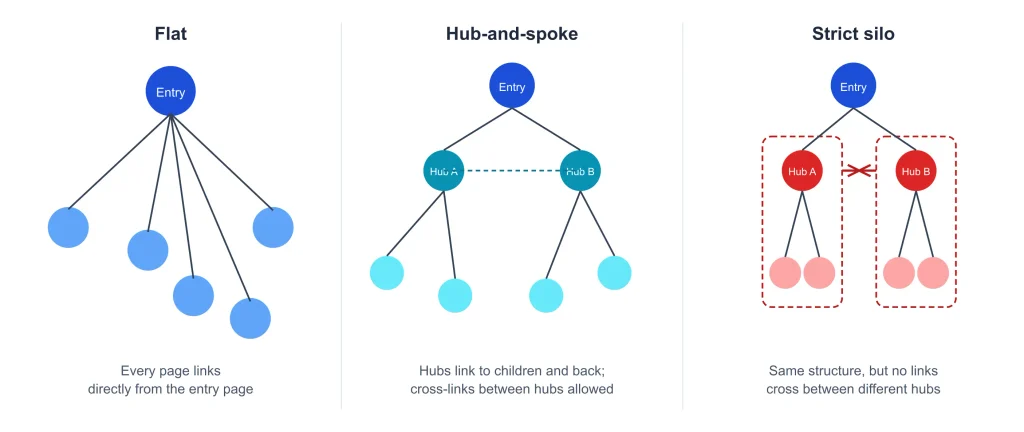
Google’s documentation doesn’t require a particular architecture. The models below are established ways of organizing sites, each with trade-offs.
| Model | Works well when | Main risk |
|---|---|---|
| Flat / shallow | The site is small and narrowly focused | Crowded hubs, weak topical grouping |
| Deep hierarchical | A large, well-defined catalog needs precise categories | Buried pages, heavy maintenance |
| Hub-and-spoke | Content clusters around topics that need a routing page | Thin or stale hub pages |
| Strict silo | Sections are genuinely separate topics | Blocks cross-links users would find useful |
| Loose thematic grouping | Topics overlap and need deliberate cross-links | Needs an explicit link policy to avoid drift |
| Attribute-driven (faceted) | People browse a catalog by attributes | URL explosion — see faceted navigation below |
Convention: “silo” is an SEO industry term. We found no Google documentation that uses this term or requires that structure, and claims that a given model produces a specific ranking benefit are practitioner opinion, not documented behavior.
Choosing a model (SEORAF recommendation). Ask four questions: How much do topics overlap (high overlap favors loose grouping over strict isolation)? Is this a catalog or a content library (catalogs need a category tree and a facet policy; libraries suit hubs and clusters)? How fast does it change (frequent change favors rules set at the template level)? Who maintains it (several teams publishing into one structure need documented rules more than a clever model)? We give no page-count thresholds, because none are documented — judge “small” and “large” against your own crawl and publishing capacity.
Click depth and orphan pages
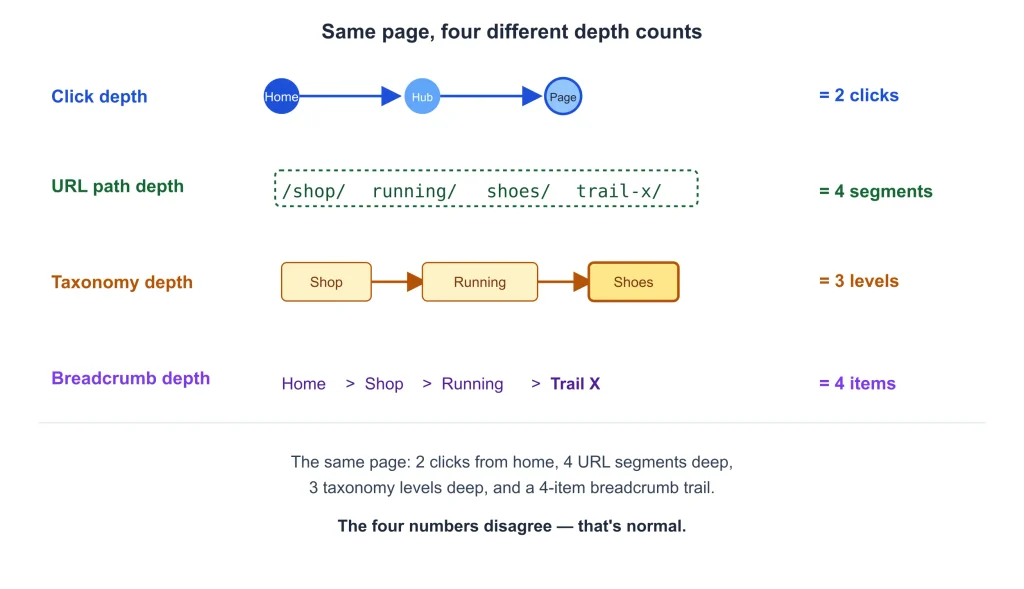
Click depth is the fewest link clicks from a start page, usually the homepage, to reach a given page. It’s often used loosely to mean the same thing as URL path depth (the number of folder segments in a URL), but the two are independent measurements and regularly disagree: a page at /a/b/c/d/ can be one click from the homepage, and a page at /page/ can be five clicks deep. Taxonomy depth (levels in the category hierarchy) and breadcrumb depth (levels shown in the breadcrumb trail) are two further, related measurements.
Google’s own guidance on crawling myths describes it as only “partly true” that pages closer to the home page are more important, and is explicit that this doesn’t mean they rank higher — only that they may be seen as more important and crawled more often. We found no Google documentation setting a maximum click depth; the “three-click rule” is a widespread convention, not a documented requirement.
SEORAF recommendation: keep the pages that matter most close to entry pages and hubs. Deeper pages are fine if they stay reachable through crawlable, rule-based links.
Crawl budget is a related but separate, narrower question. Google’s own crawl budget documentation says it’s aimed mainly at very large or fast-changing sites — sites with roughly a million or more unique pages that change weekly, sites with roughly ten thousand or more pages that change daily, or sites where a large share of URLs sit in “Discovered – currently not indexed” in Search Console. Google describes these as rough estimates, not fixed thresholds, and says that for most other sites, keeping the sitemap current and checking the Page Indexing report is sufficient. Detailed crawl budget management belongs to the crawling resource.
An orphan page has no internal links pointing to it. Google can still discover such a page through a sitemap or an external link, but the site’s own structure gives it no path or context. Common causes include a new content type never added to a hub or listing, pages dropped from navigation during a redesign, and campaign pages created outside the normal publishing flow.
To find orphan pages, compare independent sources of URLs — a crawl from the homepage, a CMS export, XML sitemaps, analytics landing pages, Search Console, and server logs where available. Normalize URLs first (protocol, trailing slashes, tracking parameters) before comparing, since skipping this step produces false orphans, and expect some false negatives too, since a crawl can miss pages blocked by its own settings or reachable only through unrendered JavaScript links.
Once identified, an orphan page is either still valuable (link it from its parent hub and related pages), obsolete (redirect or remove it — Google treats a genuine 404 or 410 response as a signal not to crawl a permanently removed URL again), intentionally excluded from search (record that decision and apply it through indexability controls), or a duplicate of another page (consolidate the two).
Worked example (illustrative): glossary entries reachable only through a site’s internal search box get a glossary index page that links to every entry, plus contextual links from related articles. Each entry now has both a discovery path and a context path. Diagnosing why a specific page isn’t indexed is covered in the indexing resource.
Planning your structure with page roles
Start with what each page is for, not with its URL. This assumes the topics to cover are already chosen, which is a content-planning question rather than a structural one.
Page roles (SEORAF model). Giving every template a defined role makes hierarchy and linking decisions easier to apply consistently.
| Role | Job | Typically links to |
|---|---|---|
| Entry | Orient and route visitors | Top-level hubs |
| Hub | Aggregate and route to related pages | Every child page; up to its own parent |
| Destination | Satisfy the primary user need | Its parent hub and related destinations |
| Support | Assist destination pages | The destinations it explains |
| Utility | Enable a function (cart, login, search) | Minimal, as functionally needed |
A category page can both route and rank; assign its primary role and note the secondary one. A page that can’t be assigned a role, or that duplicates another page’s role, is a candidate for merging.
Should this be a page? (SEORAF decision sequence.) Work through in order: Does it satisfy a need no existing page satisfies? Does it have a role and a logical parent? Will links to it be enforced by a rule — a template or hub listing — rather than memory? Is it stable enough to warrant a permanent URL? What is its intended indexation status (record the intent here; the mechanics belong to the indexability resource)?
Keep a short architecture decision record: roles, hierarchy levels, URL rules, navigation rules, link rules, taxonomy policy, indexation intent, an owner, and a review date.
Categories, tags, and taxonomy
Categories are the primary hierarchical grouping; a SEORAF recommendation is one primary category per item. Tags are cross-cutting labels, useful when reusable and harmful when each one creates a near-empty archive page. Collections are curated groups assembled for a specific purpose.
A simple overlap test: for any two taxonomy terms, list their pages. If most pages appear under both, and a visitor couldn’t say which term to choose, merge or differentiate the terms.
Worked example (illustrative): a site’s “Weeknight dinners,” “Quick dinners,” and “30-minute meals” categories mostly contain the same posts. Merging them into one category, and keeping “under 30 minutes” as a tag, leaves fewer overlapping archives and one designated path per post.
Some items legitimately belong in several places; keep the multiple contexts, but designate one primary path (see signal alignment, below). Whether archive pages should be indexable is a policy decision made here and implemented through indexability controls.
URL structure decisions
Google’s documentation recommends simple, descriptive URLs organized logically, and warns that excessive parameters and session identifiers can create problems. Google states it can crawl URLs with parameters, so “clean URLs only” isn’t a documented requirement, and we found no Google documentation requiring that URLs mirror your full hierarchy.
SEORAF preference: use paths for distinct destinations and reserve parameters for states of a page, such as sorting, since it keeps the URL inventory easier to control. Reflect the top hierarchy levels that are unlikely to change, and avoid encoding volatile attributes such as dates or temporary categories.
Of all structural choices, URLs are the hardest to reverse: every change means redirects, updated internal links, revised breadcrumbs, and updated sitemaps. Don’t change a URL solely to shorten its path — click depth and URL depth are different measurements, as described above. Slug wording itself is an on-page matter, outside this guide’s scope.
Navigation and breadcrumbs
Global navigation and mega menus
Use the main menu to route to major hubs, chosen by page role rather than internal preference. SEORAF recommendation: treat menu length as a usability and governance cost. We don’t know how Google weighs repeated template links against each other, so don’t justify a short menu with an unsupported signal claim.
Footers and HTML sitemap pages
These are supplementary. They help visitors find utility pages and act as a fallback directory, but shouldn’t become dumping grounds for links.
Mobile parity
Google’s mobile-first indexing guidance states that Google predominantly uses the mobile version of a page’s content for indexing, and asks that the mobile version carry equivalent primary content, while accepting designs that collapse content into accordions or tabs. SEORAF recommendation: confirm that collapsed mobile menus still expose the same important destinations as the desktop version.
JavaScript-dependent navigation
Google processes JavaScript-rendered pages through separate crawling, rendering, and indexing steps, and extracts links from the rendered page as well as the initial HTML response. Menus built from click handlers on elements that aren’t real links may not expose their destinations during the initial crawl.
Comparing raw and rendered links
SEORAF recommendation: for one page per template, compare the links present in the raw HTML, the rendered DOM, and a rendering tool’s output. A destination that appears only after rendering can still be found, but it depends on that extra step, and not every crawler renders JavaScript. Detailed rendering guidance belongs to a dedicated JavaScript SEO resource, outside this guide’s scope.
Breadcrumbs and signal alignment
Google’s current search result display does not consistently show a breadcrumb trail on mobile results, though breadcrumb structured data remains part of Google’s documentation and breadcrumbs continue to serve navigation and hierarchy purposes for users regardless of how they’re displayed in search. Don’t promise a specific visible search result from breadcrumb markup alone.
What signal alignment means
Signal alignment (SEORAF model): for any page, several cues state its position — URL, breadcrumb, navigation placement, parent link, category, and canonical URL. They are “aligned” when they all tell the same story.
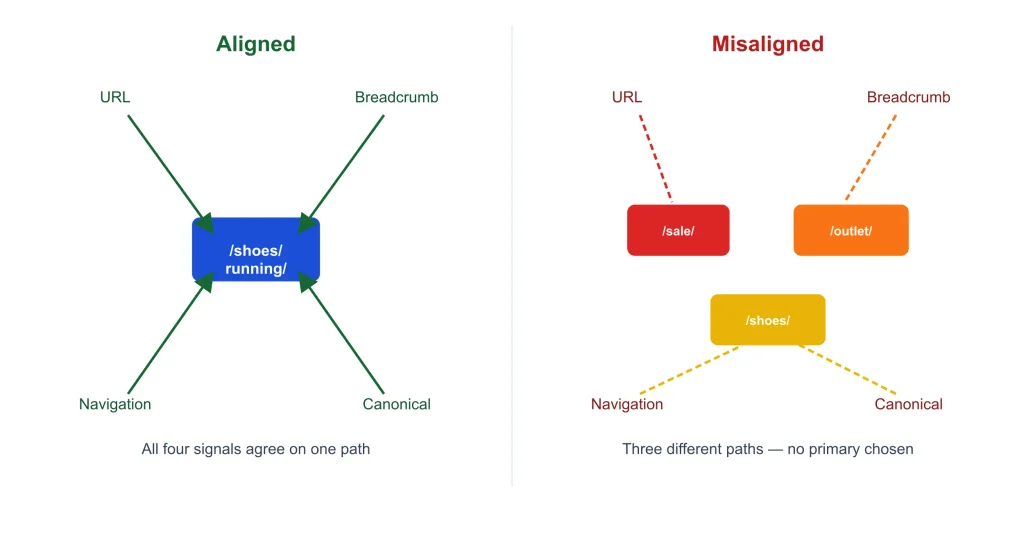
Misalignment isn’t automatically wrong, since some items legitimately belong in several contexts. It should be a conscious decision, with one path designated as primary.
Internal link architecture
Google’s link guidance asks for anchor text that is descriptive, reasonably concise, and relevant, and uses an image’s alt text as the anchor text for image links.
Link rules by page role (SEORAF recommendation): define linking by role so it happens through templates rather than memory. A hub links to all its children and up to its own parent. A destination links to the support pages that explain its terms, and those support pages link back. Entry pages link to the top-level hubs.
Navigation links are templated and express the site’s overall shape; contextual links express specific relationships between two pages. Relying only on navigation leaves most relationships unexpressed; relying only on editorial links depends on authors remembering to add them.
We found no published detail on how internal links are weighted against each other, so precise claims about how link value flows through a site are inference rather than documented fact. Google’s faceted navigation guidance lists nofollow on internal filter links, alongside canonical tags, as an available but generally less effective way to reduce crawling of filtered URLs, and notes that every link to a URL must carry the attribute for it to have any effect. Using nofollow to deliberately concentrate link value elsewhere on a site is not documented as effective and isn’t recommended.
Faceted navigation and pagination
Facet URLs, usually parameter-based, can produce very large URL sets that lead to overcrawling and slower discovery of new content. Google’s documented guidance offers two routes, in order of preference: prevent crawling of filtered URLs that don’t need to appear in search (for example, with robots.txt rules), or, where filtered URLs do need to be indexed, use an ampersand as the parameter separator, keep filter order consistent, and return a genuine 404 response for filter combinations with no results. Canonical tags and nofollow are described by Google as available fallbacks that are generally less effective over time. Implementation of these controls belongs to the crawling and indexability resources.
SEORAF facet-value test: the structural question comes first — which filter pages should exist at all? Ask, for each attribute or combination: Is there independent evidence of demand? Does it return a meaningfully different set than its parent category? Is the inventory stable enough to sustain a page? Can it be linked from a logical parent? Can it carry unique, useful content? Mostly “yes” suggests a dedicated landing page; a mixed result suggests a filter view whose crawling you control; mostly “no” suggests a filter state that shouldn’t become an indexable URL.
Worked example (illustrative): “waterproof running shoes” returns a distinct set, has a natural parent category, and could support unique content — a candidate, pending real evidence of demand and stable inventory. “Running shoes, green, size 9, $50–$80, in stock” fails on demand evidence, stability, and having a natural parent, so it shouldn’t become an indexable URL.
Google’s current pagination guidance recommends a unique URL for each page in a paginated series, sequential crawlable links between pages, and links that don’t depend on JavaScript actions, since Google does not trigger such actions to load additional content. SEORAF recommendation: items reachable only through deep pagination sit far from entry pages; surface important items through hubs, subcategories, or archives instead of relying on pagination alone. Detailed pagination implementation is outside this guide’s scope.
What technical controls can and can’t fix
Sitemaps, canonical tags, robots.txt, noindex directives, and redirects record decisions that the structure has already made. They don’t create structure.
| Control | Documented behavior | What it cannot fix |
|---|---|---|
| XML sitemap | Aids discovery; not every listed URL is necessarily crawled | A page with no logical place in the site |
| Canonical tag | A strong signal, not a directive; Google may choose a different URL | Unclear hierarchy or overlapping taxonomies |
| robots.txt | Controls crawling access | Structural incoherence |
| noindex | Keeps a crawled page out of the index | Reachability problems — the page must still be crawled to see the rule |
| Redirect | A strong canonical signal moving users and crawlers from an old URL to a new one | A hierarchy that doesn’t make sense |
Google’s documentation notes that canonicalization signals can reinforce one another — a redirect, a consistent internal-link pattern, and a matching sitemap entry pointing to the same URL raise the likelihood that URL is treated as canonical.
Worked example (illustrative): adding canonical tags across ten near-duplicate category pages can tidy duplicate signals, but visitors still encounter ten confusing categories. The structural fix is to merge or differentiate them; a control alone can’t do it. Full implementation guidance for sitemaps, canonicalization, and robots.txt lives in the crawling and indexability resources.
Architecture by website type
The principles above stay the same across site types; the constraints change.
Content sites and blogs tend to suit hub-and-spoke structures with taxonomy discipline: topic hubs, one primary category per post, and a deliberate tag policy. Recurring failures are orphaned content types and tag sprawl.
Ecommerce sites face harder decisions around multi-category products and filters. Google’s ecommerce URL guidance recommends minimizing alternative URLs that return the same content and giving each page in a paginated result set its own URL. SEORAF recommendation: designate one primary path per product, let other categories link to it, and apply the facet-value test above before letting filters generate new pages.
SaaS and documentation sites often have marketing pages, a blog, documentation, and a product with different owners and tech stacks. Decide early what shares a host, and set a version policy for documentation so different versions don’t create duplicate content.
Multi-location and multilingual sites raise structural questions this guide doesn’t cover in depth, since regional targeting and language signals work through different, dedicated mechanisms beyond page-level structure.
Subdomain or subdirectory?
In Google’s crawling documentation, a “site” for crawl budget purposes is defined as a unique hostname, so a subdomain carries its own, separate crawl budget from the root domain.
Reports of informal Google statements on whether one structure ranks better than the other are secondhand and not consistently documented, and some third-party analyses report differing results in practice. Treat any absolute claim in either direction as unsupported. The comparison below reflects operational trade-offs, not a documented Google ranking preference.
| Factor | Points toward subdirectory | Points toward subdomain |
|---|---|---|
| Shared audience and intent with the main site | Yes | |
| Separate technology stack or hosting constraint | Yes | |
| Need for isolated governance or measurement | Yes | |
| Clearly distinct products or brands | Yes | |
| A single, simpler set of structural rules | Yes |
Moving between the two later is costly either way, so decide on operational grounds rather than an assumed ranking effect.
Auditing and troubleshooting site architecture
The SEORAF Six-Lens Review
SEORAF model — an original explanatory framework, not a Google process. This is the flagship method in this guide for evaluating a site’s structure: six lenses, each rated Sound, Watch, Problem, or Not assessed, with a brief note on why. Numeric scores are deliberately avoided, since they imply more precision than the underlying evidence supports.
| Lens | Question and evidence | Red flags |
|---|---|---|
| Role clarity | Does every page have a defined role? (Page-type inventory) | Pages with no role, or duplicate roles |
| Reachability | Are important pages reachable via crawlable links from logical parents? (Source comparison; raw vs. rendered links) | Important pages found only in sitemaps or internal search |
| Hierarchy and taxonomy | Are parent-child relationships logical and non-overlapping? (Taxonomy export) | Multiple primary categories; thin or duplicate terms |
| Signal alignment | Do URL, breadcrumb, navigation, and canonical agree? (Sample per template) | Conflicting signals with no designated primary path |
| Link distribution | Do links reflect each page’s role and importance? (Inlink counts by page type) | Important pages with few links; hubs not linking to their children |
| Sustainability | Will the structure stay coherent as content grows? (Publishing workflow, documented rules) | No owner; manual-only linking |
“Importance” here is a business judgment; a crawl tool can count links but can’t determine which pages matter most to your goals. On large sites, audit by template and page role rather than by individual URL — sample pages per template and generalize only within that template. Record each finding with its source, your confidence level (observed, inferred, or unknown), a cause hypothesis, a proposed fix, and how you’ll verify it.
Symptom-based troubleshooting
Each symptom below has non-architectural causes too; these are the architecture-side checks only.
| Symptom | Architecture checks | Hand off to |
|---|---|---|
| An important page isn’t appearing in search | Is it in a crawl? What’s its shortest click path? Is it linked from its parent hub? Present in both raw and rendered HTML? | Indexing |
| Two pages compete for the same queries | Do their intents truly overlap? Do taxonomies overlap? Which page is meant to own the topic? | Indexability |
| Crawling seems spent on low-value URLs | Which structures generate them — filters, tags, archives? Do those pages have defined roles? | Crawling |
| One section underperforms comparable sections | Compare depth, inlinks, navigation presence, and hub quality. Demand, competition, and age also differ, so treat findings as hypotheses. | Content and analytics resources |
Common failure patterns worth recognizing: content orphaned by template (a new content type never gets a listing page or link rule), taxonomy sprawl (tags used as keywords, producing thin archives), duplicate hierarchies (one item reachable under several paths with no primary), dead-end hubs (pages that list children but don’t link down or add anything of their own), non-crawlable navigation (menus built without real links), and signal mismatch (URL, breadcrumb, and canonical describing different places).
Limits, edge cases, and evidence boundaries
| Question | Documented | Not established |
|---|---|---|
| Does click depth affect rankings? | Closeness to the home page may affect crawl frequency and perceived importance, not necessarily ranking | Any specific effect size or depth threshold |
| How are internal links weighted? | Links are a signal and aid discovery; anchor text provides context | Precise weighting between link types or positions |
| Do hub-and-spoke or silo structures improve rankings? | Nothing found | Any documented ranking effect |
| Does subdomain vs. subdirectory change rankings? | Hostname-level crawl budget is documented; ranking guidance is informal and undocumented | Formal guidance on ranking effects |
| Do breadcrumbs affect rankings? | Breadcrumb markup is documented and supported | Any ranking effect |
A few edge cases worth planning for: small sites usually need little of this machinery beyond a few hubs and clear navigation. Very large sites benefit from rules written at the template level, audited by sample. JavaScript-heavy applications should have links and rendered output verified per template. Expiring or seasonal content needs its lifecycle decided up front — keep, redirect, or allow it to 404. User-generated content needs per-template rules to prevent uncontrolled URL creation. Sites serving multiple distinct audiences generally do better with role-based hubs than one hierarchy forced onto everyone.
Governance, restructuring, and best practices
Architecture tends to drift as content grows. The remedy is unglamorous: assign an owner, put linking rules into templates, keep the decision record current, and review the structure on a schedule.
The SEORAF Intervention Ladder offers a way to choose the smallest sufficient change when restructuring is needed:
| Rung | Scope | Examples | Reversibility |
|---|---|---|---|
| 1. Fix in place | Individual pages or links | Add a missing link, correct a breadcrumb | Easy |
| 2. Reorganize a section | A section or taxonomy | Merge terms, re-parent pages | Moderate |
| 3. Restructure the site | Hierarchy model or host layer | Move sections, change hosts | Hard |
Move up a rung only when the problem is systemic, lower rungs can’t fix it, and a measurement baseline exists to judge the outcome. Capture that baseline before making any change, and avoid promising a specific recovery timeline.
| Claim you’ll encounter | Status | How to treat it |
|---|---|---|
| “Everything must be within three clicks” | Convention | A heuristic; Google links proximity to the home page to crawl frequency, not directly to ranking |
| “A sitemap guarantees indexing” | Contradicted by Google’s own guidance | Not every listed URL is necessarily crawled or indexed |
| “Silos are required for topical authority” | Industry term, not documented by Google | One model among several, not a requirement |
| “URLs must mirror the full hierarchy” | Not documented as required | A design choice, not a rule |
| “Subdomains always rank worse” | Informal, undocumented statements; third-party analyses disagree | Unsupported in either direction |
Site architecture checklist
Before launch: every template has a defined role; hierarchy and parents are documented; URL rules are written down; navigation is specified by page role; link rules exist for hubs, children, and related pages; taxonomy and indexation intent are set; a facet policy is defined if filters exist; a measurement baseline is planned.
When publishing a page: it has a role and a parent; it’s linked from its hub and relevant siblings; it links to related pages; its URL, breadcrumb, and primary path agree; it has one primary category; its intended indexation status is recorded.
Quarterly: compare a CMS export to a crawl to find orphans; review taxonomy terms for overlap; sample pages per template for signal alignment; confirm hubs still list all their children; check navigation links in both raw and rendered HTML; update the decision record.
Related guides in this cluster
The topics below are planned as dedicated resources that will develop each area in full detail. These resources will become links as each article is published and its URL is verified.
- Planning: a step-by-step framework for planning a new site’s architecture
- Structure: flat vs. deep architecture; silo structure; URL structure; category and taxonomy design
- Navigate and link: website navigation; breadcrumb navigation; internal link architecture
- Diagnose: the full Six-Lens Review audit method; finding and fixing orphan pages
- Specialize: ecommerce site architecture; faceted navigation; subdomain vs. subdirectory decisions
- Change and learn: restructuring a website; site architecture examples by site type
Related Technical SEO hubs
Site architecture decides what should exist and how it connects. These related resources cover how that structure is handled technically:
- Technical SEO — the overview of the wider discipline this guide belongs to
- Crawling — how crawlers access a site and how that access is managed, including crawl budget and robots.txt
- Indexing — how pages reach the index and why they sometimes don’t
- Indexability — the directives and signals, including canonical tags and noindex, that control whether a page can be indexed