
SEORAF › Technical SEO › Indexing › Noindex
Noindex: What It Is, How Google Handles It, and When to Use It
Last reviewed against Google Search Central documentation: September 2026
Noindex is a rule that tells a search engine not to show a page, file, or other resource in its search results. For Google Search, you set it with a robots meta tag in the HTML or an X-Robots-Tag HTTP response header. Google applies the rule only after it crawls the URL and reads the tag or header, so most noindex failures come down to one question: can Google actually see the rule?
This guide covers what noindex does, when it is the right control, how to implement it without breaking anything, and how to diagnose it when it misbehaves. I separate two kinds of statements throughout. Green boxes mark behavior Google documents. Amber boxes mark SEORAF recommendations, which are my own working models and judgment calls, not Google rules.
What is noindex?
Noindex is an indexing rule. It asks a search engine that supports it, such as Google, to leave a URL out of its search results. Google describes it as a rule set through a meta tag or an HTTP response header, and says that when Googlebot crawls the page and extracts the rule, Google drops the page from Search results, even if other sites link to it.
Three ideas keep the rest of this guide simple:
- Noindex controls eligibility, not ranking. A noindexed page is not demoted. It is ineligible to appear.
- Noindex is read at crawl time. Google has to fetch the URL to see the rule, so noindex never prevents crawling.
- Noindex is not access control. The page stays reachable to anyone with the URL.
What noindex does not do
- It does not stop crawling. Googlebot must request the URL to find the rule. If crawl load is the problem, noindex is the wrong tool.
- It does not hide or secure content. Visitors, other crawlers, and anyone with the link can still open the page.
- It does not apply instantly. Google notes that it can take months to revisit a page, depending on how important the page is on the internet, so the URL can remain visible until the next crawl.
- It is not guaranteed to work the same everywhere. Google notes that other search engines may interpret the rule differently, so a page can still appear elsewhere.
How noindex works: crawling, processing, indexing and serving
Google describes Search in three broad stages: crawling, indexing, and serving results (How Google Search works). I use a four-step version, shown below, purely as a troubleshooting model. It helps you ask, “At which step does this URL stop?” It is not a claim that Google runs a strict, one-way pipeline. Google’s own JavaScript documentation shows pages moving through crawl, render and index queues with links fed back into crawling, so the stages overlap and repeat. If you are new to the vocabulary, the SEORAF SEO for beginners guide covers the crawl, index and rank basics.
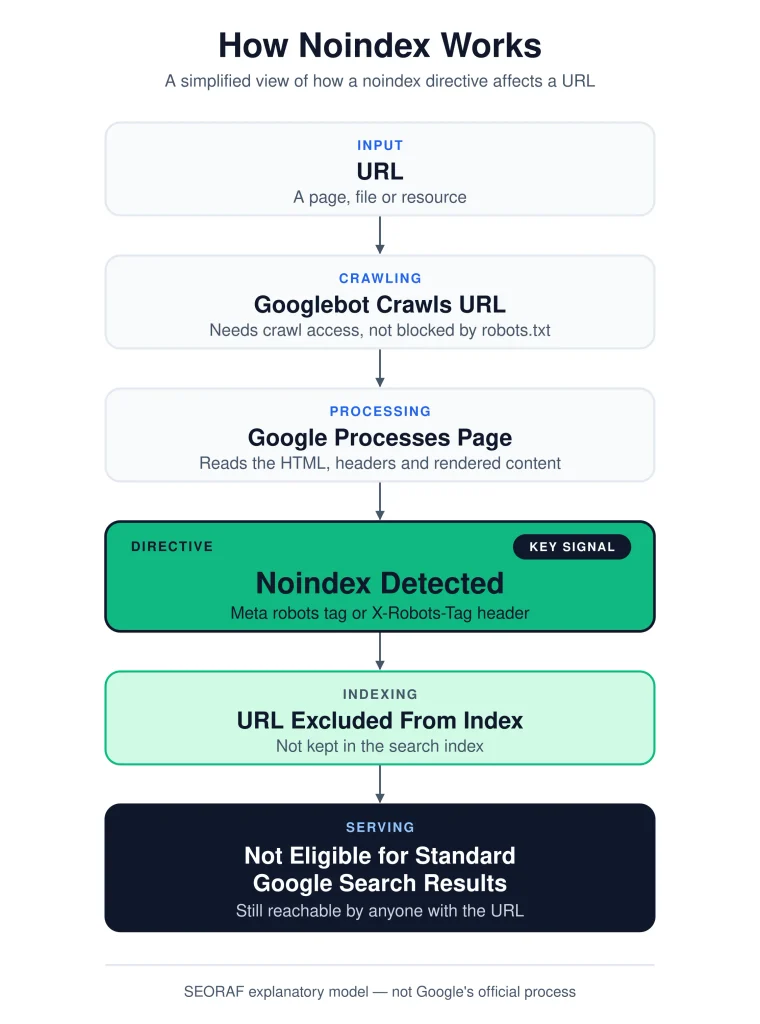
A simplified model for locating where a URL is failing. Noindex is read at fetch time and acts at the index stage.
The practical consequence is a rule I apply to every noindex audit: a noindex you cannot prove Google can read is only a hope. Reading it requires three things at once: crawl access, a successful response, and the rule present in the source or the header.
Where noindex fits in the Indexing cluster
Noindex is one control inside a larger indexing system. These related concepts are easy to confuse, so I define each by its relationship to noindex.
| Concept | What it governs | Relationship to noindex |
|---|---|---|
| Crawlability | Whether Googlebot can request and fetch a URL | A prerequisite. Noindex cannot be read on a URL Googlebot cannot fetch. |
| Indexability | Whether a fetched page is eligible to be stored and shown | Noindex is one deliberate way to make a page non-indexable. Status codes, canonicals and quality also affect it. |
| Robots.txt | Which URLs crawlers may request | Manages crawling. It can prevent Google from ever seeing your noindex. |
| Canonicalization | Which URL represents a set of duplicates | Consolidates duplicates. It is a different job from removing a page from Search. |
| Redirects | Where a moved URL should send users and crawlers | The right tool for moved or merged pages. Google ignores content on the redirecting URL. |
| XML sitemaps | URLs you suggest for crawling and as canonicals | Should list the URLs you want indexed, so noindexed URLs generally do not belong there. |
Noindex syntax and valid values
The two implementation methods have the same effect, and you choose the one that fits the content type. The HTML tag goes in the <head>:
<meta name="robots" content="noindex">To address only Google’s web crawlers, use the googlebot token:
<meta name="googlebot" content="noindex">The HTTP header version works for HTML and non-HTML files alike:
HTTP/1.1 200 OK
Content-Type: application/pdf
X-Robots-Tag: noindex
Google confirms that any rule you can use in a robots meta tag can also be sent as an X-Robots-Tag, and that names and values are case-insensitive. The table lists the values that matter most for noindex work.
| Rule | Effect in Google Search | Notes |
|---|---|---|
noindex | Do not show the page, media or resource in results | Unsupported inside robots.txt. |
none | Equivalent to noindex, nofollow | Also valid as an X-Robots-Tag value. |
nofollow | Asks Google not to use the page’s links for discovery | Treated as a hint. Not needed for noindex to work. |
unavailable_after: [date] | Stops showing the page after a date and time | Ignored if the date is invalid. Google notes it decreases the crawl rate considerably after that time. |
indexifembedded | Allows indexing of content embedded through iframes despite noindex | Only has an effect alongside noindex. |
nosnippet, max-snippet | Limit text previews, including use in AI Overviews and AI Mode | Not noindex. The page stays indexed. |
noarchive | No longer used by Google Search | The cached link feature no longer exists. |
You will also see index and follow in legacy snippets. Google’s rule table does not list them because they describe the default behavior, so you can omit them.
When to use noindex
Use noindex when a URL has a legitimate job for visitors but no useful job in Google Search, and Google can still crawl it. That single test resolves most cases. The list below is my working set of situations where noindex is usually the right control.
1. Internal site search results
Result pages for a visitor’s own query are effectively unlimited, low in standalone value, and rarely the best answer to a public search. They should remain crawlable so Google can read the noindex.
2. Thank-you, confirmation and post-action pages
A page that confirms a form submission or purchase serves people who just acted. Noindex keeps it from becoming a search landing page. If the page also exposes personal data, it needs authentication, not only noindex.
3. Thin utility and low-value archive pages
Some tag archives, date archives, or attachment pages repeat content that already has a stronger home. Noindex is reasonable when the page has no distinct purpose in Search. If the content is a true duplicate of a page you want ranked, canonicalization is usually the better fit.
4. Campaign and paid landing pages with no organic role
Ad-only variants can be near-copies of pages you want to rank. If the variant should never compete in organic results, noindex keeps them apart. If it duplicates a specific organic page, consider a canonical instead.
5. Non-HTML files you do not want in Search
Internal PDFs, feed exports, or media files can be excluded with X-Robots-Tag: noindex. If a file is private, place it behind authentication as well.
6. Time-limited content
For content with a known end date, unavailable_after lets you schedule removal from results without editing the page later. Plan what the URL will become afterward: a redirect, a 404, or an archive.
7. Staging and test environments (as a backup only)
The primary control for staging is authentication. A site-wide noindex is a useful second layer. Its biggest risk is that it can ship to production. Treat its removal as a launch-checklist item.
8. Filtered or sorted URL variants you still want discoverable
When faceted or sorted URLs create near-duplicates but you want crawlers to reach the products through them, noindex can keep the variants out of results. Google’s pagination guidance names noindex as one option for avoiding indexed filter and sort variations. It does not reduce crawling, though. For load problems, read Google’s guidance on faceted navigation and crawl budget.
| Page type | Typical control | Why | Watch out for |
|---|---|---|---|
| Internal search results | noindex | Endless, low standalone value | Do not also block in robots.txt |
| Thank-you pages | noindex | Only relevant after an action | Personal data needs authentication |
| Tag or date archives | noindex or canonical | Often repeats content | Decide by uniqueness, not by type |
| Ad-only landing pages | noindex or canonical | Avoids organic overlap | Keep ad platforms able to crawl them |
| Private PDFs | Authentication, plus X-Robots-Tag | Noindex alone is not security | Static files need server-level headers |
| Expiring offers | unavailable_after | Scheduled removal | Define the post-expiry status |
| Staging sites | Authentication, plus noindex | Prevents accidental exposure | Never copy staging rules to production |
When not to use noindex
Do not use noindex when the real problem is privacy, duplication, removal, crawling, or quality. Each of those has a better-fitting control, and picking noindex out of habit is a common source of indexing incidents.
For private or sensitive content
Noindex only asks a search engine not to list the page. Google’s robots.txt documentation points the same way: to keep a page out of Google, block indexing with noindex or password-protect the page. For anything confidential, use authentication.
On URLs blocked by robots.txt
This is the classic mistake. If robots.txt disallows the URL, Google never fetches it, so it never sees the noindex. The diagram below shows the two paths.
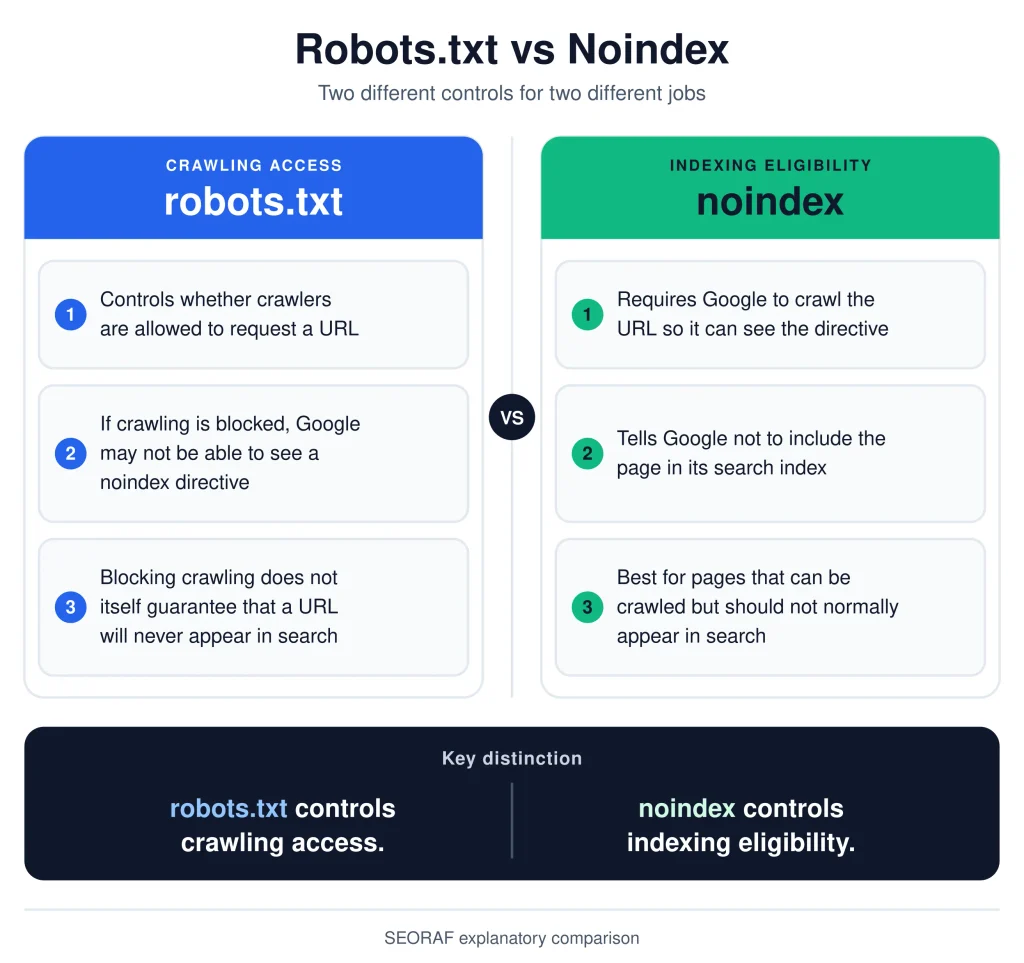
A robots.txt block hides the noindex rule from Google. Crawl access is what makes noindex work.
To consolidate duplicates
Noindex answers “remove this URL.” Canonicalization answers “treat these URLs as one.” Google’s canonicalization guidance says it does not recommend using noindex to select a canonical page within a single site, because noindex blocks the page from Search completely. It calls rel="canonical" annotations the preferred solution.
For deleted or moved pages
A page that no longer exists should return a 404 or 410, and a page that moved should redirect. Adding noindex to a URL that returns an error status does nothing useful, and noindex on a redirecting URL is moot because Google ignores content received from the redirecting URL.
To save crawl budget
Because Googlebot must fetch a page to see noindex, noindexed URLs are still crawled. If unimportant URL patterns are consuming crawl capacity, robots.txt is the crawl-management tool. Robots.txt then trades away the ability to read on-page rules, which is why the two should not be stacked on the same URL.
On pages you want to rank
Template-level noindex is the highest-impact failure mode. One setting, one theme option or one deployment can noindex an entire section. I recommend a scheduled check for noindex on every URL in your sitemap.
As a default for paginated pages
Google’s pagination guidance tells site owners to give each page in a sequence a unique URL and its own canonical, rather than canonicalizing every page to the first one. It also says Google no longer uses rel="next" and rel="prev". It does not ask you to noindex later pages, so my default is to keep paginated pages indexable and crawlable unless they are genuinely thin or duplicative. The same guidance does recommend noindex or robots.txt URL-pattern rules for filter and sort variations of the same list.
Decision framework: noindex vs robots.txt vs canonical vs 301/308 vs 404/410 vs authentication
These six controls are often used interchangeably, and that is where incidents start. Each answers a different question. Choose the control that matches the outcome you want, not the one you already know how to implement.
| Control | It tells Google | Crawling | URL can still appear in Search? | Best for | Poor fit for |
|---|---|---|---|---|---|
| noindex | Do not show this URL | Must be allowed | No, once processed | Reachable pages that should stay out of Search | Private data, duplicates, blocked URLs |
| robots.txt Disallow | Do not crawl these URLs | Blocked | Yes, usually without a description, if linked elsewhere | Managing crawl load and low-value URL patterns | Keeping pages out of Search |
| rel=“canonical” | Prefer this URL among duplicates | Allowed | The preferred URL is shown; the signal is strong but not binding | Duplicate or near-duplicate URLs | Removing a page from Search |
| 301 / 308 | This URL moved permanently | Followed | The target is processed instead | Moved, merged or retired pages with a replacement | URLs that must stay reachable |
| 404 / 410 | Nothing exists here | Fetched, then frequency decreases | No; indexed 4xx URLs are removed over time | Deleted pages with no replacement | Pages people still need |
| Authentication | Access requires credentials | Crawler cannot see content | Content is not indexable | Private, paid or staging content | Public pages |
Decision rules I apply
- The URL should no longer exist. Redirect it to the closest equivalent with a 301 or 308. If none exists, return a 404 or 410.
- The content must be private. Use authentication. Add noindex only as a secondary layer.
- The URL duplicates a page you want to rank. Use
rel="canonical", or a redirect if you are retiring the duplicate. - The URL must exist for users and stay out of Search. Use noindex and keep the URL crawlable.
- The problem is crawl load on unimportant URL patterns. Use robots.txt, and accept that a linked URL may still appear without a description.
- You are unsure whether the page belongs in Search. Leave it indexable and decide with evidence, such as whether it satisfies a real query.
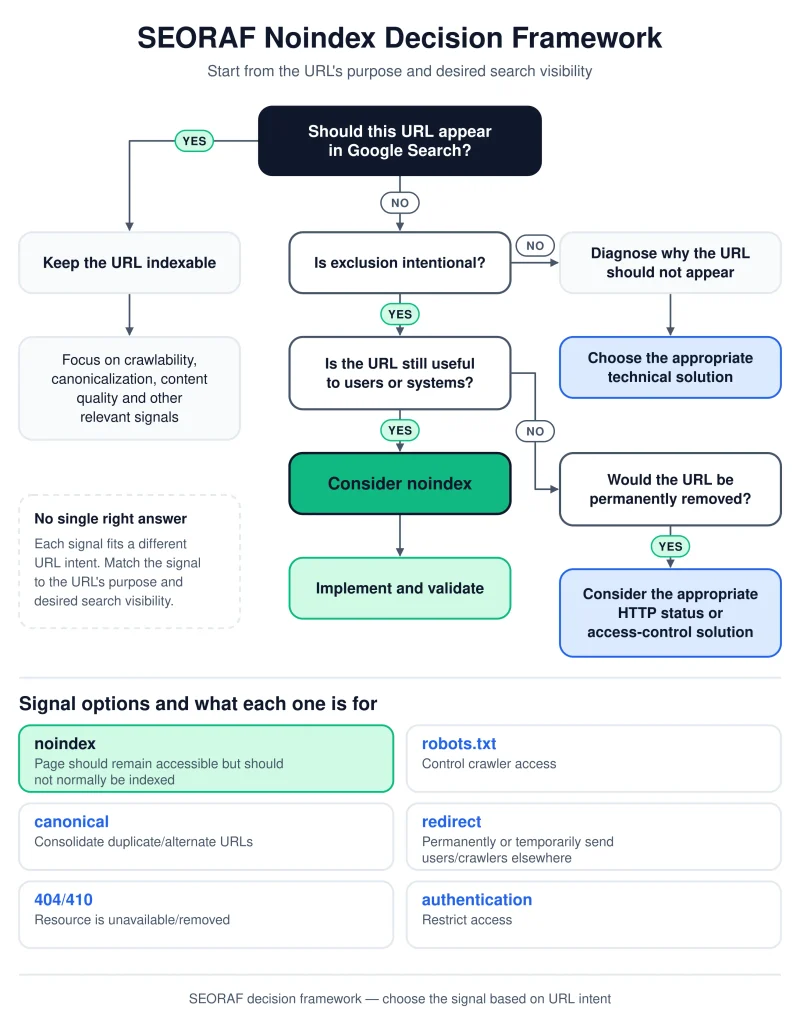
SEORAF’s decision tree. It is a recommendation model, so adapt it to your site and confirm edge cases against Google’s documentation.
How to implement noindex
Method 1: The robots meta tag in HTML
Use this for HTML pages when you can edit the template or a per-page setting.
<head>
  <meta charset="utf-8">
  <title>Order confirmation</title>
  <meta name="robots" content="noindex">
</head>
To also ask Google not to use the page’s links for discovery, combine rules with commas: content="noindex, nofollow". For a page with an end date:
<meta name="robots" content="unavailable_after: 2027-01-31">Google says it does not enforce placement of the robots meta tag in the <head> and will respect it in the body. I still recommend the head, because it is the conventional location and easier to audit.
Method 2: The X-Robots-Tag HTTP header
Use this for PDFs, images, video files, and any URL pattern you want to control in bulk. Google documents both configurations below for applying the header across file types.
Apache (.htaccess or server config, requires the headers module):
<Files ~ "\.pdf$">
  Header set X-Robots-Tag "noindex"
</Files>
NGINX (server or site config):
location ~* \.pdf$ {
  add_header X-Robots-Tag "noindex";
}
An NGINX detail catches people out. add_header directives are inherited from a parent level only when the current level defines none of its own. If a location block sets any header, re-declare the ones you need there. Google also supports multiple X-Robots-Tag headers and an optional user agent prefix, such as X-Robots-Tag: googlebot: noindex.
Which method should you choose?
| Situation | Use | Reason |
|---|---|---|
| Individual HTML page, template access | Meta tag | Visible in source, easy to audit |
| PDF, image, video, other non-HTML file | X-Robots-Tag | No HTML head exists |
| Whole directory or URL pattern | X-Robots-Tag in server config | One rule applies to many URLs |
| Hosted CMS without header access | Platform SEO setting | Google notes CMS platforms often expose their own setting instead of raw HTML |
WordPress and CMS considerations
Most noindex incidents on content management systems come from settings, not syntax. These are the areas I check first.
- Per-page controls. SEO plugins such as Yoast SEO, Rank Math and All in One SEO provide per-post and per-taxonomy indexing options. Labels differ by plugin and version, so confirm the result in the page source rather than trusting the toggle.
- The core site-wide setting. WordPress has a “Discourage search engines from indexing this site” option under Reading settings. It affects the whole site and is a request, not enforcement. Use it for staging, remove it at launch, and check the live output because behavior has changed across WordPress versions.
- Code-level control. Since WordPress 5.7, robots output can be filtered with
wp_robots. This example noindexes internal search results:
add_filter( 'wp_robots', function ( $robots ) {
    if ( is_search() ) {
        $robots['noindex'] = true;
    }
    return $robots;
} );- PDFs and uploads are static files. A PHP
header()call in a theme will not run for a PDF the web server serves directly. Use Apache or NGINX rules, or your host’s header settings. - Caching and CDNs. A cache can keep serving old HTML or headers after you change the rule. Purge the cache, then re-check the source and the headers.
- Duplicate robots tags. A theme, a plugin, and core can each print a robots tag. Google applies the more restrictive rule, so one unintended
noindexwins over a correctindex. - Archives and attachments. Decide tag, author, date and attachment pages by their content, not by their type. A tag archive with a written introduction and curated posts may deserve indexing.
- Hosted platforms. On Wix, Blogger and similar platforms, use the built-in SEO settings. Google notes that these platforms may not allow direct HTML edits.
Noindex added by JavaScript
Google can process JavaScript-added robots rules, and its own JavaScript guidance shows the pattern for client-rendered error views. The risk lies in the timing and the direction of the change.
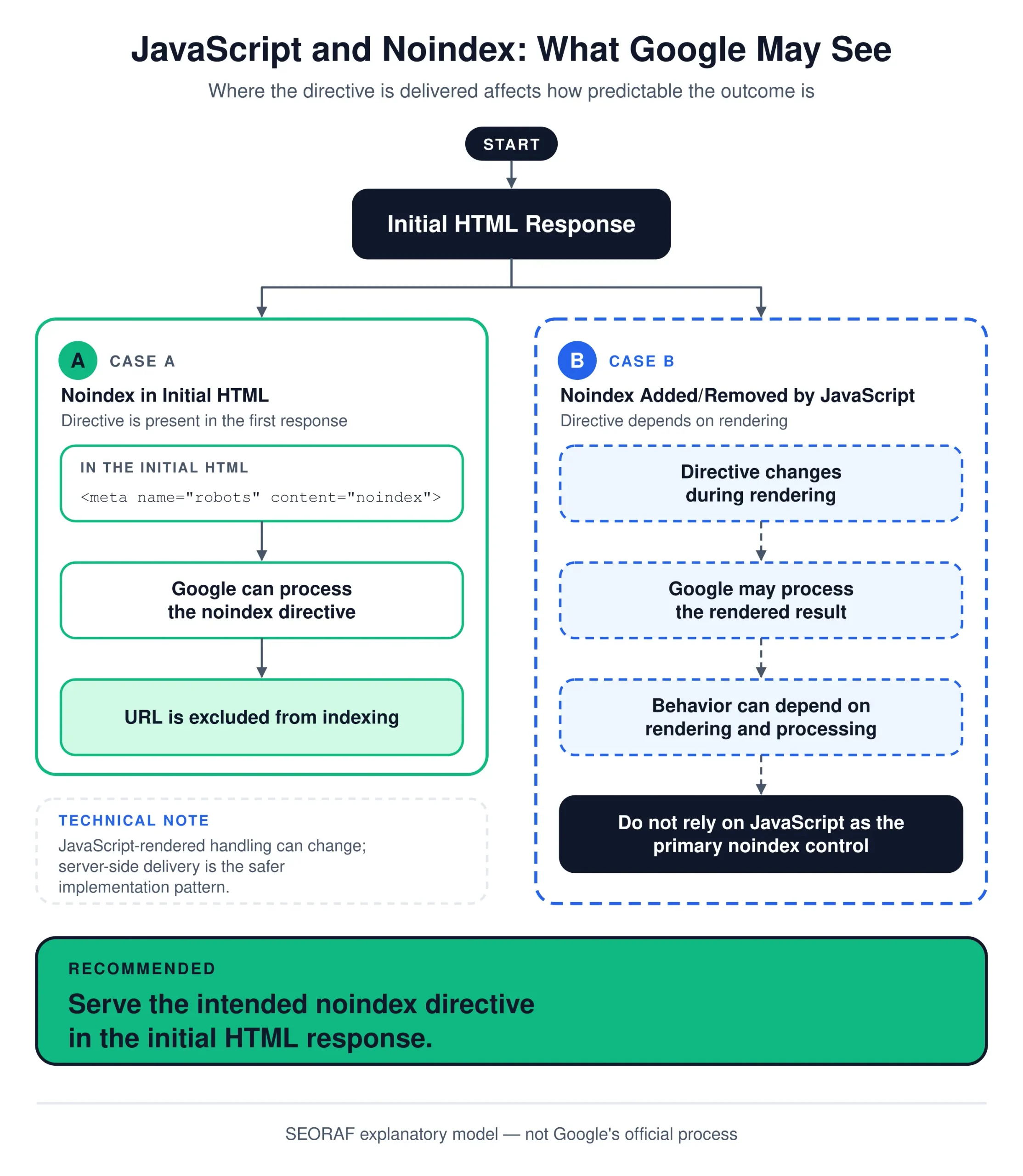
Removing noindex with JavaScript is unreliable. Adding it can work, but the server response is the safer place.
Edge cases worth knowing
noindex, followandnoindex, nofollow. Neither is required for noindex to work. Becausenofollowis a hint and Google does not promise long-term link handling on noindexed pages, do not rely on either to control link equity.- Noindex in robots.txt. Google does not support it. Remove any
Noindex:lines and use a meta tag or header. - Noindex on non-200 responses. A 404, 410 or redirect response makes the rule irrelevant.
- Embedded content. Use
indexifembeddedwithnoindexonly when you want a page’s content indexed inside another page that embeds it through an iframe. - Self-referencing canonical plus noindex. This is not a conflict, and many CMS templates output it. The conflict arises when noindex is paired with a canonical that points elsewhere.
- Bot-specific output. Some setups vary output by user agent, location or device. Treat Google’s own fetch, shown in Search Console, as the reference.
Conflicts between noindex and other signals
Search Console reports many indexing problems as statuses, but the real cause is often two directives disagreeing. This table pairs the common conflicts with fixes.
| Combination | What happens | Fix |
|---|---|---|
| robots.txt Disallow + noindex | Google never fetches the page, so the noindex is unseen. The URL can still appear without content. | Allow crawling and keep the noindex until the URL drops out. |
| noindex + URL in sitemap | Mixed message: sitemaps suggest canonical, indexable URLs. Search Console may flag the URL. | Remove noindexed URLs from the sitemap once they have been processed. |
| noindex + canonical to another URL | One signal says consolidate, the other says drop. Outcomes become hard to predict. | Choose one intent. Use canonical to consolidate or noindex to exclude. |
| noindex on a redirecting URL | Google ignores content from the redirecting URL and processes the target. | Decide on the target URL’s status. Remove pointless rules from the redirecting URL. |
| noindex + 404 or 410 | The error status decides the outcome. Noindex adds nothing. | Remove the noindex, or return 200 if the page must exist. |
| Meta noindex + header saying index | Conflicting rules resolve to the more restrictive one. | Audit every source of robots rules, including plugins and CDNs. |
| Noindex in raw HTML + JavaScript removal | Google may skip rendering, so the removal may not work. | Remove noindex on the server, not in the browser. |
| noindex + internal links everywhere | Not a technical conflict, but a strategic one: you link prominently to a page you exclude. | Reduce prominence, or reconsider whether the page should be indexed. |
Troubleshooting and validation
When a noindex does not behave, I check the same layers in the same order. Each layer answers a different question, and a mismatch between layers is usually the finding.
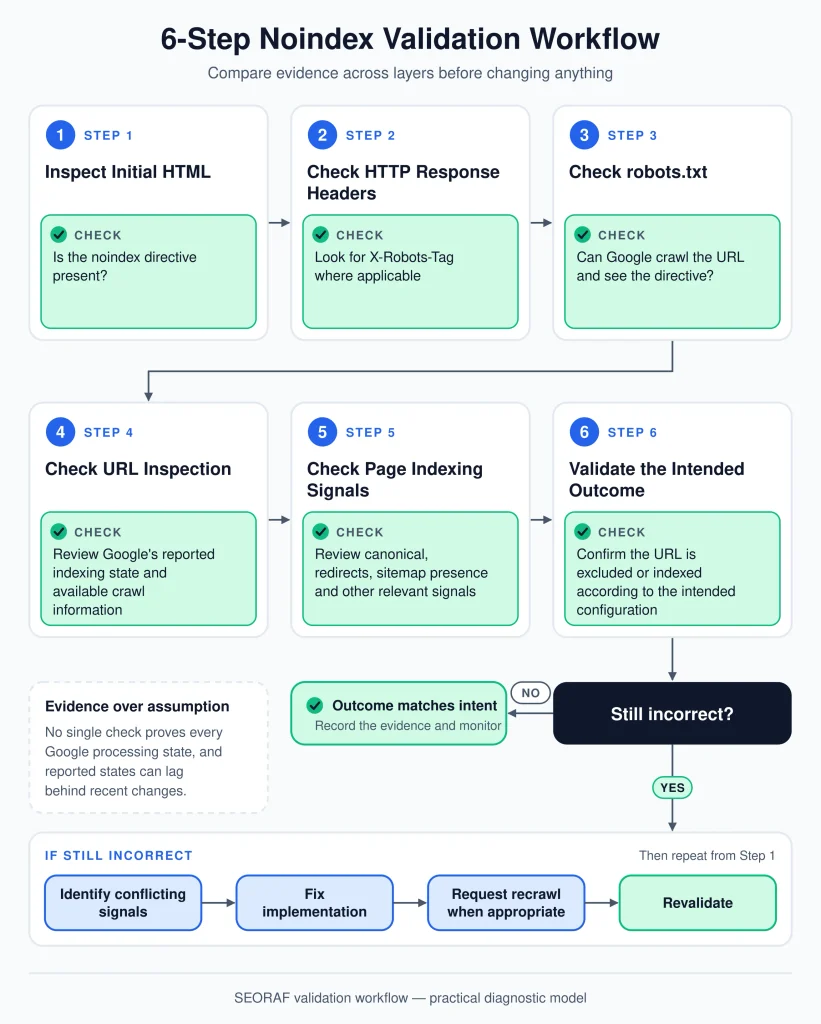
A repeatable order for validating noindex. Layers 1 to 5 are yours to inspect; layer 6 shows Google’s view.
Layer 1: source HTML
Open view-source and search for robots and googlebot. Note every match, not only the first. From a terminal:
curl -s https://www.example.com/page/ | grep -i "<meta name=\"\(robots\|googlebot\)\""Layer 2: HTTP headers
Fetch headers without the body, following redirects, so you see the response for the final URL:
curl -sIL https://www.example.com/page/ | grep -iE "^(HTTP|x-robots-tag|location)"In Chrome DevTools, the Network panel shows the same response headers. Repeat the check for PDFs and images if you intended to noindex them.
Layer 3: rendered HTML
Compare the Elements panel in DevTools with view-source. Any difference in robots tags means JavaScript changed them. Then confirm what Google saw. Google recommends the URL Inspection tool to see the HTML that Googlebot received while crawling the page. Use the live test to check the current version and the indexed view to check the last crawl.
Layer 4: robots.txt
Confirm that robots.txt does not disallow the URL, or any script, style or data file the page needs to render. Google can only apply rules on pages it can fetch, and it does not render JavaScript on blocked pages. Google may cache robots.txt, so a recent edit can take time to take effect. Use the robots.txt report in Search Console to see what Google last fetched. Google’s robots.txt specification explains how rules are matched, and the SEORAF robots.txt guide covers syntax in more depth.
Layer 5: sitemap, canonicals, redirects and links
Check whether noindexed URLs are listed in your XML sitemap, whether the page’s canonical points elsewhere, whether the URL redirects, and whether it receives prominent internal links. A crawler makes this scalable. The SEORAF SEO crawler guide explains how to compare robots meta tags, status codes and redirects across a whole site.
Layer 6: Google Search Console
URL Inspection is the closest view of what Google recorded for a URL. Google also points to the Page indexing report to monitor pages where Googlebot extracted a noindex rule. Status labels can change over time, but these are the ones I look for:
- Excluded by ‘noindex’ tag: Google found and honored the rule. This is fine if intended.
- Submitted URL marked ‘noindex’: you submitted the URL in a sitemap, but it carries noindex. Decide which signal is right.
- Indexed, though blocked by robots.txt: Google could not read on-page rules. Allow crawling and re-check.
- Blocked by robots.txt: confirm the block is intended, and do not expect noindex to work there.
Symptom-to-cause diagnostic table
| Symptom | Likely causes | What to check |
|---|---|---|
| Page still appears after adding noindex | Not recrawled yet; robots.txt block; cached old HTML; rule only added by JavaScript; wrong URL variant | URL Inspection last crawl date, robots.txt, cache purge, raw HTML, canonical URL |
| Important page is “Excluded by ‘noindex’ tag” | Template or plugin setting; staging rule shipped; header set at the server or CDN | Raw HTML, HTTP headers, plugin and theme settings, deployment diff |
| “Submitted URL marked ‘noindex’” | Sitemap generator includes noindexed URLs | Sitemap settings, then decide which signal wins |
| “Indexed, though blocked by robots.txt” | Disallow prevents Google from reading noindex | robots.txt rule matching the URL |
| Noindex in browser but not in Google | Bot-specific output, blocked render files, late JavaScript injection | Live test in URL Inspection, rendered HTML, blocked resources |
| PDF or image still indexed | Header rule not applied to static files, or CDN strips or overrides it | curl headers on the file, server and CDN configuration |
| Page reappears after being removed | Rule lost in a deployment, template change or caching layer | Deployment history, rule source, rendered output over time |
Failure modes I guard against
- The launch carry-over. A staging noindex or the WordPress discourage setting reaches production. Prevention: add “robots output on the live site” to the launch checklist and test a sample of key URLs on launch day.
- The template blast radius. One theme option or post-type setting noindexes a whole section. Prevention: crawl your sitemap URLs on a schedule and alert on any noindex found.
- The overbroad header rule. A server or CDN pattern meant for PDFs matches more URLs than intended. Prevention: test the rule against a list of URLs it should and should not match.
- The migration block. A new robots.txt disallows sections that carry noindex, so the rule can no longer be read. Prevention: compare old and new robots.txt before cutover.
- The plugin reset. An update or a switch between SEO plugins resets per-page indexing settings. Prevention: export a list of noindexed URLs before changes and compare it afterward.
- The silent removal. A developer removes noindex from a template but a cache keeps serving the old version, or the reverse. Prevention: purge caches and verify with headers and rendered HTML.
Next step: If noindex is only one item in a wider audit, the SEORAF Technical SEO checklist places indexing checks alongside crawlability, sitemaps, canonicals and duplicate content.
Timing, removal and reversal
How long does noindex take to work?
There is no fixed timeline. Noindex takes effect only after Google recrawls the URL and processes the rule. Google notes that revisiting a page can take months, depending on how important the page is on the internet. You can ask Google to recrawl a URL, though a request does not set a timeline. For urgent cases, Google points site owners to its page removals documentation.
How do I reverse noindex?
- Remove the meta tag and the header at their source, and purge caches.
- Confirm the URL is crawlable and returns 200.
- Check that no other layer, such as a plugin, header, or JavaScript, still adds noindex.
- Restore the URL to your sitemap and internal links.
- Inspect the URL in Search Console and request a recrawl if needed.
Removing noindex makes the page eligible for indexing. It does not guarantee indexing. Google states that meeting the requirements does not guarantee it will crawl, index or serve a page.
Noindex, AI Overviews and GEO
A noindexed page is not eligible to be a supporting link in Google’s AI features. Google states that to be shown as a supporting link in AI Overviews or AI Mode, a page must be indexed and eligible to be shown in Google Search with a snippet. It also says there are no extra technical requirements, and no special files or schema.org markup for these features.
For generative engine optimization (GEO), three practical points follow:
- Do not noindex content you want cited. If a guide, glossary or comparison page should be quoted, it must remain indexable.
- Choose the narrowest control. If your concern is snippets or AI reuse rather than presence in results,
nosnippetormax-snippetis more precise than noindex. - Do not assume one directive governs every AI system. Noindex is a search engine rule. Other AI crawlers and products publish their own controls, and support varies, so check each operator’s documentation.
Noindex questions, answered
Does noindex remove a page from Google immediately?
No. Google must recrawl the URL and process the rule first, and Google notes that can take months for some pages. Until then, the URL may remain visible.
Does noindex stop Googlebot from crawling a page?
No. Googlebot must crawl the page to read noindex. Use robots.txt for crawl management, keeping in mind that a blocked URL can still appear in results without a description.
What is the difference between noindex and nofollow?
Noindex asks Google not to show the page in results. Nofollow is a hint about not using the page’s links for discovery. They are independent rules that can be combined, and none is shorthand for both.
Can I use noindex and robots.txt together?
Not on the same URL if you need the noindex to work. A robots.txt block prevents Google from fetching the page, so it never reads the rule.
Is noindex better than a canonical tag?
They solve different problems. Canonical tags consolidate duplicates. Noindex excludes a page. Google does not recommend noindex for choosing a canonical within a site.
Should I noindex thin pages?
Only after asking whether the page should be improved, merged, redirected or deleted. Noindex is reasonable when a page is useful to visitors but has no independent role in Search.
Is noindex a directive Google must obey?
Google documents noindex as a rule it applies once it can read it. The conditions matter: crawl access, a successful response, and a visible tag or header. Without those, the rule cannot be applied.
Validation checklist
- The page has a legitimate reason to be reachable, and no reason to appear in Search.
- Noindex is the best-fitting control compared with authentication, redirect, 404/410, canonical and robots.txt.
- The URL is not blocked by robots.txt, and any render-critical resources are crawlable.
- The URL returns 200 and does not redirect elsewhere.
- The rule appears in the raw HTML, or in the
X-Robots-Tagheader for non-HTML files. - No plugin, theme, CDN or script adds a conflicting robots rule, and JavaScript does not remove noindex.
- The canonical is self-referencing or absent, not pointing to a different page.
- The URL is removed from the XML sitemap once processed, and internal links match its new role.
- URL Inspection shows indexing is not allowed for the intended reason.
- Pages that must be indexed carry no noindex, checked by a scheduled crawl of your sitemap URLs.
- Staging and test-site rules are confirmed removed before every launch.
Conclusion
Noindex is simple to write and easy to misuse. It works when three conditions hold together: the URL should stay reachable, Google can crawl and read the rule, and no conflicting signal points the other way. When the goal is privacy, duplication, removal, or crawl control, a different tool fits better.
My practical advice is to keep the decision small. Pick the control that matches the outcome. Prove Google can see it with source HTML, headers, rendered HTML, robots.txt, your sitemap and Search Console. Then re-check after every template, plugin or deployment change, because that is where noindex most often breaks or reappears.