
Technical SEO • Google Indexing
How Google Indexing Works: The Complete 2027 Diagnostic Guide
Google indexing is the process of processing and storing eligible web content so that it can potentially be retrieved for Google Search. A URL can be discovered without being crawled, crawled without being indexed, or indexed while Google chooses a different canonical URL. Understanding those distinctions is the foundation of accurate indexing diagnosis.
This guide explains how to investigate Google indexing at the individual-URL level. It covers discovery, crawling, rendering, processing, canonicalization, indexability, Search Console diagnostics, JavaScript, mobile-first indexing, HTTP responses, sitemaps, internal links, duplicate URLs, and practical troubleshooting.
What Is Google Indexing?
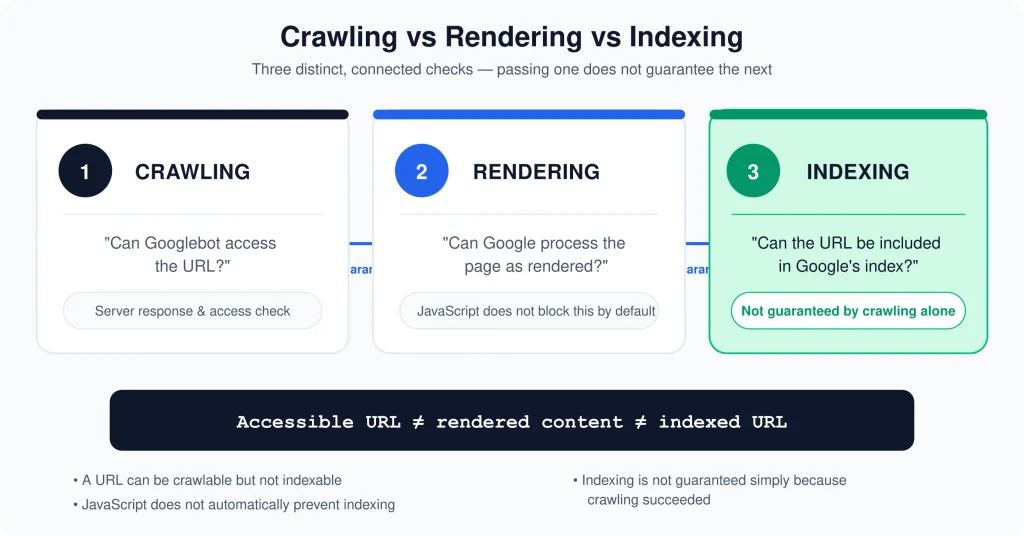
Google indexing is the process through which Google processes information discovered on web pages and stores representations of eligible content in its Search systems. Indexing is different from crawling. Crawling is the retrieval of a URL; indexing concerns what Google does with the content and signals it has processed afterward.
That distinction matters because a URL can exist on the web and still not appear in Google Search. A page can be linked from another page, included in an XML sitemap, successfully requested by Googlebot, and still not become the canonical indexed representation that you expect.
Indexing should therefore be treated as an outcome rather than a submission feature. Publishing a page, adding it to a sitemap, or using Search Console’s Request Indexing function can provide useful discovery or re-evaluation signals, but none of those actions guarantees that Google will index the URL.
Indexed Does Not Mean Ranked
Indexing and ranking are separate concepts. An indexed URL can receive little or no search visibility, while a page that ranks for a query must first be eligible to participate in the relevant search systems.
This is why an indexing diagnosis should not begin with ranking metrics. If Google has not selected a URL for indexing, improving title tags or adding more keywords may not address the underlying problem. First establish the URL’s technical and processing state.
Crawling vs Rendering vs Indexing vs Ranking
These terms are often used interchangeably, but they describe different parts of the search process. Separating them makes troubleshooting substantially easier.
| Concept | What it means | Typical diagnostic question |
|---|---|---|
| Discovery | Google becomes aware that a URL exists. | How could Google discover this URL? |
| Crawling | Googlebot requests the URL and retrieves available resources. | Can Googlebot access the URL successfully? |
| Rendering | Google processes the page and may render JavaScript-dependent content. | Does the rendered page contain the intended content and signals? |
| Indexing | Google processes content and signals for possible inclusion and canonicalization. | Is this URL eligible and selected for indexing? |
| Ranking | Eligible content is evaluated for search queries and result presentation. | How does the indexed page perform for a particular query? |
A useful mental model is to treat each step as a diagnostic layer. If a URL cannot be crawled, investigate access before evaluating content. If it is crawled but excluded, investigate directives, canonicalization, duplication, rendering, and page usefulness before assuming the issue is ranking.
How Google Processes a URL
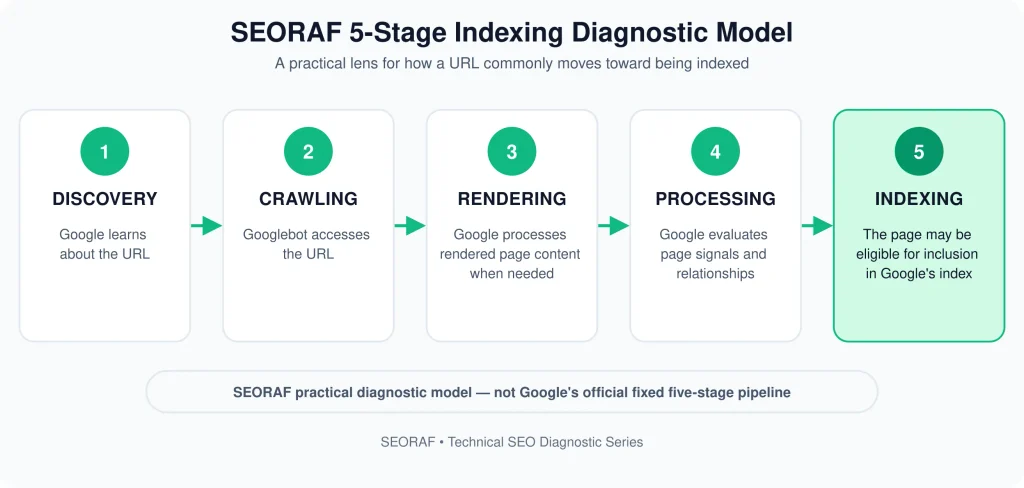
Google publishes documentation describing crawling, rendering, indexing, canonicalization, and Search Console diagnostics, but it does not publish a rigid five-step internal indexing pipeline that exactly matches the framework below.
The following is the SEORAF 5-Stage Indexing Diagnostic Model. It is a practical troubleshooting framework created by SEORAF to organize URL-level investigations. It should not be interpreted as a claim about Google’s internal evaluation order.
The practical value of this model is not predicting Google’s internal sequence. It is preventing a common SEO mistake: changing content when the actual problem is a blocked crawl, a noindex directive, a redirect, a canonical conflict, or an inaccessible rendering dependency.
Stage 1 — Discovery
Before Google can crawl a URL, it needs to know that the URL exists. Discovery can occur through links, sitemaps, previously known URLs, external references, redirects, and other signals available to Google’s crawling systems.
Internal Links
Internal links create explicit relationships between URLs. A page that is linked from relevant, crawlable pages is easier for search engines to discover than a URL that has no meaningful internal discovery path.
Internal linking also provides context. The source page, anchor text, surrounding content, and site architecture can help Google understand how a URL relates to other pages on the site.
XML Sitemaps
XML sitemaps provide a structured list of URLs that site owners consider important. They are particularly useful for helping search engines discover canonical URLs and monitor large sites, recently updated pages, or pages whose internal linking is not yet strong.
A sitemap is not an indexing guarantee. Including a URL in a sitemap does not override a noindex directive, make a duplicate page canonical, or force Google to index the URL.
External Discovery
Google may discover URLs through references outside your own website. External discovery can be useful, but you should not treat backlinks as an indexing requirement for every page.
Orphan URLs
An orphan URL has little or no useful internal linking from the site’s navigational or content structure. Such pages can be harder for crawlers to discover and harder for users to understand in the context of the site.
Stage 2 — Crawling
Crawling is the retrieval stage. Googlebot requests URLs and resources that its crawling systems are permitted and able to access. Crawlability is therefore different from indexability.
Googlebot Access
A URL must be accessible to the relevant Google crawler. Access can be affected by robots.txt rules, server responses, authentication requirements, network failures, DNS problems, firewalls, rate limiting, and other infrastructure issues.
robots.txt
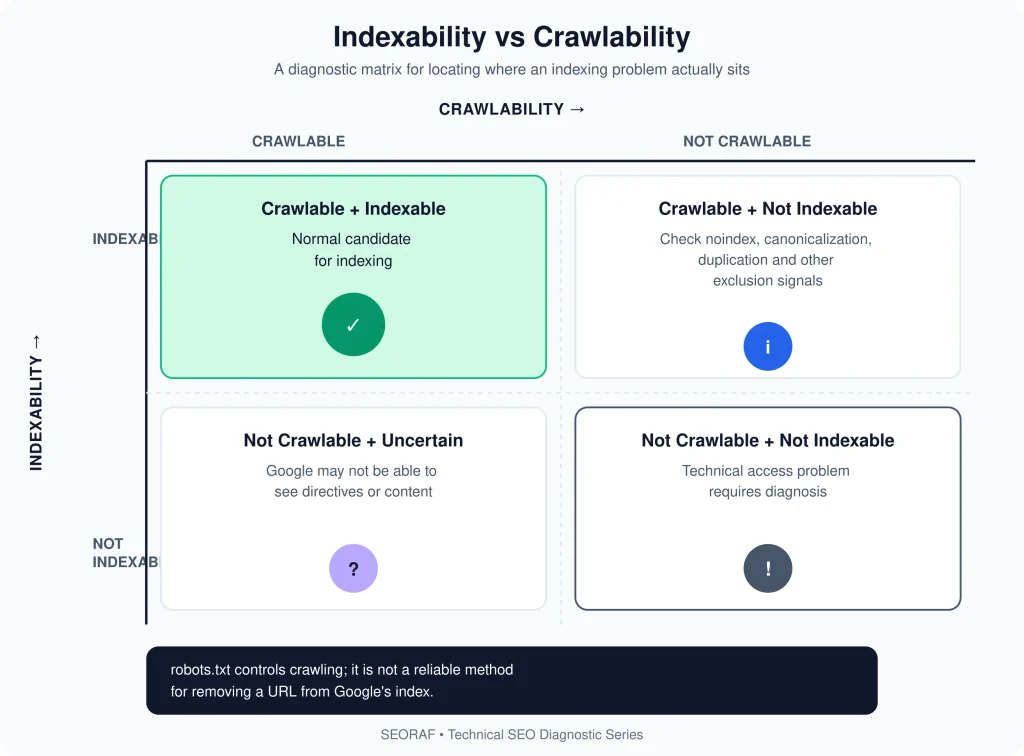
robots.txt controls crawler access to URL paths. It is not a general-purpose indexing-removal mechanism. A URL blocked by robots.txt can still be known to Google and may potentially appear in search without a normal crawlable snippet.
This creates an important diagnostic distinction: if you want Google to see a noindex directive, Google must generally be able to crawl the page and retrieve the directive. Blocking the URL in robots.txt can prevent Google from seeing page-level directives.
HTTP Responses
HTTP status codes communicate what happened when the server handled a request. A successful page normally returns a 200-level response, while redirects, client errors, and server errors require different handling.
A URL that consistently returns an error is not equivalent to a normal indexable document. Likewise, a redirecting URL should not be diagnosed as though the redirect source were the final content page.
Crawl Budget
Crawl budget is primarily a concern for larger or technically complex sites. It should not become the default explanation for a single page that is not indexed.
Before investigating crawl budget, check simpler causes: access restrictions, HTTP responses, robots.txt, noindex, canonicalization, redirects, duplicate URLs, and discovery.
Stage 3 — Rendering
Modern Google Search can render JavaScript. Google has stated that Google Search has been rendering JavaScript for multiple years, so the presence of JavaScript alone should not be treated as an indexing failure.
Rendering becomes a diagnostic concern when important content or signals depend on client-side execution and the rendered result differs from what you intended Google to process.
What to Check
- Is important text available after rendering?
- Are important internal links present?
- Does the rendered page contain the intended canonical information?
- Are robots directives implemented consistently?
- Are critical resources accessible to Google?
- Does the rendered content meaningfully differ from the original HTML?
- Does the page depend on JavaScript that fails in the crawler’s processing environment?
JavaScript and Canonicalization
Canonicalization can happen in relation to both the original HTML and rendered page processing. For JavaScript-driven sites, the safest implementation is to make the preferred canonical URL clear and consistent rather than relying on JavaScript to change canonical signals after the initial HTML response.
Non-200 Responses
Rendering behavior should not be assumed to be identical for every HTTP response. Google’s current documentation specifically discusses JavaScript behavior in relation to different response conditions. Therefore, when debugging a JavaScript-heavy URL, first establish the HTTP response and whether the page is actually eligible for the subsequent processing you are expecting.
Stage 4 — Processing
After Google has retrieved and processed a URL, multiple signals can affect how that URL is interpreted. One of the most important areas is canonicalization.
Duplicate Detection
Multiple URLs can contain identical or substantially similar primary content. Google can group such URLs into a duplicate cluster and select a canonical representation.
This means two URLs can both be technically accessible while only one becomes the preferred canonical representation for search.
Canonicalization
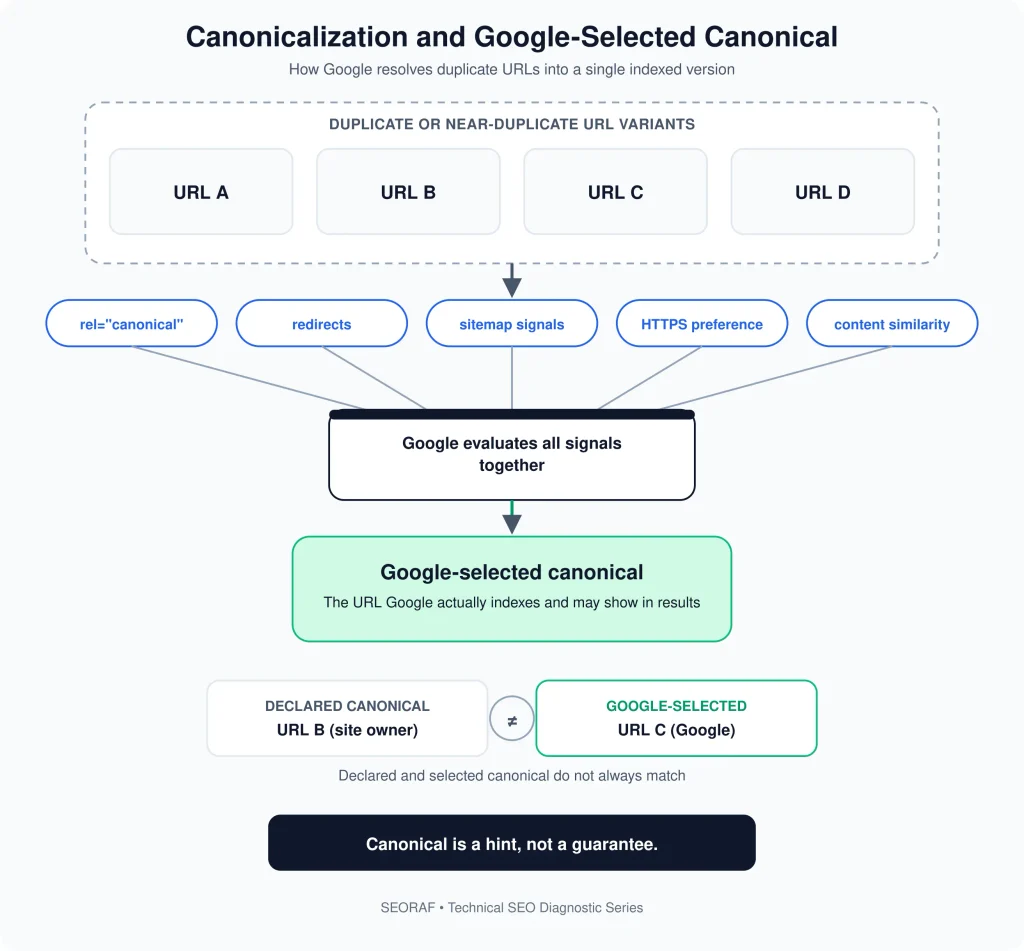
Google considers several canonicalization signals, including redirects, HTTPS versus HTTP, sitemap inclusion, and rel="canonical" annotations. These signals help Google understand which URL you prefer, but canonicalization is not an absolute command.
Language and International Signals
International sites introduce additional relationships between URLs. Language and regional variants should have clear content relationships, appropriate internal linking, and correctly implemented international signals where relevant.
Structured Data
Structured data provides machine-readable information about page content. It can help Google understand eligible content and may support search features, but valid structured data does not guarantee indexing or a rich result.
Content Interpretation
Processing also involves understanding the page itself. If several URLs serve substantially similar content, Google may have little reason to maintain each as a separate canonical representation.
For this reason, technical correctness and content differentiation should be evaluated together rather than as completely separate SEO disciplines.
Stage 5 — Indexing
Indexability means that a URL does not have an obvious technical directive preventing indexing. It does not mean Google is obligated to index the page.
A URL can be crawlable and technically indexable but still not become the canonical indexed representation. Google may choose another URL when pages are duplicates or very similar, or when other signals indicate that another URL is the more appropriate canonical.
Indexable Is Not the Same as Indexed
This distinction is one of the most important concepts in technical SEO.
Therefore, removing a noindex directive may make a page indexable, but it does not guarantee that Google will immediately index it.
Indexability vs Crawlability
Crawlability answers whether Google can access the URL. Indexability asks whether the URL can be considered for indexing under the site’s technical signals.
| Question | If the answer is “No” | First checks |
|---|---|---|
| Can Google access the URL? | Investigate crawlability. | robots.txt, DNS, server, firewall, HTTP status |
| Does the page return an appropriate response? | Investigate server behavior. | 200, redirect, 4xx, 5xx, soft 404 |
| Is the page blocked by noindex? | Remove the directive if indexing is intended. | HTML, HTTP headers, CMS/plugin settings |
| Is the preferred canonical clear? | Investigate canonical signals. | rel=canonical, redirects, sitemap, internal links |
| Is the URL substantially duplicated? | Review consolidation or differentiation. | Content comparison and canonical selection |
| Does the page provide distinct value? | Review usefulness and differentiation. | Intent, overlap, completeness, unique contribution |
The Technical Conditions Google Needs to Index a URL
There is no single “index this page” switch. Indexing diagnosis requires checking a set of interacting conditions.
-
- Crawl accessibility: Googlebot must be able to access the URL and relevant resources.
- Appropriate HTTP response: The URL should return the response you intend Google to process.
- No accidental noindex: A page intended for indexing should not contain an unintended noindex directive.
- Correct robots.txt: Important indexable pages should not be unintentionally blocked from crawling.
- Clear canonical signals: The preferred URL should be consistent across redirects, canonical annotations, sitemaps, and internal links.
- Controlled duplication: Similar URLs should have a clear reason to exist separately or be consolidated appropriately.
- Accessible rendered content: Important content should remain available when rendering is required.
- Mobile content parity: Important content and signals should be available on the mobile version.
- Useful discovery paths: Important URLs should be discoverable through relevant internal links and, where appropriate, sitemaps.
- Distinct usefulness: The page should provide a clear reason to exist as a separate resource.
These conditions should be treated as a diagnostic checklist, not as a formula that guarantees indexing.
Why Google Crawled a Page but Did Not Index It
“Crawled — currently not indexed” means Google has crawled the URL but the URL is not currently represented in the index in the way you expected. The status does not, by itself, identify a single cause.
After technical accessibility, directives, canonicalization, duplication, discovery, and rendering have been checked, content usefulness and page differentiation become important hypotheses to investigate.
Status / condition What it means Likely areas to investigate What to check next Crawled — currently not indexed Google crawled the URL but it is not currently indexed. Duplication, canonicalization, content differentiation, usefulness, technical signals URL Inspection, canonical, page content, internal links, duplication Discovered — currently not indexed Google knows about the URL but has not currently crawled it. Discovery, crawl scheduling, site architecture, technical access Internal links, sitemap, robots.txt, server availability Excluded by noindex A noindex directive tells Google not to index the page. CMS settings, SEO plugin, meta robots, X-Robots-Tag Inspect the HTML and HTTP headers Blocked by robots.txt Crawling is restricted by robots.txt. Disallow rules Review the relevant robots.txt rule Duplicate — Google chose a different canonical Google selected another URL as the canonical representation. Duplicate content, conflicting signals Compare Google-selected and user-declared canonical Duplicate without user-selected canonical Google identified duplicate content without the preferred canonical being clear. URL variants, weak canonical signals Consolidate or clarify preferred URL Page with redirect The requested URL redirects elsewhere. Redirect configuration Inspect redirect destination and chain Not found The requested resource is unavailable with a not-found response. Deleted or incorrect URL Check links, sitemap, redirects, and intended URL Soft 404 The page appears unavailable even though the server response may not be a conventional 404. Empty pages, error templates, irrelevant redirects Compare HTTP status with visible page content Server error The server reports a failure processing the request. 5xx errors, infrastructure, application failures Server logs, uptime, application and hosting configuration The SEORAF Four-Gate Indexing Diagnostic Framework
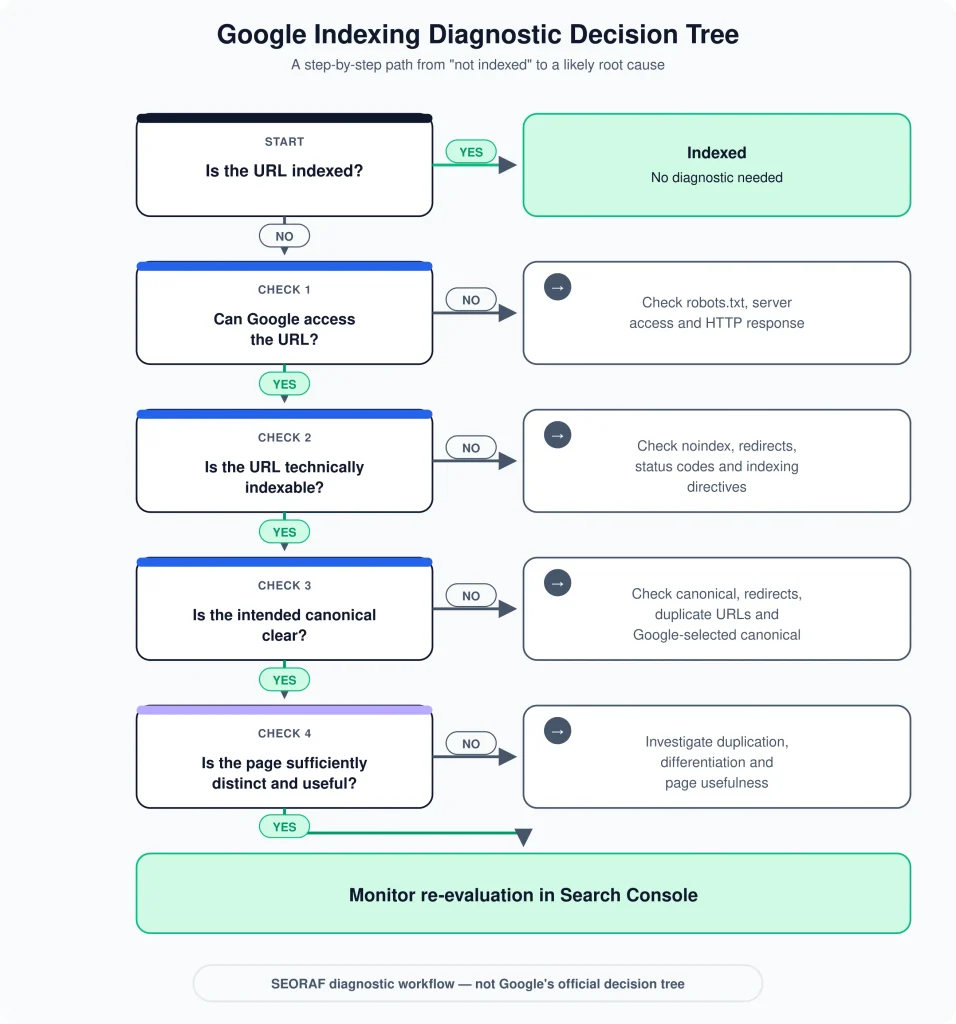
The following four-gate framework is a SEORAF troubleshooting sequence. It is not a description of Google’s internal indexing or ranking order.
This framework prevents premature content editing. If Gate 1 fails, rewriting the page will not fix the access problem. If Gate 3 reveals that Google selected another canonical, publishing more keywords on the duplicate URL may not solve the problem.
How to Diagnose Indexing in Google Search Console
Google Search Console is the primary diagnostic environment for understanding how Google reports a URL’s indexing state.
1. Start With URL Inspection
Enter the exact URL into URL Inspection. Look at the reported indexing status and the available canonical information. Do not stop at a single status label; use the details to determine which diagnostic path applies.
2. Compare User-Declared and Google-Selected Canonical
A mismatch can reveal duplicate or conflicting URL signals. If Google selects a different canonical, investigate the relationship between the two URLs rather than assuming the tool is simply reporting an error.
3. Use the Live Test Where Appropriate
A live test can help determine how the current URL behaves when tested. Remember that a live test and Google’s existing indexed state are not necessarily identical observations.
4. Check the Page Indexing Report
The Page Indexing report helps identify groups of URLs with indexing and exclusion statuses. Use it to identify patterns rather than treating every URL as an isolated problem.
5. Review Sitemaps
Sitemap reporting can help identify whether your submitted URL set matches your intended canonical URL set. A sitemap should normally contain URLs you want search engines to discover and consider, not URLs that you intentionally exclude.
6. Request Indexing After Fixing the Cause
Request Indexing is best treated as a request for crawling or re-evaluation after meaningful changes. It does not guarantee indexing, and it should not replace fixing the underlying issue.
Canonicalization and Google Indexing
Canonicalization is one of the most important concepts in URL-level indexing. When Google encounters multiple URLs with the same or substantially similar primary content, it can group those URLs and select a canonical URL.
What Is a Canonical URL?
The canonical URL is the URL Google selects as the representative version of a duplicate cluster. Site owners can communicate their preferred canonical through several signals, but Google can choose a different canonical when its collected signals point elsewhere.
Canonical Signals
Important signals can include:
rel="canonical"annotations- HTTP to HTTPS consistency
- Redirects
- Sitemap inclusion
- Internal linking patterns
- Content similarity and duplication
Google describes canonicalization signals as hints rather than absolute commands. Therefore, a canonical tag should not be treated as a force-index instruction.
Should Every Page Have a Self-Referencing Canonical?
No universal rule requires every indexable page to contain a self-referencing canonical. A self-referencing canonical can be useful for clarifying the preferred URL, particularly on sites with multiple URL signals, but it should be implemented as part of a consistent canonicalization strategy.
When Google Selects Another Canonical
If Google selects a different canonical, compare the pages first. Ask whether they are substantially similar, whether the redirects agree, whether the sitemap contains the intended URL, whether internal links consistently point to it, and whether the canonical annotation is technically correct.
If the pages are genuinely intended to serve different search intents, they should provide clearly differentiated content and purpose. Google recommends addressing canonicalization issues by ensuring that clustered pages are sufficiently different where separate indexing is intended.
Canonical Troubleshooting Checklist
- Check the requested URL.
- Inspect the declared canonical.
- Inspect Google’s selected canonical.
- Compare the primary content of both URLs.
- Check redirects.
- Check HTTP/HTTPS consistency.
- Check sitemap inclusion.
- Check internal links.
- Remove conflicting canonical signals.
- Request re-evaluation after meaningful corrections.
robots.txt, noindex, and Indexing Control
robots.txt and noindex solve different problems. Confusing them is one of the most common technical SEO mistakes.
Mechanism Primary purpose Important limitation robots.txtControls crawler access to URL paths. It is not a reliable indexing-removal mechanism. noindexTells Google not to index a page when the directive can be crawled and processed. Google must be able to access the directive. rel="canonical"Signals the preferred URL among duplicates. It is a hint, not a guaranteed command. 301/308 redirect Moves users and crawlers from one URL to another. The destination should be relevant and technically accessible. A Common Configuration Conflict
Suppose a page contains
noindexbut robots.txt blocks the same URL. The crawler may not be able to retrieve the page and therefore may not be able to see the noindex directive. If your objective is to communicate a noindex instruction, blocking the page from crawling can undermine that diagnostic path.For a page that should remain indexed, the opposite principle applies: remove accidental noindex directives and ensure robots.txt does not unintentionally block crawling.
JavaScript and Google Indexing
JavaScript is not automatically an indexing problem. Google Search has been rendering JavaScript for years. The useful SEO question is whether the implementation allows Google to access and interpret the content and signals that matter.
Potential JavaScript Problems
- Important content is only created after an execution-dependent interaction.
- Internal links are unavailable until JavaScript succeeds.
- Canonical information is changed inconsistently after rendering.
- Robots directives are generated inconsistently.
- Critical resources fail to load.
- The rendered page differs materially from the original HTML.
- Client-side routing produces unexpected URL or status behavior.
Practical JavaScript Checks
- Inspect the original HTML.
- Inspect the rendered page.
- Confirm important content exists in the rendered output.
- Check internal links.
- Check canonical consistency.
- Check robots directives.
- Check HTTP responses.
- Check whether important resources are accessible.
JavaScript should therefore be diagnosed as an implementation dependency, not as a blanket indexing risk.
Mobile-First Indexing and Content Parity
Google primarily uses the mobile version of a site’s content for indexing. This makes mobile content parity an important technical SEO consideration.
A responsive design is not automatically sufficient if important information, links, metadata, or structured data are missing from the mobile version.
Mobile-First Indexing Checklist
- Important primary content exists on mobile.
- Important internal links exist on mobile.
- Structured data represents the intended page.
- Important images and media are accessible.
- Metadata is appropriately implemented.
- Canonical signals remain consistent.
- Mobile users receive the same essential information needed to understand the page.
The goal is not to make desktop and mobile source code character-for-character identical. The goal is to ensure that the mobile version does not omit important information or signals that Google needs to understand the page.
Sitemaps and Internal Links
Sitemaps and internal links solve related but different discovery problems.
What a Sitemap Does
A sitemap gives search engines a structured list of URLs that you want them to discover. It is especially useful for large sites, newly published URLs, sites with complex architectures, and pages that may not receive many internal links.
What Internal Links Do
Internal links connect pages within the site and provide both discovery and contextual relationships. A well-structured internal linking system can help search engines understand which pages are important and how topics relate.
Use Both Consistently
A strong implementation usually keeps the canonical URL consistent across internal links and sitemaps. Avoid submitting one URL in the sitemap while most internal links point to another duplicate version.
Remember
Sitemap inclusion can help discovery, but it does not guarantee indexing. Internal links can improve discovery and context, but they also do not guarantee indexing.
HTTP Status Codes and Indexing
HTTP status codes are fundamental to indexing diagnosis because they tell crawlers what happened when a URL was requested.
Status Typical meaning Indexing implication 200Successful response. The URL can be processed as a normal page, subject to other signals. 301Permanent redirect. Google can follow the redirect and evaluate the destination. 308Permanent redirect with method preservation semantics. Like other redirects, the destination becomes the relevant URL to investigate. 404Resource not found. The URL is not functioning as a normal available document. 410Resource intentionally unavailable. Signals that the resource is gone; do not treat it as a ranking or indexing shortcut. 5xxServer-side failure. Repeated errors can prevent reliable crawling and processing. Soft 404 Page appears unavailable despite not behaving like a conventional 404. Google may treat the page as effectively unavailable. Soft 404s Deserve Special Attention
A common soft 404 pattern is returning a successful status for an error page, empty page, or irrelevant fallback page. Another is redirecting many unrelated URLs to one generic destination. These configurations can make the URL technically “work” while failing to provide a useful document.
Structured Data and Indexing
Structured data helps communicate machine-readable information about page content. It can make eligible content easier for Google to interpret and can support specific search-result features.
Structured data is not an indexing command. A page can contain valid structured data and still not be indexed, and structured data does not guarantee that a rich result will appear.
Indexing-Related Structured Data Checks
- Is the page accessible to Google?
- Is the page blocked by robots.txt?
- Does the page contain an unintended noindex directive?
- Does the structured data describe the visible page content?
- Is the markup valid?
- Is the canonical URL consistent?
- Does the structured data remain available when JavaScript is required?
Validate structured data independently, but do not confuse structured-data validity with the broader indexing state of the URL.
When Technical SEO Is Correct but a URL Still Isn’t Indexed
Sometimes the technical checklist looks clean and the URL still does not become the indexed representation you expect. That is the point where diagnosis should expand beyond directives and infrastructure.
Duplication
If another URL provides substantially the same primary content, Google may group the pages and select another canonical. The solution may be consolidation rather than adding more text to the duplicate URL.
Insufficient Differentiation
Pages targeting closely related topics need meaningful differentiation. If several URLs repeat nearly identical information with only superficial changes, maintaining every URL as a separate search resource may be difficult to justify.
Page Usefulness
A technically accessible page should still satisfy a real user need. Ask whether the page answers a distinct question, provides information not already covered elsewhere on the site, and gives users a clear reason to visit it.
Content Quality
Content quality should be evaluated after the basic technical path has been verified. This does not mean that every “crawled but not indexed” URL has been rejected because Google considers it low quality. The Search Console status alone cannot establish that conclusion.
Site-Level Context
A page exists within a larger site architecture. Internal links, topical relationships, duplicate templates, URL patterns, navigation, and overall content organization can influence how effectively a page communicates its purpose.
Search Demand and Context
Search demand can influence the practical value of maintaining multiple highly similar pages, but lack of visible search traffic should not be treated as proof that Google will not index a page. Indexing diagnosis should remain grounded in observable technical and content evidence.
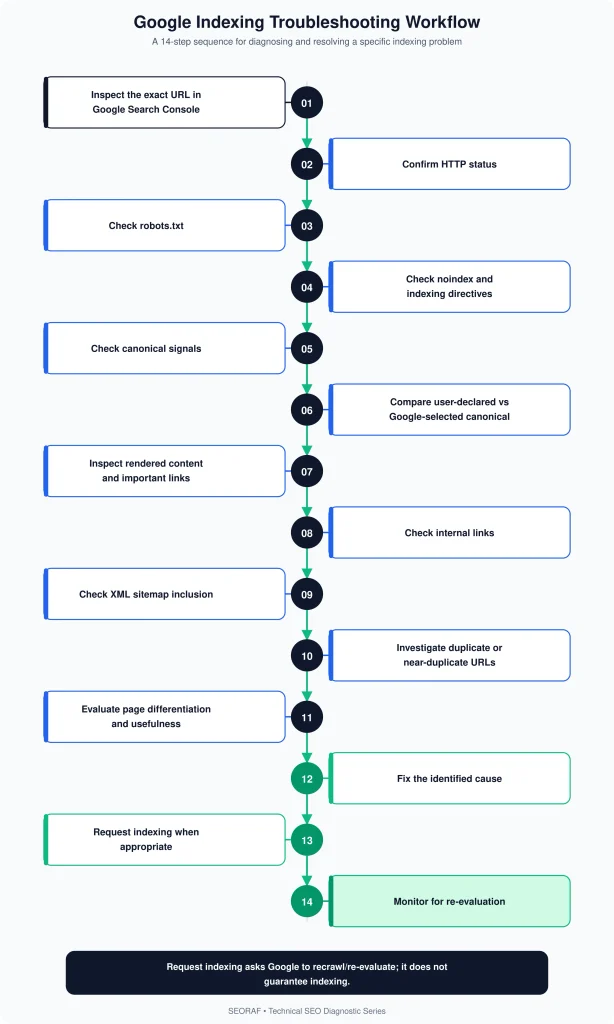
A Practical Google Indexing Troubleshooting Workflow
Use the following sequence when a specific URL is not indexed. Work from the most fundamental technical questions toward content and differentiation.
- Confirm the exact URL.Check protocol, hostname, path, trailing slash behavior, parameters, and redirects.
- Run URL Inspection.Review the reported indexing state, canonical information, and available diagnostic details.
- Check HTTP status.Confirm that the URL returns the response you intend Google to process.
- Check robots.txt.Verify that the URL and required resources are not unintentionally blocked.
- Check noindex.Inspect HTML meta robots directives and relevant HTTP headers.
- Check canonical.Confirm that the declared canonical points to the intended preferred URL.
- Compare Google-selected and declared canonical.If they differ, investigate duplication and conflicting signals.
- Inspect rendered content.Confirm that important content, links, metadata, and signals remain available when rendering is required.
- Check internal links.Verify that the URL has meaningful crawlable links from relevant pages.
- Check sitemap inclusion.Confirm that the preferred canonical URL is represented in the appropriate sitemap.
- Check duplication.Compare the URL with similar pages and parameterized or alternate versions.
- Assess page usefulness and differentiation.Determine whether the URL has a distinct purpose and meaningful information gain.
- Fix the root cause.Do not rely on repeated indexing requests while leaving the underlying issue unchanged.
- Request re-indexing when appropriate.After meaningful changes, use the appropriate Search Console mechanism to request re-evaluation.
- Monitor re-evaluation.Allow time for Google to recrawl and process the updated URL. There is no guaranteed indexing timeline.
Google Indexing Diagnostic Decision Tree
Common Google Indexing Myths
Myth 1: Submitting a Sitemap Guarantees Indexing
False. A sitemap helps communicate URLs for discovery and organization. It does not guarantee that Google will index every submitted URL.
Myth 2: Request Indexing Guarantees Indexing
False. Request Indexing asks Google to recrawl or reconsider a URL. It does not override technical exclusions, canonicalization, duplication, or other processing decisions.
Myth 3: robots.txt Removes a URL From Google
False. robots.txt primarily controls crawling. Google may know about a blocked URL without being able to crawl its content.
Myth 4: Every Page Must Have a Canonical
False as a universal requirement. A self-referencing canonical can be useful, but canonicalization is a signal rather than a mandatory indexing instruction for every page.
Myth 5: JavaScript Prevents Indexing
False. Google Search renders JavaScript. The real question is whether the implementation exposes the important content and signals Google needs.
Myth 6: Crawled but Not Indexed Always Means Bad Content
False. The status does not identify one universal cause. Technical signals, duplication, canonicalization, rendering, discovery, and content usefulness should all be investigated.
Myth 7: More Backlinks Guarantee Indexing
False. External links can provide discovery and context, but backlinks do not function as a guarantee that a URL will be indexed.
Advanced Edge Cases
Hreflang and International Variants
International sites may have multiple URLs serving different languages or regional audiences. These URLs should have clear language and regional relationships and should not be created as near-duplicate pages without meaningful localization.
Faceted Navigation
Ecommerce and large content sites can generate huge numbers of parameterized or filtered URLs. Some combinations may be useful search resources, while others may create unnecessary duplication and crawl complexity.
The indexing question should therefore be answered at the URL-pattern level: which URL combinations have a legitimate purpose, which should be discoverable, and which should not become separate search resources?
Duplicate URL Formats
Common duplication sources include HTTP and HTTPS versions, trailing-slash variants, uppercase and lowercase paths where the server treats them differently, URL parameters, print versions, tracking parameters, and alternative URL structures.
Redirect Chains
Redirects should lead users and crawlers toward the intended destination. Long or irrelevant chains make diagnosis harder and can create unexpected behavior. Check both the source and final destination.
Soft 404 Pages
A page that technically returns 200 but communicates “this page does not exist” can be treated differently from a genuine content page. Review the response, visible content, and intended URL purpose together.
JavaScript Applications
JavaScript applications require particular attention to rendered content, routing, canonicalization, internal links, and HTTP responses. The technology itself is not the problem; inconsistent implementation is what should be investigated.
International URL Architecture
International architectures should make each URL’s language or regional purpose clear. Avoid creating multiple URLs whose only meaningful difference is a superficial template change.
IndexNow and Google’s Indexing API
IndexNow should not be presented as a general Google indexing submission mechanism. Google’s Indexing API is also not a general-purpose API for forcing arbitrary web pages into Google’s index; its documented use cases are limited to supported content types.
For ordinary webpages, use normal discovery, crawlability, indexing controls, sitemaps, and Search Console diagnostics rather than treating an API submission as an indexing shortcut.
Final Google Indexing Checklist
Discovery
Crawling
Rendering
Processing
Indexability
Canonicalization
Content
Search Console
FAQs
What is Google indexing?
Google indexing is the processing and storage of web content so that eligible content can potentially be retrieved for Google Search. Crawling, rendering, indexing, and ranking are related but distinct concepts.
How long does Google indexing take?
There is no guaranteed indexing timeline. Discovery, crawling, processing, canonicalization, and re-evaluation can vary by URL and site. After publishing or making a meaningful change, monitor the URL through Search Console rather than relying on a fixed number of days.
Why is my page crawled but not indexed?
“Crawled — currently not indexed” does not identify one universal cause. Investigate duplication, canonicalization, technical directives, rendering, internal discovery, content differentiation, and page usefulness before drawing a conclusion.
Does robots.txt prevent indexing?
robots.txt primarily controls crawling. A blocked URL may still be known to Google and can potentially appear in Search without a normal crawlable snippet. If you need Google to see a noindex directive, blocking the page from crawling can prevent Google from retrieving that directive.
Does noindex stop indexing?
A noindex directive tells Google not to index the page when Google can crawl and process the directive. If indexing is intended, check the HTML and HTTP headers for an accidental noindex.
Does a sitemap guarantee indexing?
No. A sitemap helps communicate URLs for discovery and organization, but it does not guarantee that Google will index every URL listed in it.
Does canonical affect indexing?
Yes. Canonicalization helps Google determine which URL should represent duplicate or substantially similar content. A canonical is a hint, not a guaranteed command, and Google can select another canonical.
Does JavaScript affect indexing?
JavaScript can affect indexing when important content, links, canonical signals, or directives depend on rendering and are not implemented consistently. However, JavaScript itself does not automatically prevent Google from indexing a page.
How do I request Google to index a page?
Use the URL Inspection tool in Google Search Console and, where appropriate, use Request Indexing after confirming that the URL is accessible, indexable, correctly canonicalized, and technically ready. Requesting indexing does not guarantee inclusion.
Why did Google choose another canonical?
Google may select another canonical when multiple URLs contain the same or substantially similar primary content or when the available canonical signals point toward another URL. Compare the pages, redirects, canonical tags, sitemap URLs, internal links, and the Google-selected canonical in Search Console.
Final Takeaway
Google indexing is not a single switch that turns on when a page is published. A URL moves through a set of discoverability, crawling, rendering, processing, canonicalization, and indexing considerations, and different technical conditions can produce similar-looking symptoms.
The most reliable way to diagnose an unindexed URL is to work from evidence. Start with the exact URL. Confirm access and HTTP behavior. Check robots.txt and noindex. Inspect canonical signals. Compare Google’s selected canonical with your declared preference. Verify rendered content, internal links, sitemap inclusion, duplication, and mobile content. Only after those checks should you make broader judgments about differentiation and page usefulness.
The SEORAF 5-Stage Indexing Diagnostic Model and Four-Gate Indexing Diagnostic Framework are designed to make that process systematic. They are practical troubleshooting models—not claims about Google’s private internal systems.
The key principle is simple: do not treat “not indexed” as a content problem until you have ruled out the technical and canonical causes that can produce the same outcome.
Editorial note: This guide distinguishes documented Google behavior from SEORAF’s practical diagnostic frameworks. Google Search systems can change, and no indexing workflow can guarantee that a particular URL will be indexed.