Google Maps SEO: 11 Proven Secrets to Dominate the Map Pack & Steal Local Customers in 2026
Every single time a potential customer searches for “best [your service] near me,” your competitor is snatching them right out of your pocket. If your business is invisible on Google Maps, you are bleeding money daily. It’s a silent killer that devastates local businesses. While you sleep, the top 3 spots in the local map pack are funneling high-intent buyers directly to your rivals. You don’t need more ads. You don’t need a fancier website. You need visibility. Stop losing ground. Here is the exact, ruthlessly effective blueprint for Google Maps SEO that will force Google to put your business at the top of local searches and turn Google into your 24/7 lead generation machine.
Claim Your Free Google Maps SEO Audit
Stop guessing. Let us show you exactly why you aren’t ranking #1.
🔒 We respect your privacy. No spam, ever. Unsubscribe at any time. Read our Privacy Policy.
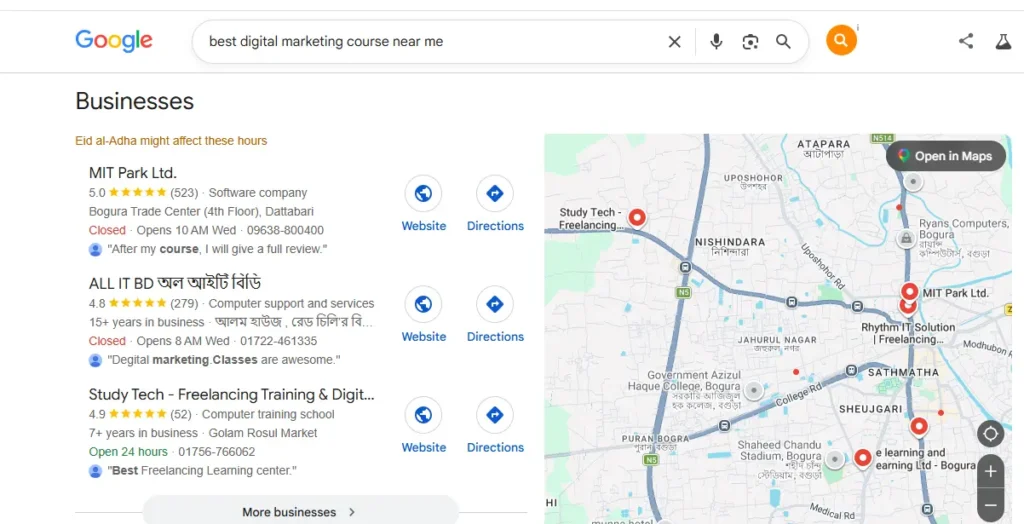
What is Google Maps SEO? (The Simple Truth)
Google Maps SEO (often referred to simply as Local SEO) is the systematic process of optimizing your online footprint so that when a customer in your specific city searches for your services, your business appears in the top 3 spots of the Google Map pack. It is the difference between thriving and closing your doors.
It’s not about tricking Google. It’s about aligning your digital properties—specifically your Google Business Profile—with exactly what the algorithm is looking for to deliver a great user experience. When you master local SEO Google Maps, you bypass the expensive ad clicks and land directly in front of people who have their wallets out and are ready to buy. Unlike traditional organic SEO, which can take months to yield results globally, local map optimization targets people physically close to you right now.
How the Google Maps Ranking Algorithm Actually Works
Google doesn’t randomly pick businesses for the map pack. It relies on three core pillars to determine your Google Maps ranking. Understanding these three pillars is the foundation of everything we do in Google Maps SEO.
- Relevance: Does your business match what the user is searching for? If they search “emergency plumber,” and you are an HVAC technician, you won’t rank. Your categories and keywords must align perfectly.
- Distance: How close is your business to the searcher’s physical location or the area they specifically typed into the search bar? Google prioritizes proximity because local search is inherently about convenience.
- Prominence: How well-known and authoritative is your business online? This is where reviews, backlinks, and citations come into play. A business with 500 reviews and news articles will outrank a business with 5 reviews, even if the latter is slightly closer. [Internal Link: Local SEO Guide]
Your ultimate goal is to maximize Prominence and Relevance so heavily that you can overcome a competitor who might be geographically slightly closer to the searcher.
Top 10 Map Pack Ranking Factors You Must Control
If you want to know how to rank on Google Maps fast, you cannot guess. You need to manipulate the exact map pack ranking factors that matter most in 2026. Here are the top 10 factors that move the needle:
- Primary Category Match: This is the heaviest weighted factor in the algorithm. Your primary Google Business Profile category must exactly match the searcher’s intent. If you are a roofer, do not choose “General Contractor.”
- Physical Proximity: Google favors businesses close to the searcher. While you can’t move your store, you can optimize your website and profile for specific neighborhood keywords to signal relevance to surrounding areas.
- Review Quantity & Velocity: The total number of reviews you have matters, but the speed at which you get them (velocity) proves to Google you are an active, popular business. A sudden spike in reviews acts as a massive ranking trigger.
- Keyword Usage in Reviews: When customers mention your specific services in their reviews (“They did a great job on my roof repair“), it acts as a powerful semantic trust signal that boosts your Google Business Profile ranking.
- NAP Consistency: Your Name, Address, and Phone number must be identical across the entire internet. Inconsistencies shatter your local trust score.
- Inbound Link Authority: High-quality local backlinks pointing to your website pass “geographic authority” directly to your Maps listing. A link from a local Chamber of Commerce is gold. [External Link: Google’s SEO Starter Guide]
- Completeness of Google Business Profile: A fully filled-out profile with accurate hours, relevant attributes, and detailed services will always rank higher than a sparse, half-finished profile.
- Click-Through Rate (CTR): If Google shows your listing in position #4, and people consistently click it over the #3 listing, Google assumes you are highly relevant and will promote you.
- Proper Use of Service Areas: If you’re a service-based business, accurately defining your service areas in your GBP prevents Google from confusing your physical location with the areas you actually serve.
- Mobile Optimization: Over 70% of Map searches happen on mobile devices. If your linked website isn’t flawlessly mobile-friendly, your Google Maps SEO efforts will hit a brick wall.
The Ultimate Google Business Profile Optimization Checklist
Most businesses set up their profile in 10 minutes and forget it forever. That is a catastrophic mistake. Your GBP is your digital storefront. Use this comprehensive checklist to squeeze maximum ranking juice out of your profile for optimal Google Business Profile ranking:
- [ ] Primary Category: Set to your highest-value, most relevant service. Do not overthink it, but be precise.
- [ ] Secondary Categories: Add up to 9 highly specific secondary categories to capture long-tail searches.
- [ ] Business Description: Write a robust 750-character description packed with local keywords, written naturally for humans, not bots.
- [ ] Services & Products: Add a highly detailed list of services with accurate pricing and descriptions. Do not just say “Plumbing.” Say “Emergency Drain Cleaning – $150 – Available 24/7.”
- [ ] Attributes: Toggle every single relevant attribute (e.g., “Women-led,” “Free parking,” “Online appointments,” “LGBTQ+ friendly”).
- [ ] Q&A Section: Do not leave this blank. Seed it yourself. Ask 5-10 common questions and answer them thoroughly with local keywords.
- [ ] Weekly Posts: Treat your GBP like a micro-blog. Publish Google Updates at least once a week with special offers, tips, or behind-the-scenes photos. This shows active engagement.

Local Citations & NAP Consistency: The Silent Trust Signal
Imagine Google finds your phone number listed as (555) 123-4567 on your website, but (555) 123-4568 on Yelp, and missing entirely on YellowPages. Google gets confused. And when Google gets confused, it does not rank you. Period.
NAP (Name, Address, Phone) consistency is the unglamorous but absolutely critical backbone of Google Maps ranking. You need to ensure your exact business name, address, and phone number are identical on:
- Your Google Business Profile
- Your website footer and contact page
- Major aggregators (Yelp, BBB, YellowPages, Facebook)
- Industry-specific directories (e.g., Avvo for lawyers, Houzz for contractors)
Build citations on high-authority local directories manually. Never use tracking numbers or “DBA” names that differ from your official GBP name. A strong citation profile proves to Google’s algorithm that your business is a real, established entity in that specific geographic location.
The Safe Review Strategy: How to Get Reviews Fast
Reviews are the absolute lifeblood of local SEO Google Maps. They build trust, increase CTR, and directly impact your prominence score. But buying fake reviews will get your business permanently banned from Google. Here is the safe, fast, and ethical way to generate a massive wave of reviews:
- Ask at the Point of Delight: Don’t wait a week to send an email. Ask for a review the exact moment your customer is happiest (right after a successful service call, a great meal, or a positive purchase experience).
- Remove All Friction: Text them a direct link to your Google review page. If they have to search for your business, find the profile, and click “leave a review,” 90% of them will abandon the process.
- Use an Automated Follow-Up System: Use a reputable tool like GoHighLevel, Podium, or Birchbird to send an automated SMS or email exactly 2 hours after a job is marked complete.
- Reply to EVERY Single Review: This is crucial. Reply to positive reviews by naturally injecting keywords (“Thanks for trusting us with your HVAC installation in Dallas!”). Respond professionally and empathetically to negative reviews to show Google you care about customer service.
🔥 Unlock Your Google Maps SEO Checklist
Enter your details below to instantly download the 2026 Map Pack Blueprint PDF.
🔒 We respect your privacy. No spam, ever. Unsubscribe at any time. Read our Privacy Policy.
Geo-Targeting & Location Signals That Move the Needle
Google needs absolute, undeniable confirmation of where your business operates. To boost your geo-signals and supercharge your Google Maps SEO, you must implement these technical strategies:
- Embed a Google Map: Embed a Google Map of your exact business location directly on your website’s “Contact” page. Make sure the pin matches your GBP exactly.
- Local Landing Pages: If you serve multiple cities, create separate, highly optimized landing pages for each city. Include unique content, local testimonials, and embedded maps. [Internal Link: Local SEO Guide]
- Local Schema Markup: Add LocalBusiness structured data (JSON-LD format) to your website’s header. This tells search engines exactly what your business is, your hours, and where it is located in a language they perfectly understand.
- Mention Local Landmarks: Naturally mention local landmarks, neighborhoods, and highway intersections in your website copy and GBP posts (“Conveniently located right off I-95 near Central Park”).
Image Optimization for Google Maps Ranking
Images aren’t just for making your profile look pretty; they are a massive, underutilized Google Maps SEO signal if handled correctly. Most businesses upload images straight from their phone without a second thought. Here is how the pros do it:
- Geo-Tagging: Ensure the GPS metadata (EXIF data) is intact on photos taken at your business location. Google reads this data to verify your physical location.
- File Names: Never upload
IMG_9876.jpg. Rename your files tocity-service-keyword.jpg(e.g.,austin-roof-repair-company.jpg). This provides contextual clues to Google’s crawlers. - Alt Text: Add descriptive, keyword-rich alt text to images on your website that match your local search terms.
- Real, Authentic Photos: Ditch the generic stock images of people in suits shaking hands. Google’s algorithm and human users both heavily prefer authentic, high-quality photos of your actual team, your office exterior, and your real work.
The Critical Website + Maps SEO Connection
Your Google Business Profile does not exist in a vacuum. Your website’s SEO directly feeds your Maps ranking. If you want to know how to rank on Google Maps fast, you must realize that your website acts as the anchor for your local entity.
Ensure your website’s Title Tags and H1 tags include your city + service (e.g., “Best Landscaper in Chicago | XYZ Landscaping”). Ensure your website loads in under 3 seconds on mobile. Most importantly, make sure your website actively drives clicks to your Google Maps listing by embedding a prominent “Find Us on Google” button. A high Click-Through Rate (CTR) from your website to your Maps profile acts as a massive behavioral ranking booster, signaling to Google that users love your business.
7 Deadly Mistakes Killing Your Google Maps Ranking
Even with the best Google Maps SEO strategy, a single critical error can tank your rankings. Avoid these 7 deadly mistakes at all costs:
- Keyword Stuffing the Business Name: Naming your business “John’s Plumbing – Best Plumber in NYC Cheap Drain Cleaning” will get your profile suspended. Use your real, legal business name only.
- Using a P.O. Box for a Local Business: If you are a brick-and-mortar store, you must use your physical address. Virtual offices and P.O. boxes do not work for local map rankings anymore.
- Ignoring Negative Reviews: Hiding from bad reviews destroys your prominence signal. Address them head-on to prove your reliability to future customers and Google.
- Having Duplicate Listings: Multiple GBPs for the same business confuse the algorithm and split your ranking power. Use Google’s “Mark as Duplicate” tool to clean them up.
- No Website Link: Businesses without a linked, optimized website will hit a strict “glass ceiling” and rarely, if ever, break into the top 3 map pack spots.
- Turning Off Messaging: Enabling Google Messages increases engagement signals. If you turn it off, you miss out on leads and send negative engagement signals.
- Inconsistent Operating Hours: If your holiday hours are wrong and a customer shows up to a locked door, your bounce rate signals will tank your rankings. Keep your hours obsessively updated.
Case Study: How a Local Business Went From 0 to Top 3 in Google Maps in 30 Days
Note: Names and specific niches altered for client privacy, but the timeline, strategy, and data are 100% accurate.
The Client: A newly opened HVAC company in a highly saturated, ultra-competitive suburb of Phoenix, Arizona.
The Problem: They had a brand-new website and a claimed Google Business Profile, but they were ranking on page 5 of the Maps results. They were getting zero phone calls and burning through their startup capital.
The Strategy (Our Google Maps SEO Intervention):
- Profile Cleanup: We audited their GBP and discovered they had 4 duplicate listings created by old marketing agencies. We merged and deleted them to consolidate authority.
- Deep Optimization: We rewrote their GBP description, added 15 specific services with accurate pricing, and toggled 12 relevant attributes.
- Citation Blast: We built 30 high-quality, perfectly NAP-consistent local citations to establish immediate geographic trust.
- Review Velocity: We implemented an automated SMS follow-up system. They generated a rapid velocity of 22 reviews in just 3 weeks.
- Website Anchor: We optimized their website’s homepage with LocalBusiness schema markup, city-specific H1 tags, and an embedded map.
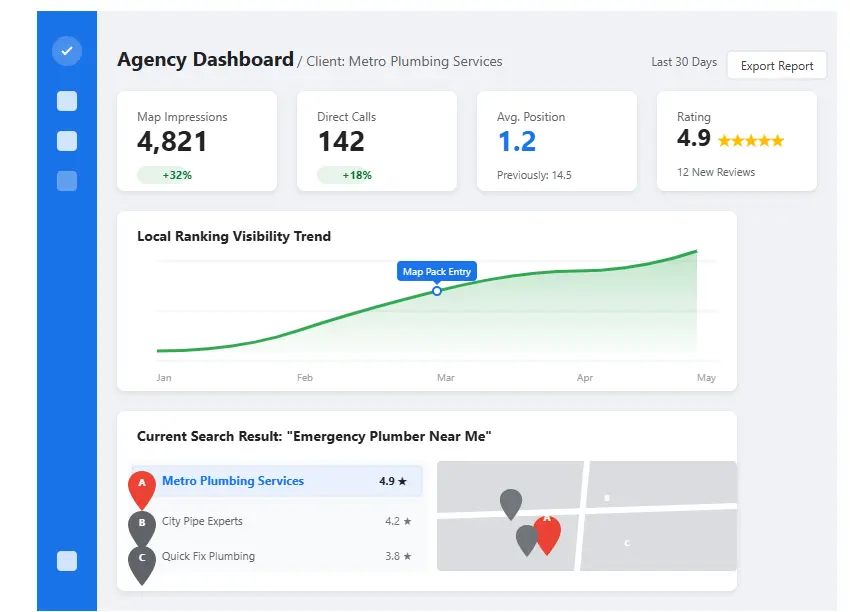
The Result: By day 32, they had jumped from page 5 to the #2 spot in the 3-pack. Their phone calls increased by 340% in the second month, generating over $45,000 in closed revenue directly from organic local search. This proves that when you manipulate the right map pack ranking factors, speed is possible.
Frequently Asked Questions About Google Maps SEO
Does Google Maps SEO still work in 2026?
Absolutely. In fact, with the rise of AI Overviews and zero-click searches, the Map Pack is one of the only guaranteed ways to get your business in front of a local buyer without paying per click. Local search is practically immune to AI replacement because Google must show physical local businesses for geo-modified queries. Investing in Google Maps SEO is safer now than ever.
How long does it take to rank on Google Maps?
If you are in a low-competition niche with a properly optimized GBP and solid NAP consistency, you can see dramatic results in 14 to 30 days. In highly competitive niches (like law, medicine, or heavy HVAC markets), it typically takes 60 to 120 days of aggressive optimization and consistent review generation to crack the top 3.
Can I rank on Google Maps without a website?
Yes, but only for extremely low-competition, hyper-local keywords (like a small town with only one coffee shop). For any profitable city, you will hit a strict glass ceiling. A properly optimized website acts as the necessary authoritative anchor for your Google Business Profile. Without it, competitors who have websites will almost always outrank you.
Why did my Google Maps ranking suddenly drop?
Sudden drops in Google Maps ranking are usually caused by three things: 1) A competitor aggressively optimized their profile and generated a surge of new reviews. 2) Your NAP consistency was broken (e.g., your address changed on a directory). 3) Google’s algorithm updated its map pack ranking factors, and you are missing a new requirement. An immediate audit is required.