
Technical SEO Guide 2026: The Complete Framework for Google & AI Search
If you’ve published genuinely useful content and watched it sit on page four of Google, you already know the frustrating truth: great writing isn’t enough. Search engines and AI systems can only rank what they can crawl, render, and understand — and in 2026, that bar is higher than it has ever been.
Google has shipped multiple confirmed core updates in 2026, and third-party rank-tracking studies have reported significant SERP volatility following recent updates. Exact percentage shifts vary by tracking methodology and source, so specific figures are marked below for independent verification rather than stated as fixed fact. At the same time, AI Overviews, AI Mode, ChatGPT, Claude, Gemini, and Perplexity are increasingly answering questions before anyone clicks a blue link. Technical SEO is no longer just about pleasing Googlebot — it is the foundation that determines whether your content is even eligible to be seen, ranked, or cited by any of these systems.
Research Note: [SEORAF Research Placeholder — exact percentage of top-three ranking volatility following the most recent 2026 core update pending verification against current SEO industry tracking reports (e.g., Semrush Sensor, SISTRIX Visibility Index) before publication]
This guide covers every layer of technical SEO that matters in 2026: crawling, indexing, Core Web Vitals, JavaScript rendering, structured data, enterprise-scale technical management, and AI search optimization. It is written to take you from “I don’t know what a canonical tag is” to “I’m managing crawl budget across a million-URL enterprise site,” with audit-ready frameworks at every stage — not just definitions.
Quick Answer: Technical SEO is the discipline of optimizing a website’s infrastructure — crawlability, indexability, speed, code, and structured data — so search engines and AI systems can access, understand, and rank its content. It is the foundation every other layer of SEO depends on.
1. What Is Technical SEO
Quick Answer: Technical SEO is the set of optimizations that make a website easy for search engines and AI crawlers to access, render, and index — separate from the content itself or the links pointing to it. Without it, even the best content can remain invisible to search.
Think of technical SEO as the plumbing of a website. Nobody visiting a house cares about the pipes behind the walls, but if they’re broken, nothing else functions. The same logic applies here: a crawler has to physically reach a page, download it, render any JavaScript, understand the content, and decide whether it qualifies for the index — all before ranking even becomes a question.
Technical SEO spans three foundational layers:
- Crawlability — can search engine bots find and access your pages at all?
- Renderability — can they see the actual content, including anything built with JavaScript?
- Indexability — once seen, does the page qualify to be stored and served in search results?
This is distinct from content quality (what the page says) and off-page SEO (who links to it). A technically broken page with excellent writing will still underperform, because the search engine never gets a clean read on what has been written.
Expert Insight: Technical SEO is frequently treated as a one-time setup task. In reality, it behaves more like infrastructure maintenance — a passing audit today does not guarantee a passing audit after the next CMS update, framework migration, or plugin change. Enterprise teams that treat technical SEO as continuous monitoring rather than a project consistently outperform those that audit once a year.
Common Mistake: Assuming that if a page “looks fine” in a browser, it must be crawlable and indexable. Browsers execute JavaScript and apply significant error tolerance that search crawlers do not always replicate. Visual correctness and technical correctness are not the same thing.To better understand why these technical differences matter, see our What Is Technical SEO — Full Guide.
Enterprise Consideration: On large sites, technical SEO problems compound. A single incorrect canonical rule in a page template can silently affect hundreds of thousands of URLs before anyone notices in analytics, because organic traffic often declines gradually rather than collapsing overnight.If you’re new to these concepts, our Technical SEO for Beginners explains the fundamentals before moving on to advanced implementations.
Real-World Scenario: A mid-size ecommerce retailer migrated to a new JavaScript framework and saw organic traffic drop nearly 40% within six weeks — not because the content got worse, but because product descriptions rendered client-side, and search crawlers were indexing empty pages. The fix was not a content strategy change; it was implementing server-side rendering.
According to Google Search Central’s documentation, a page must be both crawlable and indexable before any ranking signal — including content quality — comes into play. That ordering matters: technical SEO is not one input among many; it is the gate everything else has to pass through first.
AI Search Optimization Note: AI crawlers evaluate accessibility the same way search engines do, but with less tolerance for JavaScript-dependent content. A page that is technically “indexable” for Google may still be functionally invisible to an AI system that never executes the script rendering its content.
SEORAF Expert Perspective: In our own audit work, the single most common root cause behind “my content is great but it’s not ranking” turns out to be indexability, not content quality. Teams tend to reach for a content rewrite before checking Search Console — reversing that order consistently saves weeks of wasted effort.
2. Why Technical SEO Matters in 2026
Quick Answer: In 2026, technical SEO determines not just Google rankings but whether AI systems such as ChatGPT, Perplexity, and Google AI Overviews can read and cite your content at all. Most AI crawlers do not execute JavaScript, making technical health a precondition for AI visibility rather than an optional upgrade.
For years, technical SEO was framed almost entirely around pleasing Googlebot. That framing is now incomplete. Google’s own guidance on AI features states plainly that optimizing for AI Overviews and AI Mode is still SEO — the same fundamentals of crawlability, quality, and technical accessibility that drive traditional rankings also drive AI citation visibility. Independent studies have reported that a substantial share of AI Overview citations pull from pages already ranking in the top ten organic results, meaning your technical foundation now does double duty.
Research Note: [SEORAF Research Placeholder — exact percentage of AI Overview citations sourced from top-10 organic results pending verification against the most current third-party study before publication; figures in this space change frequently as AI Overview coverage expands]
What has changed practically:
Core Web Vitals — LCP, INP, and CLS — are confirmed ranking signals, and Google evaluates the mobile version of a site as the primary version for crawling, indexing, and ranking. Structured data increasingly feeds both rich results and the entity understanding that AI Overviews rely on to generate and attribute answers. AI crawlers from OpenAI, Anthropic, and Perplexity behave differently than Googlebot in one critical way: most do not render JavaScript. If key content only appears after a script runs in the browser, an AI crawler may see nothing at all.
Pro Tip: Run a side-by-side comparison of what Googlebot renders (via the URL Inspection Tool) versus what a non-JavaScript-executing crawler would see (view your page’s raw HTML source before any script executes). Any critical content missing from the raw HTML is a direct AI-visibility risk, regardless of how the page performs in Google.
Decision Framework — Should You Prioritize AI Search Readiness Right Now?
| Signal | Prioritize Now | Can Wait |
|---|---|---|
| Site relies on client-side rendering for core content | Yes | — |
| Significant traffic already comes from informational, question-based queries | Yes | — |
| Site is primarily transactional/checkout-flow pages | — | Yes |
| Content already ranks in top 10 organically | Yes (low-effort extension) | — |
[Internal Link: Technical SEO Ranking Factors] [Internal Link: Technical SEO for AI Search]
External Reference: Google Search Central Blog — “AI features and your website” outlines Google’s current position on this relationship in detail.
AI Search Optimization Note: Because AI Overviews draw heavily from already-ranking pages, there is no meaningful trade-off between traditional SEO and AI search optimization — strengthening one strengthens the other.
3. Technical SEO vs. On-Page SEO
Quick Answer: Technical SEO makes a site accessible to search engines; on-page SEO makes content relevant once it is found. They solve different problems, and neither substitutes for the other.
It is easy to conflate the two because both live “on the website,” but they answer fundamentally different questions.
| Dimension | Technical SEO | On-Page SEO |
|---|---|---|
| Core question | Can search engines access and understand this page? | Does this page satisfy the searcher’s intent? |
| Typical owner | Developers, technical SEOs | Content writers, marketers |
| Examples | Robots.txt, schema markup, Core Web Vitals, canonical tags | Title tags, headers, keyword usage, content depth |
| Failure mode | Content is invisible or misread by search engines | Content is visible but underperforms competitively |
Expert Insight: On-page SEO amplifies what is already crawlable and indexable. Applied to a technically broken page, even excellent on-page optimization produces unreliable results, because the search engine may not be reading the page correctly in the first place. This is precisely why professional audits address the technical layer before touching content strategy.
Common Mistake: Investing heavily in content refreshes and keyword optimization while ignoring a persistent indexation issue — effectively polishing a page that search engines cannot fully see.
Decision Framework — Where to Invest First
| Situation | Invest In |
|---|---|
| Search Console shows indexation errors or crawl anomalies | Technical SEO first |
| Page is indexed and stable, but ranks below relevant competitors | On-page SEO (content depth, intent match, keyword coverage) |
| Rankings dropped after a content update with no template changes | On-page SEO regression — review the specific edit |
| Rankings dropped after a redesign, migration, or CMS update | Technical SEO regression — check redirects, canonicals, robots.txt |
Enterprise Consideration: On large sites, technical and on-page issues often get diagnosed by separate teams working from separate dashboards, which can delay root-cause identification. A ranking drop investigated purely as a content problem — or purely as a technical problem — without cross-checking both frequently leads to fixing the wrong layer first and losing weeks before the actual cause surfaces.
[Internal Link: On-Page SEO Hub]
4. Core Components of Technical SEO
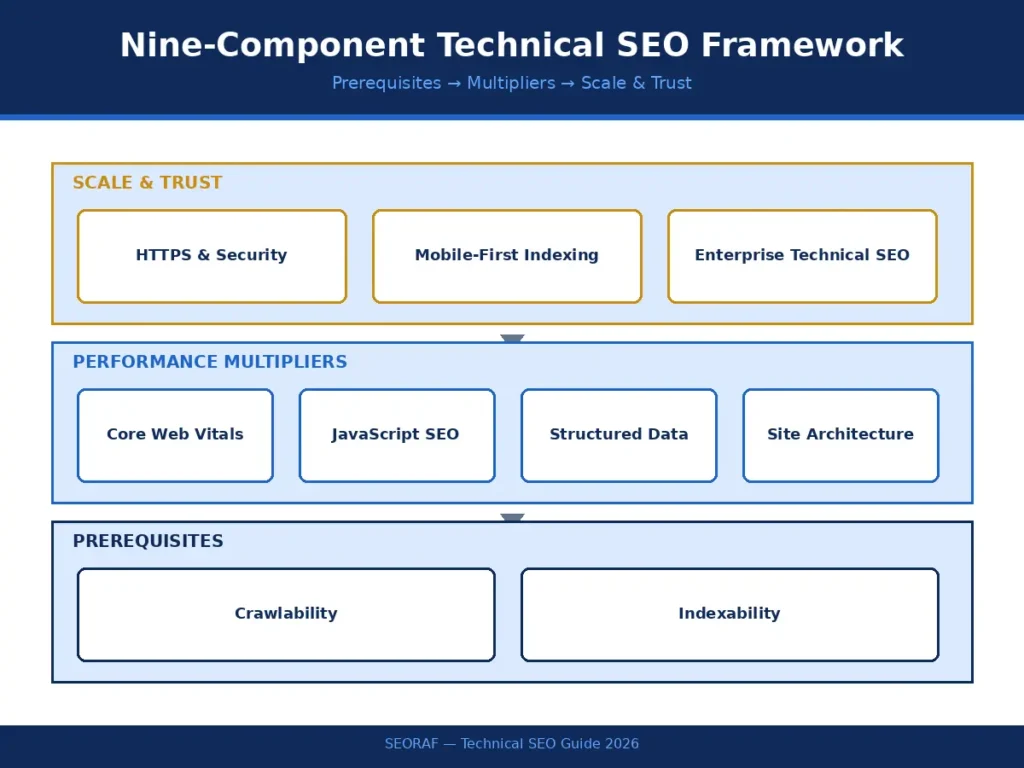
Quick Answer: Technical SEO breaks into nine practical areas — crawlability, indexability, site architecture, Core Web Vitals, JavaScript SEO, structured data, HTTPS, mobile-first indexing, and enterprise-scale technical management. Each has distinct tools, risks, and fixes.
Rather than treating technical SEO as one undifferentiated task, it is more useful to think in terms of distinct, manageable components, each with a clear owner and fix path:
- Crawlability — whether Googlebot and AI crawlers can reach pages via robots.txt, sitemaps, and internal links.
- Indexability — whether accessible pages qualify to enter the index, governed by canonical tags, noindex directives, and duplicate content handling.
- Site architecture — how pages connect via internal linking depth, URL structure, and breadcrumb navigation.
- Core Web Vitals — LCP, INP, and CLS, the three confirmed performance ranking signals.
- JavaScript SEO — how a site renders content, and whether that strategy works for both Googlebot and non-JS-executing AI crawlers.
- Structured data — machine-readable markup (JSON-LD) that helps search engines and AI systems verify facts and understand entities.
- HTTPS and security — the baseline trust signal that also prevents mixed-content errors from breaking functionality.
- Mobile-first indexing — the requirement that the mobile site, not desktop, is what gets crawled and ranked.
- Enterprise-scale technical SEO — crawl budget management, log file analysis, and international SEO for large or multi-market sites.
Decision Framework — Prioritizing These Nine Components
Crawlability and indexability are prerequisites: if either is broken, nothing downstream matters. Core Web Vitals and structured data are performance multipliers: they will not fix an invisible page but meaningfully strengthen a visible one. Enterprise-scale concerns are largely irrelevant for a small site and essential for a large one. Knowing which components matter for a specific site, at its specific size and stage, is itself a core technical SEO skill.
Mini Checklist — Component Audit Starting Point
- ☐ Confirm robots.txt is not blocking critical sections
- ☐ Confirm Search Console shows expected indexation rate
- ☐ Confirm Core Web Vitals pass on field data
- ☐ Confirm JavaScript-rendered content appears in raw HTML where critical
- ☐ Confirm schema validates without errors
- ☐ Confirm HTTPS is enforced site-wide with no mixed content
[Internal Link: Crawling cluster] [Internal Link: Indexing cluster] [Internal Link: Core Web Vitals cluster] [Internal Link: JavaScript SEO cluster] [Internal Link: Structured Data cluster] [Internal Link: Advanced Technical SEO cluster]
SEORAF Expert Perspective: Clients frequently ask which of these nine components to tackle first. Our answer is consistent: whichever prerequisite is currently broken, regardless of how advanced the rest of the site is. A perfectly tuned Core Web Vitals score cannot compensate for a robots.txt file blocking the section being optimized.
5. Technical SEO Workflow
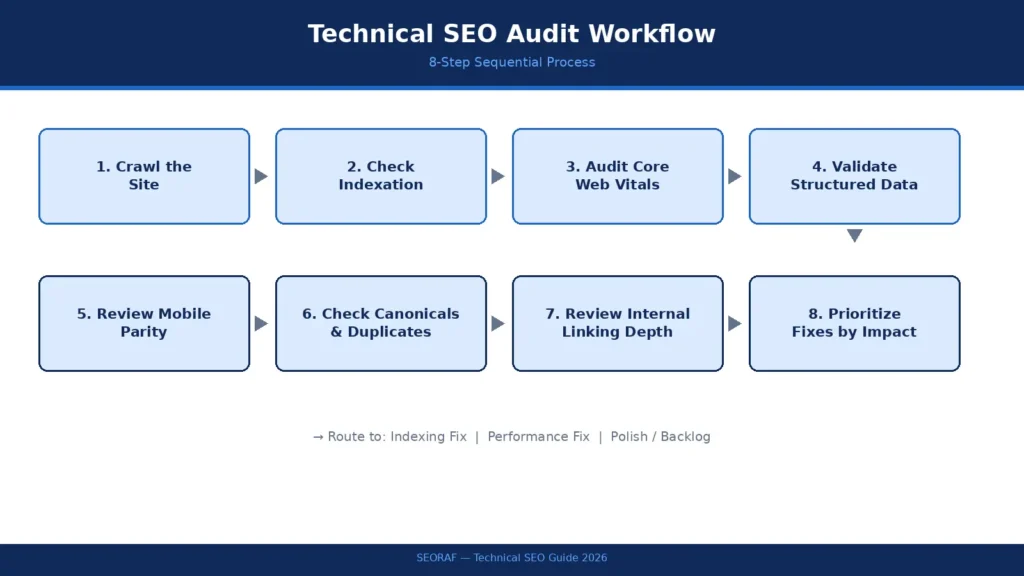
Quick Answer: A repeatable technical SEO workflow starts with crawling the site, checking indexation, auditing Core Web Vitals, validating structured data, and prioritizing fixes by impact — indexing issues first, performance second, polish last.
Technical SEO audits fail most often not because practitioners lack knowledge, but because they check things in the wrong order and burn time polishing details while a larger problem sits unaddressed. This sequence avoids that trap:
- Crawl the site with Screaming Frog or Sitebulb to surface broken links, redirect chains, and duplicate content at scale.
- Check indexation status in Google Search Console — pages indexed versus submitted, and why any are excluded.
- Audit Core Web Vitals using PageSpeed Insights, prioritizing field data (real user CrUX data) over lab data.
- Validate structured data with Google’s Rich Results Test to catch schema errors before they suppress rich result eligibility.
- Review mobile-first parity — confirm the mobile site contains the same content, links, and structured data as desktop.
- Check canonical and duplicate content issues, consistently the most common problem on sites above a few thousand pages.
- Review internal linking depth — no important page should sit more than two or three clicks from the homepage.
- Prioritize fixes by impact: indexing blockers first, then Core Web Vitals, then structured data, then smaller polish items.
Pro Tip: Run this workflow as a recurring calendar event, not a one-off project. Enterprise teams that schedule quarterly full audits and monthly spot-checks on critical templates catch regressions before they compound into measurable ranking loss.
Common Mistake: Fixing Core Web Vitals or schema errors on pages that are not even indexed. Always confirm a page is discoverable and indexable before investing effort in performance or structured data refinement — otherwise the fix has no audience.
[Internal Link: Technical SEO Audit Guide] [Internal Link: Technical SEO Checklist]
External Reference: Google Search Console Help documentation on the URL Inspection Tool is the authoritative source for verifying exactly how Google sees a specific page.
6. Indexing & Crawling Explained
Quick Answer: Crawling is how search engines discover pages; indexing is the decision to store and serve them in search results. A page can be crawled but never indexed — one of the most common, and most anxiety-inducing, technical SEO problems.
Crawling starts with Googlebot (or an AI crawler) requesting a URL, guided by sitemaps and internal links, and constrained by robots.txt. Robots.txt does not hide pages from search results directly — it tells crawlers where not to spend time. A poorly configured robots.txt can accidentally block entire sections of a site, one of the most damaging and most avoidable technical mistakes.
Crawl budget — the number of pages a search engine is willing to crawl on a site within a given timeframe — becomes a real constraint once a site grows past a few thousand URLs. Wasting crawl budget on low-value pages (filtered category pages, session-ID URLs, thin tag pages) leaves fewer resources for discovering genuinely important content.
Indexing is the next gate. Once crawled, Google decides whether to store a page based on signals like content uniqueness, canonical tags, and noindex directives. This is where the most common confusion lives: canonical tags tell search engines which version of duplicate or near-duplicate content is authoritative, while noindex tags explicitly exclude a page from the index. Use canonical when multiple URLs serve genuinely similar content and ranking signals should consolidate. Use noindex when a page — an internal search results page, a thank-you page — should never appear in search results at all.
Decision Framework — Canonical vs. Noindex
| Situation | Use Canonical | Use Noindex |
|---|---|---|
| Duplicate product pages via URL parameters | Yes | — |
| Print-friendly version of an article | Yes | — |
| Internal search results pages | — | Yes |
| Thank-you / confirmation pages | — | Yes |
| Paginated series (page 2, page 3) | Self-referencing canonical, no noindex | — |
Common Mistake: Applying noindex to a page that also has a canonical tag pointing elsewhere — this sends contradictory signals and Google’s behavior in this scenario is inconsistent. Choose one directive per page, not both.
Enterprise Consideration: On sites with tens of thousands of URLs, orphan pages — pages with no internal links pointing to them — are a quiet but significant indexing problem. Even a technically perfect page can go unindexed indefinitely if nothing on the site links to it, because crawlers primarily discover new URLs by following links from pages they already know. Sitemaps supplement internal linking; they do not replace it.
It is also worth understanding that crawl frequency is not uniform. Google adjusts how often it revisits a page based on that page’s historical update frequency and perceived importance — a homepage or frequently updated hub page might be crawled daily, while a static, rarely changed page might go weeks between visits. This is why refreshing key statistics on a pillar page is not just useful for readers; it signals to Google that the page deserves more frequent attention.
[Internal Link: Robots.txt Guide] [Internal Link: XML Sitemap Guide] [Internal Link: Crawl Budget Optimization] [Internal Link: Canonical Tag Guide] [Internal Link: Why Pages Are Not Indexed]
Real-World Scenario: A SaaS company with 50,000 auto-generated URLs from faceted navigation (filters like color, size, price range) found that Googlebot was spending most of its crawl budget on filter combinations nobody searched for, while core product pages went days between crawls. The fix combined robots.txt rules, canonical tags pointing filtered pages back to the parent category, and a pruned XML sitemap — not new content.
Mini Checklist — Indexing Health
- ☐ No contradictory canonical/noindex pairs
- ☐ No important page is orphaned (zero internal links)
- ☐ Sitemap contains only indexable, canonical URLs
- ☐ Faceted/filtered URLs are canonicalized or blocked appropriately
External Reference: Google Search Central’s documentation on how Google Search indexing works is the definitive technical source here.
7. Core Web Vitals (2026 Update)
Quick Answer: Core Web Vitals — LCP, INP, and CLS — are confirmed Google ranking signals measuring load speed, interactivity, and visual stability. INP officially replaced FID in March 2024, so any guidance still referencing FID is outdated.
Core Web Vitals measure how a page actually feels to use, based on real Chrome browser data rather than a lab simulation:
- LCP (Largest Contentful Paint) measures how long the largest visible element takes to load — a hero image, main heading, or key content block.
- INP (Interaction to Next Paint) measures how quickly the page responds to interaction — clicks, taps, keyboard input — across the entire visit, not just the first interaction.
- CLS (Cumulative Layout Shift) measures visual stability — whether elements jump as the page loads, often caused by images or ads without reserved space.
Expert Insight: The distinction between field data and lab data matters more than most guides acknowledge. Field data comes from real Chrome User Experience Report (CrUX) data — actual visitors on actual devices and networks — and that is what Google uses for ranking. Lab data, from tools like Lighthouse, is a controlled simulation useful for diagnosing why a metric is failing, but will not always match real user experience. Always trust field data for ranking decisions; use lab data as the diagnostic tool.
Common Mistake: Optimizing exclusively against Lighthouse scores while ignoring the CrUX report in Search Console. A page can score 100 in Lighthouse and still fail Core Web Vitals for real users on mid-range devices and slower networks.
Decision Framework — Diagnosing a Failing Metric
| Symptom | Likely Cause | First Fix to Try |
|---|---|---|
| Poor LCP | Large unoptimized hero image, slow server response | Compress/resize images, use a CDN |
| Poor INP | Heavy third-party scripts blocking the main thread | Defer non-critical JavaScript |
| Poor CLS | Images/ads without reserved dimensions | Set explicit width/height attributes |
[Internal Link: Core Web Vitals Explained] [Internal Link: LCP Optimization] [Internal Link: INP Optimization] [Internal Link: CLS Fix Guide] [Internal Link: Page Speed Optimization]
Real-World Scenario: A media publisher with strong Lighthouse scores was still failing Core Web Vitals in Search Console because field data told a different story — real users on mid-range Android devices, on slower mobile networks, experienced meaningfully worse INP than lab tests showed. The fix targeted third-party ad scripts blocking the main thread, not the code the lab test measured.
Enterprise Consideration: At scale, Core Web Vitals should be monitored per template (homepage, category page, product page), not just site-wide, since a single failing template can drag down aggregate scores while masking which page type actually needs attention.
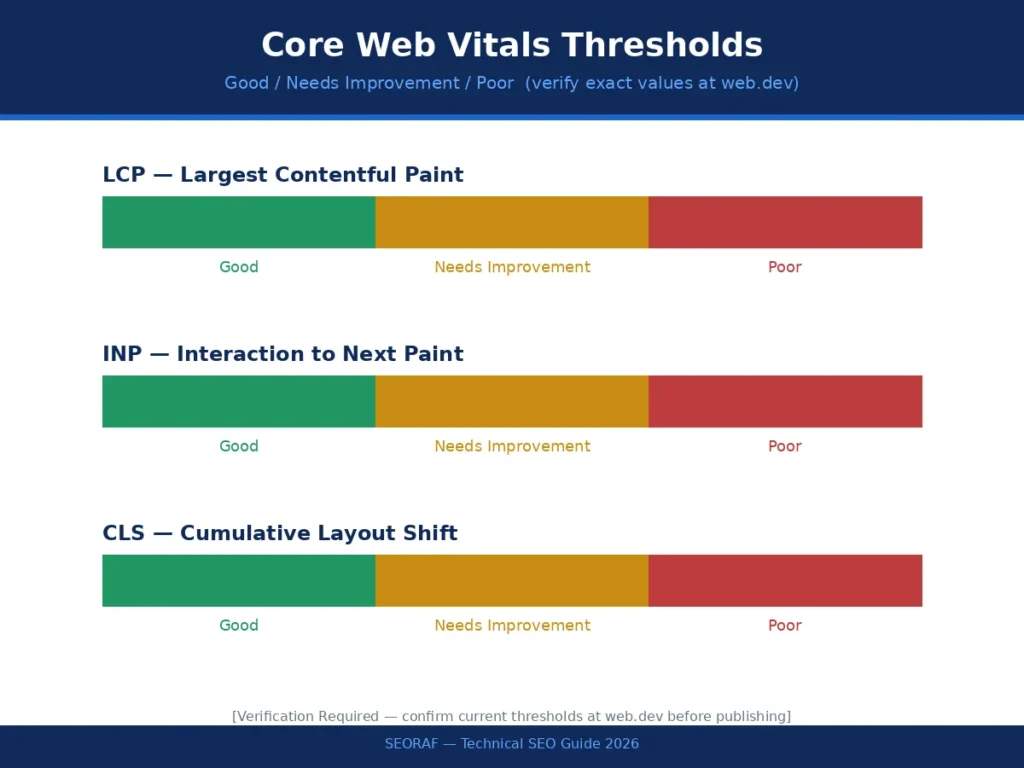
Research Note: [SEORAF Research Placeholder — confirm current LCP/INP/CLS numeric thresholds directly against web.dev before publishing; do not carry forward thresholds from prior guide versions without re-verification]
External Reference: web.dev’s Core Web Vitals documentation, maintained by Google, is the primary technical resource for thresholds and measurement methodology.
8. JavaScript SEO & Rendering
Quick Answer: JavaScript SEO governs how search engines and AI crawlers see content built or modified by JavaScript. Server-side rendering (SSR) remains the safest approach in 2026, because most AI crawlers do not execute JavaScript at all.
Modern websites — especially those built on React, Vue, or similar frameworks — often rely on client-side rendering (CSR), where the browser builds the page’s content after the initial HTML loads. Googlebot has improved at rendering JavaScript over time, but it still adds latency and risk: rendering happens in a delayed second wave after initial crawling, and if something breaks in that process, content simply does not get indexed.
For AI search, the risk is more absolute. GPTBot, ClaudeBot, and PerplexityBot generally do not execute JavaScript. If critical content — product details, article body text, pricing — only exists after a script runs in the browser, these systems may see an essentially blank page. This turns rendering strategy from a technical implementation detail into a genuine business decision about AI visibility.
Server-side rendering (SSR) sends fully built HTML from the server, so both traditional and AI crawlers see complete content immediately. Client-side rendering (CSR) delegates that work to the browser, faster to build but riskier for SEO. Dynamic rendering — serving a pre-rendered version to bots and a JS version to users — is a workaround, not a long-term fix, and Google has moved away from recommending it as a primary strategy.
Decision Framework — Choosing a Rendering Strategy
| Priority | Recommended Approach |
|---|---|
| Maximum crawlability + AI visibility | Server-side rendering (SSR) or static generation |
| Highly interactive app-like experience, less SEO-critical content | Client-side rendering acceptable |
| Legacy site, cannot migrate rendering short-term | Dynamic rendering as temporary bridge, not permanent solution |
Common Mistake: Assuming that because Googlebot “can” render JavaScript, rendering strategy is a solved problem. Google’s own guidance frames JavaScript rendering as a second-wave process with added latency and failure risk — not a guarantee equivalent to serving static HTML.
Pro Tip: View a page’s raw HTML source (not the rendered DOM) to see exactly what content exists before any JavaScript executes. If critical text, links, or metadata are missing at this stage, they are effectively invisible to any crawler that does not render JavaScript.
[Internal Link: JavaScript SEO Basics] [Internal Link: Server-Side Rendering (SSR)] [Internal Link: React SEO Guide] [Internal Link: Next.js SEO Guide]
Enterprise Consideration: For large sites managing rendering strategy across multiple teams, establish rendering standards at the framework/template level, not the individual-page level — inconsistent rendering approaches across a site create unpredictable crawl and index behavior that is difficult to diagnose later.
AI Search Optimization Note: Treat JavaScript rendering audits as a required step before any AEO/GEO optimization work. Formatting content beautifully for AI extraction is wasted effort if an AI crawler cannot see the content at all.
External Reference: Google Search Central’s “Understand the JavaScript SEO Basics” documentation covers Google’s current rendering process in technical detail.
9. Structured Data & Schema
Quick Answer: Structured data (schema markup) is code that helps search engines and AI systems understand what content means, not just what it says. It does not directly boost rankings, but it strengthens entity understanding and unlocks rich results.
It is worth correcting a common misconception directly: schema markup is not a ranking lever that can be pulled to climb positions. What it does is remove ambiguity. A search engine reading plain text has to infer that a page is a recipe, a product, an FAQ, or an organization. Structured data states this explicitly, in a format machines can parse reliably — which matters increasingly for AI systems synthesizing answers from multiple sources, since clear entity signals make content easier to trust and cite accurately.
The schema types that matter most in a technical SEO context:
- Article — for guides and blog content, carrying headline, author, and publish/update dates.
- FAQPage — for visible, genuine Q&A content, never hidden questions purely for SEO.
- HowTo — for numbered, sequential processes like an audit workflow.
- BreadcrumbList — for site navigation hierarchy.
- Organization and Person — for brand and author identity, supporting E-E-A-T signals.
Best Practice: Always implement structured data as JSON-LD, placed in the page head, rather than older microdata formats — easier to maintain and less prone to markup errors. Always validate implementation with Google’s Rich Results Test before publishing; a schema error can suppress rich result eligibility entirely rather than simply failing to help.
Common Mistake: Marking up content with FAQPage schema that does not appear visibly on the page, or that answers different questions than what’s shown to users. This violates Google’s structured data guidelines and risks manual action, not just lost rich-result eligibility.
Mini Checklist — Schema Implementation
- ☐ JSON-LD format used, not microdata
- ☐ All marked-up content is visible on the page
- ☐ Schema validated with Rich Results Test, zero errors
- ☐ Author/Organization entities match consistently across the site
[Internal Link: Schema Markup Guide] [Internal Link: FAQ Schema] [Internal Link: Breadcrumb Schema] [Internal Link: Rich Results Optimization]
AI Search Optimization Note: Structured data functions as an entity confirmation layer for AI systems — it does not replace clear prose explanations, but it reinforces them, making it easier for a generative model to correctly attribute facts to your page rather than a competitor’s.
External Reference: Google Search Central’s “Understand How Structured Data Works” and Schema.org’s vocabulary reference are the two sources worth bookmarking for implementation questions.
10. Technical SEO Maturity Model
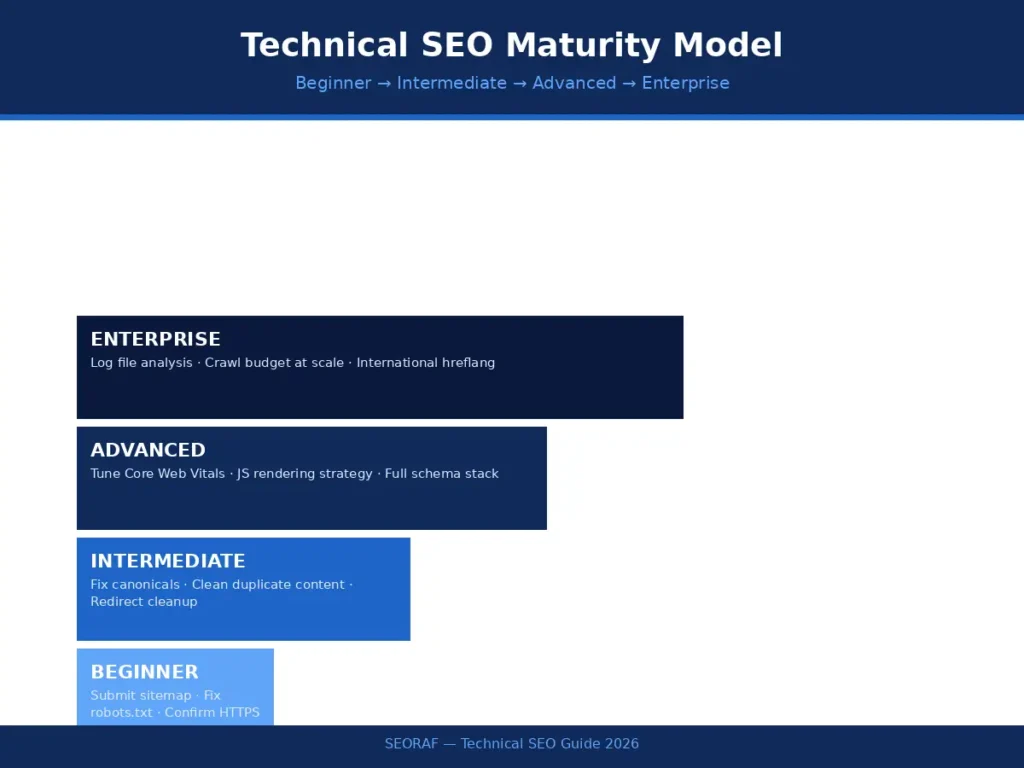
Quick Answer: Technical SEO maturity moves through four stages — beginner, intermediate, advanced, and enterprise — each with a different focus, from fixing basic visibility issues to managing crawl budget across millions of URLs.
Not every site needs every technique in this guide applied simultaneously. A five-page local business site has fundamentally different technical needs than a million-URL marketplace. Thinking in maturity stages helps prioritize correctly instead of chasing advanced tactics a site does not yet need.
| Stage | Focus | Example Actions |
|---|---|---|
| Beginner | Fix basic visibility | Submit a sitemap, correct robots.txt errors, confirm HTTPS is active site-wide |
| Intermediate | Resolve specific errors | Fix canonical and duplicate content issues, clean up redirect chains |
| Advanced | Systematic optimization | Tune Core Web Vitals, choose a deliberate JavaScript rendering strategy, implement a full schema stack |
| Enterprise | Manage at scale | Analyze server log files, manage crawl budget across large URL sets, implement hreflang for international markets |
Expert Insight: If uncertain which stage applies, the honest answer is usually revealed by the biggest current pain point. Wondering whether pages are indexed at all signals beginner-to-intermediate. Debating SSR versus CSR trade-offs or optimizing schema stacks signals advanced. A conversation centered on crawl budget allocation across a million-URL catalog signals enterprise scale.
[Internal Link: Technical SEO for Beginners] [Internal Link: Technical SEO Strategy] [Internal Link: Log File Analysis SEO] [Internal Link: International SEO Setup]
11. Troubleshooting Framework
Quick Answer: Most technical SEO problems follow a repeatable pattern: identify the symptom, isolate the likely cause, apply a targeted fix, and verify the result in Search Console. Guessing at fixes without this sequence wastes time and can make things worse.
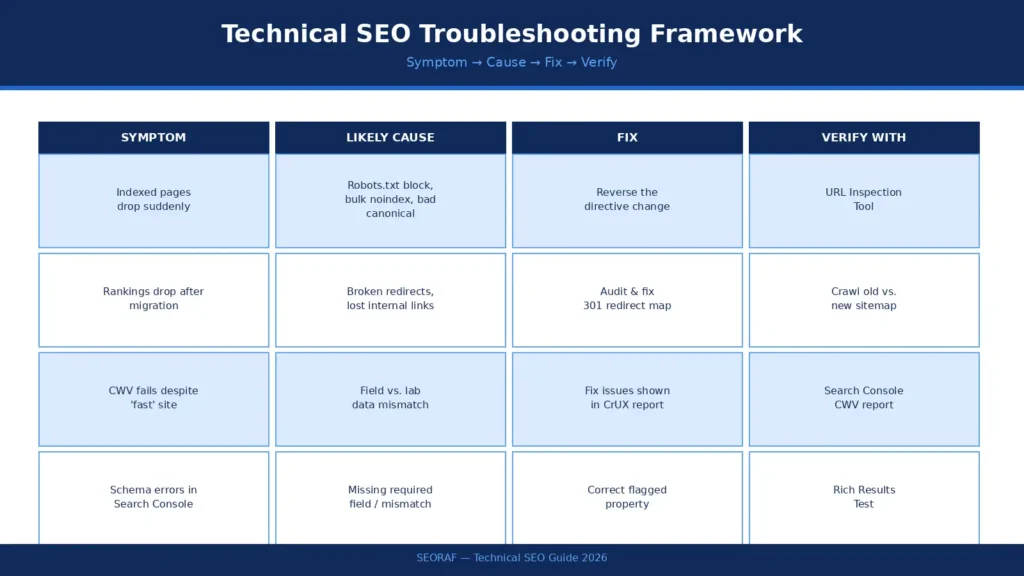
Sudden drop in indexed pages. Check Search Console’s Index Coverage report first — it usually shows a spike in “Excluded” or “Discovered, not indexed” pages. Common causes include an accidental robots.txt block after a deployment, a bulk noindex tag applied by a CMS update, or a canonical tag pointing incorrectly. Verify the fix using the URL Inspection Tool on a sample of affected pages before assuming the issue is resolved site-wide.
Rankings drop after a site migration or redesign. This almost always traces back to broken redirects, lost internal links, or a change in URL structure without proper 301 redirects. Crawl the old and new sitemaps side by side to confirm every legacy URL has a clean, single-hop redirect — redirect chains (A redirects to B redirects to C) waste crawl budget and dilute link equity.
Core Web Vitals failing despite a “fast” site. As covered earlier, this is frequently a field-data-versus-lab-data mismatch. Pull the actual CrUX report data by device type before assuming a Lighthouse score reflects real user experience.
Schema errors reported in Search Console. Run the specific URL through the Rich Results Test, fix the flagged property, and re-test — schema errors are usually a missing required field or a mismatch between the markup and the visible page content.
Common Mistake: Applying a fix broadly across an entire site before confirming the root cause on a small sample. Enterprise-scale mistakes are enterprise-scale in blast radius — validate on a handful of URLs first.
[Internal Link: Indexing Issues Fix Guide] [Internal Link: Technical SEO Recovery Guide] [Internal Link: Technical SEO Case Studies]
External Reference: Google’s Search Status Dashboard and the Google Search Central Help Community are useful for confirming whether an issue is isolated to a single site or part of a broader indexing or algorithm event.
12. Enterprise SEO Strategy
Quick Answer: At enterprise scale, technical SEO shifts from fixing individual pages to managing systems — crawl budget, log files, faceted navigation, and international structure — across sites with hundreds of thousands or millions of URLs.
Everything covered so far still applies at enterprise scale, but the stakes and mechanics change. A single misconfigured redirect rule does not affect one page — it can affect an entire URL pattern across a million pages overnight.
Crawl budget management becomes an active discipline rather than a background concern once a site crosses roughly a thousand pages. Log file analysis — examining raw server access logs to see exactly which URLs Googlebot actually requests, how often, and with what response codes — is the only reliable way to see how crawl budget is really being spent, as opposed to how it is assumed to be spent based on the sitemap alone.
Faceted navigation and pagination are common enterprise traps. Ecommerce and marketplace sites often generate enormous numbers of filter-combination URLs (category plus color plus size plus price range), each technically a unique URL but offering little unique value to search engines. Left unmanaged, these can consume the vast majority of available crawl budget. The fix typically combines canonical tags, strategic noindex rules on low-value combinations, and parameter handling.
International SEO and hreflang become essential once a business serves multiple countries or languages from the same domain structure. Hreflang tags tell search engines which language or regional version of a page to serve to which audience — implemented incorrectly, this is a common source of the wrong-language page ranking in the wrong country, or duplicate-content signals across regional variants.
Enterprise Consideration: Reading log files well is a specific skill worth developing separately from general SEO auditing. At minimum, look for three patterns: URLs receiving heavy crawl attention despite low business value, important pages receiving little to no crawl activity, and spikes in server error response codes (5xx) that could be quietly throttling how much of a site Googlebot is willing to request in a given session. Most enterprise SEO teams pull this data monthly and cross-reference it against the sitemap to catch drift between intended and actual crawl behavior.
Governance also becomes a real technical SEO concern at this scale. A single template change pushed by a development team — an altered canonical tag pattern, a modified robots.txt rule, a new redirect rule — can silently affect hundreds of thousands of pages before anyone notices in analytics. Enterprise technical SEO programs typically require any changes to crawl-critical templates (robots.txt, canonical logic, redirect rules, sitemap generation) to go through the same review process as a code deployment, precisely because the blast radius of a mistake scales with the size of the site.
Decision Framework — Faceted Navigation Handling
| Facet Type | Recommended Treatment |
|---|---|
| High-search-volume filter combination (e.g., “red running shoes”) | Index, with unique content if possible |
| Low-value multi-filter combination (e.g., color + size + price + brand stacked) | Canonicalize to parent category |
| Session/tracking parameters | Block via robots.txt or parameter handling |
[Internal Link: Log File Analysis SEO] [Internal Link: Hreflang SEO Guide] [Internal Link: International SEO Setup] [Internal Link: Crawl Budget Advanced Strategy] [Internal Link: Faceted Navigation SEO]
Real-World Scenario: The faceted-navigation SaaS example referenced earlier scales up dramatically for a global marketplace with regional pricing and multiple languages — without disciplined crawl budget management and correct hreflang implementation, search engines can end up indexing thousands of near-duplicate variants instead of the canonical, correctly localized pages that should rank.
External Reference: Google Search Central’s “Large Site Owner’s Guide to Managing Your Crawl Budget” is the authoritative resource for this entire section.
13. AI Search Optimization (AEO/GEO)
Quick Answer: AI Search Optimization combines Answer Engine Optimization (AEO) — formatting content to be directly extractable by AI Overviews and featured snippets — with Generative Engine Optimization (GEO) — earning trust and citation from generative AI systems like ChatGPT and Perplexity. Both build directly on the technical foundation covered throughout this guide.
It helps to think of this as three layers working together rather than three competing strategies. SEO gets a page into the pool of crawlable, indexable content that search engines and AI systems can even consider. AEO makes that content easy to extract as a direct answer, through clear, self-contained responses to specific questions. GEO goes further, earning the kind of trust that makes an AI system choose to cite a brand when synthesizing a longer answer from multiple sources.
Decision Framework — SEO vs. AEO vs. GEO
| Layer | Goal | Primary Levers |
|---|---|---|
| SEO | Be crawlable and indexable | Robots.txt, sitemaps, canonical structure |
| AEO | Be directly extractable as an answer | Quick-answer blocks, question-form headings, FAQ schema |
| GEO | Be cited/trusted by generative AI | Expert quotes, original data, freshness, entity clarity |
A few practical, high-leverage tactics:
Open each major section with a direct, self-contained answer in the first few sentences — the format used throughout this guide. Research suggests a meaningful share of AI Overview citations pull from earlier portions of a page’s content, so front-loading clear answers carries disproportionate weight. Phrase key headings as questions, since that is how both traditional featured snippets and AI Overviews identify extractable candidates. Where genuine, add expert commentary, original data, and clearly sourced statistics — independent research into generative engine optimization has found correlations between expert quotes, cited statistics, and increased AI citation likelihood. Keep content fresh: available evidence suggests AI systems favor pages meaningfully updated within the past year over stale content, not just re-dated pages.
Research Note: [SEORAF Research Placeholder — exact lift percentages attributed to expert quotes, statistics, and citations in generative engine optimization studies (e.g., the Princeton/Georgia Tech/IIT Delhi GEO research) should be re-verified against the original paper before being cited with specific numbers in published content]
None of this replaces the technical work covered earlier in this guide — it depends on it. If a JavaScript rendering strategy hides content from AI crawlers, no amount of AEO formatting will help, because the crawler never sees the page in the first place. Before investing heavily in AI-search formatting, confirm the basics: check robots.txt to ensure GPTBot, ClaudeBot, PerplexityBot, and Google-Extended are not accidentally blocked, and confirm critical content renders in the initial HTML response rather than depending on client-side JavaScript.
Expert Insight: Entity clarity deserves specific attention, separate from formatting. AI systems process content by first identifying entities — recognizing “Core Web Vitals” as a specific, defined concept rather than three words in sequence — before evaluating relevance. Using consistent terminology throughout a page (always “Google Search Console,” never alternating with “GSC” without first introducing the abbreviation) and connecting related entities explicitly strengthens this recognition. This is a subtle difference from writing for keyword density, but it is the difference AI systems are actually built to detect.
Enterprise Consideration: Different AI platforms weight signals differently, which is worth knowing even though it should not change core strategy. Google’s AI Overviews lean heavily on existing top-ranking organic content, meaning traditional SEO strength transfers directly. Perplexity places more weight on freshness and source authority, and consistently shows citations, making it a useful platform for tracking whether content is actually being pulled into AI answers. The practical takeaway is not to build separate content for each platform — a single, well-structured, frequently updated technical resource tends to perform reasonably across all of them, because they ultimately reward the same underlying signals: clarity, accuracy, and genuine expertise.
Mini Checklist — AI Search Readiness
- ☐ Robots.txt confirmed not blocking GPTBot, ClaudeBot, PerplexityBot, Google-Extended
- ☐ Critical content present in raw HTML (not JS-dependent)
- ☐ Every major H2/H3 answered directly within the first 1–2 sentences
- ☐ FAQPage schema matches visible on-page Q&A exactly
- ☐ Page carries a visible, accurate “last updated” date
- ☐ Key terms/entities used consistently throughout
[Internal Link: Technical SEO Ranking Factors] [Internal Link: Structured Data cluster] [Internal Link: JavaScript SEO cluster]
External Reference: Google Search Central Blog’s guidance on AI features and your website is the most direct, authoritative statement on how Google’s own AI search products relate to standard SEO practice.
SEORAF Expert Perspective: The teams that adapt fastest to AI search treat it as an extension of existing technical SEO discipline rather than a new department. The sites already winning at AI citation are, almost without exception, the same sites that had strong crawlability, clean rendering, and accurate structured data before AI Overviews existed.
Enterprise Resource Center
Quick Answer: This resource center consolidates the tools, official documentation, and verification steps referenced throughout this guide into a single quick-access reference for ongoing technical SEO management.
Official Documentation
- Google Search Central — Search documentation and SEO Starter Guide
- Google Search Central Blog — algorithm updates, AI features, and policy announcements
- Google Search Console Help — feature-specific guidance (URL Inspection, Index Coverage, Core Web Vitals report)
- web.dev — Core Web Vitals measurement methodology and thresholds
- Schema.org — full structured data vocabulary reference
- W3C — HTML, accessibility, and web standards specifications
Auditing & Diagnostic Tools
- Screaming Frog / Sitebulb — full-site crawling and technical audits
- Google Search Console — indexation, Core Web Vitals, and manual action monitoring
- PageSpeed Insights / Lighthouse — lab and field performance diagnostics
- Rich Results Test — structured data validation
- URL Inspection Tool — page-level crawl and render verification
Enterprise-Scale Tools
- Log file analyzers (e.g., Screaming Frog Log File Analyser or equivalent) — crawl budget and bot behavior analysis
- CDN and server monitoring dashboards — response code and latency tracking at scale
- Hreflang validators — international tag verification across large URL sets
Verification Protocol Before publishing or acting on any statistic, threshold, or ranking-factor claim referenced in this guide, confirm it against the current version of the relevant official documentation listed above. Search algorithms, AI features, and measurement thresholds change frequently enough that even recently accurate figures can drift — treat every numeric claim in this guide as a starting point for verification, not a permanent fact.
[Internal Link: Best Technical SEO Tools] [Internal Link: Technical SEO Audit Guide]
Frequently Asked Questions
What is Technical SEO? Technical SEO is the practice of optimizing a website’s infrastructure — including crawlability, indexability, page speed, and structured data — so search engines and AI systems can access, understand, and rank its content. It is distinct from content SEO (what a page says) and off-page SEO (who links to it), and functions as the foundation both depend on.
Why is Technical SEO important in 2026? Beyond confirmed Google ranking factors like Core Web Vitals and mobile-first indexing, technical SEO now directly determines AI search visibility. Most AI crawlers do not execute JavaScript, meaning a technically broken or poorly rendered site can be invisible to ChatGPT, Perplexity, and similar systems even if it ranks acceptably in traditional Google search.
What is the difference between Technical SEO and On-Page SEO? Technical SEO ensures search engines can access and understand a page at all; on-page SEO ensures that once found, the content satisfies the searcher’s specific intent. Strong on-page optimization applied to a technically broken page produces unreliable results, since the search engine may not be reading the page correctly.
How do I know if my pages are indexed? Use Google Search Console’s URL Inspection Tool to check any individual page, or the Index Coverage report to see indexation status site-wide. A page can be crawled without being indexed if it is excluded by a noindex tag, a canonical pointing elsewhere, or a duplicate content issue.
What are Core Web Vitals and do they affect rankings? Core Web Vitals are three confirmed Google ranking signals: LCP (load speed), INP (interactivity), and CLS (visual stability). INP replaced FID as the interactivity metric in March 2024. Google uses real-user field data, not lab simulations, to evaluate these metrics for ranking purposes.
Can Google crawl JavaScript-heavy websites? Yes, but with important caveats. Googlebot can render JavaScript, though it happens in a delayed second wave after initial crawling, which adds risk. Most AI crawlers do not execute JavaScript at all, making server-side rendering the safer default for content that needs to be both Google-ranked and AI-cited.
Does schema markup improve rankings? Not directly. Structured data helps search engines and AI systems understand what a page means and unlocks eligibility for rich results, but it is not itself a ranking factor. Its value lies in reducing ambiguity and strengthening entity understanding, supporting both traditional SEO and AI citation accuracy.
How often should Technical SEO be audited? Critical elements — indexation status, Core Web Vitals, and structured data validity — deserve review monthly, especially after any site changes or CMS updates. A full technical audit covering crawl behavior, site architecture, and enterprise-scale issues is generally appropriate quarterly, or immediately after any migration or major redesign.
How do I optimize a large (enterprise) website for crawl budget? Start with log file analysis to see exactly which URLs search engines actually crawl, then eliminate waste by consolidating faceted navigation URLs with canonical tags, blocking low-value parameter combinations, and keeping the XML sitemap focused on genuinely valuable, indexable pages.
Does Technical SEO affect AI Overview and AI search citations? Yes, directly. Google’s own guidance confirms that AI Overview and AI Mode visibility relies on the same crawlability, indexability, and quality fundamentals as traditional ranking. A meaningful share of AI Overview citations come from pages already ranking in the top ten organic results, and AI crawlers that do not render JavaScript will miss content that Google itself might still index.
Conclusion & Action Checklist
Technical SEO in 2026 is not a one-time setup — it is an ongoing discipline that determines whether everything else built on top of it, from content to backlinks, ever gets the chance to compete. The core insight worth carrying forward: the same technical foundation that earns Google rankings is now the same foundation that earns AI citations. There is no separate playbook required for one versus the other — just a higher, more consistent bar for crawlability, rendering, and structured understanding across the board.
Whether the task at hand is fixing a first robots.txt file or managing crawl budget across a million-URL enterprise catalog, the path forward is the same: audit systematically, fix in order of impact, and revisit regularly as both the site and the search landscape evolve.
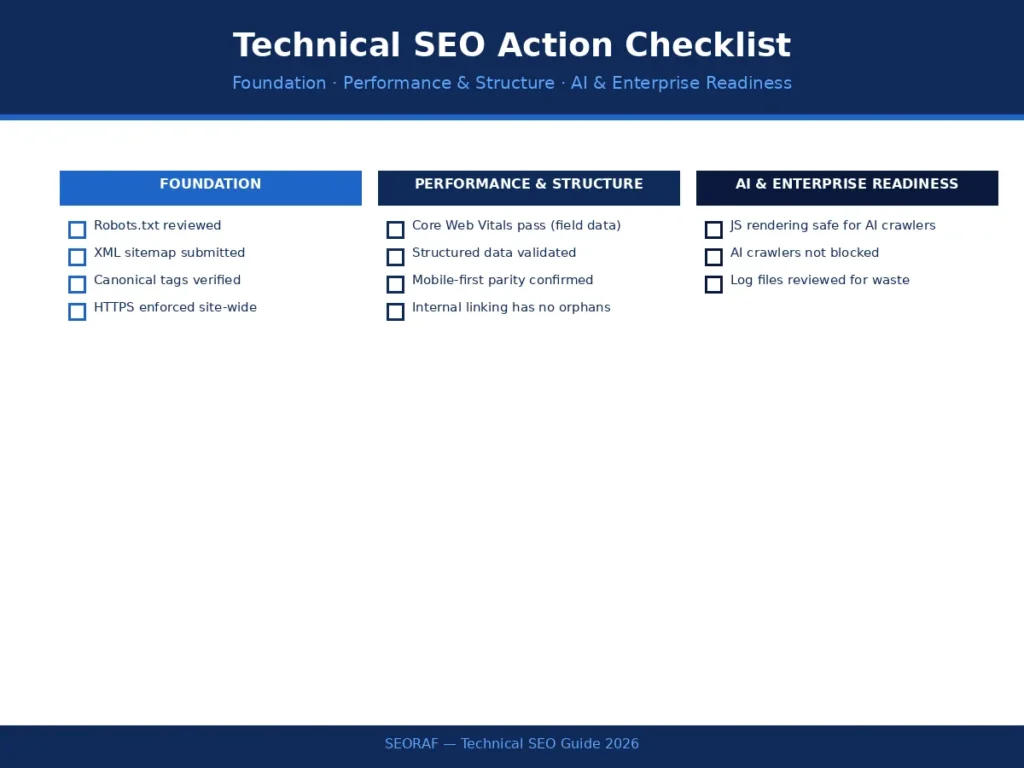
Action Checklist:
- ☐ Robots.txt reviewed and confirmed not blocking important sections
- ☐ XML sitemap submitted and free of non-indexable URLs
- ☐ Canonical tags verified across duplicate or near-duplicate content
- ☐ Core Web Vitals passing based on field data, not just lab scores
- ☐ Structured data validated with Google’s Rich Results Test
- ☐ Mobile-first parity confirmed between mobile and desktop versions
- ☐ JavaScript rendering strategy confirmed safe for both Googlebot and AI crawlers
- ☐ AI crawlers (GPTBot, ClaudeBot, PerplexityBot, Google-Extended) confirmed not blocked
- ☐ Internal linking reviewed for orphan pages and excessive click depth
- ☐ Log files reviewed for crawl waste (enterprise sites)
[Internal Link: Technical SEO Checklist — full version] [Internal Link: Technical SEO Audit Guide] [Internal Link: Best Technical SEO Tools]
For readers just getting started, the Technical SEO for Beginners guide linked above is the next step. For readers managing a large or enterprise site, the Advanced Technical SEO cluster — covering log file analysis, international SEO, and crawl budget at scale — is the appropriate next stop.