
SEO for Beginners: A Practical Guide to Ranking Smarter in Google Search
SEO for Beginners does not need to feel confusing. The real job of SEO for Beginners is simple: help Google understand your pages, help users trust your content, and make it easier for the right audience to find you in search. When these basics are strong, your site becomes easier to crawl, easier to index, and more likely to attract relevant traffic.
This guide is built as a premium pillar page, so it covers the most important parts of SEO for Beginners in a clear, practical order. Instead of jumping into advanced tactics too early, you will learn how SEO for Beginners works through search intent, keyword research, on-page SEO, technical basics, internal linking, content planning, and measurement.
SEO for Beginners is the process of learning how to improve a website so it can appear more clearly in Google Search. For most people, SEO for Beginners means understanding keywords, matching search intent, writing useful content, improving title tags and meta descriptions, building internal links, fixing technical basics, and using Google Search Console to monitor performance. The purpose of SEO for Beginners is not to trick search engines. It is to create pages that are easier to discover, easier to understand, and more useful for real users.
What Is SEO and Why Does It Matter for Beginners?
SEO for Beginners starts with one core idea: search engine optimization is the process of improving a website so search engines can discover, understand, index, and rank its content for relevant searches. That sounds technical at first, but in practice SEO for Beginners is about making pages clearer, more helpful, and easier to trust.
When someone searches in Google, Google tries to return pages that best match the question, the search intent, and the expected result. If your page answers the question clearly, uses a clean structure, and gives users a good experience, it becomes easier for Google to show that page. That is why SEO for Beginners should start with usefulness and relevance, not shortcuts.
SEO matters because it can bring long-term organic traffic without paying for every click. A strong article, service page, or comparison guide can continue attracting visibility for months or years. That makes SEO for Beginners valuable for bloggers, affiliate sites, local businesses, consultants, and growing content brands.
The right mindset for SEO for Beginners: do not try to outsmart Google. Learn how Google interprets pages, then make your pages easier to read, easier to trust, and easier to connect with the intent behind the search.
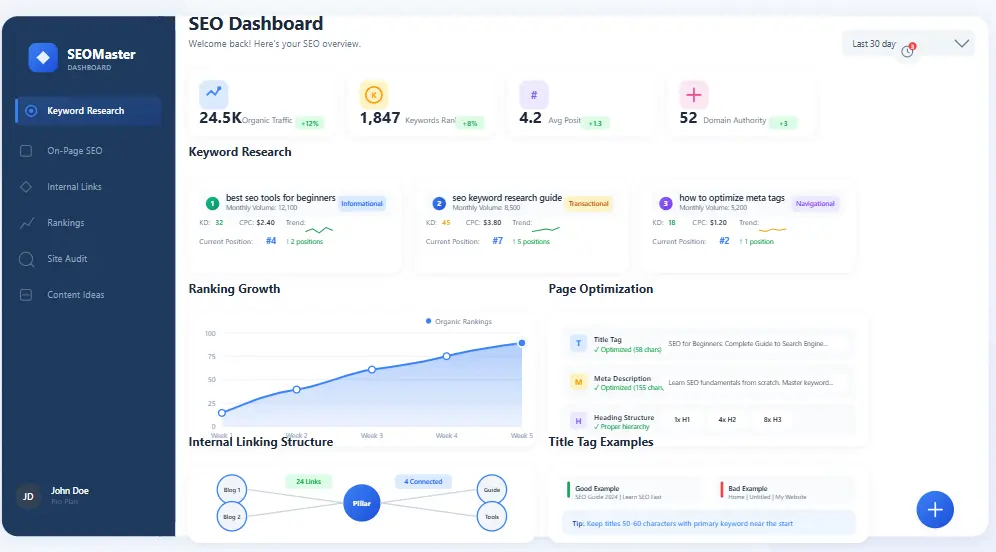
SEO for Beginners overview showing search intent, keyword targeting, page structure, and optimization basics.
After this section, the best next pages are Keyword Research Guide, Content SEO Guide, and Technical SEO Guide.
Why SEO for Beginners Should Focus on the Basics First
SEO for Beginners works best when the focus stays on fundamentals. Many people start learning SEO by chasing advanced tactics too early, but strong results usually come from simple improvements done well. SEO for Beginners should begin with search intent, page structure, internal linking, title tags, and useful content. When these basics are strong, everything else becomes easier.
Another reason SEO for Beginners should stay simple is that clarity creates momentum. A beginner does not need a huge strategy on day one. Instead, SEO for Beginners should follow a repeatable process: pick one topic, match the intent, build a clear page, optimize the title and headings, add internal links, and monitor results. That process is easier to repeat and far more sustainable.
Beginners often feel stuck because they try to learn everything at once. The better path is to build confidence through small wins. When SEO for Beginners is learned in the right order, it stops feeling random and starts feeling measurable.
Core SEO Definitions Every Beginner Should Know
Search engines reward clarity, so SEO for Beginners becomes much easier when the core vocabulary is clear. Once you understand these terms, most SEO decisions become simpler.
A keyword is the word or phrase someone types into Google Search. In modern SEO, a keyword represents both a topic and a user need.
Search intent is the reason behind a query. A user may want information, a comparison, a product, or a local result.
SERP stands for Search Engine Results Page, including organic results, snippets, maps, videos, and other search features.
To crawl means search engine bots discover and read pages by following links or visiting known URLs.
To index means Google stores and understands a page in its systems so it can be considered for rankings.
The title tag is the main headline often shown in Google Search results. It affects both relevance and click-through rate.
A meta description is a short summary of the page. It can improve clicks when it clearly explains what the page offers.
Internal links connect one page on your website to another and help users and search engines move through your content.
Shortcut for SEO for Beginners: if you understand keywords, search intent, crawling, indexing, title tags, internal links, and content quality, you already understand the foundation of SEO for Beginners.
How Google Search Works in Simple Terms
Before you optimize pages, it helps to understand what Google is doing behind the scenes. At a beginner level, the process is easiest to understand in three steps: crawl, index, and rank. This is one of the most important concepts in SEO for Beginners.
1. Crawl
Google discovers URLs by following links, reading XML sitemaps, and revisiting known pages. If your site has poor navigation, broken internal links, or blocked resources, important pages may be harder to discover.
2. Index
Once Google accesses a page, it tries to understand the topic, structure, and usefulness of that content. If the content is weak or technically broken, the page may not be indexed even if it was crawled.
3. Rank
When a person searches, Google compares indexed pages and decides which results best satisfy the query. Relevance, usefulness, clarity, and trust all play a role.
Helpful official resources:
Simple rule: if Google cannot find your page, understand your page, or trust your page, that page is unlikely to rank well. That is why SEO for Beginners always starts with accessibility and clarity.
Beginner Setup: What to Do Before You Publish More Content
Many beginners publish first and fix the foundation later. That often leads to wasted effort. Before you scale content, set up the systems that help Google discover and evaluate your site correctly. This is one of the most practical stages of SEO for Beginners.
Step-by-Step Beginner SEO Setup Checklist
- Set up Google Search Console and verify your site.
- Create and submit an XML sitemap.
- Review robots.txt so important pages are not blocked.
- Make sure your navigation links clearly to key pages.
- Choose one main topic for each important page.
- Write unique title tags and meta descriptions for core pages.
- Use mobile-friendly layouts and optimized images.
- Create trust pages like About and Contact.
Search Console is especially important because it shows which pages are indexed, what queries generate impressions, and where technical issues exist. Without it, SEO for Beginners becomes guesswork instead of strategy.
Keyword Research for SEO Beginners: Find Topics That Match Real Intent
SEO for Beginners becomes much easier when keyword research is treated as a way to understand people, not just a way to collect terms. In practical terms, SEO for Beginners means finding the topics your audience actually searches for, understanding the intent behind those searches, and building pages that satisfy that intent clearly. This is why keyword research is one of the most important skills in SEO for Beginners.
For a beginner site, the best keyword opportunities are usually specific, lower-competition, and easier to explain well. That is why SEO for Beginners often performs better with long-tail keywords than with broad head terms. A focused phrase gives the page a clearer role and makes the content easier to optimize naturally.
Step-by-Step Keyword Research Checklist
- Choose one topic your audience actually searches for.
- List common questions related to that topic.
- Study the current search results for intent patterns.
- Use People Also Ask questions to find subtopics.
- Pick one primary keyword and several related variations.
- Group related questions under one page instead of making duplicates.
- Match the format Google already prefers for that query.
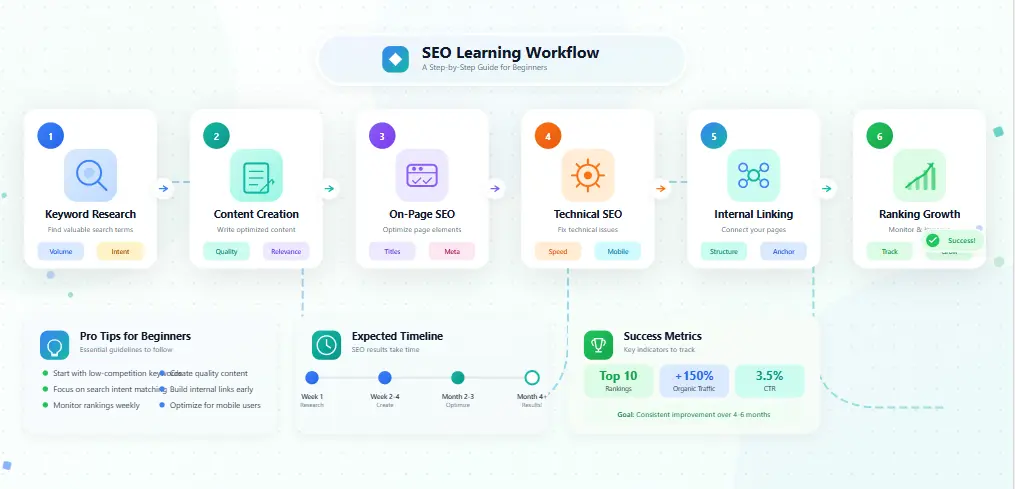
SEO for Beginners keyword research workflow with search intent, subtopics, and content planning.
After this section, continue with the full Keyword Research Guide.
On-Page SEO for Beginners: Optimize What Users and Google Actually See
SEO for Beginners becomes practical at the on-page level because this is the part most site owners can control directly. On-page SEO includes the title tag, meta description, heading structure, page copy, internal links, and media. When people say SEO for Beginners should start with actions that are easy to understand, they usually mean on-page SEO first.
A strong on-page process helps SEO for Beginners feel less overwhelming. Instead of trying to do everything, you optimize one page at a time. You make the title clearer, improve the meta description, strengthen the headings, answer the search intent directly, and add internal links. That is how SEO for Beginners turns from theory into measurable progress.
Step-by-Step On-Page SEO Checklist
- Write one clear H1 that matches the page topic.
- Add a strong title tag with the main topic near the front.
- Write a useful meta description with click appeal.
- Use short paragraphs and scannable headings.
- Answer the main question near the top of the page.
- Add examples, lists, and supporting detail.
- Include internal links to related guides and tools.
Beginner mistake: repeating the exact keyword too often does not make a page stronger. Good SEO for Beginners is based on clarity, intent match, and useful structure.
For deeper on-page strategy, continue with the Content SEO Guide.
Technical SEO Basics Beginners Should Not Ignore
Technical SEO sounds advanced, but SEO for Beginners only needs a few technical fundamentals at first. The goal is not to make your site complicated. The goal is to remove preventable barriers that stop crawlers and users from reaching your content smoothly.
Make Important Pages Crawlable
Check that your main pages are discoverable through navigation and internal links. Hidden pages are harder to evaluate and rank.
Use a Clean Sitemap
Your XML sitemap should list canonical, indexable pages you actually want Google to consider. It acts like a clean signal of what matters most.
Monitor Indexing
Search Console shows whether important pages are indexed, excluded, redirected, or blocked. That is why it is one of the best tools for SEO for Beginners.
Step-by-Step Technical SEO Checklist
- Confirm important pages are linked properly.
- Submit your XML sitemap in Search Console.
- Review robots.txt to avoid blocking key URLs.
- Inspect important pages for indexing issues.
- Fix broken links and redirect problems.
- Use schema only when it matches the page type accurately.
If you want a deeper breakdown, read the Technical SEO Guide.
Internal Linking: One of the Easiest SEO Wins for Beginners
Internal linking is often ignored because it feels too simple. In reality, it is one of the clearest ways to help Google understand your site structure. It also helps users discover related pages and keeps people engaged longer.
When you link from a broad page to a narrower page, you create topical pathways. This is a major part of SEO for Beginners because it helps both search engines and readers understand how your content fits together.
Simple rule: every important page should receive internal links from relevant pages, and every strong page should link to supporting pages when that helps the reader continue learning.
Content Strategy for SEO Beginners: Build Topics, Not Just Posts
One article rarely builds strong authority on its own. Beginners often publish isolated posts with no clear hierarchy and no internal linking plan. A stronger approach is to build a simple topic cluster. This is where SEO for Beginners starts moving from page-level optimization into site-level growth.
A topic cluster starts with a broad pillar page, then adds supporting pages that answer narrower questions. This page is the broad resource. Supporting pages can go deeper into keyword research, technical SEO, local SEO, beginner mistakes, tools, and content workflows.
Step-by-Step Content Cluster Checklist
- Choose one main topic your audience searches often.
- Create one broad, useful pillar page for that topic.
- List the supporting questions and subtopics tied to it.
- Create support pages that go deeper into each subtopic.
- Link both directions between the pillar and support pages.
- Refresh older pages as the cluster grows.
For deeper cluster planning, read Topical Authority Map for SEO.
How Beginners Should Measure SEO Progress
SEO for Beginners is slower than paid traffic, so expectations matter. Do not judge progress only by rankings in the first few weeks. Watch the signals that show momentum is building.
Use Google Search Console First
Search Console shows impressions, clicks, indexed pages, query data, and coverage issues. This helps you understand whether Google can actually see and interpret your content.
Watch These Early Metrics
- Indexed pages increasing steadily
- Impressions growing for relevant queries
- Average positions improving for important pages
- Clicks improving on pages with better titles and meta descriptions
- More related queries appearing for the same page over time
Measure what matters: early progress in SEO for Beginners often appears as impressions and broader query coverage before it appears as large traffic gains.
Common SEO Mistakes Beginners Make
Most beginner SEO problems come from confusion, not bad intent. The good news is that many are easy to fix once you know what to watch for.
1. Targeting the Wrong Intent
If the search results show guides and you publish a sales page, the page is misaligned. Always check the SERP first.
2. Writing for Keywords, Not for Users
Pages that repeat the same phrase too often usually feel weak. Good SEO for Beginners content uses natural language, direct answers, and stronger context.
3. Publishing Thin Pages
A short page is not always bad, but a page that barely answers the query is weak. Aim for completeness, not empty volume.
4. Ignoring Internal Links
If your pages are isolated, Google has less context for how they fit together. Internal linking helps solve that.
5. Expecting Instant Results
SEO takes time. Pages can gain impressions and trust before they become strong traffic drivers.
If you want the deeper breakdown, read Beginner SEO Mistakes.
SEO for Beginners FAQs
How long does SEO take for beginners?
SEO can take weeks to months to show meaningful traction. Early signs often appear as indexing and impressions before large traffic growth happens.
Is SEO hard for beginners?
SEO becomes easier when learned in the right order. Start with intent, structure, title tags, internal links, and Search Console before advanced tactics.
What is the first SEO tool beginners should use?
Google Search Console is the best first tool because it shows how Google sees your site, which pages are indexed, and which queries create impressions and clicks.
Do beginners need technical SEO?
Yes, but only the basics at first: crawlability, indexing, sitemap setup, robots.txt checks, mobile usability, and broken link fixes.
Can beginners rank without backlinks?
Yes, especially for lower-competition topics and well-structured long-tail content. Strong on-page SEO, internal linking, and intent matching can still produce results.
Ready to Move Beyond Beginner-Level SEO?
Start with a clear foundation, use the right tools, and improve one layer at a time. That is how SEO for Beginners turns into real search growth.