
SEO Templates (2026): The Ultimate Toolkit to Plan, Write & Rank Faster
SEO templates are structured, repeatable documents that turn messy optimization work into a predictable publishing system. If you publish without a plan, results can feel random. But when you use frameworks for research, planning, writing, internal links, audits, reporting, and refresh cycles, outcomes become consistent—and your pages are easier for Google and readers to trust.
This guide gives you a complete set of copy-paste assets you can apply right away: keyword research, content briefs, on-page quality checks, internal linking maps, audits, KPI reporting, snippet-ready blocks, and a refresh plan. You’ll also see a clean way to turn the toolkit into a lead magnet using a dedicated PDF landing page: Free SEO Templates PDF Download.
What Are SEO Templates?
SEO templates are frameworks that standardize your workflow. Instead of “figuring it out” for every page, you follow the same repeatable steps: intent research, entity coverage, structure planning, on-page optimization, internal linking, tracking, and refresh cycles.
In practice, these look like checklists, tables, briefs, and small workflows. They answer questions like:
- What is the search intent (guide, list, tool, template, comparison)?
- Which entities and subtopics must be covered to be “complete”?
- What headings should we use to match the SERP?
- Which internal links build topical authority?
- Which metrics tell us what to improve next?
Why this matters: The fastest way to lose rankings is inconsistency. A repeatable checklist keeps quality stable even when you’re busy.
Google’s guidance emphasizes helpful, user-first content and clear structure. That’s why many modern workflows connect these frameworks with helpful content principles and structured data basics. (See: Creating helpful content and Structured data intro.)
Why SEO Templates Rank Faster in 2026
SEO templates can rank faster because they force the steps most sites skip: align with intent, cover entities, add internal links, and track performance. In 2026, winning is less about “just writing long” and more about creating a complete, structured answer that matches how people search.
When templates are missing
- Headings don’t match SERP expectations
- Subtopics and entities are incomplete
- Internal links are random or missing
- CTAs appear but don’t fit the user journey
- No refresh plan—content decays quietly
When templates are used
- Intent match improves from the start
- Entities are covered naturally across sections
- Internal linking builds topical authority
- Readers get actionable value (tables, checklists)
- Refresh is fast and scheduled
To understand what Google expects from SEO basics, keep a bookmark to the Google SEO Starter Guide. Your workflow should follow the same mindset: clear structure, clear purpose, and real usefulness.
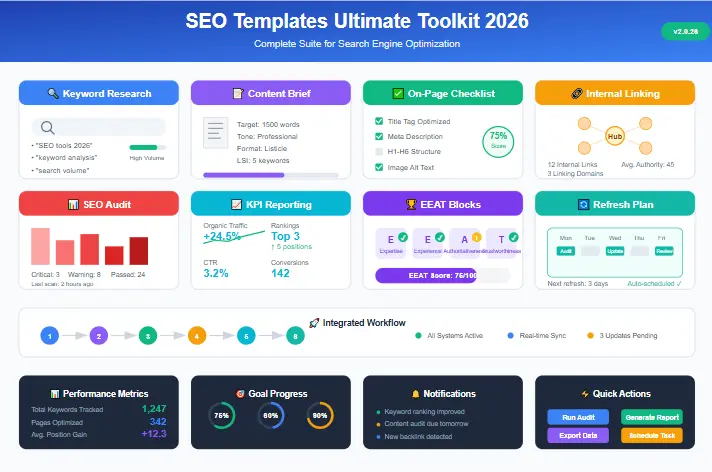
The Ultimate SEO Templates Toolkit
This is the full toolkit included in this guide. Use it as a system, or start with the first three and expand later.
Get the SEO templates PDF (landing page + lead form)
Prefer a clean PDF version? Use the landing page:
Or submit here to unlock the download:
Template 1: Keyword Research (Intent + Entities + Questions)
This first framework helps you plan before you write. The goal is simple: match intent, cover key entities, and collect real questions people ask.
Copy-paste keyword research template
- Primary keyword: SEO templates
- Intent: informational + practical toolkit
- Audience: beginners, freelancers, SMB owners, marketers
- Ideal format: ultimate toolkit + copy-paste templates + step-by-step workflow
- Secondary keywords (8–12): free SEO templates, SEO checklist template, SEO audit template, SEO content brief template, SEO report template, keyword research template, SEO workflow template, on-page SEO checklist
- Entities (25–40): search intent, SERP, topical authority, internal linking, EEAT, content clusters, Google Search Console, performance report, GA4, CTR, impressions, average position, conversions, keyword mapping, content planning, headings, meta description, structured data, sitemap, canonical, crawl depth, content decay, refresh cycle
- PAA questions (8–12): What are SEO templates? Which frameworks are most important? How do I use this system to rank? What is a content brief? What is an SEO audit checklist? How do I report SEO results? How often should content be refreshed? How do I build topical authority with internal links?
Once you have intent + entities + questions, your outline becomes clear and your draft becomes faster.
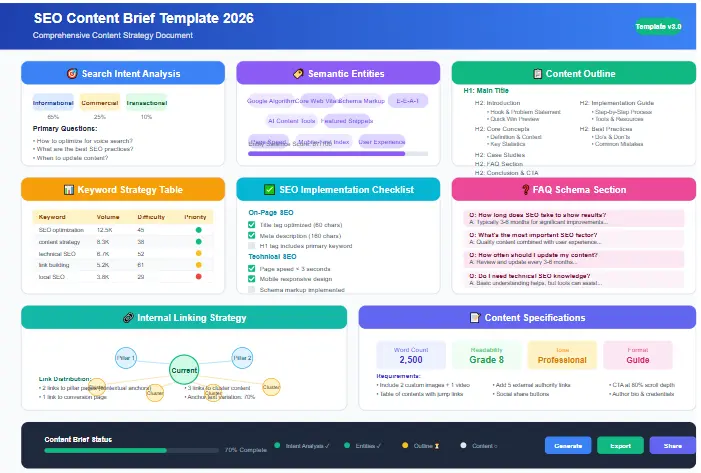
Template 2: SEO Content Brief (Structure + Assets + Links)
If you only use one document from this toolkit, use the content brief. It forces clarity before drafting, which prevents thin sections, repeated ideas, and missing subtopics.
Copy-paste content brief table
| Brief element | What to fill in |
|---|---|
| Working title | SEO Templates (2026): The Ultimate Toolkit to Plan, Write & Rank Faster |
| URL slug | /seo-templates/ |
| Meta description | Copy-paste SEO templates for keyword research, content briefs, on-page checks, internal linking, audits, KPI reporting, and refresh plans—2026 toolkit. |
| Goal | Rank + build topical authority + generate leads via PDF download |
| Primary intent | Toolkit guide with actionable blocks and a step-by-step workflow |
| Unique angle | Templates + workflow + snippet targets + EEAT blocks + refresh plan |
| Must-have assets | 1 comparison table + 2 checklists + 2 scenarios + 10 FAQs + 3 images + internal links |
| Internal link plan | Link to EEAT checklist, migration checklist, and tool reviews where relevant |
Quick writing trick: If a section feels weak, add one of these: (1) a checklist, (2) a small table, or (3) an example. Your toolkit should always create “do this next” clarity.
Template 3: On-Page SEO Checklist (Publish-Ready Quality Control)
Most pages don’t fail because the writer is “bad.” Pages fail because small steps are skipped. This checklist protects publishing quality.
Core on-page checklist (copy-paste)
- ✔ Use “SEO templates” naturally in the first 2 lines
- ✔ One H1 only (matches the main promise)
- ✔ H2/H3 structure matches the user journey
- ✔ Add entity coverage (related terms) across sections
- ✔ Add one comparison table for quick scanning
- ✔ Add two checklists for actionable value
- ✔ Add three images and include “SEO templates” in alt text
- ✔ Add 5–8 internal links and 2–4 outbound links
- ✔ Add an FAQ section (8–12 Q&A)
- ✔ Add a clear CTA (PDF landing page + lead form)
Checklist 1: Before writing
Intent + outline
- Intent confirmed (toolkit/templates guide)
- SERP headings mapped
- Entities list created (25+)
- FAQ questions collected
- Assets planned (table + checklists)
Links + proof
- Internal links chosen (pillar + supporting)
- Outbound links chosen (Google docs, trusted resources)
- Example scenarios planned
- Trust blocks ready (policy + update log)
- CTA plan mapped (PDF landing page)
Checklist 2: Before publishing
- Title + meta are benefit-driven
- Intro promises outcomes and is easy to understand
- Every section includes copy-paste blocks
- Internal links are tested (no 404)
- Outbound links are dofollow by default (no nofollow added)
This quality-control layer makes publishing predictable—which is the fastest way to scale output without dropping standards.
Template 4: Internal Linking (Pillar + Cluster Map)
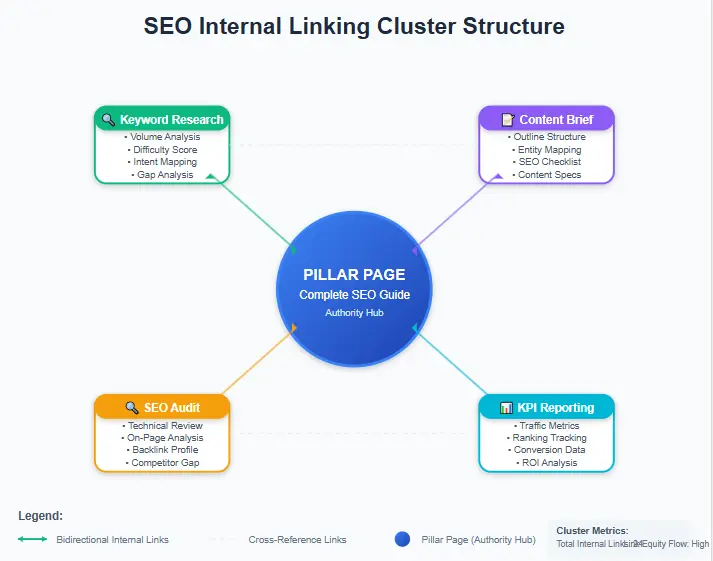
Internal linking is one of the biggest advantages of using a repeatable system. It helps Google discover content faster, understand page relationships, and build topical authority without relying on external backlinks.
Pillar + cluster structure
- Pillar: SEO templates (this guide)
- Supporting pages (suggested): keyword research template, content brief template, internal linking template, SEO audit checklist, SEO KPI report template
Internal linking rules (copy-paste)
- Pillar links to each supporting page with descriptive anchors.
- Supporting pages link back to the pillar using a “main guide” anchor.
- Supporting pages cross-link (1–2 links) when a step depends on another page.
- Don’t bury important pages: keep pillar and supporting pages within 2–3 clicks from the homepage.
Internal linking plan for this post
| Section | Internal link | Suggested anchor |
|---|---|---|
| EEAT + policy section | E-E-A-T Checklist | E-E-A-T checklist for trust |
| Refresh plan + site changes | SEO Migration Checklist | SEO migration checklist |
| Tools mention (optional) | Mangools Review | Mangools review |
| PDF lead magnet | Free SEO Templates PDF Download | free SEO templates PDF |
With linking rules baked into your workflow, you stop publishing isolated posts and start building a connected content network.
Template 5: SEO Audit (Quick + Advanced)
An audit checklist is essential because rankings can drop even when writing quality is high. Technical issues, broken links, indexing problems, and outdated sections silently reduce performance over time.
Quick audit checklist (copy-paste)
Technical
- Sitemap is submitted and valid
- Noindex/robots issues checked
- Canonical tags consistent
- Mobile layout works
- Broken pages fixed
- Redirect chains reduced
Content + On-page
- Titles and meta reviewed for CTR
- Internal links tested
- Thin sections expanded (examples/checklists)
- FAQ updated with new queries
- Outdated claims removed or refreshed
- Images compressed and alt text checked
Advanced audit checklist (optional)
- Core Web Vitals check
- Structured data errors/warnings
- Crawl depth review (important pages too deep?)
- Orphan pages (no internal links pointing to them)
- Keyword cannibalization (two pages fighting for same query)
- Content decay review (impressions dropping)
Pair this audit process with Search Console’s performance report to find quick wins and declining pages. (See: Search Console Performance report.)
Template 6: KPI Reporting (Measure → Learn → Improve)
These documents aren’t only for writing—your system should also include tracking. KPI reporting shows you what to optimize next. Without reporting, you’ll waste time updating pages that don’t need it, and ignore pages that have huge upside.
Weekly KPIs (lightweight)
- Impressions
- Clicks
- CTR
- Average position
- Top 5 pages + top 5 queries
- 1 note: what changed and why?
Monthly KPIs (business-focused)
- Organic sessions (GA4)
- Conversions (leads, signups, sales)
- New keywords gained
- Pages improving vs declining
- Action plan for next month (3–7 tasks)
Copy-paste KPI table
| Metric | Last month | This month | Change | Next action |
|---|---|---|---|---|
| Organic traffic | 5,200 | 6,450 | +24% | Improve internal links to top pages |
| Average position | 18 | 13 | Improved | Add missing subtopics + FAQs |
| CTR | 2.1% | 3.4% | +1.3% | Keep testing title/meta |
| Conversions | 42 | 58 | +16 | Improve CTA placement + landing page copy |
When reporting becomes part of your routine, you build a feedback loop: publish → measure → improve → rank better.
Template 7: SERP & Snippet Targets (Definition + Lists + Tables)
Many toolkit posts win featured snippets because they include short definitions, clean lists, and tables. This section helps you format content for snippet opportunities.
Snippet definition template (40–55 words)
SEO templates are repeatable SEO frameworks—like briefs, checklists, and reports—that standardize how you research, write, optimize, and refresh content. They reduce mistakes, improve consistency, and help teams or solo marketers publish intent-matched, entity-rich pages that perform better in search.
Snippet list template (copy-paste)
- Keyword research template (intent + entities)
- Content brief template (outline + assets)
- On-page checklist (publish-ready)
- Internal linking map (topical authority)
- Audit checklist (decay prevention)
- KPI report (measurement system)
- Refresh plan (14-day and ongoing)
Comparison table template
| SEO template | Best for | When to use | Main outcome |
|---|---|---|---|
| Keyword research | Choosing the right topic | Before writing | Intent + entity clarity |
| Content brief | Structure and coverage | Before drafting | Faster writing + better depth |
| On-page checklist | Publishing quality | Before publish | Fewer ranking mistakes |
| Internal linking map | Topical authority | At publish + refresh | Stronger site-wide relevance |
| Audit checklist | Stability | Monthly/Quarterly | Prevents decay |
| KPI report | Growth decisions | Weekly/Monthly | Clear optimization plan |
Formatting for scanning and clarity helps users and can improve snippet eligibility.
Template 8: EEAT + Editorial Policy (Trust Blocks You Can Copy)
Trust matters. A simple editorial policy and update log makes a toolkit page feel more credible—especially when readers want confidence that the guidance is current.
Mini editorial policy (copy-paste)
Editorial policy: We publish practical SEO templates and guides using a repeatable workflow (intent → entities → structure → internal links → measurement → refresh). We update content when search behavior, tools, or best practices change. When we reference tools or resources, we aim for transparency and reader value.
Source policy (copy-paste)
Source policy: We prefer primary sources and official documentation when discussing search fundamentals. For example, we reference Google’s SEO documentation and structured data guidelines when explaining best practices.
Update log template (copy-paste)
| Field | Example |
|---|---|
| Last updated | 2026-03-01 |
| What changed | Expanded the toolkit, added snippet blocks, improved internal linking rules |
| Reviewed sections | On-page checklist, KPI report, refresh plan, FAQ |
If you want a full trust checklist, link your internal guide: E-E-A-T Checklist.
Template 9: 14-Day Refresh Plan (Plus 30/60/90-Day Updates)
The biggest performance upgrade most sites miss is simple: refreshing content. Your system should include a refresh plan so updates stay fast and consistent.
14-day refresh (one-time early boost)
- Rewrite title + meta if CTR is weak (make benefits clearer).
- Add 2–3 internal links from older posts into this page.
- Add 1–2 FAQs based on Search Console queries and PAA.
- Expand one weak section with an example or checklist.
- Improve the intro for clarity and stronger promise.
30-day refresh (light)
- Add one new block or upgrade a checklist
- Improve internal linking across the cluster
- Update the PDF landing page copy if conversions are low
60-day refresh (medium)
- Re-check SERP structure and align headings if needed
- Add better examples and a clearer table
- Update the editorial policy and update log
90-day refresh (deep)
- Check content decay and refresh declining pages
- Fix cannibalization (merge/split pages if necessary)
- Improve hub page and supporting pages together
Pro tip: Use Search Console data to guide refresh decisions. Google explains core SEO fundamentals and measurement in its docs, so your process stays aligned with reality. (See: SEO Starter Guide.)
How to Use SEO Templates Step-by-Step (The Ranking Workflow)
This workflow turns your toolkit into a repeatable content engine. Use it for every post—especially toolkit pages, checklists, and template-driven guides.
- Research: fill the keyword research sheet (intent + entities + questions).
- Plan: create the content brief (outline + assets + links + CTA).
- Write: draft with clear steps, short paragraphs, and examples.
- Optimize: run the on-page checklist (table, checklists, images, FAQs).
- Link: apply the internal linking map (pillar + supporting pages).
- Publish: request indexing and link from older content.
- Refresh: run the 14-day refresh once, then 30/60/90 updates.
- Measure: KPI report monthly and choose the next optimization tasks.
Follow the same steps consistently and you’ll stop relying on luck—structure and internal links will compound your topical authority over time.
Free SEO Templates PDF (landing page + lead form)
Use this landing page for a clean download experience:
Or unlock it here:
Real Examples: How SEO Templates Work (2 Scenarios)
Scenario 1: Freelancer writing “SEO content brief template”
A freelancer wants fast wins. They use a repeatable toolkit to publish quickly without skipping important steps.
- Research sheet: confirm intent (template + how-to), collect entities and FAQs.
- Brief: plan the table + checklist + example.
- On-page QA: include images, internal links, outbound sources, and a strong CTA.
- Linking map: connect the supporting page back to this “SEO templates” pillar guide.
- 14-day refresh: adjust title/meta and add FAQs from Search Console.
Result: the supporting page strengthens the pillar, and the pillar strengthens the supporting page—topical authority grows.
Scenario 2: Small business building a “Free SEO templates library” hub
A small business wants a linkable resource. They create a hub page and publish supporting content with the same system each time.
- Create a hub: “Free SEO templates library” + PDF landing page.
- Publish 2 supporting posts: internal linking guide + SEO audit checklist.
- Link everything: hub → supporting, supporting → hub, plus cross-links.
- Refresh monthly: add one new block and update the log.
Result: the hub becomes stronger over time, and the supporting posts keep adding depth. This is how frameworks compound into authority.
Common Mistakes With SEO Templates (And Fixes)
Mistake 1: Publishing generic templates without examples
Fix: add two scenarios and at least one copy-paste checklist. The page should feel practical, not theoretical.
Mistake 2: Ignoring internal linking
Fix: publish a pillar + 2 supporting pages first. Then expand. Internal linking is the authority engine inside the system.
Mistake 3: No refresh plan
Fix: run a 14-day refresh once. Then update every 30–60 days depending on competition. A refresh plan turns a toolkit into a living system, not a one-time post.
Mistake 4: Keyword stuffing
Fix: use entities and subtopics to build depth. Good writing increases coverage without sounding repetitive.
Mistake 5: No measurement
Fix: run KPI reporting monthly and decide the next action. Tracking helps you improve strategically instead of guessing.
FAQ: SEO Templates
What are SEO templates?
SEO templates are structured documents (briefs, checklists, reports) that standardize your SEO workflow. They help you plan, write, optimize, link, measure, and refresh content consistently.
Which SEO templates should I use first?
Start with three core pieces: keyword research, a content brief, and an on-page checklist. Then add internal linking and refresh documents to build topical authority.
Do SEO templates guarantee rankings?
No, but SEO templates reduce mistakes and improve intent match, structure, and authority-building—so rankings become more likely and more stable.
How often should I update SEO templates pages?
Do the 14-day refresh once after publishing. Then update every 30–60 days for competitive topics. Keep an update log so changes are transparent and easy to manage.
How do SEO templates help EEAT?
SEO templates help you add trust blocks consistently: editorial policy, source policy, update logs, and clear authorship—especially useful for toolkit content.
Where should I link out (outbound links)?
Link to trusted sources like Google’s SEO documentation and structured data guides. Outbound links can add credibility when used naturally alongside your guidance.
What’s the best lead magnet setup for SEO templates?
Use a dedicated landing page and a simple lead form. Your PDF landing page here is ideal: Free SEO Templates PDF Download.
Can I turn these SEO templates into a content cluster?
Yes. Publish the pillar guide, then create supporting pages for each template. Link everything together using the internal linking map so relevance compounds.
Next Steps: Turn SEO Templates Into a Ranking System
If you want consistent rankings in 2026, don’t think “one post.” Think “system.” A strong toolkit creates a workflow you can repeat every week.
Your action plan (copy-paste)
- Pick one keyword and fill the research template.
- Create a content brief and plan your table + checklists.
- Publish with the on-page checklist and internal linking map.
- Send readers to your PDF landing page for downloads.
- Run the 14-day refresh and track KPIs monthly.