
Image Alt Generator: Write Better Alt Text for SEO and Accessibility
Alt text is one of the easiest image SEO elements to ignore and one of the easiest details to improve. Many pages either leave alt text empty, overuse the target keyword, or write generic phrases that say almost nothing useful. A strong Image Alt Generator helps you create cleaner, more descriptive alt text that fits the image, matches the page topic, and supports a better user experience.
This premium content page explains what an Image Alt Generator does, why image alt text matters, how to avoid common mistakes, and how to use the real tool to write stronger image descriptions faster. It is designed for bloggers, affiliate marketers, local businesses, SEO professionals, and content sites that want better on-page image optimization without guesswork.
An Image Alt Generator is a tool that helps you create descriptive alternative text for images. A good Image Alt Generator helps you write alt text that reflects what the image shows, fits the surrounding page topic, avoids keyword stuffing, and improves image SEO and accessibility without sounding robotic or forced.
What an Image Alt Generator Actually Does
An Image Alt Generator helps you create short, descriptive text that explains what an image shows. That text acts as an alternative description when the image cannot be seen directly, and it also gives search engines more context about the image when that text is used alongside relevant surrounding page content. The goal is not to write decorative filler. The goal is to describe the image clearly, naturally, and accurately.
A strong Image Alt Generator should do more than insert a keyword into a sentence. It should help you write alt text that matches the real subject of the image, fits the page topic, and stays useful for actual people. Good alt text is descriptive, relevant, and specific enough to be helpful without becoming long or awkward.
This is why an Image Alt Generator is useful for both new and existing content. For new pages, it helps you start cleaner. For older pages, it helps you improve image descriptions that were skipped, rushed, or over-optimized. It is one of those small SEO improvements that can make a page feel more polished overall.
Simple idea: good alt text helps people and search engines understand what an image is about without turning the description into spam.
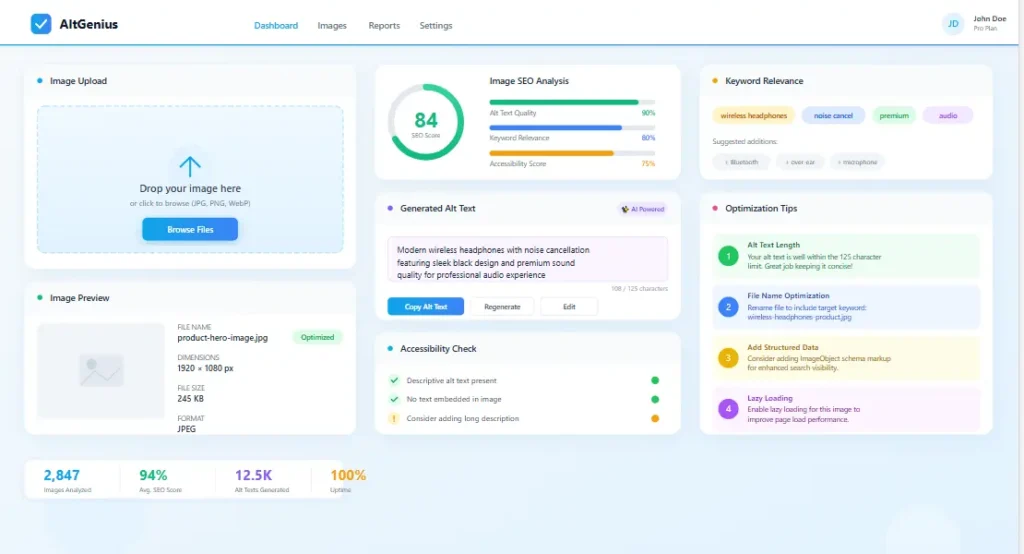
Image Alt Generator dashboard showing alt text suggestions, image context, and SEO-focused description checks.
Why Alt Text Matters for SEO and Accessibility
Alt text matters because it gives an image a text-based description. That matters for accessibility, and it also matters for image SEO when used correctly. Search engines understand images better when the image is placed on a relevant page, near relevant text, with descriptive supporting signals. Alt text is one of those supporting signals, especially when it describes the actual image clearly.
Good alt text also helps improve the overall quality of a page. When a page uses useful images but leaves them unexplained, the page feels less complete. When the images are described naturally and fit the page context, the content becomes more coherent. That matters for blog posts, service pages, category pages, tool pages, and product content.
An Image Alt Generator is useful because most websites repeat the same problems. Some pages use no alt text at all. Some repeat the target keyword in every image alt tag. Some use generic text like “SEO image” or “blog banner,” which adds almost no value. Better alt text creates cleaner optimization without requiring complex technical work.
Alt text helps users understand the meaning of an image when the image itself is not available to them directly.
Descriptive alt text helps the image fit the topic of the page more clearly and more naturally.
Good alt text improves image clarity without forcing awkward keyword stuffing into every visual.
Blog posts, landing pages, service pages, ecommerce pages, and guides can all benefit from stronger image descriptions.
Best mindset: alt text should describe the image first and support SEO naturally, not the other way around.
How to Use an Image Alt Generator the Right Way
The best way to use an Image Alt Generator is to treat it like a writing assistant, not a shortcut for keyword stuffing. The tool can help you generate a useful starting point, but you should still review whether the suggestion actually matches the image and whether it makes sense inside the page.
This matters because no good SEO workflow should separate image optimization from page context. If your page is about keyword research and the image shows a keyword dashboard, the alt text should reflect that naturally. If the image shows a workflow, checklist, or interface, the wording should describe that instead of forcing a completely different phrase.
Step-by-Step Workflow
- Open the real Image Alt Generator tool.
- Paste the image description, page topic, or surrounding content context.
- Review the suggested alt text for clarity and accuracy.
- Remove filler words or over-optimization.
- Keep the final wording descriptive and aligned with the image itself.
- Add the alt text in WordPress or your CMS before publishing.
You can also use the tool during content refreshes. If older pages already rank but the images were uploaded without useful alt text, this is an easy place to improve quality. It is not a magic ranking switch, but it is a clean quality upgrade that supports stronger image handling across the site.
Best use case: use the tool on important images first, especially hero images, screenshots, product visuals, service graphics, and blog images that support the main topic.
Ready to try it now? Open the real Image Alt Generator tool and create alt text for your next image faster.
Image Alt Generator workflow showing how alt text moves from image context to SEO-ready description.
Image Alt Text Best Practices
A good Image Alt Generator should help you follow clear alt text rules instead of producing generic or spammy descriptions. The strongest results usually come from a few simple principles applied consistently.
Describe What the Image Shows
The alt text should reflect the image itself. If the image is a screenshot of a dashboard, say that. If it is a workflow graphic, say that. If it is a product photo, describe the product. The alt text should not describe something that is not actually visible.
Match the Page Topic Naturally
Alt text works best when it connects to both the image and the surrounding topic. That does not mean every image must contain the page keyword. It means the description should make sense inside the page context and not feel random.
Be Specific, Not Generic
“SEO dashboard showing keyword rankings and traffic trend” is stronger than “SEO image.” “Image Alt Generator tool interface” is stronger than “tool screenshot.” Specificity makes the text more useful without needing to become long.
Avoid Keyword Stuffing
Adding the target keyword once can be fine when it fits naturally. Repeating the keyword unnaturally usually makes the alt text worse. An Image Alt Generator should help you write something readable first, not something obviously built for a score.
Keep It Concise
Good alt text is usually short to medium in length. It should describe what matters, not explain everything in excessive detail. The page body, caption, or nearby text can carry the rest of the context.
Common alt text problem: writing text that sounds like it was made only for an SEO plugin instead of describing the image naturally.
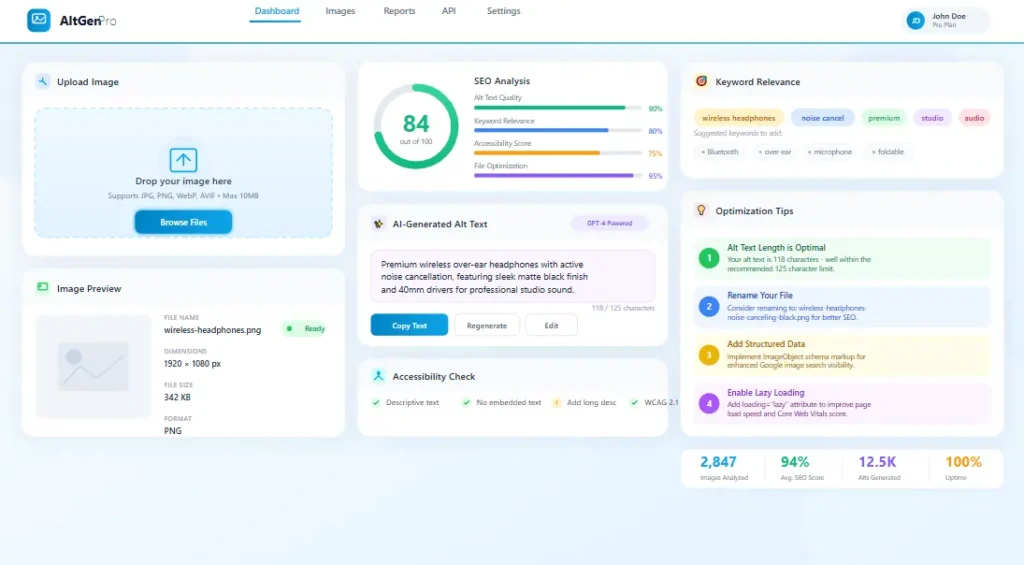
Image Alt Generator Tool interface showing alt text suggestions, page context hints, and image SEO support.
Common Alt Text Mistakes This Tool Helps You Avoid
Most alt text problems are simple, but they are often repeated on dozens or hundreds of images across a website. A strong Image Alt Generator helps you catch those issues faster and build better habits across your site.
1. Empty Alt Text on Important Images
Some decorative visuals can stay empty, but important content images often deserve useful alt text. If the image supports the content, it usually deserves a real description.
2. Keyword Stuffing
Repeating the same keyword in every image alt tag does not make the page stronger. It usually makes the alt text sound unnatural and lower quality.
3. Generic Descriptions
Alt text like “image,” “photo,” “website image,” or “banner” says almost nothing useful. The description should help someone understand what the image actually contains.
4. Descriptions That Do Not Match the Image
Sometimes site owners force the page keyword into the alt text even when the image itself does not show that subject clearly. That makes the description weaker and less trustworthy.
5. Missing Page Context
Images work better when they are placed near relevant text on a page that matches the image topic. Alt text works best as one part of that wider image context, not as an isolated trick.
Reality check: alt text is not a shortcut to instant rankings. It works best as part of a well-optimized page with useful content, relevant images, and strong overall page quality.
When You Should Update Old Image Alt Text
You do not need to update every old image on day one. But there are clear cases where refreshing alt text is worth the effort.
If a page already performs well, improving image descriptions can help strengthen polish and completeness.
Many older images were uploaded without alt text at all. Those are easy wins.
Hero images, screenshots, product visuals, and educational graphics deserve better descriptions first.
If you are updating content anyway, it makes sense to improve the image alt text at the same time.
Alt text updates are especially useful when you are already revisiting a page for stronger headings, better title tags, improved metadata, or more internal links. That is why this page connects well with other SEO resources, not just the image tool itself.
Helpful Internal Resources
This Image Alt Generator works best when it is part of a wider SEO workflow. These related pages can help you improve image SEO alongside content, metadata, and page structure.
Helpful External Resources
These official resources can help you understand why descriptive alt text, page context, and clean image handling matter for both search performance and accessibility.
Image Alt Generator FAQs
What is the main purpose of an Image Alt Generator?
Its main purpose is to help you create descriptive alt text for images faster and more consistently.
Should every image have alt text?
Important content images usually should. Decorative images may not need descriptive alt text depending on their role.
Can alt text help image SEO?
Yes. Descriptive alt text, relevant page context, and well-placed images can help search engines understand images better.
Should I put the keyword in every image alt tag?
No. Use the keyword only when it fits naturally. Forced repetition usually makes alt text worse.
Should the real tool live on a separate page?
Yes. Keeping the working tool on a separate page usually creates a cleaner SEO landing page and a faster real tool page.
Ready to Use the Real Image Alt Generator?
Open the working tool, create better alt text, and improve image SEO with cleaner descriptions that fit both the image and the page naturally.