
The Ultimate Ecommerce SEO Audit Checklist for 2026
Your step-by-step guide to diagnosing and fixing SEO issues, driving more organic traffic, and skyrocketing your online sales. This is the only ecommerce seo audit checklist you’ll ever need.
Is your beautiful ecommerce store sitting in the digital desert, starved of traffic and sales? You’ve invested in a great design, quality products, and a seamless checkout process, but the customers just aren’t coming from Google. The problem isn’t your store; it’s your visibility. Search Engine Optimization (SEO) is the engine that drives organic traffic to your site, and a regular audit is the tune-up it needs to run at peak performance. Google’s mission is to organize the world’s information and make it universally accessible, and your site needs to fit into that ecosystem.
An ecommerce SEO audit is a comprehensive examination of your website to identify strengths, weaknesses, and opportunities for improvement in your search engine rankings. It’s not a one-time fix but a crucial, recurring process. This definitive ecommerce seo audit checklist will walk you through every critical area, from the technical foundations to the content that converts. By the end, you’ll have a clear roadmap to dominate the search results and turn your store into a sales-generating machine.
Get This Checklist as a PDF!
Tired of tabs? Want a printable version to mark up and share with your team? Click the link below to get the complete ecommerce seo audit checklist delivered straight to your inbox.
Click here to reveal the download formSection 1: Technical SEO Foundations – The Bedrock of Your Ecommerce SEO Audit Checklist
Before you even think about keywords or content, you need to ensure your website’s foundation is solid. If Google can’t properly crawl, understand, and index your site, all other SEO efforts are futile. This first part of our ecommerce seo audit checklist focuses on the technical health of your store.
1.1. Check Indexability & Crawlability
What it is: This is Google’s ability to access and read the content on your site (crawlability) and then add it to its search index (indexability).
Why it matters: If your pages aren’t indexed, they don’t exist in Google’s eyes. No index means no rankings, no traffic, no sales.
How to check it: Use Google Search Console. Navigate to the “Pages” report under “Indexing.” This will show you which pages are indexed, which are not, and why (e.g., “Crawled – currently not indexed,” “Discovered – currently not indexed”).
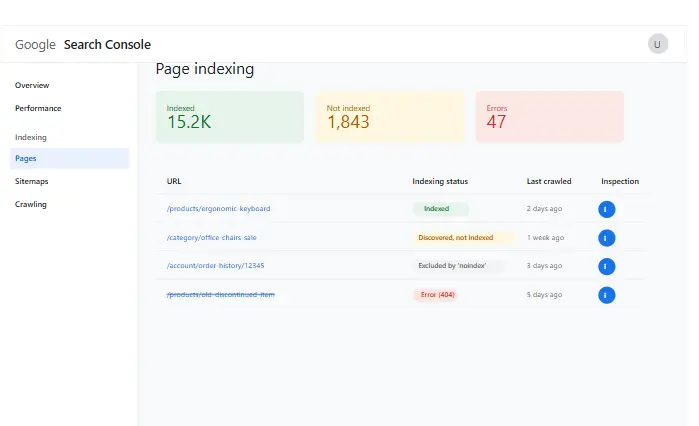
How to fix it: For non-indexed pages, investigate the reason. Is it a “noindex” tag accidentally left on a important page? Is it blocked by robots.txt? Is it a low-quality or thin content page? Fix the root cause and use the “Inspect any URL” tool in GSC to request re-indexing. This is the most critical first step in any ecommerce seo audit checklist.
1.2. Analyze Your Robots.txt File
What it is: A robots.txt file is a set of instructions for search engine crawlers, telling them which parts of your site they can or cannot access.
Why it matters: A single incorrect line in this file can accidentally block your entire site or crucial sections (like your product category pages) from being crawled.
How to check it: Go to yourdomain.com/robots.txt. Look for Disallow: / which blocks everything. Ensure that important directories like /wp-admin/ are disallowed, but / or key folders like /products/ are not. The “Robots.txt tester” tool in Google Search Console is also invaluable here.
How to fix it: Edit your robots.txt file to remove any incorrect Disallow directives. Allow access to CSS, JS, and image files, as Google needs these to render your pages properly. A correct robots.txt is a pillar of a successful ecommerce seo audit checklist.
1.3. Optimize Your XML Sitemap
What it is: An XML sitemap is a file that lists all the important pages on your website, acting as a roadmap for search engines.
Why it matters: It helps Google discover and prioritize your most important content, especially on large ecommerce sites with thousands of products. For the official protocol, you can always refer to Sitemaps.org.
How to check it: Find your sitemap, usually at yourdomain.com/sitemap.xml. Open it and check if it’s clean, well-formatted, and contains your key pages (homepage, category pages, product pages). Ensure it’s submitted in Google Search Console under “Sitemaps.”
How to fix it: If your sitemap is missing pages, is broken, or includes non-canonical URLs (e.g., filter pages), regenerate it using a plugin (like Yoast SEO or Rank Math for WordPress) or your platform’s built-in tool. Remove any “noindex” pages from the sitemap. This is a non-negotiable item on our ecommerce seo audit checklist.
1.4. Audit Site Speed & Core Web Vitals
What it is: Site speed is how quickly your pages load. Core Web Vitals (LCP, FID, CLS) are specific metrics Google uses to measure user experience related to loading, interactivity, and visual stability.
Why it matters: Slow sites frustrate users and lead to high bounce rates. Google has confirmed that page experience, including Core Web Vitals, is a ranking factor. A slow site can kill conversions and rankings.
How to check it: Use Google’s PageSpeed Insights tool. It gives you a score for mobile and desktop, along with specific recommendations for improving your Core Web Vitals. GTmetrix is another excellent tool for this.
How to fix it: Common fixes include optimizing images (next point), leveraging browser caching, reducing server response time, minifying CSS/JS files, and removing unused plugins. Prioritizing speed is a high-impact action from this ecommerce seo audit checklist.
1.5. Ensure Mobile-Friendliness
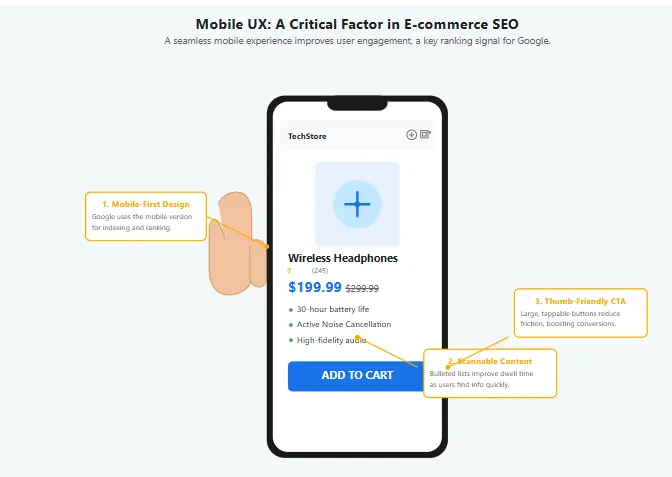
What it is: This means your website provides a seamless experience for users on mobile devices. Google primarily uses the mobile version of your site for indexing and ranking (mobile-first indexing).
Why it matters: Over half of all web traffic comes from mobile. A site that’s difficult to use on a phone will send visitors running to your competitors.
How to check it: Use the Mobile-Friendly Test tool from Google. Also, manually browse your site on your own phone. Are the buttons easy to tap? Is the text readable without zooming? Is the checkout process smooth?
How to fix it: Implement a responsive design that automatically adjusts to different screen sizes. Ensure fonts are legible, buttons are thumb-friendly, and pop-ups don’t cover the main content on mobile. This is a fundamental checkpoint for any modern ecommerce seo audit checklist.
1.6. Review Site Architecture & URL Structure
What it is: Your site architecture is how your pages are organized and linked together. Your URL structure is the address of each specific page.
Why it matters: A logical structure helps users and search engines navigate your site easily. Clean, descriptive URLs are a ranking factor and improve click-through rates from the SERPs.
How to check it: Look at your URLs. Are they short and descriptive (e.g., yourstore.com/mens-running-shoes/nike-air-max) or long and full of parameters (e.g., yourstore.com/prod?id=123&cat=45&color=6)? Map out your main category and sub-category hierarchy. Is it logical?
How to fix it: Plan a simple, deep (not wide) site structure. Use keywords in your URLs and separate words with hyphens. Avoid unnecessary parameters. For existing sites, changing URLs requires implementing 301 redirects, so plan carefully. A solid URL structure makes your entire ecommerce seo audit checklist easier to execute.
Resource
For a more comprehensive technical evaluation, check out our detailed technical SEO audit guide with step-by-step instructions and templates.
Section 2: On-Page SEO – Optimizing Every Page for Profit in Your Ecommerce SEO Audit Checklist
With a solid technical foundation, it’s time to optimize the actual content on your pages. On-page SEO is the process of aligning page-level elements with search intent and best practices to rank for specific keywords. This is where you directly communicate to Google what each page is about. Our ecommerce seo audit checklist now moves to the content level.
2.1. Perform Keyword Research & Mapping
What it is: Keyword research is finding the terms your customers use to search for your products. Keyword mapping is assigning target keywords to specific pages on your site (homepage, categories, products).
Why it matters: You can’t rank if you don’t know what to rank for. Proper mapping prevents keyword cannibalization (where multiple pages compete for the same term) and ensures each page has a clear focus.
How to check it: Look at your top 5 competitors. What keywords do their category and product pages rank for? Use tools like Ahrefs, SEMrush, or even Google’s own search suggestions (“People also ask”) to build a list. Then, create a spreadsheet mapping one primary keyword (and a few secondary ones) to each important URL on your site.
How to fix it: If you find pages targeting the same keyword, consolidate them or differentiate their focus (e.g., one targets “blue running shoes for men,” another targets “best lightweight blue running shoes”). This strategic planning is the heart of a successful ecommerce seo audit checklist.
💡 Pro Tip
Focus on finding high search volume, low competition keywords that your competitors may have overlooked. These can provide quick wins and drive targeted traffic to your product pages.
2.2. Optimize Title Tags & Meta Descriptions
What it is: The title tag is the main headline that appears in the search results. The meta description is the short snippet of text below it.
Why it matters: The title tag is one of the most important on-page ranking factors. The meta description doesn’t directly impact rankings, but it heavily influences the click-through rate (CTR).
How to check it: Use a crawler like Screaming Frog to audit all your title tags and meta descriptions. Look for:
- Missing titles/descriptions.
- Duplicates.
- Titles that are too long (>60 pixels) or too short.
- Titles that don’t include the target keyword.
- Descriptions that are auto-generated and unappealing.
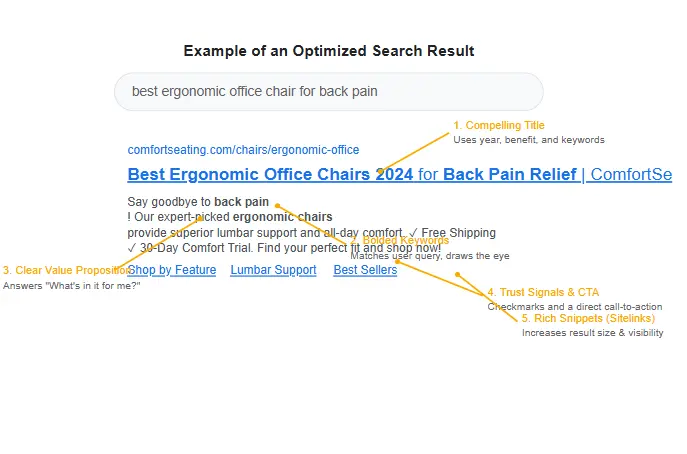
How to fix it: Rewrite every important title tag and meta description. Follow a formula like Primary Keyword | Secondary Keyword | Brand Name. Make meta descriptions compelling, including a call-to-action and your unique selling proposition. This is a quick win from our ecommerce seo audit checklist that can have an immediate impact.
2.3. Enhance Product Page Content
What it is: This is all the text, images, and videos on an individual product page.
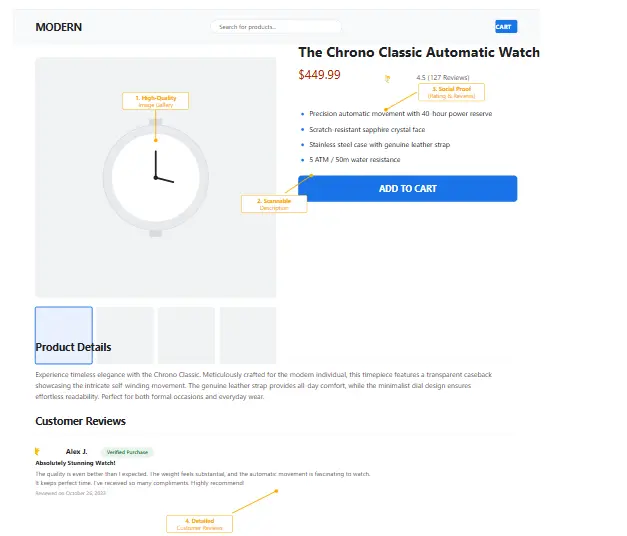
Why it matters: Thin product pages with just a manufacturer’s description won’t rank. You need unique, valuable content that answers user questions and convinces them to buy.
How to check it: Pick 10-15 of your most important product pages. Is the description unique? Does it sell the benefits, not just list features? Does it use long-tail keywords naturally? Are there customer reviews and Q&A sections?
How to fix it: Expand product descriptions. Tell a story. Include sizing guides, materials, usage scenarios, and FAQs. Add high-quality photos and videos from multiple angles. Encourage and display user-generated content like reviews. Rich content is a key differentiator and a major part of this ecommerce seo audit checklist.
2.4. Supercharge Category Page Content
What it is: The content at the top of a product category or sub-category page.
Why it matters: Category pages are your most powerful landing pages for high-volume head terms. They need content to establish relevance and rank.
How to check it: Go to your main category pages. Is there just a grid of products? Or is there at least 150-300 words of unique, descriptive text at the top?
How to fix it: Write a compelling introduction for each category. Explain what the category is about, what types of products are found within it, and what the common use cases are. Weave in your target category keywords naturally. This text provides context for Google and value for users, a crucial step in this ecommerce seo audit checklist.
Template
Need help organizing your content strategy? Download our content strategy template to plan and execute your category and product page content effectively.
2.5. Implement Image SEO
What it is: Optimizing your images for search engines and user experience.
Why it matters: Images can drive traffic through Google Image Search. Properly optimized images also improve page load speed, which we covered in the technical section.
How to check it: Right-click on a product image and “Inspect.” Does it have a descriptive alt text? Is the file name something like IMG_8394.jpg or red-running-shoe-nike-air.jpg? Are the file sizes unnecessarily large?
How to fix it:
- Alt Text: Add descriptive alt text to every important image. Describe what’s in the image, including the product name and key attribute (e.g., “Red Nike Air Max running shoe on a white background”).
- File Names: Use descriptive, keyword-rich file names before uploading.
- Compression: Use tools like TinyPNG to compress images without losing quality, reducing file size and boosting speed.
Image SEO is an often-overlooked but vital part of any ecommerce seo audit checklist.
2.6. Build a Strategic Internal Linking Structure
What it is: The links from one page on your site to another.
Why it matters: Internal links help spread “link equity” (ranking power) throughout your site. They guide users to relevant products and help Google understand the hierarchy and relationship between your pages.
How to check it: Use a tool like Screaming Frog to visualize your internal link structure. Are your most important pages (like top-selling products or key categories) linked to from the homepage and other high-authority pages? Are there orphan pages (pages with no internal links pointing to them)?
How to fix it: From blog posts, link to relevant product and category pages. On category pages, feature “best-sellers” or related products. Ensure your main navigation menu links to your most important category pages. A smart internal linking plan is a pro-level move in this ecommerce seo audit checklist.
Section 3: Off-Page SEO & Authority – A Key Part of Your Ecommerce SEO Audit Checklist
Off-page SEO refers to actions taken outside of your own website to impact your rankings within search engine results pages. It’s primarily about building your site’s authority and reputation. A key part of the ecommerce seo audit checklist is understanding how the world sees your site.
3.1. Analyze Your Backlink Profile
What it is: Backlinks are links from other websites to yours. Your backlink profile is the collection of all these links.
Why it matters: Backlinks are like votes of confidence. High-quality, relevant backlinks are a massive ranking signal. However, toxic, spammy links can harm your site.
How to check it: Use a tool like Ahrefs’ Backlink Checker or Google Search Console’s “Links” report. Look at the total number of referring domains, the authority of the linking sites, and the anchor text being used.
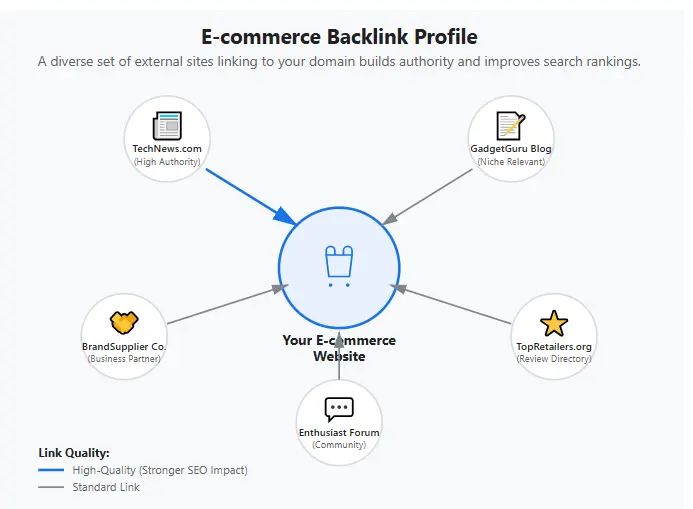
How to fix it: If you find toxic links (from spammy sites, in irrelevant languages, or using over-optimized anchor text), compile them and submit a disavow file to Google. Your primary goal should be to earn new, high-quality links through outreach, great content, and digital PR. Monitoring your backlink profile is a continuous task, not a one-off ecommerce seo audit checklist item.
3.2. Conduct Competitor Backlink Analysis
What it is: Analyzing the backlink profiles of your top-ranking competitors to find link-building opportunities.
Why it matters: If a site is linking to your competitor, there’s a good chance they might be willing to link to you too, especially if you have something better or more relevant to offer.
How to check it: In Ahrefs or SEMrush, enter a competitor’s domain and go to their backlink report. Filter for links from high-authority domains, blogs, or news sites.
How to fix it: This isn’t about “fixing” but about “building.” Create a list of potential link opportunities. Reach out to these sites with a compelling reason to link to you. Perhaps you have a better guide, a unique product, or an interesting data point they could cite. This proactive approach is what separates the pros from the amateurs in executing an ecommerce seo audit checklist.
Quick Wins
Looking for places to start? Our guide to the easiest backlinks to build will show you simple strategies to get quality links pointing to your ecommerce store.
Section 4: User Experience (UX) & The Final Step in Your Ecommerce SEO Audit Checklist
Google’s ultimate goal is to satisfy its users. Therefore, sites that provide a great user experience are rewarded with higher rankings. This final section of our ecommerce seo audit checklist bridges the gap between SEO and actual revenue.
4.1. Optimize Site Navigation & Search
What it is: The menus and search bar that allow users to find what they’re looking for.
Why it matters: Confusing navigation leads to frustration and high bounce rates, which are negative signals to Google. A good search function can be the difference between a sale and a lost customer.
How to check it: Ask a friend who has never seen your site to find a specific product. Watch where they click and how long it takes. Is it intuitive? Test your site search. Does it handle typos? Does it show relevant products?
How to fix it: Simplify your main navigation menu. Use clear, descriptive labels. Implement an intelligent, autocomplete-enabled site search. Ensure your search results page is well-organized with filters for size, color, price, etc. A smooth user journey is the ultimate goal of this ecommerce seo audit checklist.
4.2. Leverage Social Proof on Product Pages
What it is: Social proof includes customer reviews, ratings, testimonials, and user-generated photos.
Why it matters: It builds trust and answers potential buyer questions, directly increasing conversion rates. Rich snippets (like star ratings) in the search results also significantly boost CTR. To implement these, you’ll need to understand structured data (schema markup).
How to check it: Do your top products have reviews? Is it easy for customers to leave a review? Are the reviews displayed prominently on the page?
How to fix it: Implement a review system (e.g., Yotpo, Judge.me). Actively solicit reviews from customers post-purchase. Display ratings and reviews prominently above the fold on product pages. Use schema markup to help Google display star ratings in the search results. This is a high-ROI item on our ecommerce seo audit checklist.
Tools to Power Your Ecommerce SEO Audit
You can’t complete this ecommerce seo audit checklist with your eyes closed. You need the right tools for the job. Here are some of the best:
- Google Search Console: (Free) Essential. For monitoring index status, keywords, and technical issues.
- Google Analytics: (Free) For understanding user behavior, traffic sources, and conversion data.
- Screaming Frog SEO Spider: (Free/Paid) The best tool for a comprehensive on-site technical audit. Crawls your site and finds everything a search engine would see.
- Ahrefs/SEMrush: (Paid) The industry standards for keyword research, competitor analysis, and backlink audits. A subscription is a must for serious ecommerce businesses.
- Google PageSpeed Insights: (Free) For analyzing site speed and Core Web Vitals.
- Google’s Mobile-Friendly Test: (Free) A quick and easy way to check mobile usability.
Using these tools in conjunction with this ecommerce seo audit checklist will give you a 360-degree view of your site’s health.
Your Path to #1 Starts Now
Completing a full ecommerce seo audit checklist is no small task. It’s a deep dive into the very core of your online presence. But as you can see, every single item on this list is a lever that, when pulled, can lead to more traffic, higher rankings, and increased revenue.
Don’t feel overwhelmed. You don’t have to do everything at once. Prioritize the technical issues first, then move on to on-page optimization, and finally, focus on building your authority and improving user experience. SEO is a marathon, not a sprint. Make this ecommerce seo audit checklist a quarterly ritual. The digital landscape and Google’s algorithms are always changing, and regular audits are the only way to stay ahead of the curve.
You now have the knowledge, the process, and the comprehensive ecommerce seo audit checklist to transform your store’s performance. The only thing left is to take action.
Don’t Lose This Momentum!
You’ve just read the ultimate guide. Now, get the ultimate tool. Download our free, printable PDF version of this ecommerce seo audit checklist and start checking off tasks today. It’s your roadmap to the top of Google.
Click here to reveal the download form