
Moz Pro Pricing: Plans, Costs, Features and Value
By Mousume Akter, Founder & Editor, SEORAF | Pricing checked November 20, 2026
Affiliate disclosure: Some links to Moz on this page are affiliate links, and each one is labeled. SEORAF may earn a commission if you sign up through them, which doesn’t influence this analysis. SEORAF is an independent SEO research site, and I have not hands-on tested Moz Pro for this article. Everything below comes from Moz’s published pricing page and Help Hub plus independent sources, and it is labeled as such.
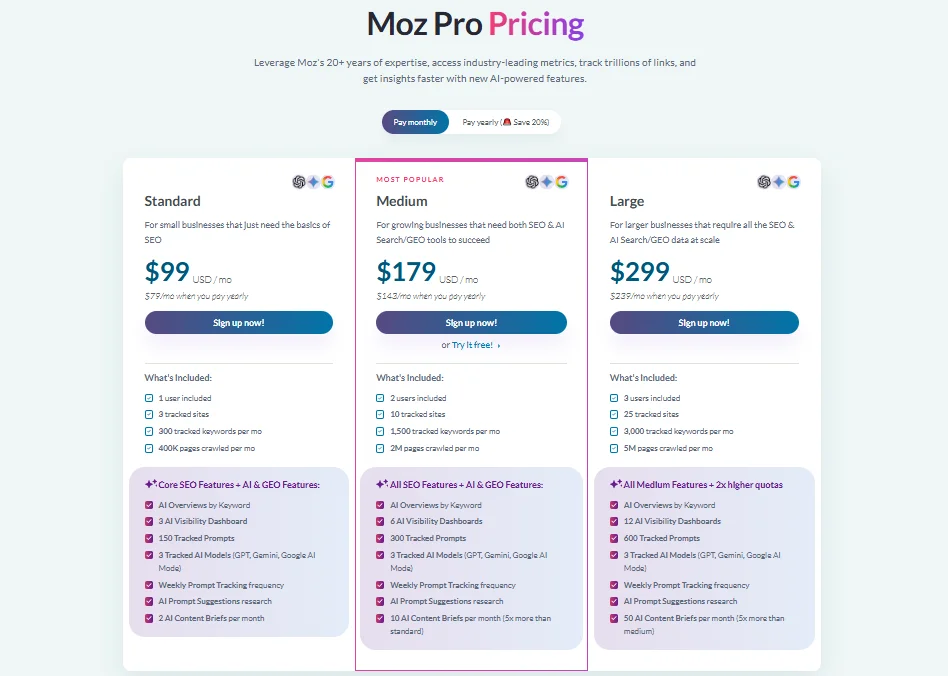
Moz Pro pricing starts at $49 a month for the Starter plan and reaches $299 a month for Large, with Standard at $99 and Medium at $179 in between. Those are the listed monthly prices. Your actual cost can be higher if you add seats, campaigns, crawl capacity, keyword capacity, or AI tracking. Annual billing also requires an upfront commitment, so review the checkout total and renewal terms before paying.
This guide compares every plan’s limits, explains monthly versus yearly billing and the free trial, and walks through three cost scenarios so you can match a plan to your setup before you spend anything. Where Moz doesn’t publish a detail, the article says so rather than guessing.
Pricing checked: November 20, 2026. Prices are in USD. I checked Moz’s Pro pricing page on that date. Policy details such as trial length, cancellation timing, refunds and renewal terms should be checked in the current Moz Help Hub and checkout flow before you buy. Moz can change prices and limits at any time.
Moz Pro Pricing at a Glance
- Monthly billing: Starter $49, Standard $99, Medium $179, Large $299. Enterprise is custom.
- Yearly billing: Moz displays $79, $143 and $239 per month for Standard, Medium and Large, and labels the corresponding totals as first-year charges. A yearly Starter price is not displayed.
- Free trial: Medium plan, monthly billing, card required. Moz’s pricing page doesn’t state the trial length.
- Extras: Additional seats are $49 a month each. Review the current cancellation and refund terms before choosing annual billing.
- SEORAF’s view: Medium offers more capacity for teams, while Standard may fit a single user with a smaller tracking workload. The best fit depends on the limits you actually need.
| Plan | Monthly billing | Yearly billing (per month) | Billed for first year | Moz’s positioning |
|---|---|---|---|---|
| Starter | $49 | Not shown | Not shown | Individuals managing a single website |
| Standard | $99 | $79 | $950 | Small businesses |
| Medium | $179 | $143 | $1,719 | Growing businesses (Moz’s “Most Popular” label) |
| Large | $299 | $239 | $2,868 | Larger businesses |
| Enterprise | Custom | Custom | Custom | Inquire through Moz |
Moz Pro plan prices in USD. Source: Moz pricing page, checked November 20, 2026.
Want to check the numbers yourself? See Moz’s current plans on Moz.com
How Much Does Moz Pro Cost?
Moz Pro costs $49 a month for Starter, $99 for Standard, $179 for Medium and $299 for Large when billed monthly. Paying yearly takes 20% off the base plan on Standard, Medium and Large, bringing them to $79, $143 and $239 a month for the first year. Seats and add-ons cost extra.
The honest answer is the base price plus whatever you add, and two things hide inside that range. First, the $49 Starter plan is easy to miss. Moz mentions it in a note below the main plan grid, describing it as an entry-level plan for individuals managing a single website, so most people comparing plans will realistically start at Standard.
Second, the base price covers a fixed quota of users, sites, keywords and AI tracking. Moz sells extra capacity in small increments, so your actual bill depends on how much you use. The scenarios later in this guide show the math.
Moz Pro Plans Compared: Prices and Limits Side by Side
This table uses the limits Moz currently publishes for Standard, Medium and Large. Moz describes Starter as a $49-per-month option for an individual managing one website, but the detailed comparison table does not publish its full limits.
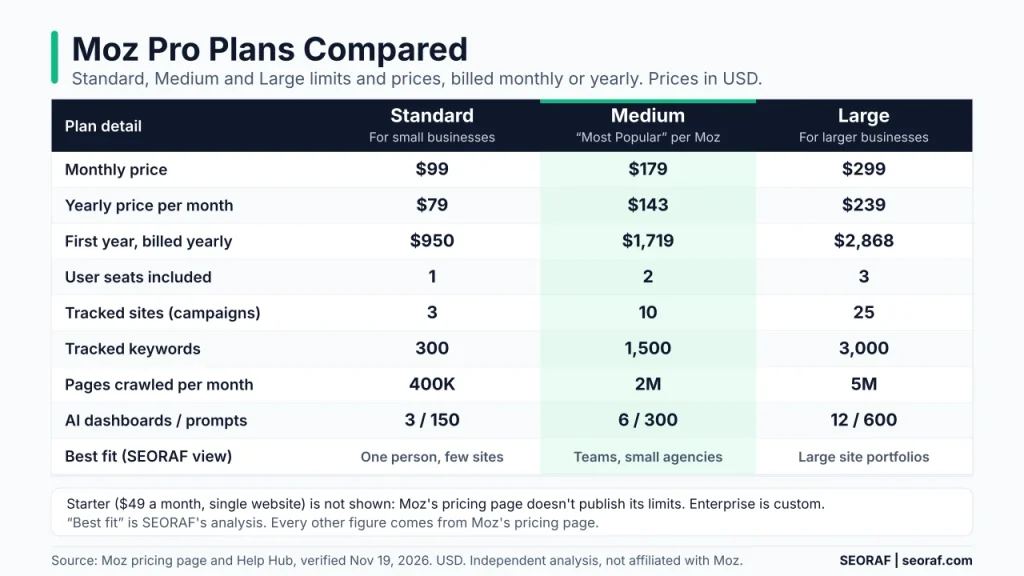
| Plan detail | Standard | Medium | Large |
|---|---|---|---|
| Monthly price (billed monthly) | $99 | $179 | $299 |
| User seats included | 1 | 2 | 3 |
| Tracked sites (campaigns) | 3 | 10 | 25 |
| Tracked keywords | 300 | 1,500 | 3,000 |
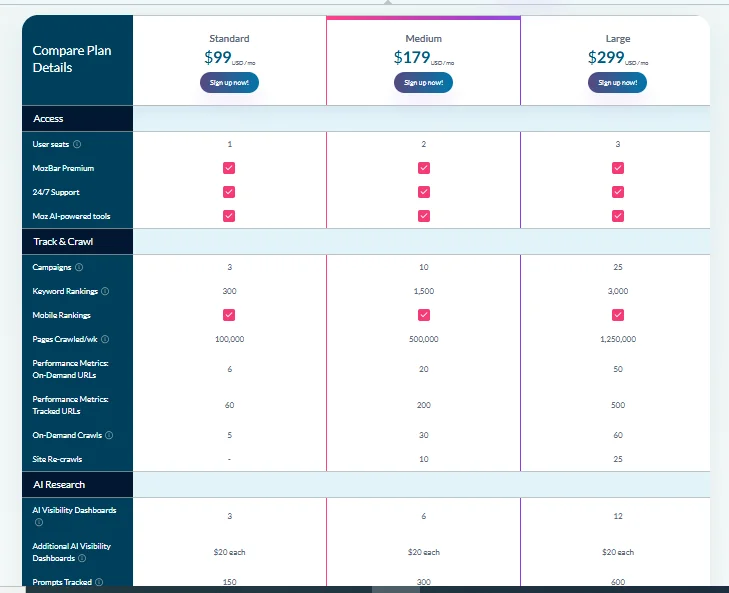
| Pages crawled | 400,000 per month (100,000 per week) | 2 million per month (500,000 per week) | 5 million per month (1.25 million per week) |
| Keyword queries a month | 150 | 5,000 | 15,000 |
| Backlink queries a month | 5,000 | 20,000 | 70,000 |
| AI Visibility Dashboards | 1 | 2 | 4 |
| Tracked AI prompts | 50 | 100 | 200 |
| AI Content Briefs a month | 2 | 10 | 50 |
| Site re-crawls | None listed | 10 | 25 |
| Branded reports and report templates | Not included | Included | Included |
Standard, Medium and Large limits. Source: Moz pricing page, checked November 20, 2026.
Moz displays crawl allowances in monthly figures on the plan cards and weekly figures in the comparison table. These are separate published presentations of the allowance; use the exact unit shown in the relevant part of Moz’s page when comparing plans.
Check current Moz Pro prices and limits before you decide . Prices change, and this page was last checked on November 20, 2026.
The Starter Plan: What Is and Isn’t Known
Moz currently describes Starter as a $49-per-month entry-level option for individuals managing a single website. However, its public pricing page does not provide the full Starter feature-and-limit breakdown shown for Standard, Medium and Large. I therefore do not reproduce third-party estimates for seats, keyword quotas, crawl limits or excluded features as confirmed facts. Check the Starter details displayed during signup and ask Moz support to confirm any limit that affects your workflow.
| Starter detail | What Moz publicly confirms |
|---|---|
| Price | $49 per month |
| Intended use | Individuals managing a single website |
| Detailed keyword, crawl and user limits | Not listed in the public plan summary |
| Annual price | Not displayed on the pricing page |
| AI Visibility features | Not specified in the Starter note |
Starter details published in Moz’s pricing-page note. Unlisted limits are not assumed to be included.
If a single website on a tight budget describes your situation, Starter may be worth investigating. Before paying, confirm the included seat count, campaign access, keyword tracking, crawl allowance, research quotas and whether any feature you need is excluded.
Enterprise
Enterprise is quote-based. Moz’s pricing page links to an “Ask about Moz Enterprise” inquiry instead of listing a price. If your needs go past Large’s limits, that is the route.
Monthly vs Annual Billing
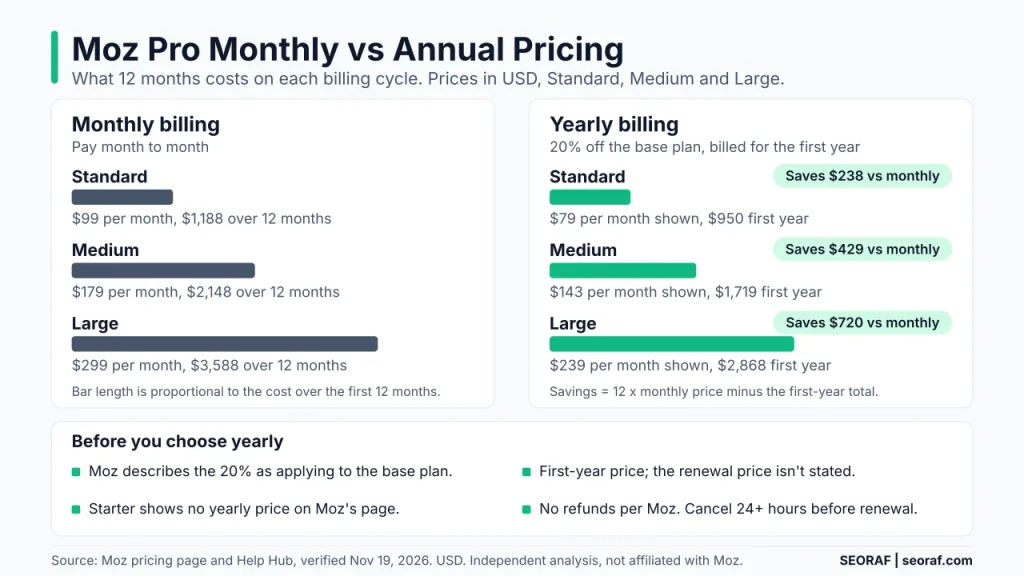
Moz takes 20% off the base plan when you pay yearly, and it labels the yearly price as the amount billed for your first year.
| Plan | 12 months at monthly billing | First year billed yearly | Saving |
|---|---|---|---|
| Standard | $1,188 | $950 | $238 |
| Medium | $2,148 | $1,719 | $429 |
| Large | $3,588 | $2,868 | $720 |
The monthly-billing totals are SEORAF calculations. Annual totals are the amounts Moz displays for the first year; monthly equivalents are rounded display figures and may not multiply exactly to the stated total.
Moz shows $79 a month for Standard on yearly billing, but $79 x 12 is $948, so use the $950 total Moz lists as the amount billed.
Three things are worth knowing before you choose yearly:
- The first-year wording. The yearly price is labeled as the amount billed for your first year. Moz’s pricing page doesn’t say what renewal costs, so check the renewal terms before committing.
- The discount covers the base plan. Moz’s FAQ describes the 20% as applying to the base plan. I couldn’t confirm whether seats or add-ons get the same discount, so verify that at checkout.
- Refund and cancellation terms. Moz says customers can cancel or change plans. Before paying annually, read the current Help Hub terms to understand when cancellation takes effect and whether any refund is available.
My view: if you haven’t used Moz Pro before, monthly billing costs more per month but limits your commitment while you learn whether the limits fit. Move to yearly once you’ve confirmed the plan matches your workload.
What Each Moz Pro Plan Includes: Features and Limits
Core SEO toolset
Moz lists MozBar Premium, support and core Moz tools across the three main paid plans in its plan comparison. Standard, Medium and Large have published quotas for campaigns, keyword rankings, crawling, SEO research, AI research and reporting. Starter is described separately and its detailed feature limits are not shown in the public comparison, so do not assume that every Standard feature is included. If you mainly want the browser toolbar, see our guide to SEO Chrome extensions, which covers MozBar alongside other options.
- Campaigns: A campaign tracks one site plus three competitor sites. The “tracked sites” counts in the table above are campaign counts.
- Rank Checker: 200 queries a day on Standard and Medium, 500 on Large.
- Keyword lists: 5 on Standard, 30 on Medium, 60 on Large.
- Link tracking lists: 1 on Standard, 30 on Medium, 60 on Large.
AI Visibility tracking
The current comparison lists 1 AI Visibility Dashboard and 50 tracked prompts for Standard; 2 dashboards and 100 prompts for Medium; and 4 dashboards and 200 prompts for Large. Tracking is weekly. Standard lists GPT and Gemini, while Medium and Large list GPT, Gemini and Google AI Mode. Moz also lists AI Overviews by keyword and monthly AI Content Brief quotas of 2, 10 and 50 respectively. For background on the Google feature behind that data, see our explainer on Google’s AI Overviews. The Starter note does not specify whether these AI features are included.
Moz can change these quotas independently of the headline subscription price. The figures above reflect the current public comparison checked November 20, 2026; recheck the page before publishing updates.
Reporting and seats
Moz lists scheduled reports for the three main plans. The comparison indicates that branded reports and report templates are not included on Standard and are available on Medium and Large. That matters for agencies and consultants who send client-ready reports. Seats are the other constraint: Standard includes one user, Medium two and Large three.
More limits by plan
| Limit | Standard | Medium | Large |
|---|---|---|---|
| Domain Overview lookups | 50 | 100 | 180 |
| Competitive Research queries | 50 | 75 | 100 |
| On-demand crawls | 5 | 30 | 60 |
| Keywords per keyword list | 100 | 500 | 750 |
| Links per link tracking list | 100 | 500 | 750 |
| Keywords per site query | 10,000 | 30,000 | 50,000 |
| Results per backlink query | 10,000 | 40,000 | 50,000 |
Additional Standard, Medium and Large limits. Source: Moz pricing page, checked November 20, 2026.
Where limits bite first
These points are SEORAF’s analysis, using arithmetic on Moz’s figures:
- Keyword queries: Standard’s 150 a month is its tightest research limit, against 5,000 on Medium. If you do a lot of keyword research, you’ll feel this first.
- Keywords per site: Standard gives 300 keywords across 3 sites (about 100 per site), Medium 1,500 across 10 (about 150 per site), and Large 3,000 across 25 (about 120 per site). Medium has the most room per site.
- Seats: A three-person team on Standard needs two extra seats.
- Crawl quota: The pages-crawled figure refers to Moz’s own site crawls of your tracked sites, not to how Googlebot crawls your site.
Moz Pro Free Trial and Free Options
How the free trial works
Moz’s pricing page offers “Try it free” only on the Medium plan with monthly billing. A few conditions apply:
- Card required: Moz’s trial help page says a valid credit card is required.
- Renewal: The trial may continue as a paid subscription unless cancelled under the terms shown at signup. Check the renewal date and exact cancellation deadline in your account and the current Help Hub.
- You keep the rest of the trial: If you cancel during the trial, you retain access for the remainder of it.
- What happens after: The trial is presented on the Medium plan. If the subscription continues on monthly billing after the trial, the listed Medium price is $179 per month; confirm the renewal date and terms shown at signup.
Trial length is not confirmed
The pricing page I read doesn’t state how long the trial lasts. I could not verify a definitive duration from the Moz pricing page. Rather than repeat conflicting third-party figures, check the trial length, start date, end date and post-trial charge displayed on Moz’s signup screen before entering payment details.
The free Moz Community account
Moz says a free Community account provides limited access to MozBar, Keyword Explorer and Link Explorer. It is separate from Moz Pro and should not be treated as a substitute for the paid plan quotas. Check the current account limits on Moz before relying on a specific monthly allowance.
What isn’t free
There is no permanent free Moz Pro plan. If you want a free test of the paid features, the trial is the only route.
Extra Seats, Add-Ons and Other Costs
Moz lists the following add-on rates for increasing selected base-plan limits. The pricing page labels the core add-ons as monthly; for AI dashboard and prompt add-ons, confirm the billing interval shown in your account before purchasing:
| Add-on | Price |
|---|---|
| Additional user seat | $49 a month each |
| Additional campaign | $10 a month each |
| Additional 50,000 pages crawled | $15 a month |
| Additional 200 tracked keywords | $20 a month |
| Additional 10,000 keyword queries | $10 a month |
| Additional 5 keyword lists | $25 a month |
| Additional 5 link tracking lists | $25 a month |
| Additional AI Visibility Dashboard | $20 each (billing interval: confirm at checkout) |
| Additional 100 tracked prompts | $50 per 100 prompts (billing interval: confirm at checkout) |
Add-on prices in USD. Source: Moz pricing page, checked November 20, 2026.
A few other billing points:
- Overages: Moz’s plan table carries a note that overages aren’t included. I read that as limits being caps you raise with add-ons, not soft allowances.
- Cancellation: Moz doesn’t offer a pause option. After a plan or trial expires, campaigns are archived and no new data is collected. Moz’s guide says archived campaign data is retained for 12 update cycles.
- Refunds and billing questions: Review Moz’s current refund and cancellation policy in the Help Hub before subscribing. For account-specific billing questions, use the contact details currently listed by Moz.
- Discounts: Moz says there is no student discount, and registered 501(c)(3) non-profits can use a separate non-profit discount page. I haven’t read that page’s terms.
- Separate products: Moz Local is a separate product with its own pricing, and the same goes for Moz API and STAT. This guide covers Moz Pro only.
- Taxes and payment methods: Moz’s Help Hub has separate pages on sales tax and accepted payment methods. If you’re outside the US, check both before you rely on the listed USD prices.
Real-World Cost Scenarios
These are SEORAF examples built from Moz’s listed prices. They are illustrations, not quotes, and they assume add-ons are billed at the listed monthly rates.
Scenario 1: A solo site owner who needs 500 tracked keywords
Standard at $99, plus one 200-keyword add-on at $20, comes to $119 a month with 500 keywords. With annual billing, Moz displays Standard at $79 per month equivalent for the first year. If the $20 keyword add-on remains billed monthly, the combined effective monthly cost would be about $99 during that period; confirm add-on billing terms at checkout.
Scenario 2: A three-person in-house team
| Route to three seats | Monthly cost | What you get |
|---|---|---|
| Standard + 2 extra seats | $99 + $98 = $197 | 3 sites, 300 keywords |
| Medium + 1 extra seat | $179 + $49 = $228 | 10 sites, 1,500 keywords |
| Large | $299 | 25 sites, 3,000 keywords |
Three ways to reach three seats, using Moz’s listed prices.
For $31 more than Standard plus two seats, Medium gives 5x the keywords and more than 3x the sites. Unless you only track a very small site, that makes Medium the better starting point for a team.
Scenario 3: A small agency with eight clients and AI tracking
Medium at $179 covers eight of its ten tracked sites and, at 150 keywords per client, 1,200 of its 1,500 tracked keywords. Medium includes two AI Visibility Dashboards, not eight. If each client genuinely needs a separate dashboard, six additional dashboards at the published $20-each rate would add $120; a third user seat adds $49. That illustrative setup would total $348 a month before tax and subject to confirmation of the AI add-on billing interval. It also has 100 tracked prompts included, so confirm whether the prompt quota is sufficient before choosing this configuration.
Why Standard plus add-ons usually loses to Medium
To reach 1,500 keywords on Standard, you’d add six 200-keyword blocks ($120). To reach 10 sites, you’d add seven campaigns ($70). That totals $289 a month, versus $179 for Medium, and the Standard setup would still have one seat, no branded reports and no site re-crawls.
Is Moz Pro Worth the Price?
I have not tested Moz Pro hands-on, so this assessment rests on published specs and pricing, not on experience with Moz’s data or interface.
Where the pricing looks strong
- A broad toolset in one subscription. Research, rank tracking, crawling, link data and AI visibility sit inside the main plans.
- Predictable add-ons. Moz publishes the price of extra seats, keywords and campaigns, so scaling cost is calculable.
- Medium’s value. The $179 plan includes 1,500 keywords, 10 sites, two seats and branded reports. It costs less per tracked keyword than Standard (about $0.12 versus $0.33), though that rough comparison ignores everything else each plan includes.
- Clear cancellation mechanics. Moz publishes step-by-step cancellation instructions and a clear deadline.
Where it gets harder to justify
- Annual commitment. Paying yearly means paying the displayed first-year amount upfront; review renewal and refund terms before checkout.
- Seats add up. Each extra seat costs $49 a month, so team costs grow fast.
- AI tracking has caps. Tracking is weekly, and the included prompt quota and supported AI models vary by plan. Additional prompt pricing is listed separately; confirm its billing interval before adding it.
- The trial has signup conditions and may continue as a paid Medium subscription; verify the card requirement, trial end date and renewal amount shown during signup.
Who should probably skip it
- Anyone looking for a permanent free tier. The Community account is a sampler.
- Teams of five or more who mostly need shared access, since seat costs will dominate.
- Buyers who need AI platforms, tracking frequency or reporting capabilities that Moz does not list for their selected plan.
Whether it’s worth it depends on whether your keyword, site and seat counts fit a plan without heavy add-ons. If they do, the pricing is reasonable and predictable. If they don’t, the math gets less attractive quickly.
Which Moz Pro Plan Should You Choose?
| If you are… | Consider | Watch out for |
|---|---|---|
| Managing one small site on a tight budget | Starter | Limits aren’t shown on Moz’s page, so verify them |
| A freelancer or small business with a few sites | Standard | One seat, 300 keywords, 150 keyword queries a month |
| A small team or agency | Medium | Seats beyond two cost $49 each |
| Managing a large portfolio | Large | Three seats included; add-ons still apply |
| Needing custom limits or support | Enterprise | Custom quote |
Plan-selection guide. The “Consider” column is SEORAF’s analysis, not Moz’s recommendation.
Standard fits when you track a few sites and one person does the work. Medium is the sensible default for anyone with a team, client reporting needs or more than a few hundred keywords. Large makes sense when you’d otherwise buy a stack of add-on blocks on Medium.
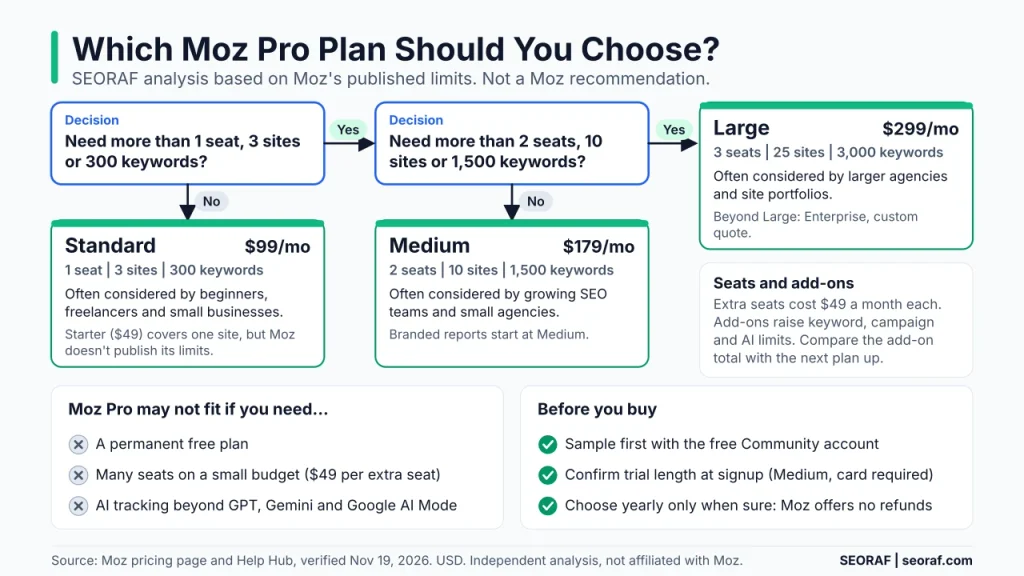
Before you buy: a five-point check
- Count the people who need their own seat.
- List the sites you track and roughly how many keywords each needs.
- Add up any add-ons you’d need using the add-on table above.
- Confirm the trial length, end date and cancellation deadline on the signup screen.
- Consider monthly billing while evaluating the product. Choose annual billing only after reviewing the upfront charge, renewal terms and current refund policy.
Review the Medium plan and trial terms
Affiliate link. Moz’s trial flow and signup screen should be checked for payment-card requirements, trial duration and the post-trial renewal date. Medium is the example used here because of the capacity in the scenarios above. If one person tracks a smaller number of sites, compare Standard first.
Entry Pricing vs Semrush, Ahrefs and SE Ranking
Moz Pro, Semrush, Ahrefs and SE Ranking package their limits differently, so a headline starting price is not a like-for-like comparison. Rather than repeat competitor prices that were not verified directly on each vendor’s current pricing page, use the official links below to compare the plan, billing term, project or campaign allowance, keyword tracking, seats and add-on costs that match your workload.
| Tool | Official pricing page | What to compare |
|---|---|---|
| Moz Pro | Moz Pro pricing | Campaigns, tracked keywords, crawl allowance, AI quotas and seats |
| Semrush | Semrush pricing | Projects, keyword tracking, user limits, add-ons and billing terms |
| Ahrefs | Ahrefs pricing | Projects, tracked keywords, credits, users and overage rules |
| SE Ranking | SE Ranking pricing | Keyword tracking, projects, seats, update frequency and billing |
Official vendor pricing pages. Prices and plan structures can change; compare equivalent limits on the date you buy.
SE Ranking’s plan names reportedly changed in 2026, so older articles may show outdated prices for it. For deeper head-to-heads, see our comparisons of SE Ranking vs Semrush and WebCEO vs Moz, our full list of Moz alternatives, or our Mangools free trial guide if you want to look at another keyword research suite.
Moz Pro Pros and Cons
Pros
- Published, specific limits for each main plan
- Plan-specific AI visibility quotas published for Standard, Medium and Large
- 20% saving on yearly billing for the three main plans
- Clear seat and add-on pricing
- Branded reports from Medium up
- MozBar Premium listed in the Standard, Medium and Large comparison
Cons
- Annual billing requires an upfront commitment; review cancellation and refund terms
- Starter limits aren’t shown on Moz’s pricing page
- Extra seats cost $49 a month each
- AI tracking is weekly and capped by prompt quota
- The Medium trial requires careful review of the trial end date and renewal price
- Yearly renewal terms aren’t stated on the pricing page
Moz Pro Pricing FAQs
How much does Moz Pro cost per month?
On monthly billing, Starter is $49, Standard $99, Medium $179 and Large $299. Enterprise is custom.
Does Moz Pro have a Starter plan?
Yes. Moz lists a $49-a-month entry-level plan for individuals managing a single website. Its limits aren’t shown on the pricing page, so confirm them at checkout.
Is there a Moz Pro free trial?
Moz’s pricing page offers a free trial on the Medium plan with monthly billing. A card is required, and the trial length isn’t stated on the pages I read. Confirm it at signup.
Is Moz Pro free?
No. Moz offers a free Community account with limited access to MozBar, Keyword Explorer and Link Explorer, but Moz Pro itself is paid.
Is yearly billing cheaper?
Yes. Moz takes 20% off the base plan, bringing Standard, Medium and Large to $79, $143 and $239 a month for the first year. Moz doesn’t show a yearly Starter price.
Can I add more users?
Yes. Additional seats are $49 a month each on any plan.
Does Moz Pro include AI visibility tracking?
Moz currently lists 1 dashboard and 50 prompts for Standard, 2 dashboards and 100 prompts for Medium, and 4 dashboards and 200 prompts for Large. Standard lists GPT and Gemini; Medium and Large also list Google AI Mode. Starter’s AI feature availability is not specified in the public pricing note.
Can I cancel anytime, and is there a refund?
Moz says customers can cancel or change plans at any time. The effect of cancellation, refund eligibility and exact cutoff should be checked in the current Help Hub and account billing screen; do not assume that cancellation automatically refunds a prepaid annual term.
Does Moz offer discounts?
Moz advertises a 20% discount on the base plan when billed yearly. Its pricing FAQ says there is no student discount and directs registered 501(c)(3) non-profits to a separate discount page; check eligibility and terms directly with Moz.
Is Moz Local included in Moz Pro?
No. Moz Local is a separate product with its own pricing.
Final Verdict
Moz Pro’s pricing is easy to understand and, for the right buyer, reasonable. Medium is the plan most people should evaluate first. It gives you far more room than Standard for a modest price difference, and Moz’s own add-on prices show that stretching Standard rarely beats it. Standard works when one person tracks a few sites. Large makes sense when you’d otherwise buy a stack of add-ons.
The main buying considerations are structural: seats cost extra, AI tracking is capped by plan, the Medium trial requires careful attention to its end date, and annual billing is an upfront commitment. If you know your site count, keyword needs and team size, you can estimate the base plan and likely add-ons before checkout.
If you’re ready to evaluate it, compare Moz’s plans against your own numbers , confirm the trial length and your plan’s limits on screen, and decide from there.
How SEORAF Verified This Pricing
SEORAF is an independent SEO research and education site. This guide doesn’t claim hands-on testing of Moz Pro or any competitor, and nothing in it guarantees rankings, traffic or results. Official Moz statements and SEORAF’s own analysis are labeled separately throughout. The primary source for plan pricing and quotas is Moz’s live pricing page. Moz’s policy and trial Help Hub pages should also be checked at the time of purchase. Here are the sources behind the figures:
| Source | Used for | Checked |
|---|---|---|
| Moz Pro pricing page | Plan prices, limits, add-ons, FAQ | November 20, 2026 |
| Moz Help Hub: Cancel Moz Pro | Refunds, cancellation timing, Community account limits | November 20, 2026 |
| Moz Help Hub: Moz Pro Free Trial | Trial conditions; verify the current page and signup terms | Recheck before publishing |
Sources and verification notes. Competitor prices are omitted; consult each vendor’s official pricing page for current rates.
What I could not confirm
- The exact free-trial duration and the post-trial renewal date until confirmed on the signup screen.
- Starter’s detailed limits, yearly price and AI feature availability.
- What yearly renewal costs.
- Whether seats and add-ons receive the yearly discount.
- The billing interval for AI dashboard and prompt add-ons.
- Competitor prices were intentionally omitted rather than presented without direct vendor verification.
Update log
November 20, 2026: Moz Pro plan prices and published limits checked against Moz’s pricing page. Billing-policy details should be reconfirmed before purchase.