Advanced SEO Audit Checklist: The Ultimate Step-by-Step Guide
Last year, I was brought in to rescue a dying SaaS company. Their organic traffic had plummeted by 64% in just four months.
This wiped out nearly $140k in monthly recurring revenue. The internal marketing team was panicking.
They blamed the latest Google core updates for the catastrophic drop. But the real culprit was much worse.
They had massive index bloat, toxic backlinks corroding their domain authority, and silent JavaScript rendering failures hiding their core content from Googlebot.
They didn’t need a content refresh. You need an advanced SEO audit checklist to survive these invisible drops.
I deployed a systematic, advanced SEO audit checklist to diagnose the exact bleed points. Within six months, we recovered the lost traffic and added an extra 40% on top.
If you are experiencing silent traffic drops, you are likely ignoring critical structural flaws. This complete SEO audit guide is the exact framework I used to turn that failing site into a market leader.
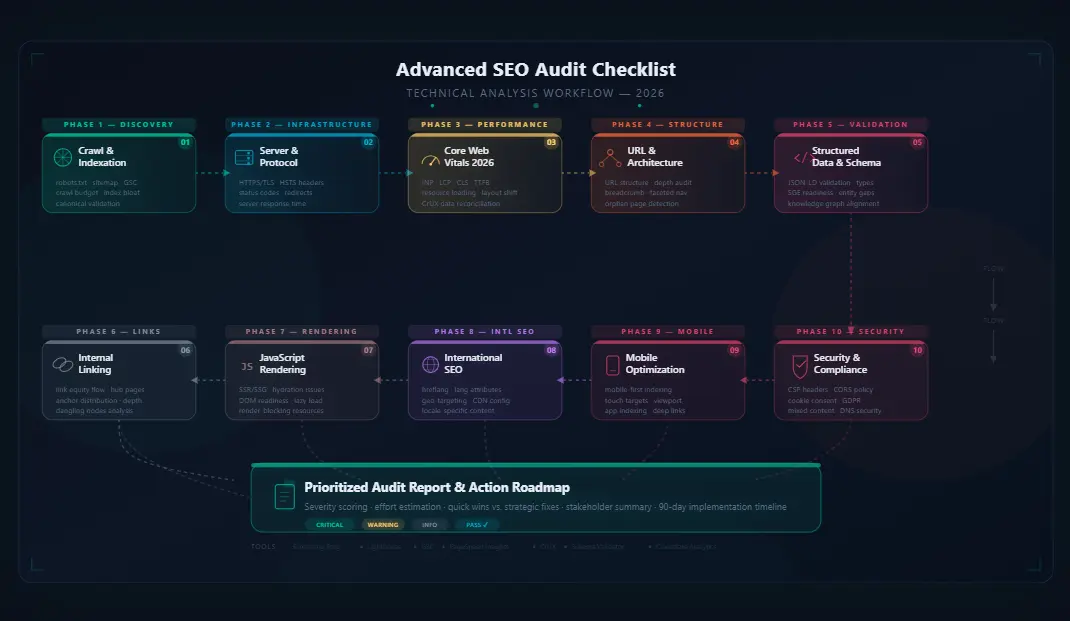
Figure 1: The workflow diagram for executing a comprehensive advanced SEO audit checklist.
What is an Advanced SEO Audit Checklist?
An advanced SEO audit checklist is a comprehensive, granular evaluation of your website’s structural, technical, and content-related health. It goes far beyond basic keyword placement.
This future-proof SEO framework analyzes server-level configurations, JavaScript rendering environments, link topology, and entity-based relevance.
Think of an advanced SEO audit checklist as a full medical MRI for your website. Standard audits look at the surface level of your site.
An advanced SEO audit checklist digs deep into the source code, the server architecture, and the off-site footprint to find the hidden bottlenecks suppressing your rankings.
Whether you are preparing for 2026 algorithm shifts or optimizing your site for AI overviews, this is your foundational blueprint. It is the definitive difference between guessing what is wrong and knowing exactly what is broken.
Why Most Websites Fail SEO (Critical Mistakes)
Most websites do not fail because they have bad writing or poor design. They fail because of invisible structural errors that confuse search engines.
When I review new clients, I see the same fatal flaws repeatedly. An advanced SEO audit checklist reveals these invisible flaws before they destroy your traffic.
Understanding these pitfalls is the first step in executing effective website SEO audit steps.
- Ignoring Crawl Budget: Allowing Google to waste finite resources crawling low-value pages like archived tags, pagination voids, or faceted navigation URLs.
- JavaScript Dependency: Hiding critical text, internal links, or schema markup behind client-side scripts that Google’s crawler struggles to render efficiently.
- Orphan Pages: Publishing new pages without adding internal links pointing to them, making the pages virtually invisible to search engine discovery.
- Toxic Link Profiles: Accumulating spammy backlinks over years without actively monitoring anchor text ratios or disavowing harmful domains.
- Poor Mobile Parity: Serving a degraded user experience, lazy-loaded content issues, or different text to mobile users compared to desktop users.
Fixing these issues requires more than installing a WordPress plugin. It demands a rigorous SEO audit checklist 2026 strategy that leaves no stone unturned.
Complete Advanced SEO Audit Checklist
This is the core framework of the article. Do not skip a single step.
This advanced SEO audit checklist is divided into six critical pillars that govern how search engines interact with your website.
1. Technical SEO Audit
Technical SEO is the foundation of your site. If Google cannot crawl, render, or understand your site properly, your content will never rank.
A proper technical SEO audit prevents silent ranking killers that destroy traffic without triggering obvious errors in Search Console.
Your technical SEO audit checklist starts with server access and ends with flawless rendering.
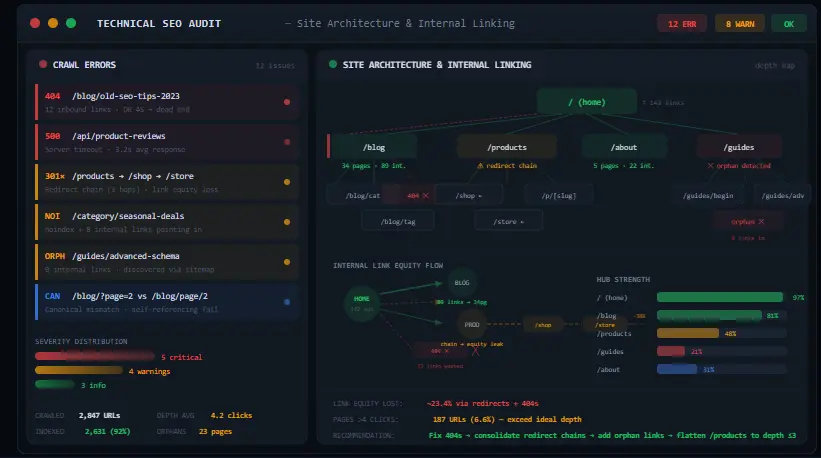
Figure 2: Analyzing site architecture and internal linking flow during a technical SEO audit.
- Crawlability Check: Ensure your robots.txt file is not blocking critical CSS, JavaScript, or image resources. Test with the URL Inspection tool.
- XML Sitemap Optimization: Remove all 404 pages, redirected URLs, and non-canonical pages from your XML sitemaps. Only include your core pages.
- HTTPS Implementation: Verify all pages redirect properly to HTTPS and that there are zero mixed-content errors loading over HTTP.
- JavaScript Rendering: Use Google’s URL Inspection tool to ensure dynamic content is fully indexed. Implement dynamic rendering if necessary.
- Hreflang Tags: For multilingual sites, ensure hreflang tags are correctly implemented on both the HTTP header and HTML body to prevent duplicate content issues.
- Log File Analysis: Review your server logs to see exactly how often Googlebot visits your site, which pages it prioritizes, and where it encounters 5xx server errors.
2. On-Page SEO Audit
The next phase in your advanced SEO audit checklist is on-page optimization. This ensures search engines understand your content’s context and intent.
Follow this strict on-page SEO checklist to maximize topical relevance and avoid keyword cannibalization.
- Title Tags & Meta Descriptions: Ensure primary keywords are placed strategically. Avoid keyword stuffing; focus on CTR optimization using power words.
- Header Tag Hierarchy: Maintain a logical H1 to H6 structure. Never skip heading levels, and ensure only one H1 exists per page to avoid confusing entity extraction.
- Keyword Cannibalization: Audit your site for multiple pages targeting the exact same search intent. Merge the weaker pages into the primary page to consolidate link equity.
- Semantic HTML5: Use proper HTML5 elements like article, section, nav, and aside to help search engines parse your content structure and understand the main body of text.
- Schema Markup: Implement advanced structured data (FAQ, HowTo, Article) to win rich snippets and optimize for AI search engine citations.
3. Content Audit
An advanced SEO audit checklist treats content as the fuel for your rankings. But low-quality fuel damages the engine.
Align this step with your broader content marketing checklist to ensure every page earns its rightful place on your domain.
- Identify Thin Content: Find pages with under 500 words that offer no real value, depth, or unique insights. Flesh them out with expert analysis or noindex them entirely.
- Content Decay Analysis: Identify historically high-traffic pages that are losing traction over time. Update outdated statistics, refresh formats, and add new relevant subtopics.
- Helpful Content Compliance: Ensure content demonstrates first-hand experience, uses original research, and satisfies user intent deeply, aligning with Google’s HCU guidelines.
- Keyword Gap Analysis: Compare your content coverage against top-ranking competitors. Find missing subtopics to close the topical authority gap using a solid keyword research guide.
4. Off-Page SEO Audit (Backlinks)
No advanced SEO audit checklist is complete without analyzing backlinks. Your backlink profile determines your domain’s trust and authority in Google’s eyes.
A flawed backlink building strategy can result in severe manual actions that take years to recover from. You must audit your off-page SEO ruthlessly.
- Toxic Backlink Identification: Export your full link profile and flag links from penalized sites, foreign language spam blogs, or sites explicitly violating Google’s spam policies.
- Anchor Text Distribution: Ensure your anchor text profile is naturally varied. Over-optimization of exact-match commercial anchors is a massive red flag in 2026.
- Link Velocity Monitoring: Monitor for sudden, unnatural spikes in link acquisition. A site gaining 1,000 links overnight usually triggers spam algorithms.
- Lost Link Recovery: Identify high-authority links you recently lost due to site migrations or page updates, and reach out to webmasters to reclaim them.
5. UX & Core Web Vitals Audit
User experience is a confirmed, measurable ranking factor. Your advanced SEO audit checklist must measure user friction accurately.
If your site frustrates users with slow loads or shifting elements, Google will demote it. In your advanced SEO audit checklist, UX is non-negotiable.
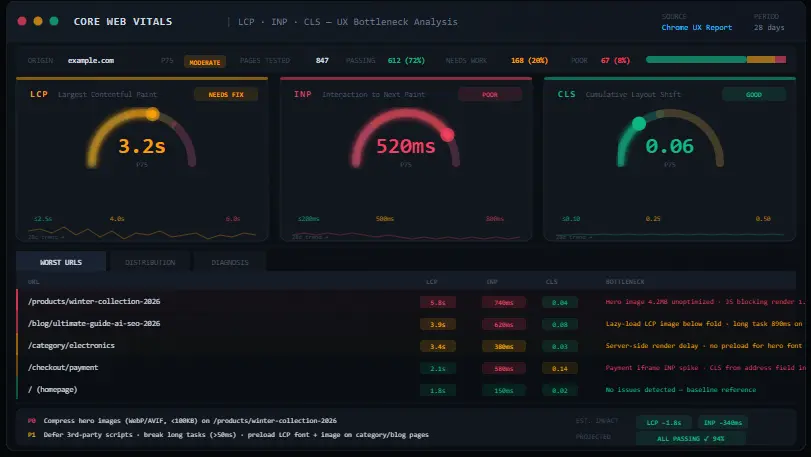
Figure 3: Analyzing Core Web Vitals metrics (LCP, INP, CLS) to identify user experience bottlenecks.
- Largest Contentful Paint (LCP): Ensure LCP occurs within 2.5 seconds. Optimize image formats (WebP/AVIF), server response times (TTFB), and eliminate render-blocking resources.
- Interaction to Next Paint (INP): Replacing FID, INP measures overall page responsiveness. Audit your JavaScript execution to ensure clicks, taps, and keystrokes register instantly.
- Cumulative Layout Shift (CLS): Eliminate visual stability issues. Always specify width and height dimensions for images, videos, and ad slots to prevent content from jumping.
- Mobile Usability: Ensure buttons are appropriately sized for touch, text is legible without zooming, and horizontal scrolling is completely eliminated on all devices.
6. Indexing & Crawlability Audit
Indexing control is what separates a basic list from an advanced SEO audit checklist. Just because a page exists on your server doesn’t mean it belongs in Google’s index.
Controlling your index is the hallmark of an advanced SEO professional. Your website SEO audit steps must eliminate wasted crawl equity.
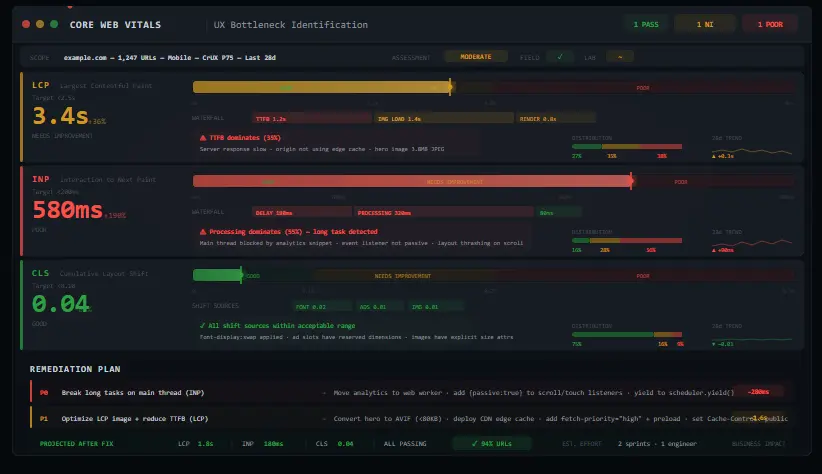
Figure 4: Using Google Search Console to monitor index coverage and identify page indexing errors.
- Index Bloat Removal: Identify indexed pages that receive zero traffic and serve no SEO purpose (like internal search result pages or auto-generated tags). Noindex or block them.
- Soft 404 Errors: Find pages returning a 200 OK status code but displaying “Page Not Found” text. Google hates soft 404s; return a proper 404 status code instead.
- Redirect Chains: Eliminate 301 redirect chains (Page A redirects to B, which redirects to C). Ensure all redirects point directly to the final destination to preserve link equity.
- Canonical Tag Auditing: Ensure self-referencing canonicals are present on all pages. Cross-check that paginated pages canonicalize correctly to avoid duplicate content penalties.
Beginner vs Advanced SEO Audit
Understanding the difference between basic surface-level fixes and advanced diagnostic deep-dives is crucial for scaling your SEO efforts.
Use this advanced SEO audit checklist comparison to help you gauge your current website SEO audit steps and knowledge level.
| Audit Metric | Beginner Audit | Advanced SEO Audit Checklist |
|---|---|---|
| Crawlability | Checks robots.txt basics | Analyzes log files for crawl waste and JS rendering blockers |
| Content | Checks word count and keyword density | Evaluates E-E-A-T, entity salience, and content decay |
| Backlinks | Looks at total backlink count | Analyzes toxic link ratios, anchor text manipulation, and link velocity |
| Performance | Checks basic page speed score | Optimizes INP, LCP, CLS at the code and server level |
| Indexing | Makes sure sitemap is submitted | Resolves index bloat, soft 404s, and canonical misconfigurations |
Real Case Study: How an Audit Saved a 7-Figure E-commerce Site
An e-commerce brand generating $1.5M annually saw a terrifying 45% drop in organic revenue over just three months. They assumed they had been hit with a Google penalty.
I ran the advanced SEO audit checklist and found three hidden, compounding issues.
First, a recent Shopify theme update had accidentally added a “noindex” meta tag to their top 50 highest-grossing product category pages.
Second, their faceted navigation had generated over 400,000 orphan URLs. These URLs were draining their crawl budget, stopping Google from finding new products.
Finally, an aggressive backlink building strategy from a previous agency had left them with 12,000 toxic footer links from irrelevant foreign blogs.
Using an advanced SEO audit checklist, we immediately removed the noindex tags. We implemented proper canonical tags and robots directives on the faceted pages.
Next, we executed a detailed Google Disavow file to neutralize the toxic links. Within 90 days, their index recovered fully and crawl stats normalized.
Organic revenue surpassed pre-drop levels by 22%. This proves that a systematic advanced SEO audit checklist framework doesn’t just fix problems; it uncovers hidden revenue.
Common SEO Audit Mistakes to Avoid
Even experienced marketers make fatal errors during audits. Avoid these traps when executing your advanced SEO audit checklist.
Doing so will ensure your complete SEO audit guide actually yields tangible business results rather than just a list of meaningless errors.
To manage these tasks efficiently without getting overwhelmed, utilize a comprehensive SEO tools list that allows you to tag, filter, and assign issues.
Pro SEO Audit Tips (Expert Insights)
If you want to operate at an elite level and rank in 2026, you need to adopt advanced methodologies. Integrating a keyword research guide into your technical findings is where the real magic happens.
Essential Tools for SEO Audit
You cannot execute an advanced SEO audit checklist with naked eyes. You need the right technology stack to parse data efficiently.
Here is my recommended SEO tools list for deep, actionable analysis.
- Google Search Console: The absolute source of truth for indexing, crawl errors, manual actions, and real-world Core Web Vitals data.
- Ahrefs / Semrush: Essential for deep backlink profiling, keyword tracking, organic traffic estimation, and competitive content gap analysis.
- Moz Pro: Excellent for tracking Domain Authority fluctuations, identifying on-page optimization opportunities, and discovering toxic link patterns.
- Screaming Frog SEO Spider: The industry standard for desktop crawling. Crucial for identifying redirect chains, missing meta tags, hreflang errors, and JavaScript rendering issues.
- PageSpeed Insights: Crucial for diagnosing specific LCP, INP, and CLS issues with field data and providing highly specific, actionable code-level recommendations.
Frequently Asked Questions
How often should I perform an advanced SEO audit?
You should perform a comprehensive technical and content audit quarterly. However, basic crawl error monitoring and index status checks should be done weekly to catch silent issues.
What is the difference between a technical SEO audit and an on-page audit?
A technical audit focuses on server configuration, crawlability, indexability, and site speed. An on-page audit focuses on content quality, keyword optimization, and HTML tag relevance.
How long does a complete SEO audit take?
For a small to medium website (under 10,000 pages), an advanced SEO audit checklist takes 15 to 25 hours. Enterprise sites with millions of URLs can take 40+ hours.
Can I do an SEO audit for free?
Yes, you can perform a foundational audit using free tools like Google Search Console. However, identifying complex issues like JavaScript rendering failures requires premium tool subscriptions.
What is index bloat in an SEO audit?
Index bloat occurs when Google indexes low-quality or empty pages on your site. This dilutes your crawl budget and can severely harm your domain’s ability to rank important pages.
How do I fix keyword cannibalization?
Identify pages competing for the same query. Decide which page best satisfies the search intent. Then, merge the weaker pages into the primary page and 301 redirect the old URLs.
Are backlinks still important in 2026?
Absolutely. While AI and user experience are growing ranking factors, high-quality backlinks remain a top-three ranking signal. Focus has simply shifted to extreme topical relevance.
What is the most critical step in an advanced SEO audit?
Crawlability and indexing verification is the most critical step. If Google cannot access or index your pages, fixing on-page content or building backlinks will yield zero results. Follow an on-page SEO checklist only after technical foundations are solid.
Ready to Fix Your Hidden SEO Issues?
Stop guessing why your traffic is dropping. Enter your details below to get the advanced SEO audit checklist PDF and start auditing your site like a professional today.

SEO Expert | 6+ Years of Experience
Mousume Akter is a technical SEO strategist with over half a decade of experience rescuing organic traffic and scaling enterprise search visibility. She specializes in complex site architecture, log file analysis, and future-proof SEO strategies.