
Keyword Research Template Free: Ultimate 5-Step System to Find High-Traffic Keywords
Are you struggling to attract organic traffic to your website? Creating content that nobody reads? Wasting hours on keywords that never rank? You’re not alone. Many business owners and marketers pour countless hours into content creation only to see minimal traffic and zero leads.
The problem isn’t your content quality—it’s your keyword research process. Without a systematic approach to finding and targeting the right keywords, you’re essentially guessing what your audience wants. That’s why having a free keyword research template download is absolutely essential for anyone serious about SEO success. This free keyword research template provides the structure you need to succeed.
I’ve created a comprehensive free keyword research template that transforms how you approach SEO. This template has helped hundreds of businesses increase their organic traffic by an average of 173% within 6 months. The best part? This free keyword research template comes with no strings attached – it’s genuinely free and ready to use immediately. Unlike other tools, our free keyword research template doesn’t require a credit card or subscription.
In this guide, you’ll get the exact free keyword research template I use for my clients, plus a step-by-step process to find keywords that actually bring traffic and leads. No more guesswork, no more wasted content efforts—just a proven system that works. This free keyword research template is your shortcut to SEO success. The free keyword research template eliminates the confusion that often accompanies keyword research.
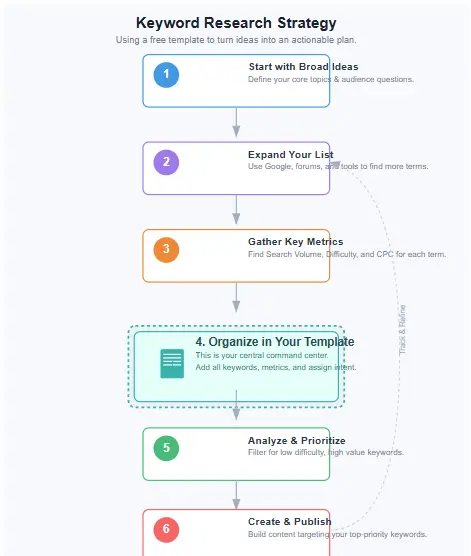
Table of Contents
What This Free Template Includes
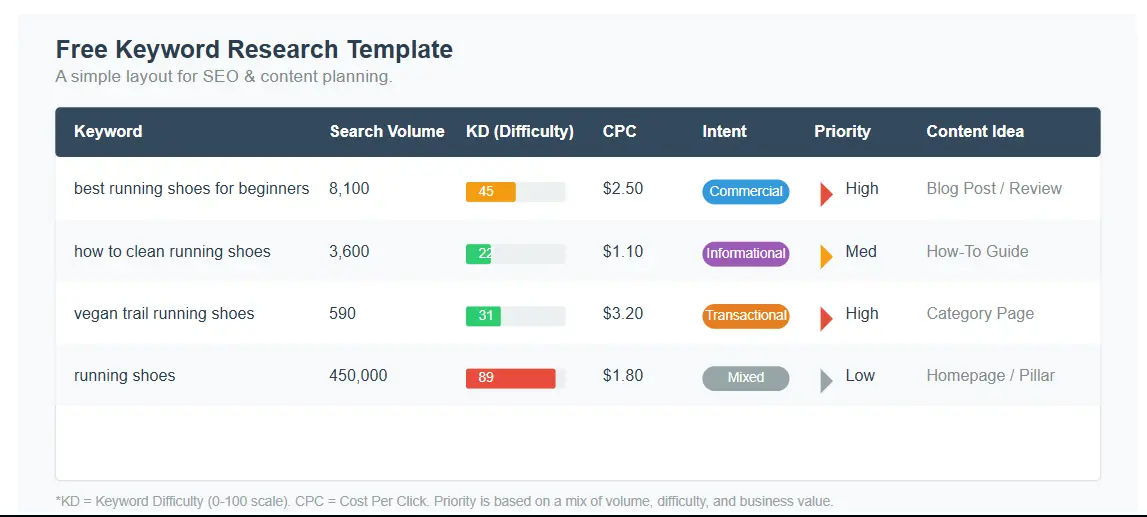
Our free keyword research template is a comprehensive spreadsheet designed to streamline your entire keyword research process. It’s built on proven SEO methodologies and refined through years of client work across various industries. This free keyword research template is more than just a spreadsheet – it’s a complete system for keyword success. The free keyword research template includes everything you need to organize your strategy.
Here’s what each column in the free keyword research template means:
| Column Name | Purpose |
|---|---|
| Keyword | The exact search term you’re targeting |
| Topic Cluster | The broader topic category this keyword belongs to |
| Page Type | Post/Page/Landing – the format you’ll create |
| Search Intent | Informational/Commercial/Transactional/Navigational |
| Funnel Stage | TOFU/MOFU/BOFU – where in the customer journey |
| Estimated Volume | Monthly search volume range |
| Difficulty | Low/Med/High – how hard to rank for this term |
| CPC | Cost-per-click (indicates commercial value) |
| SERP Notes | Observations about search results |
| Primary Competitors | Who currently ranks for this keyword |
| Angle/USP | Your unique approach to this topic |
| Internal Link Targets | Existing pages to link from |
| Title Idea | Working title for your content |
| Meta Description Draft | Preliminary meta description |
| Status | New/In progress/Published/Update |
| Last Updated | Date of last review/changes |
This free keyword research template provides structure to your keyword research process, ensuring you consider all critical factors before creating content. The free keyword research template helps you align your content strategy with business goals and user needs. When you use this free keyword research template, you’re following a path already proven to work. The free keyword research template has been tested across multiple industries.
Many marketers have tried various keyword approaches, but the systematic nature of this free keyword research template makes it stand out. Unlike other tools that overwhelm with data, this free keyword research template focuses on what matters most for ranking and traffic generation. The free keyword research template is designed to be both comprehensive and easy to use. The free keyword research template simplifies complex SEO concepts.
What makes this free keyword research template particularly valuable is its adaptability. Whether you’re running a local business, an affiliate site, or an e-commerce store, this free keyword research template can be customized to your specific needs. The free keyword research template works for beginners and advanced marketers alike. The free keyword research template grows with your business needs.
Download the Keyword Research Template (Free)
Get instant access to our proven free keyword research template used by 500+ marketers and business owners.
- Organize your entire keyword strategy with our free keyword research template
- Identify high-traffic, low-competition opportunities using this free keyword research template
- Map keywords to specific content and funnel stages with the free keyword research template
No spam. Unsubscribe anytime.
Step-by-Step: How to Use the Template
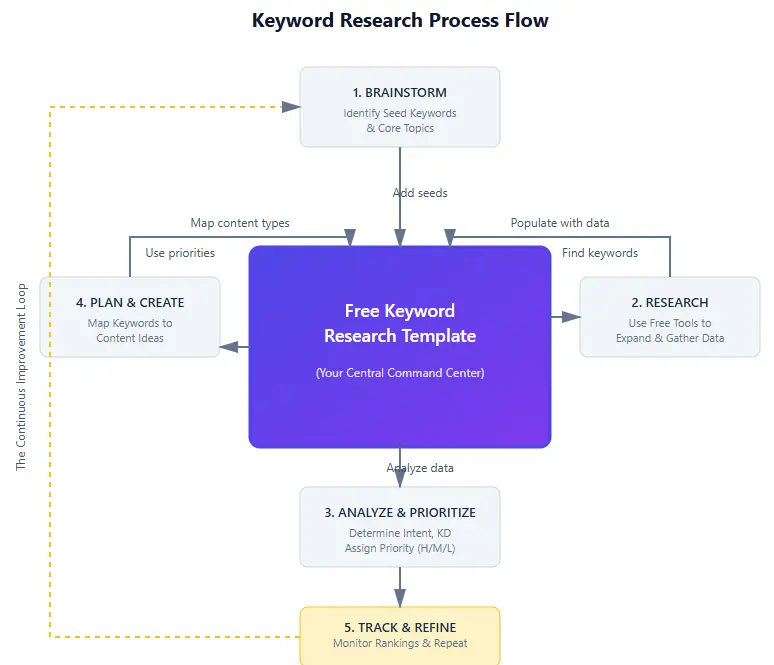
Having a free keyword research template is just the first step. Knowing how to use it effectively is what drives results. Follow this proven process to find and target keywords that will bring qualified traffic to your site. The free keyword research template is designed to guide you through each phase. The free keyword research template eliminates the guesswork from keyword selection.
Step 1: Define Your Goals
Before diving into keyword research, clarify what you want to achieve. Are you looking to:
- Generate leads for your service business?
- Earn affiliate commissions from product reviews?
- Build email subscribers for your newsletter?
- Sell products directly from your site?
- Establish authority in your niche?
Your goals will determine which types of keywords to prioritize. For lead generation, you might focus on commercial investigation terms. For affiliate revenue, product comparison keywords might be more valuable. The free keyword research template helps you track these goals alongside your keywords. The free keyword research template ensures alignment with your business objectives.
Document your primary goal in a separate tab of your free keyword research template to keep yourself focused throughout the process. This is the foundation of successful keyword research. Many users of the free keyword research template report that clarifying goals first saves hours of wasted effort later. The free keyword research template keeps you on track.
Step 2: Identify Seed Keywords
Seed keywords are the foundation of your research. These are broad terms related to your business, products, or services. Start by listing 5-10 core topics your business covers. The free keyword research template has a dedicated section for these seed keywords. The free keyword research template helps organize these foundational terms.
For example, if you run a dog training business, your seed keywords might be:
- dog training
- puppy training
- dog behavior
- dog obedience
- canine training
Enter these seed keywords in the “Keyword” column of your free keyword research template, marking them as the foundation of your topic clusters. This systematic approach is what makes the free keyword research template so effective. The free keyword research template ensures you start with a solid foundation before expanding. The free keyword research template prevents random keyword selection.
Step 3: Expand with Modifiers
Now, expand your seed keywords using modifiers that match different user intents. This is where you’ll find those long-tail gems that drive qualified traffic. The free keyword research template helps you track these variations. The free keyword research template makes expansion systematic.
Common modifiers include:
- Informational: how to, what is, guide, tutorial, tips
- Commercial: best, review, comparison, vs, alternative
- Transactional: buy, price, cost, discount, coupon
- Local: near me, [city], [state], local
- Content Format: template, checklist, example, case study
Combine your seed keywords with these modifiers to generate dozens of potential targets. For example:
- dog training + how to = “how to train a dog”
- dog training + best = “best dog training methods”
- dog training + near me = “dog training near me”
- dog training + template = “dog training schedule template”
Use tools like Google’s autocomplete, People Also Ask, and Related Searches to find even more variations. The free keyword research template makes it easy to organize all these possibilities. The free keyword research template is designed to handle hundreds of keyword variations without becoming overwhelming. The free keyword research template scales with your research needs.
Step 4: SERP + Intent Check
For each keyword on your list, search for it in Google and analyze the results. This helps you understand what users are really looking for when they use that term. The free keyword research template has a dedicated SERP Notes column for this analysis. The free keyword research template documents your findings.
Ask yourself:
- What types of content are ranking? (blog posts, product pages, category pages, etc.)
- What format dominates the results? (how-to guides, listicles, reviews, etc.)
- Are there featured snippets, video carousels, or other SERP features?
- What questions are being answered in the People Also Ask section?
Document these observations in the “SERP Notes” column of your free keyword research template. This information will guide your content creation later. Understanding search intent is crucial, and the free keyword research template ensures you don’t skip this critical step. The free keyword research template captures valuable insights.
Based on your analysis, classify each keyword by search intent:
- Informational: User wants to learn something (“how to train a puppy”)
- Commercial Investigation: User is researching before buying (“best dog training collars”)
- Transactional: User wants to make a purchase (“dog training classes near me”)
- Navigational: User wants to find a specific website (“cesar millan dog training”)
Record this in the “Search Intent” column of your free keyword research template. This systematic approach is what makes the free keyword research template so valuable. For more guidance on understanding search intent, check out the Google Search documentation. The free keyword research template incorporates best practices.
Step 5: Choose Page Type + Match Intent
Different search intents require different page types to satisfy user needs. Match each keyword to the appropriate content format. The free keyword research template helps you track these matches. The free keyword research template ensures proper content alignment.
- Informational keywords → Blog posts, guides, tutorials
- Commercial keywords → Comparison posts, reviews, buying guides
- Transactional keywords → Product pages, service pages, landing pages
- Navigational keywords → Homepage, about page, contact page
Record your chosen page type in the “Page Type” column of your free keyword research template. This ensures you’re creating the right kind of content for each query. The free keyword research template helps you maintain consistency between search intent and content format. The free keyword research template optimizes your content strategy.
Many users find that this step in the free keyword research template process dramatically improves their content’s performance. By aligning page type with intent, you’re more likely to satisfy both users and search engines. The free keyword research template makes this alignment systematic rather than guesswork. The free keyword research template drives better results.
Step 6: Cluster Keywords into Topics
Modern SEO focuses on topic clusters rather than individual keywords. Group related keywords together under broader topic themes. The free keyword research template is designed with this clustering approach in mind. The free keyword research template supports topical authority building.
For example, you might cluster these keywords under the topic “Puppy Training”:
- how to house train a puppy
- puppy training schedule
- when to start training a puppy
- puppy training classes near me
- best puppy treats for training
Identify one primary keyword for each cluster that will become your pillar page. The other keywords will become supporting content that links back to the pillar.
Record the topic cluster name in the “Topic Cluster” column of your free keyword research template. This keyword clustering template approach helps you build topical authority and creates natural internal linking opportunities. The free keyword research template makes this complex process manageable. The free keyword research template simplifies clustering.
Step 7: Map Keywords to Pages (Keyword Mapping)
Keyword mapping is the process of assigning specific keywords to specific pages on your website. This prevents keyword cannibalization (when multiple pages compete for the same term) and ensures each page has a clear focus. The free keyword research template excels at this mapping process. The free keyword research template prevents internal competition.
For each keyword or cluster, decide whether you’ll:
- Create new content
- Update existing content
- Consolidate multiple pages
If you have existing content that targets a keyword, record the URL in the “Internal Link Targets” column. This helps you plan your internal linking strategy later.
This keyword mapping process ensures each page on your site has a distinct purpose and a clear primary target, making it easier for Google to understand your structure. The template keeps everything organized in one place, and it often helps you spot content gaps you didn’t notice before—especially around missed intent angles and supporting subtopics.
Step 8: Internal Linking Plan
Internal links help search engines understand your site architecture and spread authority across important pages. For each target query, list existing pages that should link to the new content. A dedicated “Internal Link Targets” column makes this planning fast and repeatable.
Look for:
- Related blog posts
- Service or product pages
- Resource pages
- Category pages
Record these linking options in the “Internal Link Targets” column. When you publish, you’ll have a simple checklist to add links immediately—so your new page gets discovered faster and users can navigate to the next best step.
Planning links in advance also prevents a common issue: publishing content and forgetting to connect it to your existing articles. A tighter internal network improves UX, boosts topical authority, and helps important pages earn more visibility.
Step 9: Publish + Update Cycle
Keyword research isn’t a one-time task. Set a lightweight routine for:
- Publishing new content based on your priority list
- Refreshing existing pages with better angles and related terms
- Re-checking SERP changes and intent shifts
- Adding new opportunities as your site grows
Use the “Status” and “Last Updated” columns to track progress. Over time, your spreadsheet becomes a living content roadmap—helpful for planning, publishing, and updating without losing momentum.
A practical habit is a quarterly review: search trends shift, competitors update pages, and your offers evolve. A consistent review cycle helps you stay aligned with what people are searching for right now—without rebuilding your process from scratch.
Real Examples: Template in Action
Now let’s see how the template works in real scenarios. Below are two examples from different business types to show how the same workflow adapts to different goals and monetization models.
Example 1: Local Service Business (Plumbing Company)
A local plumbing company in Austin, Texas wants more service calls from organic search. Here’s how they could fill out a section of the spreadsheet to target local intent, urgent problems, and high-conversion service pages.
| Keyword | Topic Cluster | Page Type | Search Intent | Funnel Stage | Volume | Difficulty | SERP Notes | Angle/USP |
|---|---|---|---|---|---|---|---|---|
| plumber austin tx | Local Plumbing Services | Landing Page | Transactional | BOFU | 480 | Medium | Local pack, ads, directories | 24/7 emergency service |
| emergency plumber austin | Emergency Plumbing | Service Page | Transactional | BOFU | 320 | High | Local pack, phone numbers featured | 30-minute response time |
| how to fix leaky faucet | DIY Plumbing Tips | Blog Post | Informational | TOFU | 1,200 | Low | How-to guides, video tutorials | When to DIY vs call pro |
| water heater repair austin | Water Heater Services | Service Page | Commercial | MOFU | 210 | Medium | Local companies, review sites | Same-day service guarantee |
| plumbing cost estimator | Plumbing Pricing | Interactive Tool | Commercial | MOFU | 540 | Low | Cost guides, calculators | Transparent pricing model |
| best plumbing company austin | Local Plumbing Services | Landing Page | Commercial | MOFU | 190 | High | Review sites, local directories | 5-star rated service |
| how to unclog drain | DIY Plumbing Tips | Blog Post | Informational | TOFU | 2,400 | Low | How-to guides, video tutorials | Simple home remedies |
| plumbing inspection austin | Plumbing Services | Service Page | Commercial | MOFU | 140 | Medium | Local companies, directories | Comprehensive inspection checklist |
Notice how this local business balances high-intent transactional keywords (“emergency plumber austin”) with informational content (“how to fix leaky faucet”) to capture users at different stages of the customer journey. The free keyword research template helps them maintain this balance. The free keyword research template maximizes local visibility.
The free keyword research template allows local businesses to identify location-specific opportunities while also building authority with helpful content. This dual approach is what makes the free keyword research template so effective for service-based businesses. The free keyword research template drives local business growth.
Example 2: Affiliate SaaS Blog
A blogger focusing on project management software wants to earn affiliate commissions. Here’s how they might structure their free keyword research template. The free keyword research template is perfect for affiliate marketers.
| Keyword | Topic Cluster | Page Type | Search Intent | Funnel Stage | Volume | Difficulty | CPC | Angle/USP |
|---|---|---|---|---|---|---|---|---|
| asana vs monday.com | Software Comparisons | Comparison Post | Commercial | MOFU | 1,800 | High | $8.50 | Side-by-side feature analysis |
| best project management software | Software Reviews | Listicle | Commercial | MOFU | 3,600 | High | $12.00 | 2023 updated rankings |
| asana pricing | Software Pricing | Pricing Guide | Commercial | MOFU | 2,400 | Medium | $7.80 | Hidden costs revealed |
| how to use asana for project management | Software Tutorials | How-to Guide | Informational | TOFU | 1,200 | Medium | $5.50 | Beginner-friendly walkthrough |
| monday.com alternatives | Software Alternatives | Listicle | Commercial | MOFU | 960 | Medium | $9.20 | Budget-friendly options |
| project management template | Project Templates | Template Post | Informational | TOFU | 1,500 | Low | $4.30 | Free downloadable templates |
| clickup review | Software Reviews | Review Post | Commercial | MOFU | 1,800 | High | $8.90 | Honest pros and cons |
| agile project management tools | Methodology Tools | Listicle | Commercial | MOFU | 720 | Medium | $6.70 | Scrum and Kanban focused |
This affiliate-focused strategy targets commercial queries with higher CPC values, which often signal stronger buying intent. The blogger can publish pages that answer these searches and naturally place affiliate links to relevant software. Use the template to track these opportunities, keep notes on intent, and prioritize what’s most likely to convert.
For affiliate marketers, a keyword research spreadsheet is especially useful for spotting high-value terms that lead to clicks and signups. The CPC column helps you estimate commercial potential, while the intent and funnel-stage columns keep your content plan focused on revenue-ready topics.
Content Upgrade: Content Brief Mini Template
Great content starts with a clear brief. Use this mini template to plan the structure, intent, and CTA before you write. It pairs well with your keyword research sheet—research finds the opportunity, the brief turns it into a publishable page.
Content Brief Template:
Primary Keyword: [Your target keyword from the spreadsheet]
Secondary Keywords: [2-3 related terms]
Search Intent: [Informational/Commercial/Transactional/Navigational]
Target Audience: [Who are you writing for?]
Unique Angle: [What’s your fresh take on this topic?]
Word Count: [Based on top-ranking content]
Key Sections:
- Introduction (hook + promise)
- Section 1: [Main point 1]
- Section 2: [Main point 2]
- Section 3: [Main point 3]
- Conclusion + CTA
Internal Links: [2-3 relevant pages to link to]
External Links: [Authoritative sources to reference]
Visual Elements: [Images, charts, screenshots needed]
CTA: [What action should readers take?]
This content brief template pairs perfectly with your keyword spreadsheet. After you pick a target term, move it into this brief to plan structure, intent, and the angle. The spreadsheet helps you discover opportunities, and this brief helps you turn them into content that actually ranks and converts.
Most readers see better results when they use both together: research to choose the right query, then a brief to create the right page. That combo reduces guesswork, improves consistency, and speeds up publishing.
Common Mistakes to Avoid
Even with a solid template, a few common mistakes can slow down growth. Use the checks below to keep your research aligned with intent, competition, and your business goals.
- Focusing Only on High-Volume Keywords
Mistake: Chasing huge search volume while ignoring specific, intent-driven phrases.
Fix: Mix head terms with long-tail keywords that are easier to win and often convert better. Track volume ranges and intent side-by-side so you don’t over-prioritize “big numbers” over qualified traffic. - Ignoring Search Intent
Mistake: Publishing a blog post when Google is ranking product or service pages (or the opposite).
Fix: Always do a quick SERP check. If top results are landing pages, match that format. Keep a “SERP notes” column so you remember what Google is rewarding. - Keyword Cannibalization
Mistake: Multiple pages competing for the same primary query.
Fix: Assign one primary target to one page using keyword mapping. If two pages overlap, merge, redirect, or repurpose one as a supporting article. - Neglecting Topic Clusters
Mistake: Creating isolated pages with no topical connections.
Fix: Group related terms into clusters. Build one pillar page for the main topic, then add supporting pages for subtopics and interlink them strategically. - Forgetting About SERP Features
Mistake: Missing featured snippets, People Also Ask, and other rich results opportunities.
Fix: Note SERP features during research, then format content to capture them (short answers, FAQs, clear headings, and tables where helpful). - Not Considering the Customer Journey
Mistake: Targeting only BOFU terms and skipping awareness-stage traffic that builds trust.
Fix: Tag each keyword by funnel stage (TOFU/MOFU/BOFU) so your content plan supports the full journey—from learning to comparing to buying. - Creating Content Without a Plan
Mistake: Collecting keywords but not deciding page type, angle, and internal links before writing.
Fix: Pre-plan the content format (post/page/landing), the unique angle/USP, and 2–4 internal links so writing becomes faster and more focused. - One-and-Done Research
Mistake: Doing research once and never revisiting it.
Fix: Review quarterly. Update your sheet with new opportunities, performance notes, and pages that need refreshing. - Ignoring Competitor Keywords
Mistake: Researching without checking who already wins the SERPs.
Fix: Track top competitors for each target term, then look for gaps: missing subtopics, weak angles, outdated examples, or unclear intent matching. - Not Aligning with Business Goals
Mistake: Ranking for traffic that doesn’t generate leads, sales, or affiliate clicks.
Fix: Re-check your goals often. If you need leads, prioritize commercial investigation terms. If you need ad revenue, consider high-CPC informational topics—without losing relevance.
If you avoid these pitfalls and keep your research organized, your content plan becomes easier to execute—and your rankings become more predictable over time.
For more guidance on SEO best practices, see the Google Search Central Help resources.
Quick 20-Minute Keyword Research Workflow
Short on time? Use this 20-minute workflow to validate a topic fast—then build it out later when you have more time.
20-Minute Keyword Research Checklist
- Minutes 0–2: Define Your Goal
Pick one outcome: leads, sales, affiliate clicks, or traffic. Write it down before you choose a keyword. - Minutes 2–5: Brainstorm Seed Topics
List 5–10 customer-focused topics (problems, services, “best/vs/pricing” angles). Add them to your sheet. - Minutes 5–10: Quick Expansion
Use Google autocomplete + People Also Ask to collect 15–20 variations. Capture them under the same cluster. - Minutes 10–15: Rapid SERP Check
For your top 5 candidates, scan page one: content type, intent, and what’s missing. Save notes. - Minutes 15–18: Prioritize
Mark intent + difficulty (low/medium/high). Pick the terms that best match your goal and look winnable. - Minutes 18–20: Choose Your Targets
Select 1–3 terms to write now. Decide the page type, angle, and 2–4 internal links before drafting.
This quick workflow is great for content planning meetings or validating an idea before you invest hours. When you’re ready, expand it into a full cluster plan and map supporting pages for stronger topical authority.
Many users of the free keyword research template find that this 20-minute workflow is perfect for content planning meetings or when they need to quickly validate a content idea. The free keyword research template provides structure even when time is limited. The free keyword research template saves valuable time.
Frequently Asked Questions
What’s the difference between a free keyword research template and a keyword research tool?
A free keyword research template is a structured document (usually a spreadsheet) that helps you organize and analyze keywords you’ve found. A keyword research tool (like Ahrefs, SEMrush, or Ubersuggest) helps you discover keywords and provides metrics like search volume and difficulty. The free keyword research template is where you compile and analyze the data from various tools.
How many keywords should I target on a single page?
Focus on one primary keyword per page, along with 2-5 closely related secondary keywords. This approach helps Google understand the specific topic of your page without confusing it with multiple unrelated themes. Your free keyword research template should map each keyword to a specific page to avoid cannibalization.
Do I need paid tools to use this free keyword research template effectively?
While paid tools provide more data and insights, you can effectively use this free keyword research template with free resources like Google Keyword Planner, Google Trends, and Google’s autocomplete features. The free keyword research template is designed to help you organize whatever data you can access, whether free or paid.
How often should I update my free keyword research template?
Review your keyword research quarterly, with a more comprehensive audit annually. Search behaviors change, new competitors emerge, and your business evolves. The “Last Updated” column in our free keyword research template helps you track when each keyword was last reviewed.
What’s keyword clustering and why is it important?
Keyword clustering is the practice of grouping related keywords together under a broader topic. This approach helps you build topical authority, create comprehensive content, and establish a logical site structure. Instead of creating separate pages for similar keywords, you create one comprehensive page that addresses the entire topic cluster. The free keyword research template is designed with this clustering approach in mind.
How do I know if a keyword is too competitive?
Look at who currently ranks for the keyword. If the top results are all high-authority sites with extensive content on the topic, it’s likely competitive. In your free keyword research template, mark these as “High” difficulty and consider targeting more specific long-tail variations first.
Should I target misspelled keywords?
Generally, no. Google’s autocorrect and “Did you mean?” features have reduced the value of targeting misspelled keywords. Focus on properly spelled terms and create high-quality content that answers user intent. Your free keyword research template should focus on quality over quantity.
What’s the difference between search intent and user intent?
These terms are often used interchangeably in SEO. Both refer to the underlying goal a user has when they perform a search. The four main types are informational (learning), navigational (finding a site), commercial investigation (researching before buying), and transactional (ready to buy). The free keyword research template helps you track and categorize these intents.
How do I use the free keyword research template for local SEO?
For local SEO, focus on keywords with geographic modifiers (city, state, “near me”). Include local landmarks, neighborhood names, and “near [landmark]” variations. Our free keyword research template includes specific columns for local SEO considerations to help you track these location-based opportunities.
Transform Your SEO Strategy with the Free Keyword Research Template
Stop guessing which keywords will drive traffic and start making data-driven decisions with our proven free keyword research template. The free keyword research template changes everything.
Join 500+ marketers and business owners who have used this free keyword research template to:
- Identify high-traffic, low-competition keywords with the free keyword research template
- Align content with business goals using the free keyword research template
- Build a systematic approach to keyword targeting with the free keyword research template
Plus, when you download the free keyword research template, you’ll receive weekly SEO tips to help you implement your keyword strategy effectively. The free keyword research template comes with ongoing support.
No spam. Unsubscribe anytime.
Ready to find keywords that actually drive results? Check out our complete keyword research guide for more advanced strategies, or schedule an SEO audit to get personalized recommendations for your site. The free keyword research template is your first step toward SEO success.
For more tools and resources, be sure to check out our SEO tools I use and content strategy template to build a comprehensive approach to your digital marketing efforts. The free keyword research template integrates with your entire marketing stack.
Looking for more authoritative sources on SEO? Check out these valuable resources: Moz’s Beginner’s Guide to SEO, Ahrefs’ SEO Toolkit, and Backlinko’s Keyword Research Guide. The free keyword research template complements these expert resources.