
SEO Migration Checklist (2026): The Step-by-Step Plan to Preserve Rankings During Any Site Move
If you’re planning a redesign, CMS switch, domain change, or URL restructure, this SEO migration checklist will help you protect rankings and reduce traffic drops. You’ll get a practical SEO migration checklist for pre-migration, launch day, and post-migration monitoring—plus a free PDF download with a redirect map template and QA tracker. This guide is written for real teams: short steps, clear ownership, and “launch blockers” you must fix before you press go-live.
Free download: SEO migration checklist PDF + redirect map + QA tracker
Want the exact workflow in a printable + spreadsheet format? This free pack supports your SEO migration checklist end-to-end: URL inventory, redirect mapping, launch QA, and post-launch monitoring.
Download the SEO Migration Checklist (Free)
Gutenberg-safe form placeholder. Connect to your email tool. After submit, redirect to the PDF link below.
What you’ll get:
- Printable SEO migration checklist (pre, launch, post)
- Redirect mapping spreadsheet (1:1 mapping rules + consolidation guidance)
- Launch-day QA tracker (redirect tests, indexability checks, analytics validation)
- Post-migration monitoring dashboard (indexing, rankings, traffic, conversions)
Keep your baseline reporting clean using: SEO KPI dashboard and best SEO report template.
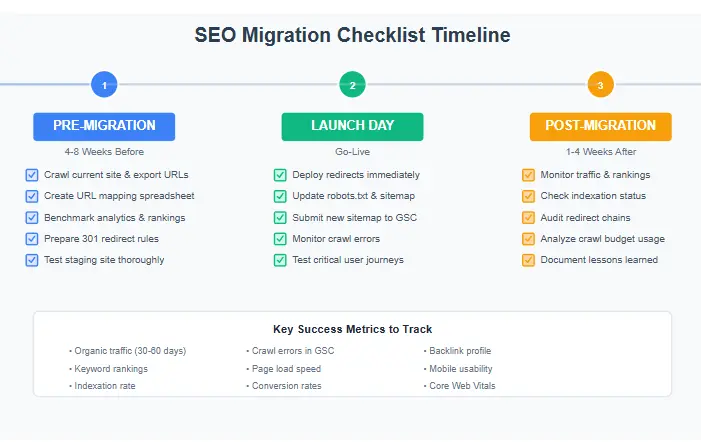
What is an SEO migration (and why traffic drops happen)
An SEO migration is any site change that can alter how search engines crawl, interpret, and rank your pages. That includes a new domain, a new URL structure, a CMS change, a redesign, moving from HTTP to HTTPS, or expanding international versions. The reason you need a disciplined SEO migration checklist is simple: migrations create “signal transfer” problems and “discovery” problems at the same time.
Signal transfer is about how well your old URLs pass authority and relevance to new URLs (mostly redirects, canonicals, and internal links). Discovery is about how quickly search engines find, crawl, and index the new site (sitemaps, robots directives, crawl paths, and server behavior). If either side fails, you often see ranking volatility, missing pages in the index, or traffic drops on your most valuable landing pages—exactly what this SEO migration checklist is designed to prevent.
Key takeaway: Most migration traffic drops are not “mysterious.” They come from incomplete redirects, blocked indexation (robots/noindex), incorrect canonicals, broken internal linking, or template-level metadata changes. A strong SEO migration checklist catches those before they become losses.
External references: Google SEO Starter Guide, Site move with URL changes, Site moves help doc.
Types of migrations (domain change, URL structure, HTTPS, CMS change, redesign, international)
Your SEO migration checklist should start by naming the migration type because the risks and tasks change based on what’s moving. Below are the most common site moves and the specific failure modes to watch.
- Domain change: Highest risk. Requires clean 1:1 redirects, monitoring, and careful Search Console configuration.
- URL structure change: High risk. Redirect mapping checklist and internal link updates become the core work.
- HTTPS migration: Medium risk. Watch mixed content, canonical alignment, and redirect chains.
- CMS change: Medium to high risk. Template logic can break titles, canonicals, schema, and indexation.
- Redesign: Medium risk. Navigation and internal linking changes can shift authority and hurt conversions.
- International expansion: Medium to high risk. hreflang, duplicates, and geo targeting need strict validation.
For eCommerce moves, combine this SEO migration checklist with: ecommerce SEO audit checklist to cover facets, pagination, category templates, and product indexing.
Migration decision checklist (should you migrate now?)
A migration is not only a technical project. It’s a revenue protection project. This decision gate helps you decide timing and scope. If your team cannot execute the basics below, your SEO migration checklist should recommend delaying, splitting, or de-scoping the move.
Decision gate (green light if you can say “yes” to most)
- We can create a complete inventory of indexable URLs (not just the sitemap).
- We can build and test a redirect map for all priority URLs (traffic, conversions, backlinks).
- We can set a freeze window during launch week (no last-minute template/content changes).
- We have Search Console + analytics access and a plan to monitor daily after launch.
- We can crawl staging and crawl the live site right after go-live.
- We have a rollback plan and clear ownership for approvals and fixes.
If you’re unsure about current technical risk, do a baseline audit first: advanced SEO audit checklist.
Practical timing tip: if you have seasonal peaks, avoid migrating right before your highest-revenue period. It’s normal for rankings to fluctuate during reprocessing, even when your SEO migration checklist is perfect. Choose a window when you can monitor and fix issues quickly, and when business can tolerate volatility.
PRE-MIGRATION checklist (strategy + inventory + benchmarks)
Pre-migration work is where migrations are won. This phase creates the baseline, the “truth set” of URLs, and the rules you’ll enforce at launch. Treat this as the foundation of your SEO migration checklist—because launch day is simply execution.
Crawl the old site
- Crawl the old site and export: status codes, titles, H1s, meta descriptions, canonicals, directives (index/noindex), and internal links.
- Capture key templates (home, category/service, product, blog, resource pages, location pages).
- Identify duplicates and thin pages that need consolidation or retirement planning.
Export all URLs + status codes
- Build a full URL inventory from crawl + sitemaps + analytics landing pages + Search Console pages report.
- Label each URL by status and role: 200, redirect, 404, canonicalized, parameter, paginated, noindex.
- Flag URLs with backlinks and URLs that drive conversions—these are “must-map” in your redirect mapping checklist.
Benchmark rankings and traffic
- Export top queries and rankings for priority pages (positions, clicks, impressions, URL) for the last 28–90 days.
- Export organic sessions and conversions by landing page (90–180 days depending on seasonality).
- Save baselines for top pages so you can prove stability or pinpoint losses post-launch.
Identify top pages and revenue pages
- Top organic landing pages by sessions.
- Top converting pages (lead forms, sales, trials, signups).
- Pages with strong backlinks (equity transfer risk).
- Internal hub pages that distribute authority (guides, resource centers, category hubs).
Stakeholders + freeze window
- Assign ownership: SEO, dev/ops, analytics, content, QA.
- Define a freeze window (ideally 5–10 days pre-launch through 2–3 days post-launch).
- Agree on “launch blockers” (robots/noindex, broken redirects, 5xx errors, missing tracking).
- Create a change log: what changed, who approved it, and when it shipped.
Key takeaway: If pre-migration is rushed, post-migration becomes slow and expensive. A complete SEO migration checklist makes launch day predictable and recovery faster.
SEO migration checklist: REDIRECT MAP checklist (the most important part)
Redirect mapping is the centerpiece of every successful migration. Redirects are how search engines transfer signals from old URLs to new URLs. If your redirect mapping checklist is weak, authority leaks, relevance changes, and indexing becomes messy. This section is designed to make your SEO migration checklist redirect-proof.
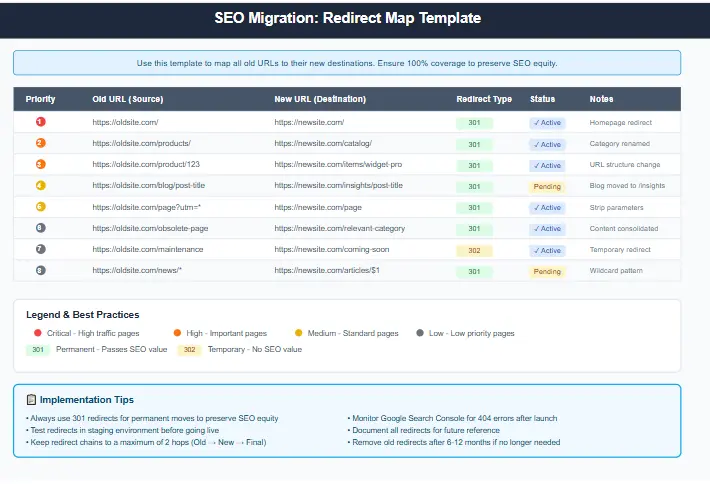
1:1 mapping rules (default)
- Map each important old URL to the closest intent match on the new site (same topic, same purpose, same funnel stage).
- Prefer one hop redirects (old → final). Avoid chains (old → interim → final).
- Use 301 for permanent moves. Avoid 302 unless truly temporary.
- Confirm the final destination returns 200 and is indexable.
When to consolidate
- Consolidate only when multiple pages serve the same intent and you are merging content into one stronger page.
- Do not consolidate when pages rank for different queries, represent different services/locations, or convert separately.
- If consolidating, update internal links and canonicals to point directly to the final destination.
Parameter rules
- Define tracking parameters (UTM) vs content-changing parameters (filters, sort, pagination tokens).
- Prevent crawl traps and index bloat by aligning parameter rules with canonicals and directives.
- If parameter formats change, add rewrite rules so legacy parameter URLs resolve cleanly.
404/410 rules
- Use 410 only when content is intentionally removed and has no replacement.
- Do not redirect everything to the homepage (often treated like a soft 404 pattern).
- Maintain a retire list with reasons and timestamps.
External authority: Google site move with URL changes and site moves help doc.
ON-PAGE + CONTENT checklist
Redirects preserve authority, but on-page signals preserve relevance. This section ensures your new pages still communicate what they are about, which URL should be indexed, and how pages relate to each other. It’s the “relevance layer” of the SEO migration checklist.
Titles, meta, headings
- Preserve high-performing title patterns on priority pages unless you have proven improvements.
- Keep meta descriptions unique; avoid template duplicates at scale.
- Maintain descriptive H1s and stable heading structure (don’t remove headings for design reasons).
- Confirm templates do not generate duplicate titles/H1s across categories or locations.
Canonicals
- Canonical must point to the final indexable URL (not redirected, not blocked).
- Avoid canonical logic that points to old URLs or mixed protocols (http vs https).
- Align canonical rules with pagination and parameter strategy.
- Re-check canonicals after launch (template logic often shifts in production).
Internal links
- Update navigation, breadcrumbs, and in-content links to new URLs (don’t rely on redirects for internal linking).
- Protect internal hub pages that distribute authority.
- Fix links from older blog posts to new destinations—these links often carry strong equity.
Use this to track changes: internal linking template.
Pagination/facets
- Confirm pagination is crawlable and consistent; avoid accidental noindex or blocked paths.
- Define which facets/filters are indexable vs canonicalized/noindexed.
- Prevent infinite URL generation (crawl traps) from filters and sort combinations.
hreflang (if used)
- Update hreflang URLs to new canonicals.
- Ensure reciprocity and correct language/region codes.
- Verify hreflang does not conflict with canonical tags.
TECHNICAL checklist
Technical mistakes can override everything else. This section focuses on crawl access, indexing signals, discovery, and measurement. Treat these items as “launch blockers” inside your SEO migration checklist. If any are wrong, fix them before pushing the launch further.
robots.txt
- Remove staging rules (like Disallow: /) before go-live.
- Confirm key sections are crawlable and not accidentally blocked.
- (Optional) Include the sitemap location in robots.txt.
External reference: robots.txt intro.
XML sitemaps
- Generate fresh sitemaps for new URLs only (no old URLs in the new sitemap).
- Ensure sitemap URLs return 200 and are indexable.
- Split large sites into logical sitemaps (type/section) and use a sitemap index.
- Submit sitemaps after launch QA confirms indexability.
External reference: sitemaps overview.
Structured data
- Carry over key schema types where relevant (Organization, Breadcrumb, Article, Product).
- Validate schema after launch; template changes often break markup silently.
- Ensure URLs inside schema match new canonical URLs.
Analytics + conversion tracking
- Verify GA/GTM tags and key events (forms, purchases, calls) are firing correctly.
- Confirm ecommerce tracking and revenue attribution (if applicable).
- Validate canonical URLs and page paths are consistent in analytics reports.
Server logs basics (optional)
- Sample logs to confirm Googlebot is crawling new URLs and receiving correct status codes.
- Watch for crawl waste (parameter traps, repeated redirects, loops).
- Monitor spikes in 404 and 5xx errors.
Core Web Vitals sanity checks
- Spot-check key templates (home, category/service, product, blog) for major regressions.
- Confirm images and fonts do not cause layout shift or slow rendering.
- Reduce unnecessary scripts that harm UX and conversion rate.
Key takeaway: Technical blockers cause the fastest losses. A strong SEO migration checklist treats robots/noindex, canonicals, and sitemaps as “stop-the-line” checks.
SEO migration checklist: LAUNCH DAY checklist (hour-by-hour)
Launch day is controlled execution. Your SEO migration checklist should run in the right order: confirm redirects and indexability first, then submit sitemaps, then monitor errors and conversions. Use this hour-by-hour plan.
| Time window | What to check | Pass criteria |
|---|---|---|
| H-2 to H0 Before go-live |
Freeze changes. Confirm redirect rules deployed. Remove staging blocks (robots/noindex). Confirm analytics + conversion tracking. | Indexable site, redirect rules ready, tracking verified. |
| H0 to H+1 Immediate QA |
Test top 25–50 priority URLs: old → new 301, correct destination, no chains. Spot-check canonicals, titles, headings. | Correct 301s, no chains, canonicals correct, pages render. |
| H+1 to H+3 | Crawl the new site (priority sections). Triage 404, loops, duplicates, noindex, blocked resources. Fix blockers first. | Critical errors fixed quickly; crawl paths stable. |
| H+3 to H+6 | Submit XML sitemaps in Search Console. Verify properties and that sitemaps include only new indexable URLs. | Sitemaps accepted; indexing signals start updating. |
| H+6 to H+24 | Monitor 404/5xx spikes and fix missed redirects. Update internal links pointing to old URLs. Watch conversions (not only traffic). | Error rates decline; conversions stable; links cleaned. |
For consistent reporting during the first 2 weeks, use: SEO KPI dashboard and best SEO report template.
POST-MIGRATION monitoring checklist (first 48 hours, week 1–2, month 1–3)
A complete SEO migration checklist continues after launch because edge cases show up late: long-tail URLs missed in the redirect map, unexpected template logic, or blocked sections that only appear in production. Expect volatility, but monitor with structure so you can tell “normal reprocessing” from real issues.
First 48 hours
- Check indexation blockers: robots, noindex, canonical-to-old, wrong canonicals.
- Review indexing/coverage reports and error spikes; prioritize high-value pages.
- Validate conversions and key events. A “successful” migration that breaks tracking is not successful.
- Fix missed redirects on high-impact URLs immediately.
Week 1–2
- Track priority rankings daily (expect movement; watch sustained drops).
- Fix redirect chains/loops and incorrect targets.
- Update internal links and navigation paths to point directly to new URLs.
- Clean XML sitemaps if needed (only indexable URLs) and resubmit.
Month 1–3
- Confirm stable indexing of priority sections and templates.
- Compare baseline vs current traffic and conversions by landing page.
- Only after stability: ship improvements in controlled batches (content upgrades, CRO tests, title experiments).
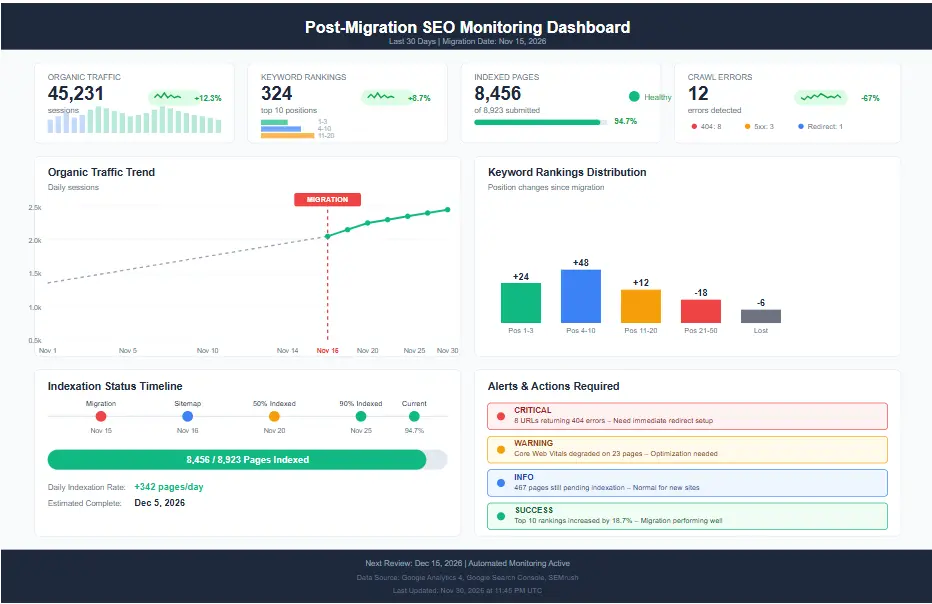
SEO migration checklist: Common migration mistakes + recovery plan
Even experienced teams make mistakes. What matters is whether you detect them quickly and fix them in the right order. This recovery section is designed as a “triage stack” inside your SEO migration checklist.
Common mistakes
- Redirecting everything to the homepage (often treated like soft 404 behavior).
- Missing redirects for long-tail URLs (old posts, legacy slugs, historic resource pages).
- Redirect chains and loops (waste crawl budget and delay signal transfer).
- Launching with robots/noindex blocks from staging.
- Bad canonical logic (canonicals pointing to old URLs or wrong variants).
- Changing too many variables at once (URLs + titles + content + navigation in one launch).
- Forgetting internal links (authority paths break even when redirects exist).
- Sitemaps containing non-indexable URLs (redirected, 404, or noindex URLs).
Recovery plan (fix in this order)
- Unblock indexing: robots/noindex/canonical errors, rendering blockers, 5xx stability.
- Fix redirect mapping: missed 301s, wrong targets, chains, loops.
- Repair internal linking: nav, breadcrumbs, in-content links updated to new URLs.
- Clean and resubmit sitemaps: only new indexable 200 URLs.
- Stabilize content signals: restore critical titles/headers when intent mismatches appear.
This order prevents wasting time fixing “symptoms” before fixing “blockers.”
After stability returns, improve safely. Many teams store changes as controlled experiments so they can measure impact and roll back if needed: SEO experiments.
DOWNLOAD section: checklist + redirect map + QA tracker (lead magnet box)
If you want a repeatable process your team can reuse on every site move, use the free pack. It converts this guide into a checklist + tracker system that matches the phases of the SEO migration checklist.
What’s inside the free pack
- Printable SEO migration checklist (pre-migration, launch day, post-migration)
- Redirect map template (columns + mapping rules + QA status)
- Launch-day QA tracker (hour-by-hour triage plan)
- Post-migration monitoring dashboard (rankings, traffic, conversions, indexing)
Internal resources to support this workflow: advanced SEO audit checklist, internal linking template, best SEO report template, SEO KPI dashboard, ecommerce SEO audit checklist, SEO experiments.
FAQ (toggle)
These answers match real scenarios people face when running an SEO migration checklist. Use them to set expectations with stakeholders and prioritize fixes.
How long does an SEO migration take to stabilize?
Small sites often stabilize in 2–6 weeks; large sites may take 6–12+ weeks. The biggest drivers are redirect quality, indexability, and how much template/content changed. The post-launch portion of your SEO migration checklist should run daily checks for 2 weeks and weekly checks for up to 3 months.
What is the single most important item in a website migration SEO checklist?
The redirect map. It transfers authority and relevance from old URLs to new URLs. Your SEO migration checklist should prioritize 1:1 intent mapping, avoid chains, and cover all priority URLs (traffic, conversions, backlinks).
Should I change content during a migration?
It’s safer to migrate first, stabilize, then improve. Content rewrites add variables and make diagnosis harder. Preserve proven titles and headings for priority pages, then optimize after stability returns (ideally via controlled tests).
Do I need to redirect every old URL?
Redirect every important URL and any URL with backlinks or meaningful traffic. For intentionally removed content with no replacement, return 410 and document it. Avoid redirecting everything to the homepage—this can look like soft 404 behavior and reduce trust.
When should I submit XML sitemaps?
Submit after launch QA confirms the site is indexable and key redirects work. Ensure sitemaps include only new, indexable, 200 URLs. Reference: Google sitemaps overview.
What if rankings drop right after launch?
Some volatility is normal. If drops are severe or sustained, follow the recovery order in this SEO migration checklist: unblock indexing, fix redirect mapping, repair internal linking, then verify sitemaps and on-page signals.
How do I track success beyond traffic?
Track conversions, revenue, indexing coverage, error rates, and priority rankings. Use consistent reporting: SEO KPI dashboard and best SEO report template.
Where can I find official guidance for site moves?
Start with: SEO Starter Guide, robots.txt intro, sitemaps overview, site move with URL changes, and site moves help doc.
Conclusion + CTA
A migration doesn’t need drama. With the right process, your SEO migration checklist becomes a safety system: inventory what exists, map redirects with intent, preserve on-page signals, launch with disciplined QA, and monitor recovery until stability returns. If you want the easiest repeatable workflow, download the free pack and run the checklist as a phased project—pre-migration, launch day, and post-migration.
Next step
Download the SEO migration checklist PDF and templates, then run the decision gate and pre-migration inventory before you schedule launch. If you want an expert review, a Migration Risk Audit can quickly uncover hidden blockers (redirect gaps, indexation issues, template traps).
External authority links: SEO Starter Guide, Sitemaps overview, robots.txt intro, Site move with URL changes, Site moves help doc.