
SE Ranking Review 2026: Pricing, Features, Pros/Cons + Is It Better Than Semrush?
An honest, practical breakdown of what you get, where it shines, and when you should choose a different SEO suite.
If you’re searching for an SE Ranking review because you want an all-in-one SEO tool that doesn’t feel “enterprise-priced,” you’re in the right place. SE Ranking is positioned as a clean, modern platform for tracking rankings, auditing websites, researching keywords, monitoring competitors, and producing client-ready reports. In this SE Ranking review, I’ll walk you through real-world workflows, highlight the most useful features, and point out the limitations you should know before paying—so you can decide with confidence.
Transparency note: I keep this SE Ranking review balanced. No guaranteed ranking promises—just practical guidance and a clear “best fit” checklist. For Google’s official baseline SEO guidance, see the SEO Starter Guide and the broader Google Search documentation.
SE Ranking review: quick verdict
Best for
- Freelancers who need a reliable SE Ranking rank tracker + audits + reporting in one place
- Small agencies managing multiple client projects without bulky workflows
- Startups building organic visibility and needing “good coverage” across SEO essentials
- Local businesses that want clear tasks, simple reporting, and steady tracking
Not best for
- Teams who need the deepest enterprise-level competitive datasets available
- Power users who live inside advanced link indexes and complex query modeling
- Organizations needing heavy custom BI integrations or bespoke dashboards
Bottom line: In this SE Ranking review, the “sweet spot” is obvious: it’s a strong all-in-one SEO toolkit that feels practical, budget-aware, and workflow-friendly—especially for small teams and agencies.
If you’re currently comparing suites, you may also want to skim these all-in-one SEO tools and my roundup of rank tracking software to see how different platforms stack up by use case.
SE Ranking review: key features that matter
Most people don’t need “every SEO feature ever created.” They need a platform that covers the daily work: tracking, auditing, research, monitoring competitors, and communicating results. Here’s how the core modules show up in real use.
At-a-glance feature map
Rank tracking Keyword research Competitor research SE Ranking site audit Backlink monitoring Reporting Local SEOSE Ranking rank tracker
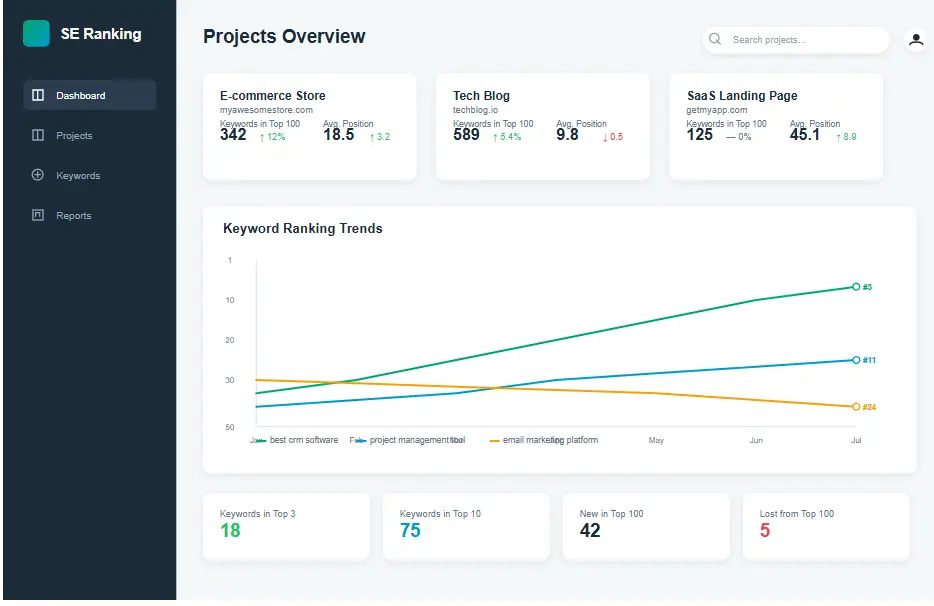
The rank tracking experience is built for routine: add a project, set the search engine + location, and track your keyword set over time. A practical SE Ranking review point: rank tracking is often the “home base” for client communication, and SE Ranking generally makes it easy to show progress, drops, and priorities without a complicated setup.
- What it does well: clean trend views, location-aware tracking, and easy keyword grouping for reporting
- Watch-outs: like all trackers, you’ll want to sanity-check major jumps with manual checks or Search Console context
Keyword research
Keyword research should answer two questions: “What should we target?” and “How hard is it?” SE Ranking’s keyword tools aim to support planning with metrics, SERP context, and competitor overlap. Pair it with a structured process like my keyword research guide so you’re not just collecting keywords—you’re building a plan.
- Useful for: building clusters, spotting “mid-tail” opportunities, and prioritizing by intent
- Pro tip: map keywords to pages early; don’t create content without a page-to-keyword match
Competitor research
Competitor research is where SE Ranking tries to “feel like a suite” rather than a single-purpose tool. In this SE Ranking review, the standout value is time saved: you can identify competitors, compare overlaps, and pull ideas for content expansion without switching tools constantly.
- Quick wins: identify competitor pages that win “easy” intent queries you’re missing
- Best practice: focus on pages and intent, not just keyword counts
SE Ranking site audit
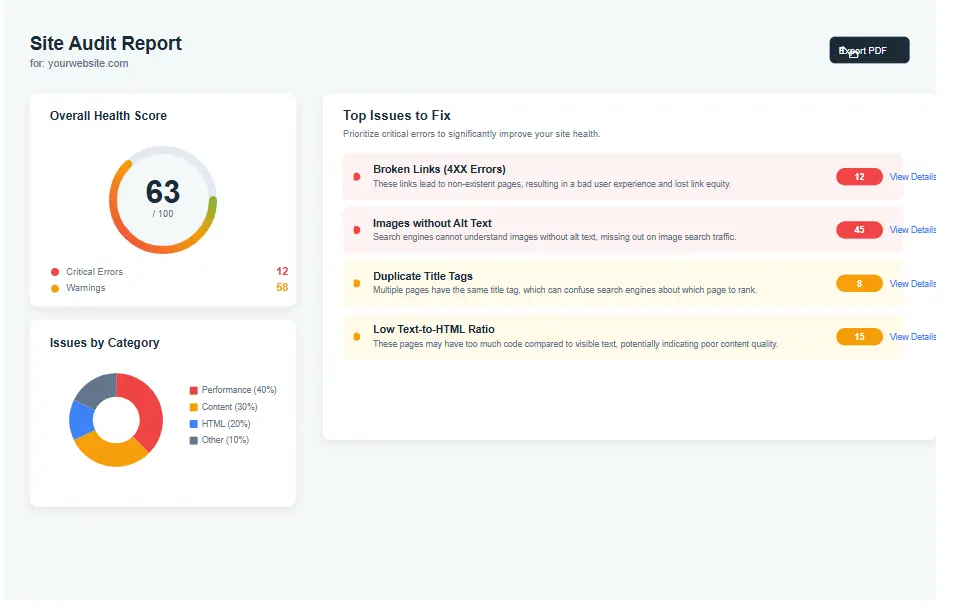
The SE Ranking site audit is the part many teams use weekly: crawl the site, surface technical issues, and keep a prioritized list of fixes. A good SE Ranking review has to mention that audits only help when you turn findings into tickets—so treat it like a backlog, not a report you “read once.”
- Helpful for: broken links, redirect chains, missing tags, indexation hygiene, and performance-related signals
- Workflow tip: run an audit after major releases and before reporting cycles
Backlinks & monitoring
Backlink monitoring is most useful when it supports decisions: link clean-up, competitor gap spotting, and outreach targeting. In this SE Ranking review, think of backlinks as “visibility signals” rather than a vanity metric—track growth, identify risk patterns, and measure acquisition velocity realistically.
- Use it for: monitoring new/lost links and spotting suspicious spikes
- Don’t do: chase link counts without relevance or quality checks
Reporting & client communication
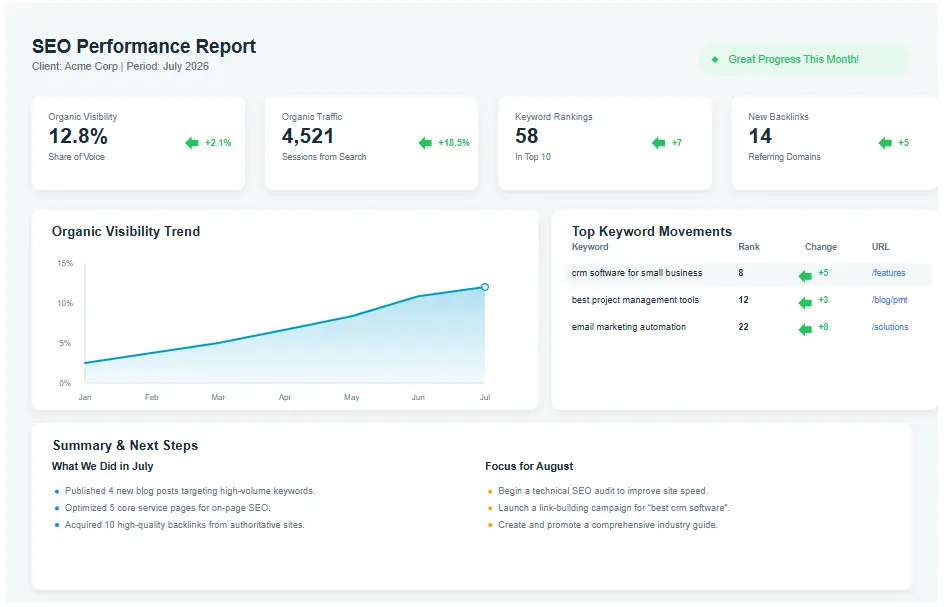
Reporting is where tools either save you hours or waste them. SE Ranking’s reporting is designed to package key KPIs (rankings, audit status, visibility changes) into a shareable format. If you’re building a consistent reporting system, a structured SEO report template can help your narrative stay focused.
Local SEO workflows
For local businesses, the combination of location-aware tracking + audits + competitor monitoring is often enough to run a monthly “progress loop.” This SE Ranking review takeaway: if your local SEO strategy is primarily about consistency and execution, SE Ranking can fit nicely as the single tool your team actually uses.
SE Ranking review: who it’s best for (use cases)
Different teams buy SEO tools for different reasons. The fastest way to decide if this SE Ranking review matches your situation is to choose the closest use case below.
Freelancers
If you need one platform to track results, produce simple client updates, and catch technical issues, SE Ranking can reduce tool-hopping. The SE Ranking review verdict for freelancers is positive when you’re balancing budget with “enough features to deliver outcomes.”
Small agencies
Agencies typically want: multi-project management, reliable tracking, repeatable reporting, and an audit workflow. SE Ranking tends to work well when you want consistency across clients without the complexity of enterprise setups.
Startups
Startups usually need fast signal: which pages are moving, which keywords are realistic, and what technical issues block growth. A practical SE Ranking review insight: it’s easier to onboard a small team into one platform than to coordinate multiple tools and spreadsheets.
Local businesses
Local SEO is a rhythm game: consistent tracking, consistent fixes, consistent content, consistent reviews and citations. SE Ranking’s workflows can support that rhythm—especially if you keep your KPIs simple and action-based.
Ecommerce
Ecommerce SEO needs technical hygiene, category/page mapping, and ongoing monitoring for indexation and site changes. SE Ranking can handle audits and tracking well; for very advanced competitor intel or massive product catalogs, you may still supplement with specialized tooling.
SE Ranking review: hands-on walkthrough (project → keywords → audit → report)
This is the part most reviews skip: what you actually do on day one. Here’s a realistic workflow you can repeat monthly. If you follow this walkthrough, your SE Ranking review experience should feel practical—because it’s built around execution, not features.
Step 1: Set up a project
- Create a new project and add your domain (use the exact canonical version you want to track).
- Select search engine + location (country/city if relevant). This matters for local intent keywords.
- Connect data sources if available (e.g., Search Console) so you can validate trends with real query impressions.
Tip: Keep one “core project” per site. Don’t create duplicates for minor experiments—track experiments via tags and notes.
Step 2: Add and organize keywords
- Start with a focused list (20–100 keywords is usually enough to begin).
- Group by intent: brand, transactional, informational, local, comparison.
- Map keywords to pages (even if it’s a “best guess” at first). This prevents content cannibalization.
The goal is not just tracking. A good SE Ranking review outcome is clarity: “Which page should win which keyword?”
Step 3: Run an SE Ranking site audit
- Run the crawl and let the tool categorize issues (critical, warnings, notices).
- Sort by impact: indexation blockers → redirect chaos → on-page gaps → performance issues.
- Create a fix list you can execute this week. Don’t try to fix 200 items at once.
If you want a structured approach to audit fixes, use my advanced SEO audit checklist as a guide so you don’t miss fundamentals.
Step 4: Build a simple report
- Pick KPIs that match the client’s goals: rankings, organic clicks, conversions, leads, revenue (when available).
- Tell a story: what improved, what declined, why it happened, what you’ll do next.
- Include next actions so the report drives decisions.
Reporting works best when it’s consistent and simple. If you want a deeper reporting workflow, compare how your tool supports it in this all-in-one SEO tools guide.
Optional: Watch a quick walkthrough video
SE Ranking review: pros and cons (honest)
Pros
- Strong “all-in-one” coverage for small teams: tracking, audits, research, reporting
- Workflow-friendly UI that’s easier to adopt than many enterprise tools
- Great fit for ongoing client work where consistency matters more than deep edge-case features
- Practical SE Ranking site audit you can run on a schedule and turn into tasks
- Solid value for freelancers and agencies managing multiple projects
Cons
- May feel lighter than top-tier enterprise suites for ultra-deep competitive datasets
- Backlink analysis depth can be “enough” for many teams, but power users may want more
- Reporting flexibility may not replace a full BI dashboard for larger organizations
- Like any rank tracker, you should validate big swings with other data sources
The simplest way to interpret this SE Ranking review: it wins when your priority is shipping SEO work consistently—tracking, fixing, publishing, reporting—without paying for advanced features you won’t use.
SE Ranking review: pricing (what to expect)
SE Ranking pricing typically varies based on plan level, how many keywords you track, how many projects you manage, and which add-ons you choose. Because SaaS pricing can change and promotions come and go, the best approach is to check current pricing directly on the official site at the time you’re buying.
How to choose the right plan
- If you’re a freelancer: prioritize keywords + projects + reporting features you’ll use every month.
- If you’re an agency: prioritize multi-client workflow and reporting consistency over “extra” research features.
- If you’re ecommerce: prioritize crawl/audit capacity and tracking coverage for categories and top products.
Tip: Start smaller, validate ROI, then expand your tracked keyword set over time.
In many cases, the biggest driver of value isn’t the plan—it’s your process. Use a repeatable system for audits, keyword mapping, and reporting, and your SE Ranking review results will improve month after month.
SE Ranking review: comparison table (Semrush vs Ahrefs vs Ubersuggest)
If you’re choosing between suites, compare them by your main job-to-be-done. This SE Ranking review table focuses on what each tool is generally best at, plus typical strengths and trade-offs.
| Tool | Best for | Strengths | Weaknesses / trade-offs |
|---|---|---|---|
| SE Ranking | Small teams, freelancers, agencies needing an all-in-one workflow | Great balance: rank tracking, site audit, research, reporting; friendly UI | May feel lighter than top enterprise suites for deepest competitive/link datasets |
| Semrush | Broad marketing + SEO research and competitive insights | Very wide feature set; competitive research depth; strong ecosystem | Can be expensive; feature complexity can slow adoption for small teams |
| Ahrefs | Backlink-heavy workflows and deep competitive analysis | Strong link index; excellent competitor discovery and content research | All-in-one reporting/workflow may require extra tooling depending on your needs |
| Ubersuggest | Beginners and budget users wanting basic keyword/SEO insights | Simple to use; generally lower cost; decent starter features | Less depth for advanced teams; may not scale as well for agencies |
Note: Your “best” tool depends on how you work. If your main goal is consistent execution + client reporting, the SE Ranking review outcome often favors SE Ranking’s workflow approach.
SE Ranking review: alternatives (brief)
If SE Ranking isn’t the perfect match, here are a few alternative directions based on what you prioritize:
- If you want deeper competitive research: consider a more research-heavy suite and pair it with a dedicated reporting workflow.
- If you want a backlink-first approach: a link-centric platform may fit better, especially for advanced link strategy.
- If you want the simplest starter toolkit: a lightweight keyword + tracking tool might be enough while you learn.
- If you need a process-first approach: use a structured audit and keyword mapping system (tool choice becomes easier afterward).
For a broader shortlist by budget and use case, see: best all-in-one SEO tools.
SE Ranking review: FAQs
1) Is SE Ranking good for beginners?
Yes—this SE Ranking review highlights usability as a strength. The interface is generally easier to adopt than more complex suites, especially for rank tracking, audits, and basic research.
2) Is the SE Ranking rank tracker accurate?
Like any rank tracker, accuracy is best interpreted as “directionally reliable” with occasional fluctuations depending on location, personalization, and SERP volatility. In this SE Ranking review, the safest practice is validating major changes with Search Console and spot checks.
3) Can I use SE Ranking for local SEO?
Yes. A key point in this SE Ranking review is location-aware tracking and repeatable audit/reporting workflows, which are useful for local businesses. Your results still depend on execution: content, reviews, citations, and on-page relevance.
4) How often should I run an SE Ranking site audit?
Weekly for fast-moving sites, and at least monthly for most small businesses. In this SE Ranking review, audits work best as a recurring routine—especially after site changes or content updates.
5) Does SE Ranking replace Google Search Console?
No. Search Console is a first-party data source for queries, impressions, and indexing signals. SE Ranking complements it with tracking, audits, research, and reporting. In this SE Ranking review, using both together is the practical approach.
6) What should I check before paying (important in any SE Ranking review)?
Confirm your needs for: number of projects, number of tracked keywords, reporting requirements, crawl/audit capacity, and whether competitor research depth is “enough” for your strategy.
7) Is SE Ranking better than Semrush?
It depends. This SE Ranking review leans toward SE Ranking for workflow simplicity and value for small teams. Semrush can be stronger for broader competitive/marketing datasets. Compare based on your main daily tasks.
8) Is SE Ranking good for ecommerce SEO?
Often, yes—especially for audits and tracking. For very large catalogs or advanced competitive modeling, you may supplement with additional tools. In this SE Ranking review, ecommerce fit depends on your site scale and reporting needs.
9) What’s the best way to get results with SE Ranking?
Turn it into a monthly operating system: track → audit → prioritize fixes → publish content → report outcomes. This SE Ranking review emphasizes process over features. If you need structure, follow a checklist-based audit system and keyword-to-page mapping.
10) How do I know if SE Ranking pricing is worth it?
If the tool saves you time, helps you prioritize the right work, and improves client communication, it’s worth it. Check current pricing, start with the smallest plan that fits your needs, and scale as your keyword/project requirements grow.
SE Ranking review: final thoughts
This SE Ranking review comes down to one idea: SE Ranking is strongest when you want a single platform that supports consistent SEO execution—tracking, auditing, researching, and reporting—without overwhelming your team. If you’re a freelancer, a small agency, a startup, or a local business, it often hits the “sweet spot” between capability and simplicity.
If you’re still deciding, re-check your needs for tracked keywords, project count, and audit capacity, then compare your workflow against the tools in my rank tracker guide and my all-in-one SEO tools roundup. A tool should fit your process—not force you to change it.
One last reminder: no SEO tool guarantees rankings. Follow proven fundamentals and Google’s official guidance, then use your platform to execute consistently. (See: SEO Starter Guide.)