
Programmatic SEO Template: The 2026 System to Publish 100–10,000 Pages (Without Thin Content)
A high-quality programmatic SEO template is the fastest way to scale organic growth without filling your site with near-duplicate pages. If you want programmatic landing pages that rank, you need more than “swap {{location}} and publish.” You need a repeatable page system that produces unique value cluster linking indexing gates conversion UX at scale.
In this guide you’ll get a reusable programmatic SEO template (Gutenberg-safe), a complete template pack workflow, plus a variable map and sheet schema you can reuse for tools, locations, services, comparisons, and alternatives. We’ll also cover when a pSEO template works, when it fails, and the exact 7-part framework that keeps scaled SEO pages helpful (and safe).
Download the pSEO Template Pack
Download URL: https://www.seoraf.com/wp-content/uploads/2026/02/Programmatic-SEO.pdf
Open download form (collect lead first)
Lead capture: fill this to unlock the download CTA.
Download CTA
After you submit the form, show this button on your Thank You page (or redirect to the PDF).
Download Programmatic SEO Template Pack (PDF)What you get:
- MASTER Gutenberg-safe HTML template (no scripts)
- Variable map (placeholder → meaning → example)
- CSV/Sheet schema (headers + 1 example row)
- QA checklist + indexing rules (publish safely)
- Internal linking rules (hub → spokes → siblings)
Pro tip: Keep your template pack versioned. A living programmatic SEO template improves over time as you learn what ranks and converts.
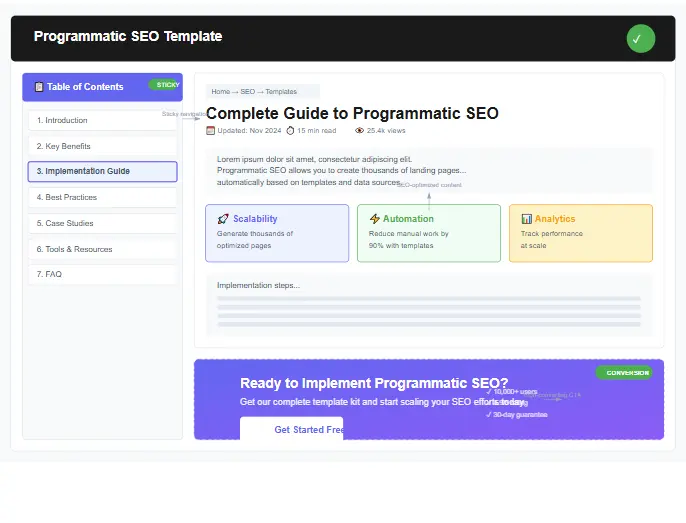
Official references (non-affiliate): Google SEO Starter Guide, Sitemaps, Robots.txt, Canonicalization, Structured Data.
What is a programmatic SEO template?
A programmatic SEO template is a reusable layout that generates many pages from a structured dataset (usually a CSV or sheet). Each page is created by swapping placeholders (variables) such as {{primary_keyword}}, {{secondary_keyword}}, {{location}}, {{service}}, {{tool_name}}, and {{industry}} into a consistent framework.
But here’s the key: a real programmatic SEO template is not “a page shell.” It’s a system for satisfying search intent at scale. The best pSEO template is built like a product page or a lead-gen landing page: it answers the query quickly, proves credibility, helps the user decide, and offers a clear next step.
The difference between “pSEO pages” and “thin pages”
- Thin pages: same text, different keyword. Little decision support. No unique data. Weak internal links.
- Programmatic landing pages: same structure, but meaningful variation per row: pricing bands, comparisons, constraints, examples, FAQs, and data tables.
- Scaled SEO pages that win: pages are organized into clusters with hubs, sibling links, and QA gates before indexing.
If you’re starting from scratch, use the free keyword research template to map patterns (service × location, tool × use case, alternatives, comparisons).
What makes a programmatic SEO template “Google-first-page” quality?
A Google-first-page programmatic SEO template includes at least three types of uniqueness: (1) content uniqueness (intent-specific text), (2) structural uniqueness (different modules show on different rows), and (3) linking uniqueness (different sibling links by cluster). When you combine those, you can publish scaled SEO pages without your site feeling repetitive.
Practical example: a tool page for {{tool_name}} shouldn’t read like a location page for {{service}} in {{location}}. Your pSEO template must allow different modules based on {{use_case}} and {{pain_point}}. That’s why your dataset should include fields like {{pricing_range}}, {{review_rating}}, and a block for {{data_table}} and {{faqs}}.
When pSEO works (and fails)
Programmatic SEO works when your dataset has real differences and your template can express those differences clearly. It fails when you publish near-duplicate pages with tiny swaps. In other words: a programmatic SEO template is only as strong as your data and your QA gate.
When a programmatic SEO template works
- You have structured inputs that matter (features, pricing, coverage, specs, compatibility, constraints).
- Search intent repeats across many pages (predictable keyword patterns).
- You can add proof per page (tables, comparisons, examples, or steps).
- You can build clusters (hub pages + spokes + siblings) to avoid orphan pages.
- You’re willing to iterate: improve the template after seeing real performance.
When a programmatic SEO template fails
- Your dataset is too thin (no real differences from row to row).
- You publish everything to the index without a quality gate.
- Your pages have weak internal links (no hubs, no sibling navigation).
- You ignore intent and write generic copy that doesn’t help users decide.
- You don’t maintain pages (pricing changes, tools change, local rules change).
Before you scale, run a baseline technical and content audit. Scaling multiplies whatever problems you already have. Use the advanced SEO audit checklist as your “pre-flight” step: fix indexing issues, speed issues, internal linking gaps, and template rendering problems (like content cut).
A safe rollout plan (batch publishing)
Here’s the simplest way to scale your programmatic SEO template without risky “publish 10,000 pages overnight” behavior:
- Batch 1 (20–50 pages): Validate template quality, page uniqueness, and conversion UX.
- Batch 2 (100–300 pages): Build hubs and clusters, improve weak modules, refine internal linking.
- Batch 3 (1,000+ pages): Only after clusters show real impressions/clicks and engagement signals.
A programmatic SEO template should be treated like a landing page funnel: publish → measure → improve → scale.
Page types that scale (location/service/tools/comparisons/alternatives)
Most successful scaled SEO pages fit one of these patterns. Choose the pattern that matches your data and your business goal, then build a programmatic SEO template that matches that intent.
1) Location pages (service × location)
Pattern: “{{service}} in {{location}}.” These pages rank when you include local-specific value: what changes in that location, what pricing drivers exist, what timeline to expect, and what users commonly ask. The pSEO template should include a local proof module ({{data_table}}) and location-specific FAQs ({{faqs}}).
2) Service pages (service × industry)
Pattern: “{{service}} for {{industry}}.” These pages work when your service has different outcomes, steps, or constraints for different industries. The programmatic SEO template should include a “best for / not for” section plus process steps tied to {{use_case}}.
3) Tool pages (tool × use case)
Pattern: “{{tool_name}} for {{use_case}}.” These pages often convert better than generic tool reviews because intent is clearer. Connect them to a category hub like best all-in-one SEO tools so your programmatic landing pages form a cluster and pass relevance through internal links.
4) Comparisons (X vs Y)
Pattern: “{{tool_name}} vs {{tool_name}}” or “{{brand_name}} vs {{brand_name}}.” Comparisons should include a decision table ({{data_table}}), “who should pick what,” and FAQs about switching costs, integrations, and pricing. A strong programmatic SEO template keeps comparisons short, factual, and action-oriented.
5) Alternatives pages
Pattern: “{{tool_name}} alternatives.” These work when you clearly explain why someone wants an alternative ({{pain_point}}), then list options by use case. The pSEO template should have “alternatives by use case” modules, not one generic list.
6) Template + checklist lead magnets
Pattern: “{{primary_keyword}} template” or “{{industry}} checklist.” These are perfect for lead generation. When your goal is email capture, pair your content with strong assets like best SEO report template and the ecommerce SEO audit checklist. Your programmatic SEO template should put the download offer early (after the promise) and reinforce it after the implementation guide.
No matter which page type you pick, the winning formula stays consistent: a programmatic SEO template must be modular enough to create meaningful variation and strict enough to publish reliably.
7-part framework for pages that rank (programmatic SEO template system)
This is the framework you apply to every page cluster. If your programmatic SEO template follows these seven steps, your programmatic landing pages are far more likely to rank and convert because they match intent, add proof, and guide the user to a next step.
1) Intent lock: one page = one decision
Don’t try to cover everything. Each page should map to one primary intent ({{primary_keyword}}). Your template should avoid mixed intent like “definition + tutorial + comparison + price list” all at once. Instead, answer the primary question quickly, then provide decision support that fits the intent.
2) Strong first screen: answer + who it’s for
The first 80–120 words should confirm the user’s goal and show what they’ll get on the page. Use {{use_case}} and {{pain_point}} to make the page feel specific. This is where a programmatic SEO template can feel human: you’re not writing long introductions—you’re writing a direct “you’re in the right place” statement.
3) Unique value modules: not just swapped keywords
Real uniqueness comes from modules that change per row: industry constraints, local issues, feature differences, pricing bands, and examples. A pSEO template becomes powerful when different rows show different “helpful blocks.” If you only swap {{location}} or {{tool_name}}, your programmatic SEO template won’t hold.
4) Proof module: data tables beat fluff
The placeholder {{data_table}} exists so you can inject a real table per page (features, packages, specs, comparisons, or pricing). Users trust proof. Google also benefits from structured, clear information. If you want to add structured data later, follow Google’s guidelines: structured data intro.
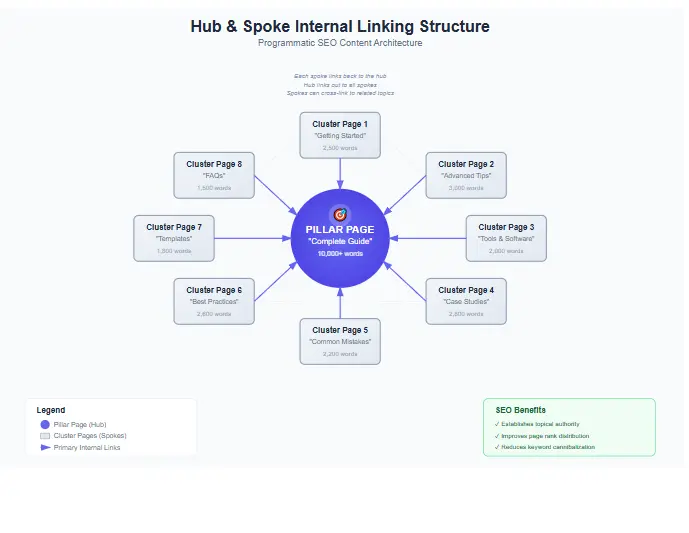
5) Internal linking system: hubs + spokes + siblings
Scaled SEO pages must be organized into clusters. Every page should link up to a hub and sideways to relevant siblings. That is how you distribute relevance and keep crawl paths short. Use the internal linking template so your cluster logic stays consistent at scale.
6) Indexing gates: index quality, not quantity
The biggest pSEO mistake is indexing everything. A strong programmatic SEO template system uses an index gate: pages only get indexed when placeholders are filled, internal links exist, and the proof/FAQ modules are present. Submit only index-ready pages in your sitemap (see sitemaps overview), and keep low-quality drafts out until improved.
7) Conversion UX: CTA after value
A conversion-friendly programmatic SEO template doesn’t push CTAs too early. It earns the click: (1) quick answer, (2) proof, (3) guidance, then (4) a clear CTA. That’s why this layout uses: a lead magnet CTA near the top and a soft audit CTA after implementation sections.
MASTER Gutenberg-safe HTML template (no scripts)
This is the MASTER programmatic SEO template you can reuse across niches. It uses only the required placeholders: {{primary_keyword}}, {{secondary_keyword}}, {{location}}, {{service}}, {{tool_name}}, {{industry}}, {{pain_point}}, {{use_case}}, {{pricing_range}}, {{brand_name}}, {{cta_url}}, {{review_rating}}, {{data_table}}, {{faqs}}.
This MASTER programmatic SEO template stays clean on purpose. The conversion and anti-thin-content power comes from two placeholders: (1) {{data_table}} and (2) {{faqs}}. Those are where you inject proof and intent coverage per row.
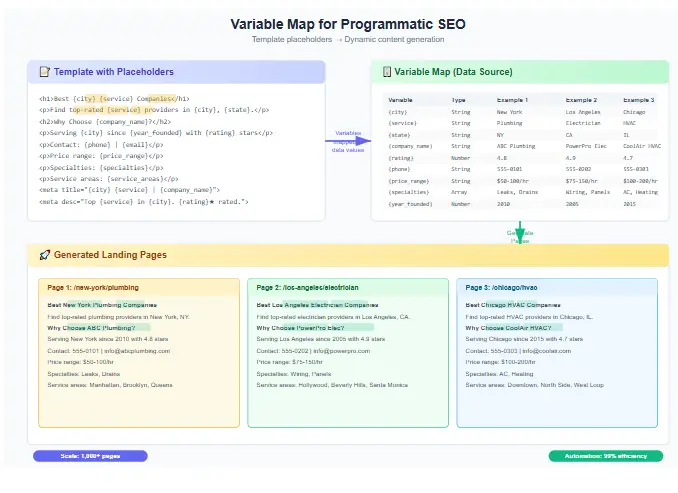
VARIABLE MAP table (placeholder → meaning → example)
A scalable programmatic SEO template needs strict mapping. If the sheet column names don’t match placeholders, your pages break. Use this variable map as your “single source of truth.”
| Placeholder | Meaning | Example |
|---|---|---|
{{primary_keyword}} | Main target keyword for the page | programmatic SEO template |
{{secondary_keyword}} | Supporting keyword variation | pSEO template |
{{location}} | Geo modifier (if local pages) | Dhaka |
{{service}} | Service offered | local SEO audit |
{{tool_name}} | Tool/software name | rank tracker |
{{industry}} | Niche/vertical | ecommerce |
{{pain_point}} | Main problem | thin content risk at scale |
{{use_case}} | Specific scenario | launching 1,000 landing pages |
{{pricing_range}} | Budget/pricing band | $0–$299/month |
{{brand_name}} | Brand name | SEORAF |
{{cta_url}} | Primary CTA link | https://example.com/download |
{{review_rating}} | Rating-style proof (only if true) | 4.6 |
{{data_table}} | HTML table block (proof module) | <table>…</table> |
{{faqs}} | FAQ HTML block | <details>…</details> |
If you want your programmatic SEO template to stay manageable, avoid adding random fields. Add only fields that improve uniqueness and decision support. When you do add fields, update both the variable map and the sheet schema immediately.
CSV/Sheet schema (headers + 1 example row)
This schema is your generation control panel. One row = one page. One column = one placeholder for your programmatic SEO template.
Include index_status so you can keep weak pages out of the index until they’re improved.
For performance tracking by cluster, pair this with a reporting workflow like this SEO report template. Cluster-level reporting is the easiest way to improve your programmatic SEO template over time.
Programmatic generation guide (URL pattern, internal linking, indexing, QA)
This is the practical “how to launch” guide that turns your programmatic SEO template into a scalable publishing system. Keep the process simple: URL rules, internal linking rules, indexing gates, and a QA checklist.
Step 1: Choose one URL pattern per cluster
Consistent URLs make crawling and reporting easier. Pick one pattern per cluster and stick to it:
- Service × location:
/{{service}}/{{location}}/ - Tool × use case:
/tools/{{tool_name}}/{{use_case}}/ - Alternatives:
/alternatives/{{tool_name}}/ - Comparisons:
/compare/{{brand_name}}-vs-{{brand_name}}/ - Templates:
/templates/{{industry}}/{{primary_keyword}}/(or a shorter slug)
Step 2: Build hub pages first (then spokes)
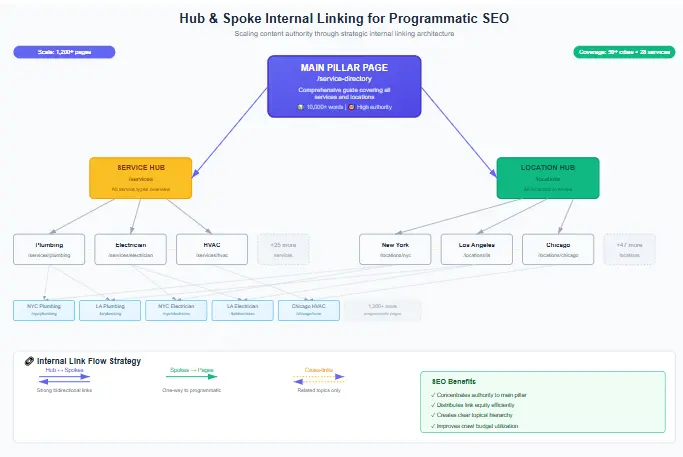
Hub pages summarize the cluster and link to the most valuable spokes. They help users explore and help search engines understand the topic structure. Every spoke should link back to its hub. Use the internal linking template to keep this consistent at scale.
Step 3: Internal linking rules (hub → spokes → siblings)
- Each page links to its hub: 1 strong descriptive anchor.
- Each page links to 3–6 siblings: same intent cluster (not random links).
- Each page links to 1 deep guide: a long-form page that supports the cluster.
- Hubs link down: to the best spokes first (high intent + best conversion).
Step 4: Indexing gates (publish safely)
Indexing everything is the fastest way to dilute your site. Use an index gate: only index pages that pass your minimum QA. Include only index-ready URLs in sitemaps (see sitemaps overview), keep robots rules clean (see robots intro), and apply canonical rules when needed (see canonicalization).
Step 5: QA checklist (minimum pass)
Run this checklist per batch before you index pages created from your programmatic SEO template:
- Placeholder check: no empty {{primary_keyword}}, {{cta_url}}, {{data_table}}, or {{faqs}}.
- Uniqueness check: at least 3 modules differ meaningfully (not only keyword swaps).
- Intent check: first 120 words match the query and confirm {{use_case}}.
- Link check: hub + sibling links + 1 deep guide link exists and is relevant.
- UX check: mobile readable, no horizontal cut, tables scroll inside wrapper.
- Conversion check: lead magnet CTA + soft audit CTA present (but not spammy).
Get a Programmatic SEO Audit
Want a tailored programmatic SEO template system (keyword clusters → page types → internal links → indexing gates)? An audit helps you scale what works, fix what breaks, and avoid indexing weak programmatic landing pages.
Get a Programmatic SEO Audit3 mini examples (different niches)
These examples show how one programmatic SEO template adapts to different industries while staying unique, helpful, and conversion-ready.
Example 1: Local services (service × location)
Keyword pattern: “{{service}} in {{location}}”
A local business creates programmatic landing pages for each service in each service area. The pSEO template includes: (1) local constraints, (2) pricing drivers ({{pricing_range}}), (3) a package table ({{data_table}}), and (4) FAQs that match local intent ({{faqs}}). The pages interlink to a hub page for the service category, plus sibling locations nearby.
- What changes per page: response times, service scope, neighborhood notes, pricing drivers.
- Conversion UX: CTA after proof, not before trust.
- QA gate: if a location lacks enough unique info, keep it noindex until improved.
Example 2: SaaS directory (tool × use case)
Keyword pattern: “{{tool_name}} for {{use_case}}”
A tools site publishes scaled SEO pages for each tool and each use case. Each page includes: a “best for / not for” block, a comparison table, and FAQs about integrations and switching. Pages link to a cluster hub (for example, a category hub similar to best all-in-one SEO tools) and to sibling tools that solve the same pain point.
- What changes per page: workflows, integrations, pricing band, recommended setup steps.
- Conversion UX: download pack for DIY users + audit CTA for teams who want help.
- QA gate: remove or noindex pages that can’t add proof beyond generic text.
Example 3: Ecommerce categories (category × intent)
Keyword pattern: “{{industry}} template” / category variations
An ecommerce site builds programmatic landing pages for category variations and buyer intent. The programmatic SEO template includes: specs table, “how to choose,” and FAQs. The site keeps a strict QA gate and uses a checklist like the ecommerce SEO audit checklist to ensure scaled SEO pages remain helpful.
- What changes per page: specs, sizing guidance, comparisons, availability notes.
- Conversion UX: guide-first content that moves users toward selection.
- QA gate: only index pages that show real differences and proper internal linking.
FAQ (8–12)
1) Is a programmatic SEO template safe for Google?
2) How many pages should I publish first?
3) What’s the biggest reason pSEO pages fail?
4) Do I need a huge dataset to use a programmatic SEO template?
5) Should I index every generated page?
index_status in your sheet and index only pages that pass QA. Keep weak pages noindex/draft until improved.
6) How do I avoid “content cut” or layout breaking in WordPress?
min-width:0 on grid children, wrap tables with an overflow container, and remove parent container overflow hidden. This template already includes safe CSS for that.
7) What internal links should each page include?
8) Can programmatic SEO work for affiliate content?
9) How often should I update programmatic landing pages?
10) What should I track after publishing scaled SEO pages?
Conclusion + CTA
A programmatic SEO template is powerful when it scales value—not just page count. The winning approach is simple: strict variables, proof modules ({{data_table}}), intent-based FAQs ({{faqs}}), cluster internal linking, and an indexing gate. If you follow this system, your programmatic SEO template can produce programmatic landing pages and scaled SEO pages that rank and convert.
Ready to build and launch? Download the pSEO Template Pack, publish your first batch, and improve from real performance data. If you want a faster, safer rollout, use the audit CTA in the sidebar.