
Best Project Management Software for Digital Agencies in 2026
Streamline your agency operations, improve client satisfaction, and boost team productivity with the right project management solution.
Introduction: The Digital Agency Operations Challenge
Digital agencies today face a perfect storm of operational challenges. Managing multiple client projects simultaneously, coordinating cross-functional teams, meeting tight deadlines, and maintaining transparent communication with clients has become increasingly complex in our remote-first business environment.
Consider these common agency pain points:
- Missed deadlines due to poor task prioritization
- Client dissatisfaction from lack of visibility into project progress
- Inefficient resource allocation leading to team burnout
- Scattered communication across multiple platforms
- Inconsistent processes that can’t scale as the agency grows
- Time tracking and billing inaccuracies that impact profitability
These challenges aren’t just operational annoyances—they directly impact your agency’s bottom line, client retention rates, and team morale. The solution is investing in quality project management software for digital agencies designed specifically to handle these unique workflow demands.
What Is Project Management Software for Digital Agencies?
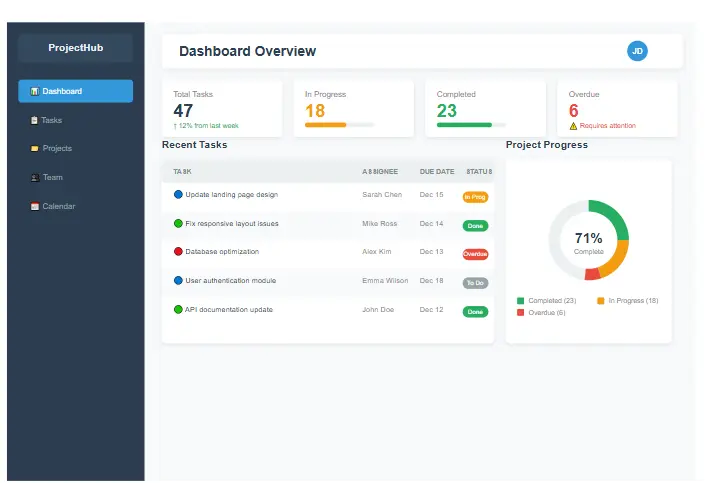
Modern project management software interface with dashboard and task management features
Project management software for digital agencies is a specialized class of tools designed to address the unique workflow challenges faced by creative, marketing, and development teams. Unlike generic solutions, the best project management software for digital agencies understands the cyclical nature of client work, the importance of client collaboration, and the need for resource management across multiple concurrent projects.
According to Project Management Institute, organizations that use standardized project management practices waste 28 times less money than their counterparts. This statistic highlights the importance of implementing the right systems for your agency.
While generic PM tools focus primarily on internal task management, agency-specific solutions offer:
- Client-facing dashboards and portals
- Resource management across multiple projects
- Time tracking integrated with billing
- Workflow automation specific to marketing and creative processes
- Templates for common agency deliverables (SEO campaigns, website builds, content calendars)
- Customizable reporting for both internal stakeholders and clients
The right platform becomes your agency’s operational command center—centralizing communication, standardizing processes, and providing the visibility needed to deliver exceptional results consistently. This makes it the most critical project management software for digital agencies can invest in.
Key Features Digital Agencies Must Have
When evaluating project management software for digital agencies, prioritize these essential features to ensure it meets your operational needs:
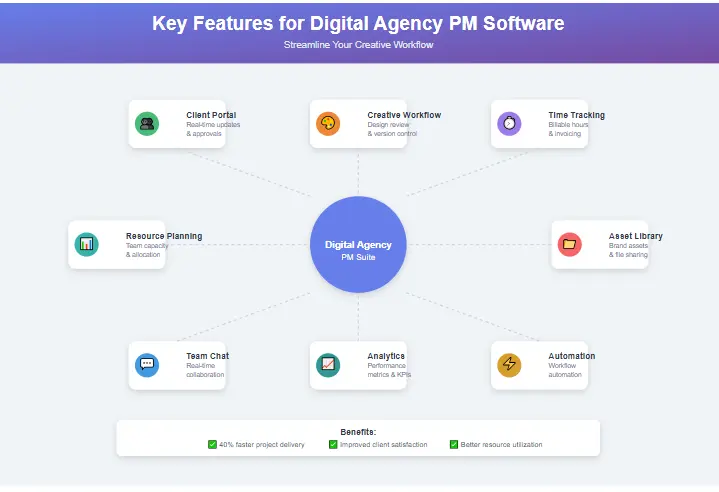
Essential features to look for in project management software for digital agencies
Client Collaboration & Permissions
Your PM software should facilitate seamless client interaction without compromising internal workflows. Look for:
- Client portals or dashboards with controlled access levels
- Comment and approval systems for deliverables
- Brand customization options for client-facing elements
- Secure file sharing with version control
- Automated client notifications for key milestones
Task Automation & Recurring Workflows
Digital agencies thrive on consistency. The right PM tool should enable:
- Custom automation rules for routine processes
- Template creation for repeatable project types
- Trigger-based actions (e.g., when a task is completed, notify the client)
- Recurring task setup for ongoing services like SEO or content marketing
- Integration with other tools in your tech stack
Time Tracking & Billing
For agencies, time is literally money, which is why the best project management software for digital agencies includes robust time tracking. Essential features include:
- Built-in time tracking with multiple entry methods
- Billable vs. non-billable hour categorization
- Budget tracking against actual hours spent
- Integration with accounting software
- Customizable rate structures by team member or service type
SEO & Marketing Workflow Support
Since many digital agencies handle marketing functions, look for:
- Content calendar functionality
- Campaign management tools
- Approval workflows for creative assets
- Integration with marketing platforms
- Kanban boards for visual workflow management
For agencies specializing in search engine optimization, having dedicated SEO project management capabilities is crucial for managing campaigns effectively and tracking keyword performance alongside project tasks.
Team Accountability & Reporting
Data-driven insights help agencies improve performance:
- Real-time project dashboards
- Individual and team productivity metrics
- Client profitability analysis
- Resource utilization reports
- Custom report creation for client updates
As noted by Harvard Business Review, effective project management can increase project success rates by up to 20% when teams have access to real-time data and reporting.
Best Project Management Software for Digital Agencies
After extensive testing and research, we’ve identified the top PM solutions that cater specifically to digital agency needs. Finding the best project management software for digital agencies means balancing features, usability, and cost. The list below represents the finest project management software for digital agencies available today.
ClickUp
Best Use Case: Agencies wanting a highly customizable, all-in-one workspace
ClickUp offers an extremely flexible platform with multiple view options (list, board, Gantt, calendar), robust features including goals, docs, whiteboards, and mind maps, and excellent automation capabilities. Its generous free plan makes it attractive for small teams.
Pros
- Extremely customizable with multiple view options
- Robust feature set
- Generous free plan for small teams
- Excellent automation capabilities
- Strong integration ecosystem
Cons
- Steeper learning curve due to extensive features
- Can feel overwhelming for simple projects
- Mobile app less feature-rich than desktop
Ideal Agency Size: Small to mid-sized agencies (5-50 team members)
Asana
Best Use Case: Agencies focused on collaboration and clean user experience
Asana provides an intuitive, user-friendly interface with strong project templates and workflow builders. It offers excellent timeline and workload management features, robust integration capabilities, and a strong mobile app experience.
Pros
- Intuitive, user-friendly interface
- Strong project templates and workflow builders
- Excellent timeline and workload management
- Robust integration capabilities
- Strong mobile app experience
Cons
- Limited reporting in lower-tier plans
- Can become expensive as team grows
- Less customizable than competitors
- Time tracking requires integration
Ideal Agency Size: Small to large agencies (10-100+ team members)
Notion
Best Use Case: Agencies wanting maximum flexibility and documentation capabilities
Notion offers an extremely flexible and customizable workspace that excels at knowledge management and documentation. Its clean, minimalist interface and all-in-one approach make it popular with agencies that value organization and information architecture.
Pros
- Extremely flexible and customizable
- Excellent for knowledge management
- Clean, minimalist interface
- All-in-one workspace approach
- Growing template ecosystem
Cons
- Steeper learning curve for complex setups
- Limited native project management features
- Can become slow with large databases
- Basic reporting capabilities
Ideal Agency Size: Small to mid-sized agencies (5-50 team members) with strong documentation needs
Teamwork
Best Use Case: Agencies focused on project profitability and resource management
Teamwork is built specifically for client service businesses, offering excellent profitability tracking and reporting, strong resource management features, and client billing and invoicing capabilities. It includes comprehensive project templates designed for agency workflows.
Pros
- Built specifically for client service businesses
- Excellent profitability tracking and reporting
- Strong resource management features
- Client billing and invoicing capabilities
- Comprehensive project templates
Cons
- Interface can feel dated compared to competitors
- Mobile app less polished than alternatives
- Steeper price point for advanced features
- Learning curve for new users
Ideal Agency Size: Mid-sized to large agencies (20-100+ team members)
Monday.com
Best Use Case: Agencies wanting visual project management with strong automation
Monday.com features a highly visual and colorful interface with excellent automation capabilities, strong integration options, and customizable dashboards and reporting. It offers a good balance of features and usability for agencies that prefer visual workflow management.
Pros
- Highly visual and colorful interface
- Excellent automation capabilities
- Strong integration options
- Customizable dashboards and reporting
- Good balance of features and usability
Cons
- Can become expensive with many users
- Limited features in basic plan
- Some advanced features require technical knowledge
- Reporting could be more robust
Ideal Agency Size: Small to mid-sized agencies (5-50 team members)
Wrike
Best Use Case: Agencies with complex projects requiring detailed management
Wrike offers powerful Gantt chart and timeline features, excellent for complex, multi-stage projects. It includes strong proofing and approval tools, detailed analytics and reporting, and robust security and permissions for agencies handling sensitive client data. For a comprehensive review of this platform, check out our detailed Wrike project management software analysis.
Pros
- Powerful Gantt chart and timeline features
- Excellent for complex, multi-stage projects
- Strong proofing and approval tools
- Detailed analytics and reporting
- Robust security and permissions
Cons
- Steeper learning curve
- Interface can feel cluttered
- Higher price point for advanced features
- Less intuitive than some competitors
Ideal Agency Size: Mid-sized to large agencies (20-100+ team members) with complex projects
How to Choose the Right Project Management Software for Digital Agencies
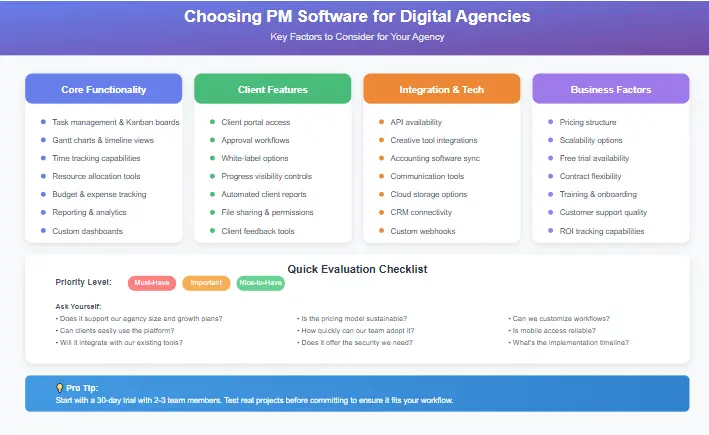
Key factors to consider when selecting project management software for your agency
Selecting the perfect PM solution requires careful consideration of your agency’s specific needs. When choosing project management software for digital agencies, here’s how to evaluate options based on key factors:
Based on Team Size
Small Agencies (1-10 team members):
- Prioritize ease of use and quick implementation
- Consider solutions with generous free tiers (Asana, ClickUp, Notion)
- Focus on core features without unnecessary complexity
- Look for scalable options that can grow with you
Mid-Sized Agencies (11-50 team members):
- Balance between features and usability
- Consider pricing structures that work for larger teams
- Prioritize collaboration and reporting capabilities
- Evaluate automation features to improve efficiency
Large Agencies (50+ team members):
- Advanced security and permission controls
- Robust reporting and analytics
- Integration with existing enterprise systems
- Dedicated support and training options
- Customization capabilities for specific workflows
For large agencies, selecting project management software for digital agencies with advanced security is non-negotiable.
Based on Client Volume
Low Client Volume (1-10 active clients):
- Simple client collaboration features may suffice
- Focus on internal workflow management
- Basic reporting capabilities
- Standard templates for common project types
Medium Client Volume (11-50 active clients):
- Advanced client portal features
- Client-specific reporting capabilities
- Template libraries for different client types
- Client onboarding workflows
High Client Volume (50+ active clients):
- Sophisticated client management features
- Client self-service capabilities
- Automated client reporting
- Client-specific billing and invoicing
- Client segmentation and management tools
Based on Budget
Budget-Conscious Agencies:
- Start with free tiers and upgrade as needed
- Consider annual billing for discounts
- Evaluate total cost of ownership, including training
- Look for all-in-one solutions to replace multiple tools
Mid-Range Budget:
- Balance between features and cost
- Consider ROI from improved efficiency
- Evaluate pricing per user vs. flat-rate options
- Factor in implementation and training costs
Premium Budget:
- Focus on comprehensive feature sets
- Consider enterprise solutions with dedicated support
- Factor in customization and integration costs
- Evaluate long-term scalability and partnership potential
Based on Automation Needs
Basic Automation Needs:
- Simple task dependencies and notifications
- Template creation for repeatable processes
- Basic recurring task setup
- Standard deadline reminders
Intermediate Automation Needs:
- Custom workflow automation
- Integration with other tools in your stack
- Automated client reporting
- Advanced approval workflows
Advanced Automation Needs:
- Complex multi-step automation
- Custom API integrations
- Automated resource allocation
- Predictive analytics and insights
Based on Reporting & Scalability
Basic Reporting Needs:
- Standard project progress reports
- Simple time tracking reports
- Basic team workload views
- Client-facing status updates
Intermediate Reporting Needs:
- Custom report creation
- Financial reporting and profitability analysis
- Resource utilization reports
- Client satisfaction metrics
Advanced Reporting Needs:
- Predictive analytics and forecasting
- Custom dashboard creation
- Advanced financial metrics
- Business intelligence capabilities
For agencies deciding between two popular options, our detailed Wrike vs Asana comparison provides insights into which platform might better suit your specific needs.
Download Your Free Project Management Software Buyer Checklist
Choosing the right project management software for digital agencies is a critical decision that impacts your agency’s efficiency, profitability, and growth potential. To help you make an informed choice, we’ve created a comprehensive buyer checklist specifically for digital agencies.
Our “Project Management Software Buyer Checklist for Digital Agencies” includes:
- Feature comparison matrix for all major PM tools
- Custom evaluation criteria based on agency size and specialty
- Implementation timeline template
- Team onboarding checklist
- ROI calculation worksheet
- Migration considerations and tips
This free resource will save you hours of research when selecting project management software for digital agencies and help you avoid costly mistakes.
Why These Tools Convert Well for Digital Agencies
The project management solutions we’ve recommended are the best project management software for digital agencies because they have proven track records for several key reasons:
- Industry-Specific Features: Each tool offers features that address the unique challenges faced by digital agencies, from client collaboration to billing integration.
- Scalability: These platforms can grow with your agency, from a small team to a large enterprise, without requiring a complete system change.
- Integration Capabilities: All options integrate with the tools agencies already use, from accounting software to marketing platforms.
- Strong Support Resources: Each provider offers extensive documentation, training, and customer support to ensure successful implementation.
- Proven ROI: Agencies using these tools consistently report improved efficiency, better client satisfaction, and increased profitability.
According to a report by McKinsey & Company, organizations that implement effective project management practices see a 20-30% improvement in project success rates and a significant reduction in budget overruns.
When you’re ready to implement a new PM solution, we recommend starting with a free trial or demo to ensure the tool meets your specific needs. Many of our recommended partners offer special discounts for agencies through our affiliate links.
Realistic Use Case: Transforming Agency Operations with PM Software
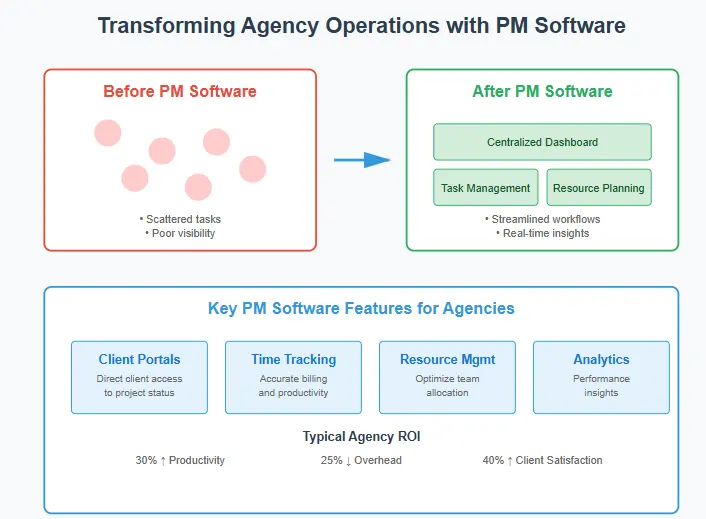
Before and after: How project management software transforms agency operations
Let’s examine how a mid-sized digital marketing agency, “GrowthMinds,” transformed their operations by implementing the right project management software for digital agencies.
Before Implementation:
- 15-person team struggling with 25+ active client projects
- Missed deadlines on 30% of deliverables
- Client complaints about lack of visibility into project progress
- Inconsistent processes across different account managers
- Manual time tracking leading to billing inaccuracies
- Team burnout from poor workload distribution
Implementation Process:
- Evaluation Phase: Used our buyer checklist to assess needs and evaluate options
- Selection: Chose ClickUp for its balance of features, customization, and pricing
- Migration: Phased rollout over 6 weeks, starting with internal projects
- Training: Dedicated training sessions for different team roles
- Client Onboarding: Gradual introduction to client portal features
After Implementation (6 Months Later):
- 95% on-time delivery rate
- 40% reduction in time spent on administrative tasks
- 25% increase in client satisfaction scores
- 15% improvement in project profitability
- More balanced workload distribution across team
- Standardized processes for all client work
Key Success Factors:
- Strong leadership buy-in and communication
- Customizing the tool to match existing workflows rather than forcing change
- Starting with essential features before implementing advanced functionality
- Regular check-ins to address challenges and optimize usage
- Creating internal champions to drive adoption
This realistic scenario demonstrates how the right project management software for digital agencies can transform operations and deliver measurable business results. For more insights on implementing project management systems, Digital Agency Network offers case studies and best practices from successful agencies.
Frequently Asked Questions
The best project management software for digital agencies depends on your specific needs, but ClickUp, Asana, and Teamwork are consistently top-rated. ClickUp offers the most customization options, Asana provides the most user-friendly experience, and Teamwork excels in profitability tracking. Consider your agency size, budget, and specific workflow requirements when making your selection.
Yes, project management software for digital agencies is absolutely worth it for small teams. Implementing the right PM tool early helps establish scalable processes, improves client satisfaction, and prevents common growing pains. Many tools offer free or low-cost plans perfect for small agencies, with options to upgrade as you grow.
Free project management tools are suitable for very small agencies or those just starting out, but they typically have limitations in features, users, and storage. Paid tools offer advanced functionality like automation, detailed reporting, client portals, and integrations that become essential as agencies grow. For most agencies, the ROI from improved efficiency and client satisfaction justifies the investment in a paid plan.
Yes, most modern project management tools offer client access features. These typically include client portals, dashboards, or limited-access accounts that allow clients to view project progress, approve deliverables, and communicate with the team without accessing sensitive internal information. This transparency significantly improves client satisfaction and reduces status update meetings.
SEO agencies often prefer tools with strong content calendar features, approval workflows, and reporting capabilities. Popular choices include Asana for its user-friendly interface, ClickUp for its customization options, and Teamwork for its profitability tracking. Many SEO agencies also look for integrations with SEO-specific tools like Ahrefs, SEMrush, or Google Analytics. For more information on this topic, Moz’s guide to project management for SEO provides additional insights.
Take Control of Your Agency’s Future
Implementing the right project management software for digital agencies is one of the most impactful decisions you can make for your digital agency’s efficiency, profitability, and growth potential. The tools we’ve recommended have been thoroughly tested and proven to deliver results for agencies like yours.
Ready to take the next step?
- Download our free “Project Management Software Buyer Checklist for Digital Agencies” to evaluate your options systematically. This comprehensive resource will guide you through the selection process and help you avoid costly mistakes.
- Start a free trial of one of our recommended tools to see how it works with your agency’s specific workflows. Most offer 14-30 day trials with full feature access.
- Schedule a demo with your top choice to see advanced features and discuss agency-specific needs with their team.
The right project management solution will transform how your agency operates, improves team collaboration, enhances client satisfaction, and ultimately drives greater profitability. Don’t let operational challenges hold your agency back—invest in project management software for digital agencies today.
Looking for personalized recommendations? Contact our team for a free consultation on selecting the perfect PM software for your digital agency.