
Keyword Mapping Template: The Ultimate 2026 Guide to Rank #1
Feeling lost in a sea of unorganized keywords? You’re not alone. Trying to rank for hundreds of terms without a clear plan is like driving without a map—you might move, but you won’t reach your destination efficiently. The solution? A powerful keyword mapping template.
This isn’t just a spreadsheet; it’s your strategic blueprint for 2026. It connects every search query to the perfect page on your site, kills keyword cannibalization dead, and organizes your content so Google *has* to rank you. Whether you’re running a local business, a massive e-commerce store, or a niche blog, this guide (and free template) will transform your SEO from guesswork into a systematic ranking machine.
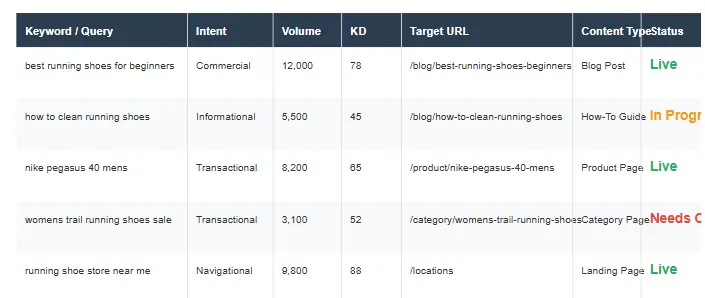
What is a Keyword Mapping Template?
Think of a keyword mapping template as the architectural blueprint of your website’s SEO strategy. It is a structured document (usually a spreadsheet) that assigns specific target keywords to specific URLs on your site.
A keyword mapping template is a strategic spreadsheet used in SEO to assign specific target keywords to individual URLs on a website. It helps organize content strategy, prevent keyword cannibalization, and ensure that search intent matches the page type.
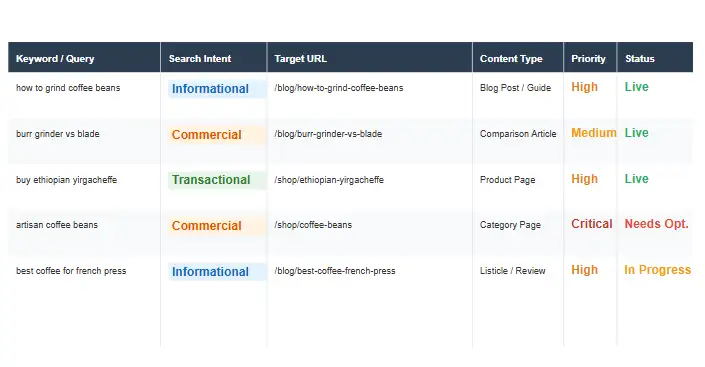
For example, let’s say you run an e-commerce store selling athletic shoes. Your keyword mapping template might look something like this:
| Primary Keyword | Target URL | Search Intent | Content Type |
|---|---|---|---|
| men’s running shoes | example.com/mens-running-shoes | Commercial | Category Page |
| best running shoes for flat feet | example.com/blog/best-running-shoes-flat-feet | Informational | Blog Post |
| nike air max 90 review | example.com/blog/nike-air-max-90-review | Informational | Product Review |
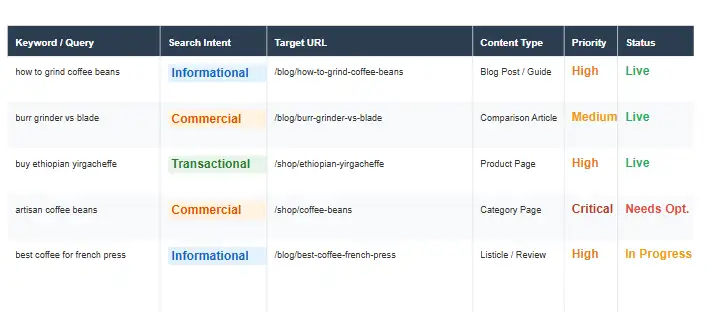
This simple keyword-to-url mapping example shows how different types of keywords are assigned to specific pages based on search intent and content type. As your website grows and your keyword strategy becomes more complex, this mapping becomes increasingly valuable for maintaining SEO organization and preventing content overlap. A comprehensive keyword mapping template is essential for scaling your SEO efforts effectively.
Why Keyword Mapping Matters
Why bother with a template? Because without it, your SEO is chaotic. Here is the impact of proper mapping:
- Eliminates Cannibalization: It stops your own pages from fighting each other for the same spot.
- Boosts Authority: It groups related content into clusters, signaling expertise to Google.
- Saves Time: It gives your writers and developers clear instructions on what to optimize.
- Increases Conversions: It ensures users land on the exact page type (blog vs. product) that matches their needs.
The benefits of using a keyword mapping template include:
1. Prevents Cannibalization: Stops multiple pages from competing for the same keyword.
2. Improves Site Structure: Creates a logical hierarchy that search engines love.
3. Aligns Content with Intent: Ensures informational searches go to guides and commercial searches go to product pages.
4. Streamlines Workflow: Provides a clear roadmap for content teams and developers.
Keyword Mapping vs. No Keyword Mapping
The difference between a site that maps keywords and one that doesn’t is the difference between a library and a messy garage.
| Metric | With Keyword Mapping | Without Keyword Mapping |
|---|---|---|
| Rankings Stability | High. Clear signals to Google reduce ranking fluctuations. | Low. Unintentional competition between pages causes volatility. |
| Content Planning | Strategic. Every new piece of content has a pre-defined purpose. | Reactive. Content is created based on guesswork or trends. |
| Cannibalization Risk | Near Zero. Pre-mapped URLs prevent internal conflict. | High. Multiple pages often target the same terms unknowingly. |
| Internal Linking | Contextual. Links connect topic clusters logically. | Random. Links are often added without semantic context. |
| Crawl Efficiency | Optimized. Googlebot follows a clear thematic path. | Wasted. Crawl budget spent on duplicate or thin themes. |
| Conversion Potential | Maximized. Intent alignment ensures users land on the right page type. | Reduced. Users often land on content that doesn’t match their stage in the funnel. |
The Keyword Mapping Process: A Step-by-Step Guide
Ready to build your map? Follow this proven process used by top agencies.
Step 1: Comprehensive Keyword Research
Don’t just grab a list of keywords. Use tools like Ahrefsfs, SEMrush, or Moz to find terms your competitors are missing. Look for high-value, low-competition “long-tail” gems.
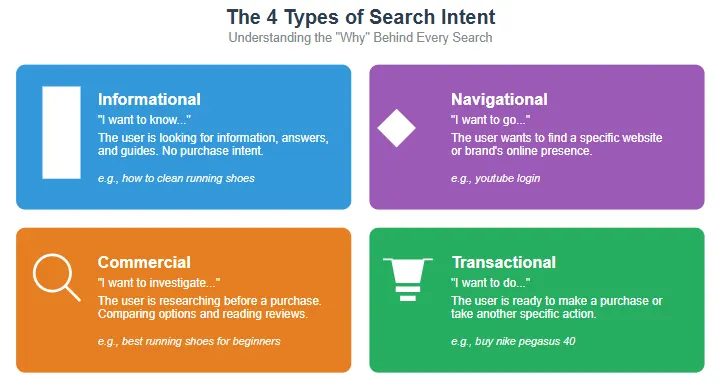
Step 2: Analyze Search Intent
This is the most critical step. Categorize every keyword:
- Informational: “How to…” (Needs a Blog Post)
- Commercial: “Best…” (Needs a Comparison/Review)
- Transactional: “Buy…” (Needs a Product Page)
Step 3: Group by Topic (Clustering)
Don’t map single keywords. Map *topics*. Group “Running shoes,” “Jogging sneakers,” and “Marathon footwear” into one cluster.
Step 4: Audit & Assign
Look at your current site. Do you have a page for this cluster?
- Yes? Update it.
- No? Create one.
- Multiple? Consolidate them (301 redirect the weak ones to the strong one).
Step 5: Implement Internal Links
Your map shouldn’t just list URLs; it should define relationships. Ensure your cluster pages link back to your main “Pillar” page.
To create a keyword map:
1. Research: Gather keywords from tools like Ahrefs or SEMrush.
2. Categorize Intent: Label keywords as Informational, Commercial, or Transactional.
3. Cluster: Group related keywords together.
4. Audit: Check existing content.
5. Assign: Map each keyword to a specific URL.
6. Link: Build internal links between related pages.
7. Track: Monitor performance.
Using Keyword Mapping to Discover Content Gaps
One of the most powerful, yet underutilized, features of a keyword mapping template is its ability to reveal content gaps that are costing you traffic and revenue. By systematically comparing your target keyword list against your existing URL structure, you can uncover high-value opportunities.
Identifying Competitor Gaps
Run a content gap analysis using your SEO tool to see which keywords your competitors rank for that you don’t. Add these to your mapping template immediately. If a competitor ranks for “sustainable running shoes” and you don’t, but you sell that product, you have an immediate opportunity. Map this keyword to a new landing page or product category.
Spotting “Orphan” Keywords
In your template, filter for keywords that have high search volume but are assigned to “No URL” or a “301 Redirect.” These are orphan keywords—terms you want to rank for but have no real estate for. These gaps represent pure revenue potential. Prioritize these in your content calendar.
Revenue Opportunities vs. Demand Opportunities
Your map should distinguish between “Demand” (high volume, informational) and “Revenue” (lower volume, transactional). Often, sites ignore the “Revenue” gaps because the volume looks low in tools. However, mapping these out often reveals that you are missing 50-100 small transactional keywords that, collectively, could double your organic revenue.
The Template Columns Explained
Our free keyword mapping template includes several columns designed to capture all the essential information for your SEO strategy. Here’s a breakdown of each column and how to use it effectively:
| Column Name | Description | Example |
|---|---|---|
| Keyword | The primary keyword you’re targeting | men’s running shoes |
| Search Volume | Monthly search volume for the keyword | 2,400 |
| Keyword Difficulty | Competition level for ranking (1-100) | 45 |
| Current URL | Existing page targeting this keyword (if any) | example.com/mens-running-shoes |
| Target URL | Page you want to rank for this keyword | example.com/mens-running-shoes |
| Search Intent | What the user wants to accomplish | Commercial |
| Content Type | Type of page that best serves the intent | Category Page |
| Priority | Importance level for your business (High/Medium/Low) | High |
| Status | Current state of optimization (Not Started/In Progress/Optimized) | Optimized |
| Current Position | Current ranking position for the keyword | 12 |
| Target Position | Desired ranking position | Top 3 |
| Notes | Additional information or action items | Need to add more product options |
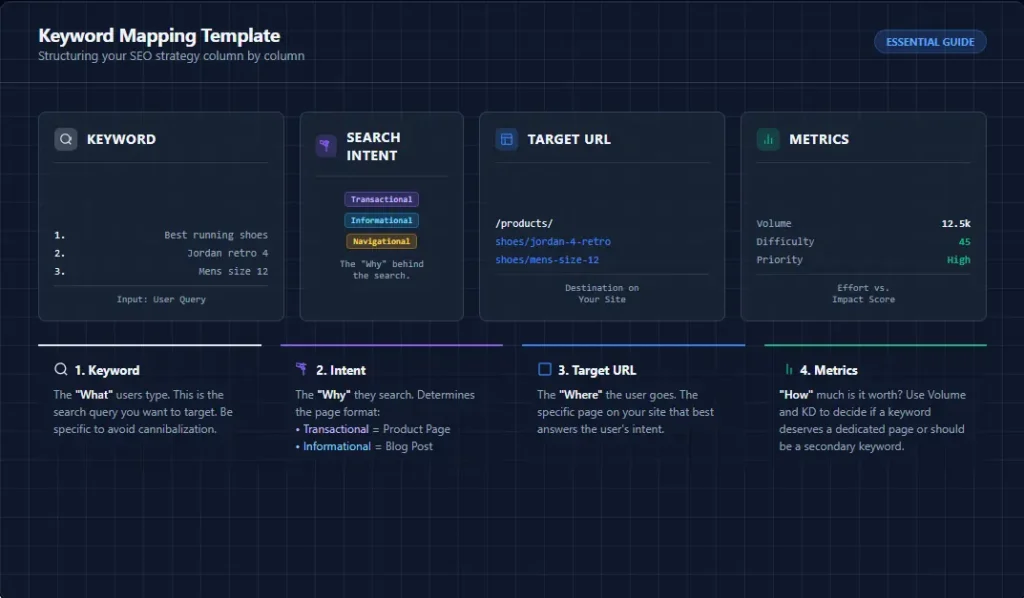
Keyword Variations
While the template includes a primary keyword column, you should also track variations and related terms. You can add additional columns for secondary keywords, LSI (latent semantic indexing) terms, and question-based queries. This comprehensive approach ensures your content covers the topic thoroughly and captures a wider range of search queries. A robust keyword mapping template accounts for all these variations.
Search Volume and Keyword Difficulty
These metrics help you prioritize your efforts. Search volume indicates how many people are searching for a term, while keyword difficulty (sometimes called competition) estimates how hard it would be to rank for that keyword. The ideal targets have decent search volume with manageable difficulty—these often represent the best balance of opportunity and effort. Your keyword mapping template should track both metrics.
Current vs. Target URL
Separating these two columns allows you to identify where you are versus where you want to be. If the current and target URLs are different, you’ll need to either optimize the existing page, create a new page, or implement a redirect. This distinction is particularly valuable during content audits and site restructuring. The keyword mapping template makes these discrepancies easy to spot.
Search Intent and Content Type
These columns ensure you’re creating the right kind of content for each keyword. Misaligning content with search intent is a common SEO mistake that can hurt your rankings and conversion rates. For example, creating a product page for an informational keyword like “how to choose running shoes” would likely perform poorly because it doesn’t match what the searcher is looking for. Your keyword mapping template prevents these mismatches.
Priority and Status
These columns help you track progress and manage your workflow. Priority allows you to focus on high-impact keywords first, while status keeps your team aligned on what’s been completed and what still needs work.
Priority and Status
These columns help you track progress and manage your workflow. Priority allows you to focus on high-impact keywords first, while status keeps your team aligned on what’s been completed and what still needs work. For larger teams, you might also add columns for assigned team members and deadlines. The keyword mapping template becomes your project management tool for SEO.
Warning: Don’t obsess over exact match keywords. Google’s algorithm has become much more sophisticated and understands semantic relationships. Focus on creating high-quality, comprehensive content that addresses the topic thoroughly rather than trying to perfectly match exact keyword phrases.
Keyword Mapping for Topical Authority
In 2026, you don’t just rank for keywords; you rank for *topics*. Google wants to see you as an expert.
Building Content Hubs and Clusters
To build authority, you must move beyond a flat list of keywords. Use your template to visualize “Pillar Pages” and “Cluster Content.” Your Pillar Page should target a broad term (e.g., “Running Shoes”), while your cluster pages target specific long-tail variations (e.g., “Best Running Shoes for Flat Feet”). The mapping template should explicitly define the relationship: Cluster Page A -> Links to -> Pillar Page. This internal link structure signals to Google that you are the definitive resource on the topic.
Semantic SEO and Entity Relationships
When mapping, don’t just look at keywords; look at entities. An entity is a person, place, or thing. For “Running Shoes,” the entities might be “Asics,” “Gel Cushioning,” “Marathon,” and “Pronation.” Your mapping template should ensure these entities are mentioned and linked across the relevant URLs. This semantic weave helps Google’s Knowledge Graph understand exactly what your content is about, boosting your authority.
Content Depth Hierarchy
Use your map to assign a “Depth Score” to each URL. Depth 1 might be a broad overview, Depth 2 a comparison, and Depth 3 a technical specification. This ensures you have content for users at every stage of the awareness ladder, further solidifying your topical coverage.
Real-World Keyword Mapping Results
Does this actually work? **Yes.**
Scenario 1: The E-Commerce Cannibalization Fix
The Situation: A fashion retailer had 5 pages ranking for “Blue Denim Jacket.” None were on Page 1. We mapped the term to one strong category page and 301-redirected the others. The Result: Rank #1 in 6 weeks.
Scenario 2: The Content Gap Discovery
The Situation: A SaaS company ranked for “Project Management Software” but had low leads. Mapping revealed they missed “Small Business Project Management Software.” We created a dedicated landing page. The Result: Leads increased by 45%.
Scenario 3: Local SEO Service Area Overhaul
The Situation: A plumbing service had 50 pages targeting “plumber [city name].” Only 5 ranked. We remapped the strategy to create 3 distinct “Service Area Hubs.” The Result: Local pack appearances increased by 300%.
Stop Guessing. Start Ranking.
Download the Proven Keyword Mapping Template used by top SEO agencies to dominate search results.
- Turn 1,000+ keywords into a clear strategy.
- Identify and fix cannibalization instantly.
- Create topical clusters that Google loves.
What Most SEO Guides Get Wrong (Avoid These Traps)
Having audited hundreds of sites, I’ve noticed consistent mistakes in how most guides teach keyword mapping. Here is the unvarnished truth.
The “One Keyword, One Page” Fallacy
Guides love to say “One primary keyword per page.” This is dangerous advice. If you write a comprehensive guide, you should rank for dozens of related terms. If you artificially limit a page to one keyword, you produce thin content. The correct approach is “One Primary Intent per page.”
Ignoring the “Middle” of the Funnel
Most maps focus on “Informational” (top of funnel) and “Transactional” (bottom of funnel). They ignore the “Commercial Investigation” stage (middle). Users searching “vs” questions (e.g., “Nike vs Adidas”) are ready to buy but need validation. If your map doesn’t have a column for “Comparison Keywords,” you are handing these high-conversion users to your competitors.
Static Mapping in a Dynamic Search Landscape
Most guides treat keyword mapping as a “set it and forget it” task. Search intent changes. Last year, “best running shoes” might have been a blog post topic. This year, Google might be showing a carousel of product pages. If you don’t update your map to reflect this SERP change, you are optimizing for 2024’s Google, not 2026’s.
How to Use It in WordPress
Once you’ve created your keyword mapping template, the next step is implementing it on your WordPress website. Here’s how to translate your keyword map into actionable WordPress optimizations:
Creating Your Content Structure
Use your keyword mapping template to plan your WordPress site structure. Keywords with similar themes should be grouped into categories and subcategories. For example, if you have multiple keywords related to “running shoes,” create a main category and use child categories for specific types like “trail running shoes,” “marathon running shoes,” etc.
This structure not only helps users navigate your site but also creates a logical hierarchy that search engines can understand. Your category pages can target broader terms, while individual posts and pages focus on more specific keywords. The keyword mapping template guides this entire structure.
Optimizing Individual Pages
For each page in your keyword map, follow these WordPress SEO best practices:
- URL structure: Include the target keyword in your URL (e.g.,
example.com/best-running-shoes-flat-feet). - Title tag: Place the keyword at the beginning of your title tag.
- Meta description: Include the keyword naturally in your meta description.
- Headings: Use the keyword in your H1 heading and consider variations in H2/H3 headings.
- Content: Naturally incorporate the keyword and related terms throughout your content.
- Images: Use descriptive file names and alt text that includes your keyword.
Implementing Internal Linking
Internal linking is a crucial but often overlooked aspect of keyword mapping. Use your keyword mapping template to create strategic internal links between related pages. For example:
- Link from a blog post about “how to choose running shoes” to your product category page for “men’s running shoes.”
- Link from product pages to relevant blog posts and guides.
- Create hub pages that link out to multiple related articles on a topic.
These internal links help distribute authority throughout your site and guide both users and search engines to your most important content. For a systematic approach, use our Internal Linking Strategy Guide alongside your keyword mapping template.
Creating Category Plans
Use your keyword mapping template to plan your content at the category level. Group related keywords and plan how they’ll interconnect through your site structure. This approach helps you create comprehensive topic coverage that establishes authority on broader subjects.
For example, if you have a “Running Shoes” category, your keyword map might include:
- Category page targeting “running shoes”
- Subcategory pages for specific types (e.g., “trail running shoes”)
- Blog posts addressing informational queries (e.g., “how to choose running shoes”)
- Product reviews for specific models
- Comparison posts (e.g., “Nike vs. Adidas running shoes”)
This comprehensive approach ensures you’re covering the topic from all angles and capturing traffic at every stage of the customer journey. Your keyword mapping template is the foundation for this strategy.
Tracking Performance with WordPress
Connect your WordPress site to analytics tools to track how your keyword mapping strategy is performing. Google Analytics and Google Search Console provide valuable insights into which pages are driving traffic and how they’re ranking for their target keywords.
Consider adding a WordPress plugin that tracks keyword rankings directly from your dashboard. This makes it easy to monitor progress and identify opportunities for further optimization as you implement your keyword mapping strategy. Regular updates to your keyword mapping template based on this data are essential.
Advanced Keyword Mapping Strategy for Large Websites
Keyword mapping for a 10-page blog is different from mapping a 10,000-page e-commerce giant. Here is how to scale your strategy for enterprise and large-scale operations.
Ecommerce Stores: The Faceted Navigation Trap
Large stores often create thousands of URLs via filters (e.g., ?color=red&size=10). Never map keywords to filter URLs unless they are permanent, canonicalized categories. Instead, map high-volume head terms to your main category pages and long-tail specific terms to specific product pages. Use your template to track which product variants are ranking and ensure they aren’t cannibalizing the main category.
SaaS Websites: Feature vs. Benefit Mapping
SaaS sites often rank for features (“time tracking software”) but miss out on benefits (“improve team productivity”). Your mapping must have two distinct tracks: one for technical searches (features) and one for outcome-based searches (benefits). This often requires two distinct sets of landing pages mapped in the same spreadsheet but managed by different teams (Product Marketing vs. Demand Gen).
Affiliate Websites: Commercial Intent Density
For affiliates, traffic is vanity; clicks are sanity. Your keyword map should include a “CPC” column. Map your highest priority writing resources to keywords with high commercial intent AND high CPC. If a keyword has high volume but low CPC (informational), map it to a “Supporting Page” that links to a high-CPC “Money Page.” This funnel approach is the only way to scale affiliate revenue profitably.
Local SEO Websites: Service Area Radius
For multi-location businesses, do not map “City + Keyword” for every city within 50 miles. Map based on “Service Area” or “Region.” This consolidates authority. Use your template to map “near me” queries to your homepage or a dedicated “locations” page with a strong store locator, rather than spamming individual city pages which can trigger a manual action.
Keyword Mapping for AI Search and Generative Engines
The rise of Google’s AI Overviews (SGE), ChatGPT Search, and Perplexity has changed the game. Keyword mapping is no longer just about ranking a blue link; it’s about feeding the AI’s knowledge graph.
Entity Salience
AI engines don’t just match strings; they understand entities. If you want your product to appear in a Google AI Overview for “best running shoes for beginners,” your keyword map must ensure that your content explicitly links the entities “Beginner,” “Cushioning,” and “Stability.” If your page is mapped to “Running Shoes” but lacks the specific entity connections required by the AI prompt, you won’t be cited. Update your map to include “Required Entities” for each target keyword.
Source Attribution
Generative engines rely on corroborating sources. If you map “Nike vs Adidas” to a page, but that page has no outbound citations to权威 sources (like Running Warehouse or Runner’s World reviews), the AI will hesitate to cite you. Your keyword mapping strategy should include a “Citation Strategy” column: which external high-authority sources must this page link to in order to be trusted by AI engines.
Direct Answer Optimization
Map “Question Keywords” (Who, What, Where, Why) to specific FAQ sections or concise summary paragraphs at the top of your pages. AI engines pull direct answers from the first 50-100 words of content. Your map should flag these keywords as “Direct Answer Candidates” so writers know to front-load the answer.
Common Mistakes + Fixes
Even experienced SEO professionals can make mistakes when implementing keyword mapping strategies. Here are some common pitfalls and how to fix them:
Mistake 1: Keyword Cannibalization
The problem: Multiple pages on your site are competing for the same keyword, confusing search engines and diluting your ranking potential.
The fix: Identify the strongest page for each keyword and consolidate weaker pages. You can merge content, implement redirects, or reoptimize the weaker pages for different keywords.
Mistake 2: Ignoring Search Intent
The problem:Creating content that doesn’t match what users are actually looking for when they search for a particular keyword.
The fix: Reevaluate the search intent for your target keywords. Make sure your content type aligns with this intent.
Mistake 3: Targeting Only Broad Keywords
The problem: Focusing exclusively on high-volume, competitive keywords while ignoring long-tail variations that often have higher conversion rates.
The fix: Expand your keyword research to include long-tail variations and question-based queries.
Mistake 4: Not Updating Your Keyword Map
The problem:Creating a keyword mapping template but never revisiting it as rankings change, new keywords emerge, or your business evolves.
The fix: Schedule regular reviews of your keyword mapping template—monthly for competitive niches or quarterly for less competitive ones.
Mistake 5: Poor Internal Linking
The problem:Creating optimized pages but failing to connect them through strategic internal linking, missing opportunities to distribute authority and guide users through your site.
The fix: Use your keyword mapping template to plan internal links between related pages. Create topic clusters with hub pages that link to and from related content.
Pro Tip: When fixing keyword cannibalization issues, use 301 redirects to preserve any link authority the original page has accumulated. This ensures that your consolidated page starts with the maximum ranking potential. Document these changes in your keyword mapping template for future reference.
Mistake 6: Over-Optimization
The problem:Trying to perfectly match keywords in every possible place on a page, resulting in unnatural content that provides poor user experience.
The fix: Focus on creating high-quality, comprehensive content that naturally incorporates your target keywords and related terms.
Mistake 7: Ignoring Local SEO Opportunities
The problem:Forgetting to include location-based keywords in your mapping template if you serve specific geographic areas.
The fix: Add location-based keywords to your template for each area you serve.
Quick Checklist
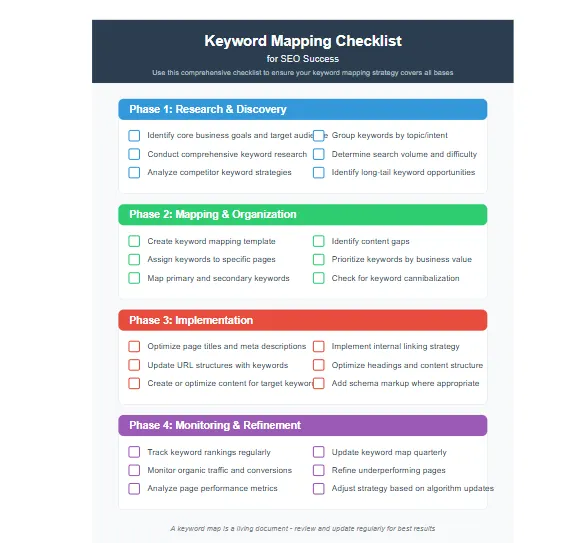
Use this comprehensive checklist to ensure your keyword mapping strategy covers all the essential elements:
Keyword Research & Analysis
- [ ] Conducted comprehensive keyword research using multiple tools
- [ ] Analyzed competitor keyword strategies
- [ ] Identified primary and secondary keywords for each topic
- [ ] Researched long-tail variations and question-based queries
- [ ] Analyzed search volume and keyword difficulty for all terms
- [ ] Categorized keywords by search intent (informational, commercial, transactional)
Content Mapping
- [ ] Created a complete keyword mapping template
- [ ] Assigned each keyword to a specific URL
- [ ] Matched content type to search intent for each keyword
- [ ] Identified content gaps in current coverage
- [ ] Prioritized keywords based on business value and opportunity
- [ ] Checked for and resolved keyword cannibalization issues
On-Page Optimization
- [ ] Optimized title tags with target keywords
- [ ] Crafted compelling meta descriptions including keywords
- [ ] Created SEO-friendly URL structures with keywords
- [ ] Optimized H1, H2, and H3 headings with keywords
- [ ] Naturally incorporated keywords in page content
- [ ] Added descriptive alt text to images with keywords [ ] Ensured content comprehensively covers the topic
Technical Implementation
- [ ] Implemented proper site structure based on keyword groups
- [ ] Created logical category and subcategory hierarchy
- [ ] Established strategic internal linking between related pages
- [ ] Set up tracking for keyword rankings and performance
- [ ] Configured analytics to measure SEO success
- [ ] Created XML sitemap with all optimized pages
Monitoring & Maintenance
- [ ] Established regular review schedule for keyword performance
- [ ] Set up alerts for significant ranking changes
- [ ] Created process for updating keyword mapping template
- [ ] Planned periodic content audits and refreshes
- [ ] Established system for tracking competitor keyword movements
- [ ] Created reporting dashboard for SEO stakeholders
- [ ] Planned periodic content audits and refreshes
Monitoring & Maintenance
- [ ] Established regular review schedule for keyword performance
- [ ] Set up alerts for significant ranking changes
- [ ] Created process for updating keyword mapping template
- [ ] Planned periodic content audits and refreshes
- [ ] Established system for tracking competitor keyword movements
- [ ] Created reporting dashboard for SEO stakeholders
Frequently Asked Questions
What is the difference between keyword research and keyword mapping?
Keyword research is finding the terms people search for. Keyword mapping is assigning those terms to specific pages on your website to ensure organization and prevent competition between your own pages.
How many keywords should I target per page?
Focus on one primary topic/intent per page. However, a single comprehensive page can naturally rank for dozens of related secondary keywords.
Should I create a new page for every keyword?
No, you shouldn’t create a new page for every single keyword. Instead, group related keywords and concepts together on comprehensive pages to build topical authority.
How often should I update my keyword mapping template?
Review your map at least quarterly. Search intent changes, competitors publish new content. Regular updates keep your strategy effective.
Does keyword mapping help with local SEO?
Absolutely! Keyword mapping is especially valuable for local SEO. Include location-specific keywords in your template and assign them to relevant pages on your site.
Does keyword mapping improve indexing?
Yes. By mapping keywords to specific URLs and ensuring they are internally linked, you create clear crawl paths for Googlebot. This helps Google discover and index your content more efficiently, reducing the likelihood of orphan pages.
Is keyword mapping important for affiliate SEO?
Crucially important. Affiliate sites often suffer from “thin content” penalties because they create pages just for keywords. A map forces you to group keywords into high-value “review” or “best X” pages that satisfy user intent, rather than spamming the index with low-value pages.
How does keyword mapping affect topical authority?
It is the blueprint for topical authority. You cannot build authority if you don’t know which topics you own and which you are missing. Mapping identifies the “Pillars” and “Clusters” required to cover a topic completely.
Should every keyword get a unique page?
No. As mentioned earlier, this leads to keyword cannibalization and a bad user experience. Only create unique pages if the search intent is significantly different.
What tools can I use for keyword mapping?
Several tools can help with keyword mapping:
- Spreadsheets: Google Sheets or Excel are perfect for creating and managing keyword mapping templates
- SEO Platforms: Tools like Ahrefs, SEMrush, and Moz offer keyword mapping features
- WordPress Plugins: Yoast SEO and Rank Math provide on-page optimization guidance
- Project Management Tools: Asana, Trello, or Monday.com can help track keyword mapping tasks.
How does keyword mapping relate to content clusters?
Keyword mapping and content clusters are closely related concepts. A content cluster is a group of related content pieces that all revolve around a central topic (pillar content). Your keyword mapping template helps identify which keywords should be grouped together in these clusters.
Can keyword mapping help fix SEO penalties?
Yes, keyword mapping can be valuable in recovering from certain SEO penalties. If you’ve been penalized for keyword stuffing or poor content quality, a keyword mapping template helps you restructure your approach more strategically.
Does keyword mapping work with AI Search?
Yes, it is crucial. AI updates rely on understanding context and entity relationships. A keyword map helps organize your site so Google’s AI can easily understand and cite your content.
Is keyword mapping important for affiliate SEO?
Crucially important. Affiliate sites often suffer from “thin content” penalties because they create pages just for keywords. A map forces you to group keywords into high-value “review” or “best X” pages that satisfy user intent.
How often should I update my keyword map?
Review your map at least quarterly. Search intent changes, and competitors publish new content. Regular updates keep your strategy effective.
Should every keyword get a unique page?
No. As mentioned earlier, this leads to keyword cannibalization and a bad user experience. Only create unique pages if the search intent is significantly different.
Conclusion: Transform Your SEO with Strategic Keyword Mapping
A well-executed keyword mapping strategy is the foundation of successful SEO. By connecting your target keywords to specific pages on your website, you create a clear roadmap that guides both search engines and users to your most valuable content. This strategic approach eliminates guesswork, prevents keyword cannibalization, and ensures every page on your site serves a specific purpose in your overall SEO strategy.
Remember that keyword mapping isn’t a one-time task—it’s an ongoing process that should evolve as your business grows and search behavior changes. Regularly review and update your keyword mapping template to stay ahead of the competition and capitalize on new opportunities.
Ready to take your SEO to the next level? Download our free keyword mapping template and start organizing your strategy today. For more advanced techniques, check out our comprehensive SEO Strategy Guide that covers everything from technical optimization to content promotion.
By implementing a systematic approach to keyword mapping, you’ll not only improve your search rankings but also create a better experience for your visitors—delivering the right content at the right time and guiding them seamlessly through their journey from discovery to conversion.
According to Google Search Central, a well-organized site structure with clear keyword targeting is one of the fundamental aspects of good SEO. As industry experts have consistently shown, businesses that implement systematic keyword mapping strategies see significant improvements in both rankings and conversion rates.
Start your keyword mapping journey today and transform your SEO from scattered efforts into a strategic, results-driven approach that delivers measurable business impact. Your keyword mapping template will become the central hub for all your SEO decisions.
