
Moz Review (2026): Which Moz Products Are Actually Worth Paying For?
By Mousume Akter, Founder & Editor, SEORAF. Information reviewed: November 15, 2026.
Affiliate disclosure: some links to Moz on this page are affiliate links. If you buy through them, SEORAF may earn a commission at no extra cost to you. That does not change the price you pay or how I assess the product. Read the affiliate disclosure and review methodology for details.
Search for a Moz review and most of the results describe a single product: Moz Pro. But Moz is more than one tool. Over the years the company has built an SEO software suite, a local listings and reputation-management product, a data API, an enterprise rank tracker and a set of free tools. It also built one of the best-known learning communities in SEO. Whether Moz is a good fit for you depends on which of those you actually need.
This review looks at Moz as a brand and a product ecosystem. It explains what each product does, how the products differ, what they cost according to available public sources, who each one suits and when another platform may be a better choice. It is not a feature-by-feature evaluation of Moz Pro. For that, read the Moz Pro review.
Moz Review: The Quick Verdict
Moz is worth considering if you want an approachable SEO platform with a widely recognized authority metric, strong educational resources and separate products for separate jobs. It is a weaker choice if your priority is the largest possible keyword database, extensive backlink research workflows, or a single bundle that covers everything from SEO to advertising research.
| If you are… | Likely fit | Why |
|---|---|---|
| A beginner or solo site owner | Worth testing | Guided tools, learning resources and free tools you can try before paying. |
| An agency whose clients ask for Domain Authority | Good fit | Domain Authority is a Moz metric, so Moz is the source of that specific score. |
| A single-location local business | Consider Moz Local | Listing and reputation-management features are available through location-based plans. Confirm your country is supported. |
| A multi-location or global brand | Compare carefully | Check country, directory and publisher coverage against the alternatives you are considering. |
| A developer or analyst who wants authority data in your own tools | Consider the Moz API | Programmatic data access is sold separately and usage is measured in rows. |
| An enterprise team tracking rankings at scale | Ask about STAT | Sales-led product with quote-based pricing. |
| Someone who needs the biggest keyword or backlink database | Compare alternatives | Some third-party comparisons position competitors ahead on data scale. Compare the same tasks before choosing. |
Quick fit guide by reader type. This is SEORAF’s analysis based on public product information and third-party sources, not a vendor claim or hands-on test.
Where Moz tends to stand out
- Domain Authority and Page Authority, which many agencies and clients already use as shared vocabulary.
- A long-running education library, including the Moz Blog and Whiteboard Friday.
- Separate products for SEO research, local listings and data access, so you can evaluate the product that matches your needs.
- Free tools and a free browser extension for light use.
Where Moz tends to fall short
- Some third-party comparisons describe a smaller keyword database than Semrush or Ahrefs. Database-size claims use different methods and should not be treated as directly comparable measurements.
- Products are sold separately, so total cost can rise if you need more than one.
- Some public reviews raise billing and cancellation concerns, which are worth reading before you subscribe.
- Trial terms, free-tool limits and plan details can change, and older articles may show outdated numbers.
If you want to see how Moz’s data and interface fit your own workflow, you can look at Moz’s current plans and signup options. Check the trial terms on the signup page before you enter payment details.
How This Moz Review Was Researched
This article is based on public product pages, documentation, review platforms and third-party reports reviewed in November 2026. It does not contain SEORAF test results, and I do not claim hands-on testing of any Moz product here. To keep the evidence clear, claims are labeled throughout:
- Vendor-stated: what Moz, or content commissioned by Moz, says about its own products.
- Third-party report: what reviewers, directories, pricing trackers and community pages say.
- SEORAF analysis: my interpretation of how those facts fit together.
Moz changes plans, limits and trial terms. Treat every price and allowance below as a reported snapshot, and confirm it on Moz’s own pages before you buy: Moz Pro pricing, Moz Local pricing and the Moz API page.
What Is Moz?
From SEOmoz to a product suite
Moz began in 2004 as SEOmoz, founded by Rand Fishkin and Gillian Muessig. Company profiles such as CB Insights describe it as a Seattle-based company that started as a blog and community where SEO practitioners shared research, then moved into software. Moz’s site footer identifies SEOMoz, Inc. as a Ziff Davis company. In 2021, Moz announced its acquisition by iContact, a Ziff Davis subsidiary.
Why Domain Authority still matters
Moz is best known for Domain Authority (DA) and Page Authority (PA), proprietary scores on a 1 to 100 scale that estimate a domain’s or page’s comparative ranking potential using Moz’s link data. They are third-party metrics, not Google ranking factors, and they do not predict or guarantee search rankings. For what Google says about Search, the better reference is Google Search Central documentation.
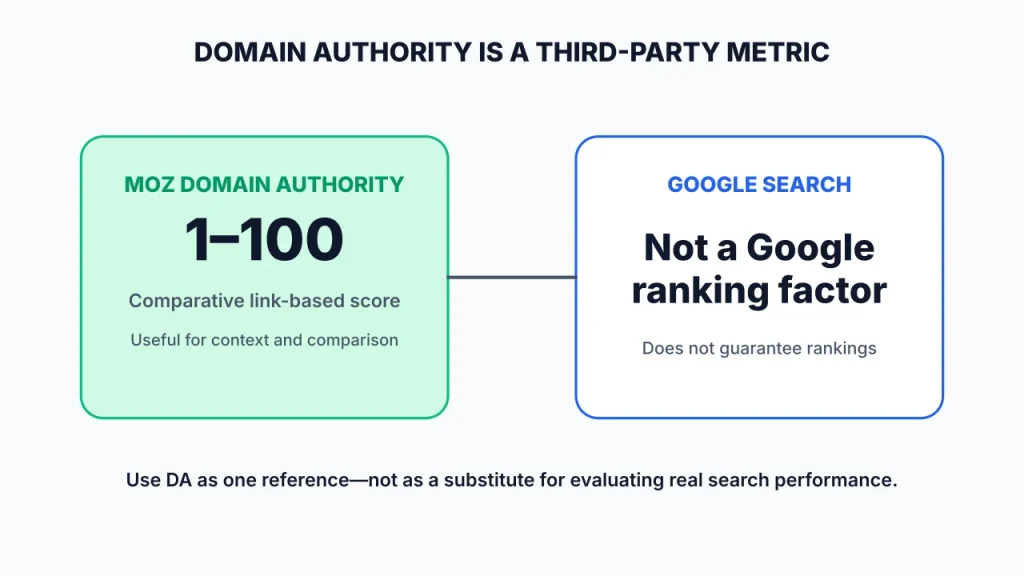
So why do people still care? Because DA became shared vocabulary. Agencies report on it, outreach teams use it to help screen prospects and clients ask about it. That is a practical reason to look at Moz data, even if you would never treat the score as a Google ranking signal. If you build links, the link building guide explains how to judge link quality beyond any single authority score.
Moz as a learning brand
Moz also publishes educational content, including the Moz Blog and the Whiteboard Friday video series, and runs the MozCon conference. Many reviewers cite this learning side as a reason beginners start with Moz. Its educational resources are also available without buying a software subscription, which matters when you are deciding whether to pay.
The Moz Product Ecosystem at a Glance
Moz’s product and help pages list Moz Pro, Moz Local, Moz API, Moz Data, STAT and Moz AI Explorer, alongside a set of free tools. They do different jobs, and they are not all included in one subscription.
| Product | What it does | Typically suits | How it is sold |
|---|---|---|---|
| Moz Pro | SEO toolset covering keyword research, link analysis, site crawling, rank tracking and reporting. | Beginners, small teams, in-house marketers and agencies | Self-serve subscription tiers, with enterprise options |
| Moz Local | Local presence management, including business listings and reputation-related features. | Local businesses and eligible multi-location brands | Self-serve plans priced per location, with enterprise options |
| Moz API | Programmatic access to Moz link and authority data, with usage measured in rows. | Developers, analysts and dashboard builders | Separate API access; check current free and paid usage terms |
| STAT | Enterprise-scale search rank tracking. | Large SEO teams and agencies | Sales-led |
| Moz Data | Data solutions for organizations with specific data requirements. | Enterprise and data teams | Contact sales for scope and pricing |
| Moz AI Explorer | A separate Moz product related to AI search exploration and visibility workflows. | Teams evaluating AI search visibility | Check the current product page for subscription and access details |
| MozBar and free tools | Browser extension and limited free SEO lookups. | Anyone evaluating Moz | Free access with usage limits or account requirements |
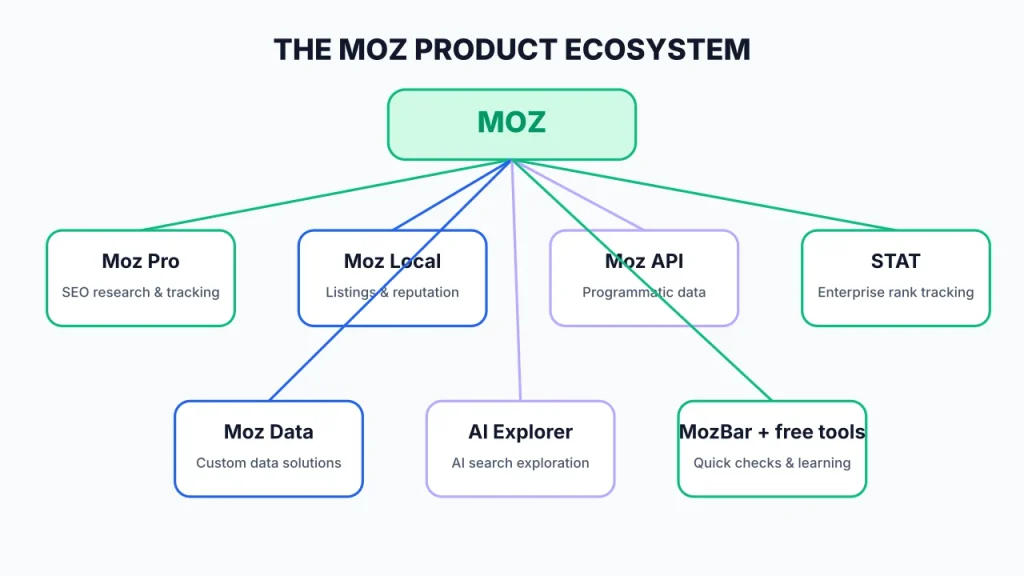
Moz product map. Product names are based on Moz’s product and help pages. Descriptions summarize the publicly described purpose of each product; features and access terms may change.
Why the separation matters
The single most useful thing to understand is that a Moz Pro subscription does not automatically give you every product or service Moz sells. Moz Local and API access are separate from the standard Moz Pro subscription, while STAT and Moz Data are positioned for enterprise or data-heavy requirements. Moz AI Explorer is also listed as a separate product. In practice, your total spend depends on which products you actually need and their current subscription terms.
Moz Products Explained, One by One
Moz Pro: the overview
Moz Pro is the product most people mean when they say “Moz.” It brings keyword research, link analysis, site crawling, rank tracking and reporting into one subscription. Moz has also been developing AI-related search visibility features. Availability, plan eligibility and quotas for newer features can change, so check the current plan details before relying on a particular feature.
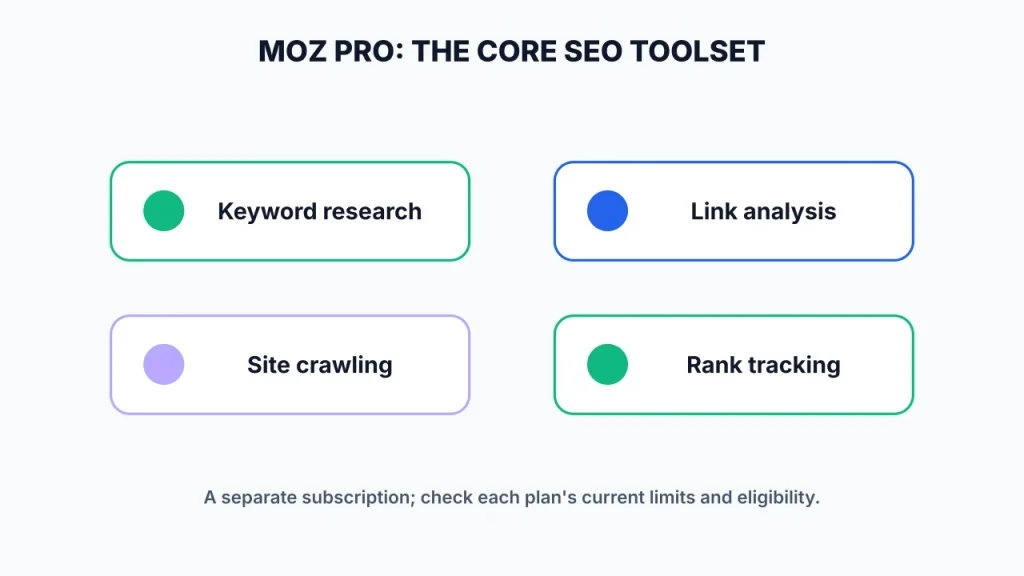
Reviewers generally position Moz Pro as a tool for in-house marketing teams and agencies. For example, Experte describes it as aimed at teams that want established SEO metrics. Within the ecosystem, think of Moz Pro as the research and tracking hub. Moz Local, the API and STAT handle other jobs.
I keep this section short on purpose. For analysis of Moz Pro’s keyword research, link research, site crawling, rank tracking and plan limits, see the detailed Moz Pro review.
Moz Local
Moz Local is designed to help businesses manage their local online presence. Its publicly described areas include listings, social presence and review-related features. The available features, distribution partners, add-ons and plan entitlements can vary, so check the current plan comparison rather than assuming every feature is included in every tier. Moz Local offers self-serve plans and enterprise options; pricing is generally presented on a per-location basis.
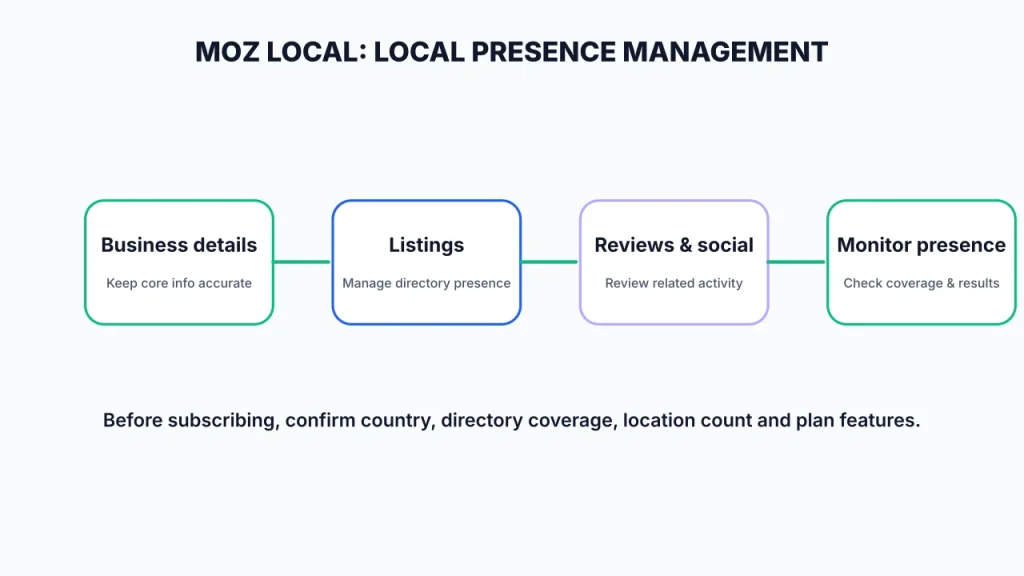
Check your country first. Third-party sources do not always agree about Moz Local’s supported countries and directory coverage. I could not establish a complete, current country list from the available public information for this review. Verify your country, business category and the specific directories you need with Moz before paying.
Who it suits: local businesses and eligible small groups of locations that want help managing listings and reputation-related activity without handling every platform separately. Who should compare first: multi-location or international brands, and agencies that want rank tracking, citation management and review reporting in one place. Common comparison points are BrightLocal, Yext and Semrush Local. Some comparison pages are published by competitors, so treat their product claims as vendor-stated rather than independent test results.
Moz API
The Moz API gives developers and analysts programmatic access to Moz data, including link and authority metrics. Moz’s current API documentation describes its API V3 approach. Requests use HTTP POST and JSON-RPC, with authentication handled through a token sent in the x-moz-token header. API usage is measured in rows, but the number of rows consumed depends on the endpoint and the data requested. Do not assume every returned object always costs exactly one row.
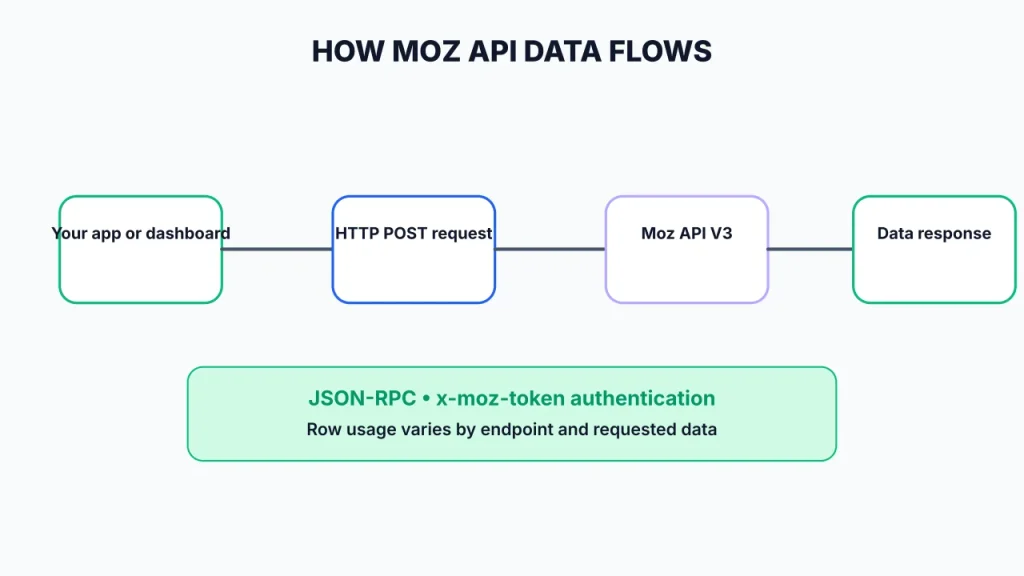
Third-party guides have reported specific free monthly row allowances and paid entry tiers, but those figures can change and may not reflect the current API account terms. I have therefore left exact row allowances and starting prices out of the main recommendation. Check the Moz API page and its documentation for current quotas, endpoint costs, overage rules and authentication requirements.
Who it suits: developers building reports, dashboards or applications that need Moz link and authority data. Who can skip it: anyone who only needs to look up metrics occasionally and can use Moz’s free tools instead.
STAT and Moz Data
STAT is Moz’s enterprise rank tracking platform, built for teams that need to monitor search results at scale. Public pricing reports are inconsistent, so ask Moz for a quote rather than relying on a number from an older article. Moz Data refers to data solutions for organizations with specific requirements. Public descriptions do not provide enough consistent detail to define every available data package, so ask Moz sales to confirm the exact scope, delivery format, licensing and pricing. These products are aimed at enterprise and data-heavy teams, not most small sites.
Moz AI Explorer
Moz AI Explorer is listed separately from Moz Pro in Moz’s product and help resources. It should not be assumed to be included with a standard Moz Pro subscription. If you are considering it for AI search research or visibility work, check its current feature set, subscription terms, usage limits and relationship to other Moz products directly with Moz before purchasing.
MozBar and the free tools
MozBar is a browser extension that shows Domain Authority, Page Authority and other SEO metrics as you browse. Its Chrome Web Store listing describes different access levels for guests, Community accounts and Moz Pro subscribers. When I reviewed the listing, it showed approximately 900,000 users and a rating of about 3.3 out of 5. Ratings and user counts can change, so check the current listing and recent reviews before relying on the extension. Moz also offers free lookups such as Domain Analysis, Keyword Explorer and Link Explorer, covered in the free tools section below.
Which Moz Product Do You Actually Need?
Start with the job you need done, not the brand. Use this path as a quick filter:
- You want a general SEO toolset for keyword research, link analysis, audits and rank tracking: look at Moz Pro.
- You manage listings and reviews for physical locations: look at Moz Local, after confirming your country and required features are supported.
- You need authority or link data inside your own reports or apps: look at the Moz API and estimate your monthly row usage.
- You track very large keyword sets for an enterprise or agency: ask Moz about STAT, then compare it with other enterprise trackers.
- You are researching AI search visibility: review Moz AI Explorer separately and confirm its current access terms.
- You only check Domain Authority occasionally: start with MozBar and the free tools before paying for anything.
- None of these describe your needs: compare the alternatives below.
Who Should Consider Moz (and Who Should Avoid It)
Moz is worth considering if…
- You are newer to SEO and value guided tools and learning resources.
- Your clients or stakeholders ask for Domain Authority in reports.
- You run a small team or agency and prefer an approachable interface over maximum data depth.
- You need local presence management for one or a few locations in a supported country.
- You want to test Moz data through free tools before committing to a subscription.
You may want to avoid Moz if…
- Backlink research is your main daily workflow and you need the data coverage that best matches your requirements.
- You need the largest keyword database or broad competitive and advertising research in one suite.
- You manage listings across many locations or countries and have not confirmed Moz Local’s coverage.
- You only use an SEO tool occasionally, in which case free tools or a cheaper option may be enough.
- You want a single subscription to cover SEO research, local listings and API access.
Moz Pricing Across the Ecosystem
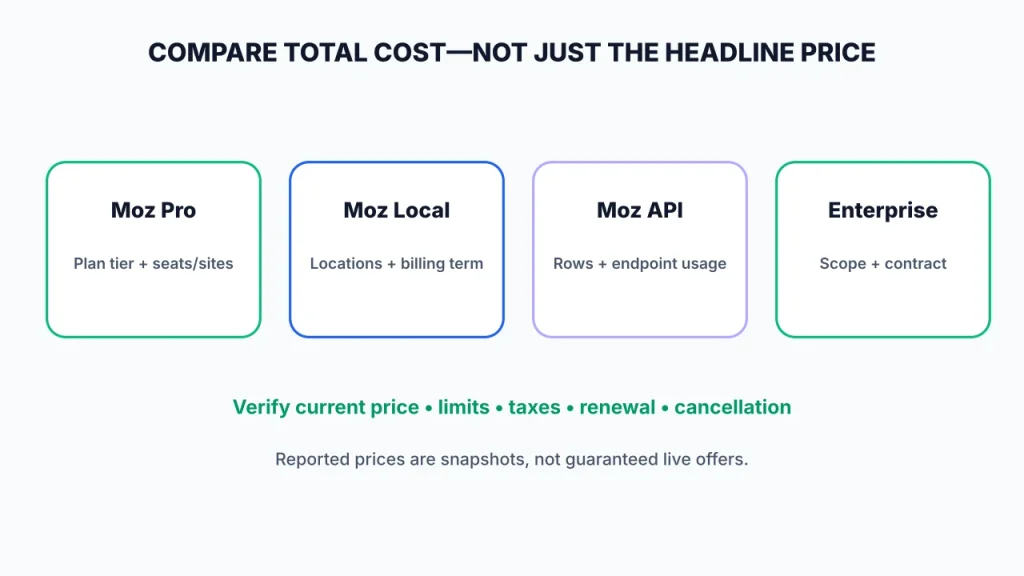
The table below summarizes prices reported by third-party pricing trackers and review sources in November 2026. I could not independently confirm every displayed price through Moz’s live checkout pages during research. Treat these figures as reported pricing snapshots, not guaranteed current offers. Confirm the exact plan, billing interval, taxes, limits and renewal amount on Moz’s own pages before subscribing. Older articles may also show discontinued or outdated tiers.
| Product | Reported pricing | Billing model | Confirm on Moz |
|---|---|---|---|
| Moz Pro | About $49, $99, $179 and $299 per month across four reported tiers. Annual billing is reported at about $79, $143 and $239 per month for the Standard, Medium and Large tiers respectively. I could not confirm an annual equivalent for the Starter tier. | Monthly or annual subscription, depending on plan | Current tiers, annual discounts, plan limits and availability |
| Moz Pro Enterprise | Custom pricing | Quote | Limits, seats and included services |
| Moz Local | Reported at about $20, $30 and $40 per month, or $199, $299 and $399 per year. The annual prices equal approximately $16.58, $24.92 and $33.25 per month. | Per location; monthly or annual terms may vary | Current plans, supported countries, add-ons and annual terms |
| Moz Local Enterprise | Custom or quote-based pricing reported | Quote | Eligibility, location minimums and included features |
| Moz API | Free and paid access options are reported, but exact row allowances and paid tiers should be checked directly. | Usage measured in rows | Current quotas, endpoint row costs, overage rates and billing |
| STAT | Sales-led. Public figures conflict. | Quote | Pricing, tracking limits and contract terms |
| Moz Data | Custom | Contact sales | Scope, delivery and pricing |
| Moz AI Explorer | Separate subscription terms; confirm current pricing directly. | Check current product terms | Features, access, limits and billing |
| MozBar and free tools | Free access options with usage limits | Free tools or account | Current query allowances and account requirements |
Reported Moz pricing, November 2026. Figures are third-party reported snapshots and should be verified against Moz’s current checkout and product pages.
What the headline prices do not tell you
- Limits differ by plan. Moz Pro tiers are reported to differ in tracked sites, keywords, seats and crawl allowances, not simply in the core product name.
- Moz Local scales with locations. The total subscription cost depends on the number of locations and the selected billing terms.
- API cost follows data usage. Rows consumed per request vary by endpoint and method, so estimate usage before choosing a tier.
- Products are billed separately. Do not assume Moz Pro includes Moz Local, API access, STAT, Moz Data or Moz AI Explorer.
Three cost scenarios
- One site, light use: start with the free tools. Move to a Moz Pro plan only if you outgrow the free query limits or need paid features.
- One local business: compare the relevant Moz Local plan for one location with the cost of managing listings manually or using another local platform.
- Agency with client reporting: price Moz Pro for the number of sites and seats you need, then evaluate Moz Local separately for clients that need local presence management.
These are SEORAF’s planning examples, not Moz recommendations, and they do not promise any return. For detailed Moz Pro plan comparisons, see the Moz Pro review.
Moz Free Tools and Trial Availability
What you can use for free
Moz lists free tools including Domain Analysis, Keyword Explorer, Link Explorer and other SEO research tools on its free SEO tools page. MozBar also has access options for users who are not paying Moz Pro subscribers. Exact free query allowances and account limits may change. Some third-party and Moz-commissioned articles publish specific monthly query numbers, but those figures may not match every account or the current product terms. Confirm the allowance shown in your own Moz account before planning around it.
For occasional checks, the free tools may be enough. If you want other no-cost options, see the guide to free SEO tools.
Is there a Moz free trial?
Moz has offered a Moz Pro trial, but published sources do not consistently agree on the current trial length or which plans qualify. Moz’s Help Hub indicates that a payment card is required for the Moz Pro trial. I could not confirm a current trial duration or plan eligibility from the available official information, so I am not presenting a 7-day or 30-day period as a guaranteed current offer.
The safest approach is simple. Open the Moz signup page, read the trial length, eligible plan and card requirement displayed there, and note the renewal date and cancellation steps before you start. Do not assume Moz Local or other separate products have the same trial terms as Moz Pro.
Moz Advantages and Disadvantages
Advantages
- Recognized authority metrics. DA and PA are widely used in agency reporting and outreach. This is a practical reporting advantage, not a Google ranking advantage.
- Beginner-friendly learning. The Moz Blog, Whiteboard Friday and guides are useful resources for people learning SEO.
- Modular products. You can evaluate local presence management or API access separately from a full SEO suite.
- Accessible entry points. Free tools and MozBar make it possible to explore some Moz data before committing to a paid subscription.
- Positive user feedback on some review platforms. Software Advice has published generally positive Moz Pro user ratings. Scores and review counts change over time, so check the current profile and read recent reviews rather than relying on a fixed rating.
Disadvantages
- Data scale may be a limitation. Some third-party comparisons report smaller keyword and backlink datasets for Moz than for Semrush or Ahrefs. Database-size claims are based on different methods, so compare the data you need rather than treating vendor totals as directly equivalent.
- Costs can stack. Moz Pro, Moz Local, API access and other products may require separate purchases.
- Interface opinions are mixed. Some reviewers describe Moz Pro as clean and approachable. Others, such as Gizmodo, describe parts of the experience as dated.
- Changing terms. Trial availability, free allowances, plan details and newer feature quotas can change.
- Billing concerns in some public reviews. Read recent customer feedback and the cancellation terms before starting a paid subscription.
Is Moz Easy to Use?
Moz’s reputation rests partly on being approachable. Software Advice publishes user-submitted Moz Pro ratings for ease of use, functionality, value for money and customer support. These scores and review counts can change over time, but they provide one source of feedback about the product experience.
Opinions are less uniform on interface polish. Experte describes Moz Pro as clean but not always as intuitive as competing tools, while Gizmodo calls the interface dated. Moz Local focuses on a narrower set of local-presence tasks, while the Moz API requires developer skills such as authentication, JSON-RPC requests and tracking row usage. Moz’s free educational resources can help people learn the tools, which is one reason the brand appeals to people new to SEO.
One caution: ease of use depends on your workflow and experience, and I am not reporting my own usability testing. If it is a deciding factor, use the free tools or any currently available trial and judge the interface against your own tasks.
Moz Product Limitations to Know Before You Buy
Data and coverage
Third-party reviewers often point to data depth as an area to compare carefully. Some reviews cite a smaller keyword database, limited research allowances or fewer competitive research features than competing suites. Other comparisons position Ahrefs and Semrush strongly for particular keyword and backlink workflows. Each vendor describes its own database differently, and the figures are not necessarily measured in the same way. Rather than choosing based on a headline database number, compare the tools using the keywords, websites and markets that matter to you. A comparison such as Semrush vs Ahrefs vs Moz can help you identify the claims that need checking.
Product boundaries
- Moz Pro does not automatically include Moz Local or separate API access.
- Moz Local’s country and directory coverage should be checked against your business location and category.
- STAT and Moz Data are sales-led, so you may need to contact Moz to understand scope and pricing.
- Moz AI Explorer is listed separately, so confirm its subscription and feature access rather than assuming it is part of Moz Pro.
Billing and account concerns
Software review platforms publish positive feedback about Moz Pro’s functionality, but some public reviews describe problems with auto-renewal, cancellation and refunds. One review aggregator, checkthat.ai, summarizes third-party review sentiment and reports billing-related complaints. I have not independently verified its aggregated figures against the original Trustpilot reviews, so treat the page as a reason to read recent customer feedback and Moz’s own account and cancellation help information, not as a final verdict. A sensible habit with any SaaS trial is to note the renewal date, payment terms and cancellation steps on day one.
What I could not confirm
Transparency matters more than a tidy conclusion. During this review, I could not independently confirm every current detail for native integrations and export options, refund and cancellation terms, regional availability, the complete Moz Local country list, support hours by plan, API row costs and the current trial duration. If any of these affect your decision, check the relevant Moz product documentation or ask Moz directly before buying.
Moz vs Competing SEO Platforms
Moz usually appears next to Semrush and Ahrefs in comparisons. The table below summarizes how third-party comparisons commonly position each platform. It is not a feature-by-feature test, and it deliberately avoids competitor prices, which vary by plan and change often.
| Platform | Typically positioned as | Often-cited strengths | Often-cited trade-offs |
|---|---|---|---|
| Moz | Approachable SEO platform plus separate local, API and enterprise products | Domain Authority, learning resources and accessible entry points | Data scale may not suit every workflow, separate product billing and mixed interface opinions |
| Semrush | Broad online marketing suite | Wide toolkit including competitive, advertising and AI visibility research | Can feel complex, and higher entry prices are commonly reported |
| Ahrefs | SEO platform often associated with backlink research | Backlink analysis and link-related research workflows | May be less guided for beginners, and costs can rise on higher tiers |
| SE Ranking | Value-oriented all-in-one platform | Broad SEO features and a commonly considered alternative for budget-conscious users | Its metrics and database are not directly interchangeable with Moz’s authority metrics |
How third-party comparisons commonly position each platform. This is SEORAF’s summary of reported views, not test results.
Moz vs Semrush vs Ahrefs, by job
- Learning and clarity: Moz is frequently described as approachable, although interface preferences vary.
- Backlink research: Ahrefs is often shortlisted for backlink-focused workflows, but compare the data using your own target sites.
- Marketing breadth: Semrush covers a broad range of tasks beyond SEO.
- Authority metric: Moz provides Domain Authority. Ahrefs and Semrush use their own metrics, which are not interchangeable with DA.
For deeper head-to-head coverage, read the Semrush review and the Semrush vs Ahrefs comparison, or browse all SEO software comparisons. To research competitors with any of these tools, the competitor analysis guide explains a practical workflow.
Moz Local vs local listing alternatives
For local presence management, the usual comparison set includes BrightLocal, Yext and Semrush Local. These platforms differ in listing distribution, review management, local rank tracking, supported countries and pricing models. Some comparison pages report wider publisher networks for Yext, while BrightLocal positions itself as a broader local SEO platform. Those claims may come from companies with commercial interests, so use them to build a shortlist and verify coverage for your own country, business category and required directories.
Best Moz Alternatives, by Scenario
Many “best Moz alternatives” articles are written by vendors that rank themselves first. I organize alternatives by what you need, and explain how tools are assessed on the review methodology page. These are starting points, not rankings.
If you want deeper backlink data
Ahrefs is a platform often cited for backlink research. Compare it with Semrush in the Semrush vs Ahrefs guide, and see the Mangools vs Ahrefs comparison if budget matters.
If you want one broad marketing suite
Semrush covers SEO and a wider set of marketing workflows, including content and advertising research. The Semrush review and best all-in-one SEO tools page are useful next reads.
If you want value for money
SE Ranking is frequently shortlisted as a lower-cost all-in-one option. See the SE Ranking vs Semrush comparison. For keyword-focused work on a budget, Mangools often appears in these lists, and the best keyword research tools guide covers more options.
If you prefer desktop software
Some SEOs choose installed software instead of a subscription suite. Read the SEO PowerSuite review to see how that model compares.
If you need local listings
Compare Moz Local with BrightLocal, Yext and Semrush Local based on your number of locations, your countries and whether you also need rank tracking. If you want help with local visibility rather than software, SEORAF also offers local SEO services.
For wider lists, browse the SEO software alternatives and best SEO software pages.
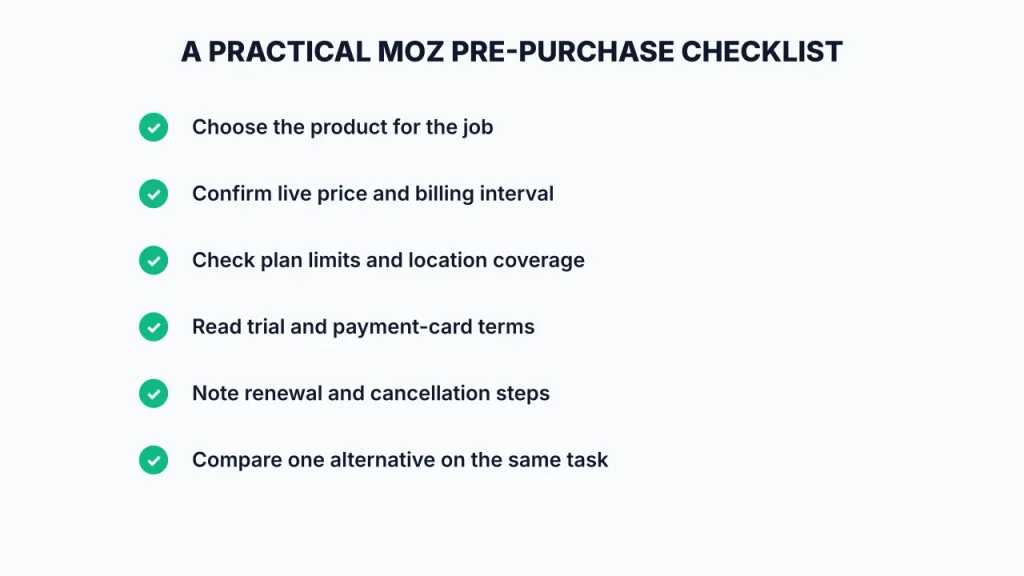
How to Decide: A Step-by-Step Buying Guide
- Name the job. Write down whether you need SEO research, local presence management, API data, AI search research or enterprise tracking.
- Match the product. Use the product-selection path earlier in this article.
- Test for free first. Use MozBar and the free tools to see whether Moz’s data suits your workflow.
- Check live terms. Confirm prices, limits, trial length and card requirements on Moz’s pages.
- Compare one alternative. Evaluate one competitor on the same task so you can judge the results against your own requirements.
- Decide and review. Set a calendar reminder before any renewal.
Pre-purchase checklist
- Trial length, eligible plan and whether a payment card is required.
- Cancellation steps, renewal date and refund terms.
- Plan limits for sites, keywords, seats and crawling.
- For Moz Local: supported countries, per-location cost, included features and add-ons.
- For the API: expected monthly rows, endpoint costs and overage rules.
- For Moz AI Explorer: separate subscription terms, features and usage limits.
When you are ready to compare plans, you can review Moz’s current options here. Whatever you choose, no SEO tool can guarantee rankings or traffic. These tools can help you make better-informed decisions, but results still depend on your content, your site, your market and how you use the information.
Moz Review FAQs
Is Moz worth it?
It depends on which product you mean and what you need. Moz is worth considering for beginners, agencies that report on Domain Authority and local businesses that need supported local presence features. It may be less suitable if you need a particular depth of keyword or backlink data, broad global listings coverage or one subscription for every marketing task.
What is Moz used for?
People use Moz for SEO research and tracking (Moz Pro), local presence and listing management (Moz Local), programmatic access to link and authority data (Moz API), enterprise rank tracking (STAT), data solutions (Moz Data), AI search-related workflows (Moz AI Explorer) and quick authority checks (MozBar and free tools).
Is Moz free to use?
Partly. Moz offers free tools and a free MozBar access option with usage limits. Some free features require an account, and the available query allowance can change. Full product subscriptions are paid. Check Moz’s free tools page and your account for current limits.
Does Moz have a free trial?
Moz Pro has offered trials, and Moz’s Help Hub indicates that a payment card is required. Published sources conflict on the trial duration and eligible plans, so check the current signup page for the exact terms before starting.
How much does Moz cost?
Third-party pricing trackers have reported Moz Pro monthly tiers starting at about $49, Moz Local plans starting at about $20 per location per month and paid API access with usage-based pricing. These are reported figures, not guaranteed live offers. Confirm current prices, billing terms and limits on Moz’s official product pages.
Is Moz Pro the same as Moz Local?
No. Moz Pro is an SEO toolset for research and tracking. Moz Local focuses on local presence management, including listings and reputation-related features. They are separate products with separate plan terms.
Does a Moz Pro subscription include the Moz API?
Moz API access is separate from the standard Moz Pro subscription. Check the Moz API page for current API access, billing and usage terms.
Is Domain Authority a Google ranking factor?
No. Domain Authority is Moz’s proprietary metric, not a Google ranking factor. It can be useful as a comparative SEO metric, but it should not be treated as a direct ranking signal or a guarantee of search performance.
Which is better for beginners, Moz or Semrush?
Some comparisons describe Moz as approachable and Semrush as broader, with more marketing features. The better choice depends on whether you value a simpler starting point or a wider toolkit. Try the free tools and compare both platforms on the same task where possible.
Where can I verify Moz’s current details?
Use Moz’s own Moz Pro pricing, Moz Local pricing, Moz API, free tools and Moz Help Hub pages. Official product pages are the best place to confirm current plan terms because third-party figures can become outdated.
Final Verdict: Is Moz Worth It?
Moz is best understood as a family of products under one recognizable brand. Its biggest strengths are approachability, Domain Authority, a substantial library of learning content and the ability to evaluate separate products for separate jobs. Its main trade-offs are that data coverage may not suit every research workflow, products can have separate billing and plan terms can change often enough to make older reviews unreliable.
Choose Moz if you are learning SEO, report on Domain Authority, run a small team or agency that values an approachable interface, or need local presence management for a supported location. Compare alternatives if backlink depth, keyword database coverage, global listings or a broad all-in-one marketing suite is your priority.
The most reliable next step is a small, low-risk evaluation. Use the free tools first, read the live trial and cancellation terms, and compare one alternative on a task that matters to you. If you decide Moz fits, you can explore Moz’s current plans. For a closer look at the flagship SEO product, read the Moz Pro review.
Sources and Further Reading
- Moz: Moz Pro pricing, Moz Local pricing, Moz API, free SEO tools, Moz Help Hub and Moz Blog
- MozBar on the Chrome Web Store (vendor listing; rating and user count can change)
- Google Search Central documentation
- CB Insights company profile
- Ziff Davis (company information)
- Software Advice Moz Pro profile
- Experte Moz Pro review (may earn commission from its links)
- Gizmodo Moz review
- Semrush vs Ahrefs vs Moz comparison (commercial comparison site)
- checkthat.ai review aggregation (secondary review summary)