
Title & Meta Analyzer: The Ultimate 2026 Guide to SERP Domination
Why Snippet Optimization Matters in 2026
In the highly competitive digital landscape of 2026, securing a top position on Google’s Search Engine Results Page (SERP) is only the first hurdle. The real challenge is convincing a human user to click your link. This is where the strategic use of a Title & Meta Analyzer becomes non-negotiable. Your title tag and meta description act as your digital billboard; they are often the first interaction a potential customer has with your brand.
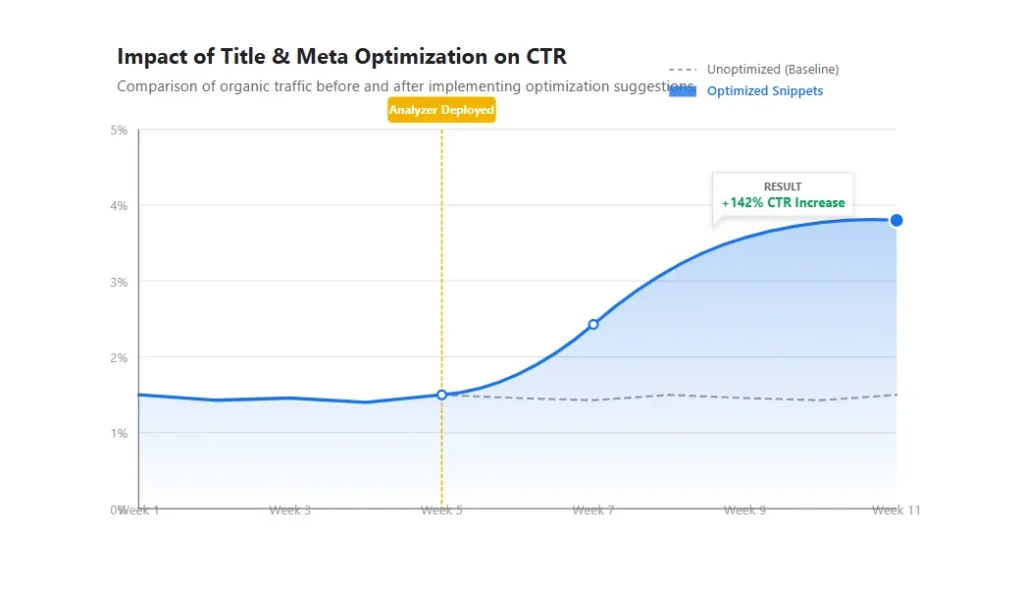
Many webmasters invest heavily in backlinks, technical audits, and Outreach Email Strategies, yet they neglect the very text that represents their business in search results. A poorly crafted title can render a number-one ranking virtually useless in terms of traffic generation. Conversely, a well-optimized snippet allows a lower-ranking page to steal significant traffic from competitors. This guide explores how leveraging a Title & Meta Analyzer can transform your click-through rate (CTR) and overall search visibility.
What is a Title & Meta Analyzer?
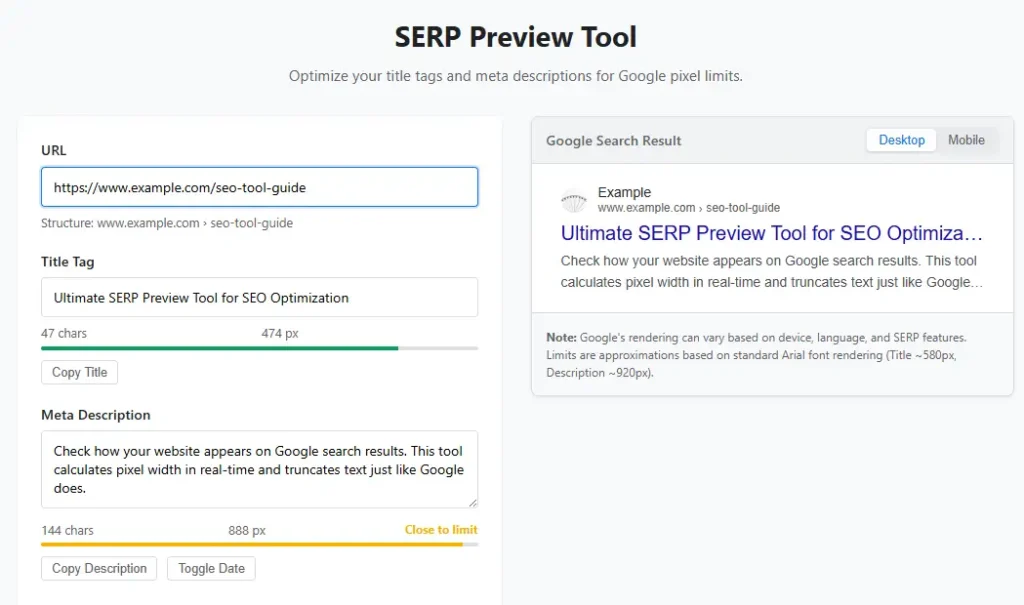
A Title & Meta Analyzer is a specialized SEO utility designed to simulate how a webpage appears within search engine results. While basic Content Management Systems (CMS) like WordPress or all-in-one platforms (if you need a platform comparison, check our Systeme.io Review) provide fields to enter these tags, they rarely offer real-time feedback on how that content renders to the end-user. Google’s display algorithms are complex; they do not simply count characters.
The Title & Meta Analyzer goes beyond simple text entry. It evaluates the visual footprint of your text. It checks for truncation risks—where Google cuts off your message with an ellipsis (…)—and ensures your most critical keywords are placed where they are most likely to be seen. By using a Title & Meta Analyzer, you remove the guesswork from on-page optimization, allowing you to fine-tune your messaging before you even publish a page. To ensure your site renders these elements correctly, refer to our comprehensive JavaScript SEO Checklist.
The Pixel Width vs. Character Count Myth
For years, SEO advice centered around keeping titles under 60 characters and descriptions under 160 characters. While this is a decent rule of thumb, it is technically inaccurate. Google does not count characters; it measures pixels. This is a crucial distinction that a high-quality Title & Meta Analyzer will address immediately.
Consider the difference between the letter “I” and the letter “W”. In the standard Arial font used by Google, a “W” takes up significantly more horizontal space than an “I”. Therefore, a title composed of wide letters might be truncated at 50 characters, while a title with narrow letters might fit 70 characters. A robust Title & Meta Analyzer calculates the exact pixel width—usually aiming for a maximum of roughly 600px for titles and 920px for descriptions. This precision ensures that your value proposition is never cut off.
According to Google’s official documentation on title links, the search engine focuses on the content that is most useful to the user. Relying solely on character counts is a relic of the past; modern SEO requires the pixel-perfect precision provided by a Title & Meta Analyzer.
Psychology of High CTR Copy
Optimizing for technical constraints like pixel width is purely mechanical. However, the true power of a Title & Meta Analyzer lies in its ability to help you craft persuasive copy. Search Engine Optimization is ultimately about human psychology. You are writing for two distinct audiences: the Googlebot and the human searcher.
When using a Title & Meta Analyzer, you should experiment with psychological triggers. Data consistently shows that titles containing numbers (e.g., “7 Ways to…”) outperform generic titles. Similarly, “power words” such as “Ultimate,” “Free,” “Proven,” and “Fast” trigger emotional responses that drive clicks.
The Title & Meta Analyzer allows you to draft multiple variations and visualize them instantly. You can test if a question-based title works better for your query or if a list-based format drives higher engagement. This iterative process is essential for CTR optimization. By treating your snippet as ad copy, you utilize the Title & Meta Analyzer to bridge the gap between ranking and revenue. For scaling this testing process, you might even integrate an AI SEO Workflow into your strategy.
Mobile-First Snippet Optimization
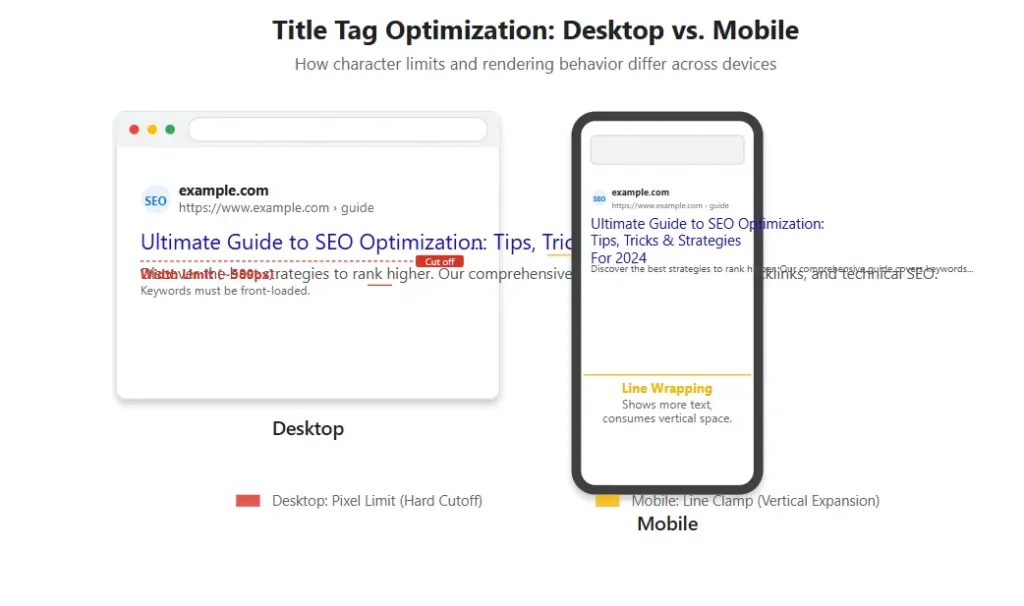
With the majority of searches now occurring on mobile devices, the vertical layout of the SERP has changed dramatically. On a desktop screen, a user has a wide horizontal view. On a mobile phone, the screen is narrow and vertical. This means that a long title can push your URL and meta description completely off the screen, forcing the user to tap to see more.
A mobile-optimized Title & Meta Analyzer will simulate how your listing appears on a 360px or 414px wide screen. It might reveal that your perfectly good desktop title is actually crippling your mobile performance. The goal is to front-load your most important keywords and brand name. If the most critical information isn’t visible “above the fold” on a mobile device, you are losing potential traffic. The Title & Meta Analyzer ensures your snippets are responsive and effective across all device types, which is a core factor in Core Web Vitals.
Common SEO Mistakes to Avoid
Even with a sophisticated Title & Meta Analyzer at their disposal, many marketers still make fundamental errors. Identifying these pitfalls is the first step toward rectifying them.
- Keyword Stuffing: Cramming every possible keyword into your title tag looks spammy to both users and Google. A Title & Meta Analyzer will often flag keyword density issues. Focus on one primary keyword and perhaps one secondary modifier.
- Duplicate Tags: Every page on your website deserves a unique title and description. Using a Title & Meta Analyzer in bulk can help you spot duplicate content across your site, which confuses search engines and wastes resources. For large sites, managing this efficiently is key to your Crawl Budget Optimization Guide.
- Mismatched Content: If your title promises “Free Guide” but the page is a sales pitch, your bounce rate will skyrocket. Google monitors this behavior. Use the Title & Meta Analyzer to ensure your snippet accurately reflects the page content. If you find many pages with mismatched intent, you may need a strategy for consolidation using our SEO Content Pruning Guide.
- Ignoring Branding: While you want keywords for SEO, neglecting your brand name can be a mistake, especially for branded searches or local queries. If you run a local business, read our Local SEO Guide to see how branding impacts local pack results.
Step-by-Step Usage Guide
To get the most out of a Title & Meta Analyzer, follow this systematic workflow to ensure your on-page SEO is flawless.
- Input Current Data: Enter your existing title and meta description into the tool. If you are starting from scratch, enter your draft.
- Analyze Desktop Preview: Look at the desktop simulation. Is the title cut off? Is the description engaging? Does it look trustworthy?
- Check Mobile Preview: Toggle to the mobile view in the Title & Meta Analyzer. Ensure the core message is visible without scrolling.
- Check Pixel Count: Look at the pixel counter. If you are in the red zone (over 600px for titles), edit aggressively. Remove stop words like “and,” “the,” or “of” where possible without losing meaning.
- Iterate: Rewrite your tag. Move your main keyword closer to the beginning. Add a year or current adjective for freshness. Re-check with the Title & Meta Analyzer.
- Implement and Monitor: Update your CMS. After Google indexes the change, monitor your CTR in Google Search Console to see if the changes derived from your Title & Meta Analyzer usage had a positive impact.
Frequently Asked Questions
Why is pixel width more important than character count?
Can a Title & Meta Analyzer improve my rankings?
Why does Google rewrite my title tags?
Ready to Dominate the SERPs?
Don’t let bad snippets waste your hard-earned rankings. Use our free Title & Meta Analyzer Tool to fix your tags today.
Analyze My Snippets Now